Desertcart purchases this item on your behalf and handles shipping, customs, and support to Panama.
๐ฅ๏ธ Elevate your headless setupโbecause your GPU deserves to shine in 4K!
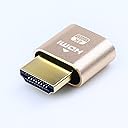
The DTECH HDMI Dummy Plug 4K Display Emulator is a compact, gold-plated HDMI adapter that emulates a high-resolution 4K display (up to 4096x2160) to keep discrete GPUs fully enabled on headless PCs. Compatible with Windows, Mac OSX, and Linux, it requires no drivers or external power and comes in a convenient 3-pack. Perfect for remote desktop, cryptocurrency mining, VR, and server environments, it solves common resolution and performance issues when no physical monitor is connected.
| ASIN | B07C4TWZRM |
| Best Sellers Rank | 18,269 in Computers & Accessories ( See Top 100 in Computers & Accessories ) 15,439 in Accessories (Computers & Accessories) |
| Brand | DTECH |
| Brand Name | DTECH |
| Colour | Gold |
| Compatible Devices | Desktop, Keyboard, Laptop, Monitor, Mouse, Television |
| Compatible devices | Desktop, Keyboard, Laptop, Monitor, Mouse, Television |
| Connector Type | HDMI |
| Connector type | HDMI |
| Country of Origin | China |
| Current Rating | 0.5 Amps |
| Customer Reviews | 4.5 out of 5 stars 970 Reviews |
| Finish type | Gold |
| Item Weight | 0.04 Pounds |
| Manufacturer | DTech |
| Manufacturer Part Number | 43237-2 |
| Model Number | T0667-3 |
| Number of Items | 3 |
| Number of Ports | 1 |
| Package Quantity | 1 |
| Power Plug Type | No Plug |
| Product Finish Type | Gold |
| Specific Uses For Product | Computer, Laptop |
| Specific uses for product | Computer, Laptop |
| UPC | 714131650149 714131650118 |
| Unit Count | 3 count |
| Warranty Type | Limited |
T**Y
Very good
Work at 1440p 120hz
A**S
Perfect on a headless Mac mini
100% Perfect! OK โฆ. We all know what itโs like trying to remote into anything with no monitor connected, the resolution is always wrong! Too big, too small, canโt change it, not working!! Well this bag of 3 little puppies made my Mac mini and 2 beelink servers dance to MY drum baby! Good range of resolutions, plug one in, settings, displays, and boom! just works! Right - off to install a RustDesk server in docker ..
N**H
Worked as expected
Perfect for what I needed, which was to act as a display emulator plug on a server, for the HDMI port. Decent quality and worked as expected.
M**E
Does what it says on the box
Great quality, it feels durable and it does the job.
A**R
Perfect for headless applications where a monitor is expected.
Smart, well made HDMI plugs that produce an EDID of several formats upto and including standard 4K. Ideal for HDMI splitters and remote access to a computer (such as a Raspberry Pi) where VNC or some other remote access client produces a desktop of a pre-determined, low resolution. These were very good value having been purchased in a pack of 3 for ยฃ7. Note: You can edit the config.txt file on a Raspberry Pi to force the HDMI output resolution but if that's not convenient, these and a micro HDMI to HDMI cable / adapter are the way to go.
S**S
Spot on
spot on for purpose and allows you to connect to PC's and devices remotely whilst maintaining a sensible 1080P or higher resolution, so during remote RDP or such like sessions - you can maintain a familiar screen layout on the remote device
J**L
Spot On
all good
B**T
Works with Raspberry Pi 4 and 5 with suitable micro to hdmi adapter.
I'm using it with Nomachine to get a fully working remote desktop for free apart for hardware cost. If you do this with the most recent Nomachine remember to turn of Wayland on the RPi (nothing to do with this adapter, just how the software works).
F**0
ุณูุฆ ูุง ูุนู ู
ูุงูุนู ู
A**R
Works great! Simulates a 28 inch UHD monitor
DTECH HDMI Dummy Plug 4K Display Emulator works well. I use one on a headless server with very old and flaky on-board video that doesn't output anything unless a monitor is attached before booting. Using the HDMI dummy plug allows me to boot the server without a monitor attached, and attach a monitor later if needed. Output of 'monitor-edid -v' follows: parsing EDID from /sys/class/drm/card1-HDMI-A-2/edid parse_edid: unhandled CEA mode 97 parse_edid: unhandled CEA mode 96 parse_edid: unhandled CEA mode 101 parse_edid: unhandled CEA mode 102 parse_edid: unhandled CEA mode 93 parse_edid: unhandled CEA mode 94 parse_edid: unhandled CEA mode 95 parse_edid: unhandled CEA mode 98 Name: AOC28E850.HDR EISA ID: IDVed11 EDID version: 1.3 EDID extension blocks: 1 Screen size: 62.0 cm x 34.0 cm (27.84 inches, aspect ratio 16/9 = 1.82) Gamma: 2.2 Digital signal Standard resolution: 640x480 @ 60 Hz (established timing) Standard resolution: 640x480 @ 75 Hz (established timing) Standard resolution: 800x600 @ 56 Hz (established timing) Standard resolution: 800x600 @ 60 Hz (established timing) Standard resolution: 800x600 @ 72 Hz (established timing) Standard resolution: 800x600 @ 75 Hz (established timing) Standard resolution: 1024x768 @ 60 Hz (established timing) Standard resolution: 1024x768 @ 70 Hz (established timing) Standard resolution: 1024x768 @ 75 Hz (established timing) Standard resolution: 1280x1024 @ 75 Hz (established timing) Standard resolution: 1920x1080 @ 75 Hz, ratio 16/9 Standard resolution: 1680x1050 @ 60 Hz, ratio 16/10 (!) Standard resolution: 1600x900 @ 60 Hz, ratio 16/9 Standard resolution: 1440x900 @ 60 Hz, ratio 16/10 (!) Standard resolution: 1280x1024 @ 61 Hz, ratio 5/4 (!) Standard resolution: 1280x800 @ 60 Hz, ratio 16/10 (!) Standard resolution: 1280x720 @ 60 Hz, ratio 16/9 Standard resolution: 1920x1200 @ 60 Hz, ratio 16/10 (!) # Monitor preferred modeline (60.0 Hz vsync, 67.5 kHz hsync, ratio 16/9, 78 dpi) [6/42] ModeLine "1920x1080" 148.5 1920 2008 2052 2200 1080 1083 1088 1125 -hsync +vsync # Monitor supported modeline (60.0 Hz vsync, 98.7 kHz hsync, ratio 16/10, 104x119 dpi) (bad ratio) ModeLine "2560x1600" 268.5 2560 2608 2640 2720 1600 1603 1609 1646 -hsync +vsync # Monitor supported modeline (60.0 Hz vsync, 88.8 kHz hsync, ratio 16/9, 104 dpi) ModeLine "2560x1440" 241.5 2560 2608 2640 2720 1440 1443 1449 1481 -hsync +vsync # Monitor supported CEA modeline (120.0 Hz vsync, 135.0 kHz hsync, ratio 16/9, 78 dpi) ModeLine "1920x1080" 297 1920 2008 2052 2200 1080 1084 1089 1125 +hsync +vsync # Monitor supported CEA modeline (60.0 Hz vsync, 33.8 kHz hsync, interlaced, ratio 16/9, 78 dpi) ModeLine "1920x1080" 74.25 1920 2008 2052 2200 1080 1084 1094 1125 +hsync +vsync Interlace # Monitor supported CEA modeline (60.0 Hz vsync, 45.0 kHz hsync, ratio 16/9, 52 dpi) ModeLine "1280x720" 74.25 1280 1390 1430 1650 720 725 730 750 +hsync +vsync # Monitor supported CEA modeline (59.9 Hz vsync, 31.5 kHz hsync, ratio 3/2, 29x35 dpi) (bad ratio) ModeLine "720x480" 27 720 736 798 858 480 489 495 525 -hsync -vsync # Monitor supported CEA modeline (59.9 Hz vsync, 31.5 kHz hsync, ratio 4/3, 26x35 dpi) (bad ratio) ModeLine "640x480" 25.175 640 656 752 800 480 490 492 525 -hsync -vsync # Monitor supported CEA modeline (50.0 Hz vsync, 56.2 kHz hsync, ratio 16/9, 78 dpi) ModeLine "1920x1080" 148.5 1920 2448 2492 2640 1080 1084 1089 1125 +hsync +vsync # Monitor supported CEA modeline (50.0 Hz vsync, 31.2 kHz hsync, ratio 5/4, 29x43 dpi) (bad ratio) ModeLine "720x576" 27 720 732 796 864 576 581 586 625 -hsync -vsync # Monitor supported CEA modeline (50.0 Hz vsync, 37.5 kHz hsync, ratio 16/9, 52 dpi) ModeLine "1280x720" 74.25 1280 1720 1760 1980 720 725 730 750 +hsync +vsync # Monitor supported CEA modeline (50.0 Hz vsync, 28.1 kHz hsync, interlaced, ratio 16/9, 78 dpi) ModeLine "1920x1080" 74.25 1920 2448 2492 2640 1080 1084 1094 1125 +hsync +vsync Interlace # Monitor supported CEA modeline (24.0 Hz vsync, 27.0 kHz hsync, ratio 16/9, 78 dpi) ModeLine "1920x1080" 74.25 1920 2558 2602 2750 1080 1084 1089 1125 +hsync +vsync # Monitor supported modeline (60.0 Hz vsync, 110.8 kHz hsync, ratio 16/10, 117x134 dpi) (bad ratio) ModeLine "2880x1800" 336.72 2880 2928 2960 3040 1800 1803 1809 1846 -hsync +vsync # Monitor supported modeline (30.0 Hz vsync, 67.5 kHz hsync, ratio 16/9, 157 dpi) ModeLine "3840x2160" 297 3840 3888 3920 4400 2160 2164 2170 2250 -hsync +vsync # Monitor supported modeline (60.0 Hz vsync, 135.0 kHz hsync, ratio 16/9, 157 dpi) ModeLine "3840x2160" 594 3840 4016 4104 4400 2160 2162 2172 2250 +hsync +vsync
D**E
great to run headless
works great for simulating a display and also just pops in with no drivers or anything to install (atleast for windows 11 that is)
D**G
Works as advertised!
What else can I say? Cheap and cheerful is the best :)
N**E
Even a dummy can use these plugs
Not much to know other than these plug into an HDMI port which is one way many displays connect to a computer. So the computer needs to have an HDMI connector on it or you use another converter or cable to provide the right connector for these plugs. These units remove the need to use a physical display. I use them so I can put the computer out of the way, without a screen (that takes up space) so I can access and use this computer remotely. These are also called display emulators, or ghosts. The only issue one needs to know is to make sure the max resolution that you want the computer to generate matches the max resolution of these units which is included in specs. This affects max resolution you will get on your remote display. However, often the max resolution is higher than I might want when I work remotely which is not a problem. These are nicely packaged and look like they are well made - no problems using for over a year and should last "forever' if you don't use to pop off bottle caps. (grin)
Trustpilot
2 weeks ago
5 days ago