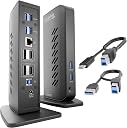
Desertcart purchases this item on your behalf and handles shipping, customs, and support to Panama.
🚀 Elevate your workspace with dual 4K power and seamless connectivity!
The Plugable UD-6950Z is a premium USB 3.0 and USB-C docking station designed for professionals craving dual 4K monitor setups at 60Hz. Featuring six USB 3.0 ports, dual HDMI and DisplayPort outputs, and Gigabit Ethernet, it supports Windows, macOS (driver required), and ChromeOS for versatile, reliable connectivity. Ideal for productivity-focused multitasking, this compact dock transforms your laptop into a powerhouse workstation—without charging your device.


| ASIN | B08B6CZ29Q |
| Best Sellers Rank | #612 in Computers & Accessories ( See Top 100 in Computers & Accessories ) #57 in Laptop Docking Stations |
| Brand | Plugable |
| Built-In Media | USBC/USB 3.0 Dual 4K Dock |
| Color | Black |
| Compatible Devices | Macbook Pro 13" / 14" / 15", 16", MacBook Air, MacBook Retina, MacBook M1 / M2 / M3 / M4 / M5 / Neo, HP Spectre x360 / Pavilion / Envy, Dell Pro / Plus / Pro Max / XPS / Latitude / Inspiron series, Lenovo ThinkPad / IdeaPad / Yoga / Flex, Surface Pro 7 / 7+ / 8 / 9, Surface Laptop 3 / 4 / 5 / Go / Go 2 / Studio / SE, LG Gram, Acer Aspire / Swift / Spin, ASUS Zenbook / Vivobook, Most Windows systems with Windows 10 or newer, Most Chromebooks running ChromeOS 100 or newer Compatible Devices Macbook Pro 13" / 14" / 15", 16", MacBook Air, MacBook Retina, MacBook M1 / M2 / M3 / M4 / M5 / Neo, HP Spectre x360 / Pavilion / Envy, Dell Pro / Plus / Pro Max / XPS / Latitude / Inspiron series, Lenovo ThinkPad / IdeaPad / Yoga / Flex, Surface Pro 7 / 7+ / 8 / 9, Surface Laptop 3 / 4 / 5 / Go / Go 2 / Studio / SE, LG Gram, Acer Aspire / Swift / Spin, ASUS Zenbook / Vivobook, Most Windows systems with Windows 10 or newer, Most Chromebooks running ChromeOS 100 or newer See more |
| Customer Reviews | 4.4 out of 5 stars 1,697 Reviews |
| Hardware Interface | USB 3.0, USB Docking Station , USB Type C |
| Item Dimensions L x W x H | 5.31"L x 2.76"W x 7.48"H |
| Item Weight | 350 g |
| Manufacturer | Plugable |
| Mfr Part Number | UD-6950Z |
| Minimum Required Operating System Version | Windows 7 |
| Model Number | UD-6950Z |
| Number of Ports | 13 |
| Product Dimensions | 5.31"L x 2.76"W x 7.48"H |
| Total Number of HDMI Ports | 2 |
| Total USB Ports | 6 |
| Total Usb Ports | 6 |
| UPC | 819927012016 |
| Unit Count | 1 Count |
| Warranty Description | no |
S**N
Perfect for 2 monitors
I purchased this docking station after the smaller USB dongles I had been using stopped working reliably once I added a second external monitor to my laptop. After spending a lot of time searching Google and asking AI for recommendations, this docking station kept coming up as a top solution. I'm glad I gave it a tr! It has worked flawlessly. Both monitors stay connected, I've had no screen glitches or disconnects, and everything has been stable since I installed it. If you're struggling to get dual monitors working reliably, this docking station is definitely worth considering.
J**T
Plugable Dual DisplayPort & HDMI Docking Station
This Plugable Dual DisplayPort & HDMI Docking Station - USB 3.0 & USB-C Laptop Dock for Dual Monitors is working great for now. Makes my life easier to have two monitors.
A**S
Great Functionality Matched by Great Customer Service!
At first, I had quite a few issues getting my Sharing Switch and Pluggable Docking station to work together. I wanted to have one docking station with all of my peripherals to go between my personal gaming tower and my work laptop. On my work computer it always worked fine, on my personal desktop the screens would intermittently flash black and I would have delayed functionality in some of my peripherals. Things would work fine if I pluged the dock directly into either computer, but I really wanted the functionality of the Switch. I looked up fixes others had used but nothing worked. Finally, I reached out to Pluggable's customer service and they couldn't have been better! Not only did they send me a free replacement Switch to see if that would solve the problem but also, after noticing one of my monitors didn't have the expected refresh rate available, did research into the manual of the monitor and provided me recommendations and screenshots of the manual to configure my setup properly. It actually solved a different issue I'd just come to deal with when using my monitors! With everything combined, we got my setup working perfectly. With that, I highly recommend Pluggabe not only for the ease of use with their devices, but that they genuinely want to help their customers out and have great customer service!
A**A
Works for M4 Mac
I have a MacAir Book 2025 Chip M4 and this docking station works. Sometimes one monitor stays in sleep mode but I go to display and it comes back up. The only thing is that u have to keep the power cable in MAC so once the lid is closed it still mirroring or extending.
W**R
Great product, excellent customer service
I bought this docking station in March of 2023 and it has served us well. I had two computers hooked up to it (one at a time of course): one of them a MacBook Air, and the other an LG Gram running Windows 11. The Mac required a little extra TLC to get it up and running - some program had to be auto-started every time I booted up. But once I figured that out it worked fine. The LG worked "out of the box". At the other end I had a 34" wide screen HP monitor and a Samsung 55" TV, both connected with HDMI cables, and a number of USB peripherals including webcam, scanner, CD drives. All the peripherals moved seamlessly from computer to computer with the help of the docking station. A problem arose last earlier this month: the power light didn't come on, on the docking station, and nothing was working. I communicated with customer support through Amazon, and was given some basic troubleshooting steps which I followed. When they didn't fix the problem Plugable speedily sent me a replacement unit and told me to properly dispose of the original one. When I received it I plugged it in and it worked great. Of course I'm concerned that the original docking station failed and hope that the replacement will last longer, but I'm pleased and impressed with the service I received.
M**E
Plugable - Awesome Product Great Investment
Great product, fast delivery, durable and easy setup. It is compatible with my Lenovo Legion Pro 5 unfortunately this model does not charge it but that is okay. The price on the unit was a good value and has plenty of usb ports. I had a previous Plugable unfortunately it only had one hdmi plug in on the unit the other hdmi plug was on the laptop. And I needed to upgrade it so that I can have two hdmi/display ports on the same unit just in case I decide to buy a 4k display down the road. At least now I have the option to add a third display because the third hdmi plug is on the laptop which supports only 3 displays according to the specs.
T**F
Updated Stopped Working after a week or two.. Twice
Update 3 almost a year down the road a new issue arose, my screen and text bars continuously drag to the right until you cannot view the screen or text, causing standard functions to be impossible. Unfortunately I strongly do not recommend this product. I was almost convinced my Mac is the problem but removing this device fixes these problems. I am seeking an alternative product Update 2 a few more months after the second purchase. Both displays failed within a few months, the second purchase randomly started working again about another full month after it also failed. Very unreliable, but works as advertised when it does happen to function correctly Update 1 Months after I purchased the first one, as well as the second. New - This product works flawlessly for maybe a month. I bought one in May, replaced it in June, the next one lasted 2-3 months and I am now in need of another unit as my displays will not extend from my new Macbook Pro M3. I did realize after each time you turn the laptop off, you. have to re-open the DisplayLink application in order to reconnect your monitors. Unfortunately it no longer works and I am stuck to the default HDMI port to use only 1 extra. This is a very expensive piece of equipment to not even make it past 6 months. I do NOT recommend this product. Original - It was extremely hard to find a way to extend 2 displays from a macbook, this did work for a little while, the HDMI display extenders failed within a couple weeks of using. Everything else connects correctly, keyboard and mouse USB however I'm unable to use this how I intended to. Also very expensive to achieve multiple monitors
D**4
Skeptic at first for M1 MacBook Air
TLDR: Hopefully this helps someone struggling because, to my knowledge, none of these are mentioned: 1) monitors must be on to allow plugable divide to be detected on a macbook. 2) check display port and HDMI compatibility with your monitors. Find the response rate that works best for your configuration - may take some tweaking. 3) if flicker occurs, do not let it continue, or you risk damaging your monitors with image burn. I was initially hesitant to purchase this due to the screen recording requirement, but realistically, plugable storing that information isn’t feasible, as it would take an incredible amount of storage and toll on my system. The impact on performance of having a second monitor with my M1 MacBook Air has been negligible, and I have enjoyed having an extended display. Due to my use of several programs when studying and working on research, having an additional monitor is invaluable, but I was honestly nervous after the initial set-up. The MacBook immediately had an issue recognizing the plugable dock after downloading the software, but that was because my monitors weren’t turned on - a slight difference, as waking my MacBook used to also turn on my single monitor but no big deal to turn both on manually. I immediately noticed a headache-inducing flicker after the external monitors started working. For context, I have two LG GL83A monitors that are set to 1440p with a 144 Hz refresh rate. I quickly played with the settings in my display preferences and found that 120 Hz was perfect for both monitors connected to the display ports in the plugable dock. Display ports tend to be a bit more capable than HDMI because (most of the time) you’re comparing a 1.4 display port cable to a 2.0 HDMI cable. Tested with HDMI too because I’m always curious - 60 Hz was perfect for the same monitors using HDMI instead. After messing with some settings and worrying that my only shot at two external displays, I noticed that my monitors had a slight image burn. Fortunately, I managed to solve the flickering before the image burn became an issue. The monitor screens resolved after a few minutes. Do not let the flickering go on for very long or you’ll damage the screens. After getting everything set up, I am very happy with the plugable dock. It has exceeded my expectations. It’s still a little pricy but it’s the only way to counter the single display limitation of the M1 macs without purchasing an M1 MacBook Pro with a designated HDMI-out.
A**ー
4Kモニターに十分対応できない。
MacBook M2 AirにLGの4Kモニターに繋げて利用してますが、画像は綺麗に映りません。 文字の拡大ができなく、見ずらいです。 因みに、返品には6000円+海外郵送費用がかかります。
S**G
Never had an issue!
Perfection
R**I
Excelente para quem tem Macbook AIR M1
Após muitas dificuldades em encontrar a dock Station (3 antes dessa) finalmente encontrei a Dock Station perfeita para as minhas demandas (2 monitores externos de tamanhos diferentes). Ela funciona muito bem, deixou a imagem nas telas com uma definição perfeita e seguindo as orientações do vendedor eu consegui fazer o Macbook Air M1 funcionar em duas telas independentes. No meu outro computador Dell também funciona perfeitamente bem! Não precisei instalar o app. sugerido pelo fabricante. Estou muito feliz com a performance do produto. Recomendo!
T**O
Excelente producto
Excelente producto, compatibilidad con Windows y Mac, el HDMI y DP simultaneo te permite adaptarlo a cualquier tipo de monitor, el cable USB A o C te permite conectarlo a la computadora por el puerto que este disponible, una gran calidad en los cables, quizas el unico punto en contra es que no cuenta con puertos usb-c, pero cumple muy bien su funcion con 6 puertos usb a.
N**S
Finally dual monitors with my M1 MackBook monitor (three monitors in total)
The product is a bit pricy but my work involves using my laptop 8-10 hours a day and my setup has always been my laptop monitor plus two external monitors and I was shocked to learn the new M1 MackBooks do not support dual monitors like the old intel based one did (totally my fault didn't do enough research before buying M1) so a quick Google search led me to buying this product and it does what it promises, it's worth mentioning with the USB dock that I was using for my old MackBook connecting screens to my laptop was awful as it was very laggy with this one it connects so smooth it's a breeze the only complaint I have is there is now two extra cables on my desk as this thing needs to be plugged to power and I still have to plug a charger to my MackBook when it runs out of charge since this does not provide power.
Trustpilot
2 days ago
1 month ago