


Desertcart purchases this item on your behalf and handles shipping, customs, and support to Panama.
๐ Triple your productivity, not your clutter!
This 11-in-1 USB-C docking station features dual 4K HDMI ports, VGA output, 3 USB 3.1 ports with 10Gbps transfer speeds, 2 USB 2.0 ports, 1Gbps Ethernet, and 100W Power Delivery charging. Compatible with most USB-C laptops (excluding Mac M1), it supports triple display setups on Windows and Linux, making it the ultimate all-in-one hub for professionals seeking seamless multitasking and fast connectivity.
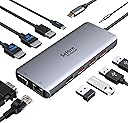


| Asin | B08BF8XMZP |
| Best Sellers Rank | 1,701 in Computers & Accessories (See Top 100 in Computers & Accessories) 14 in Docking Stations |
| Brand Name | Selore&S-Global |
| Colour | Light Gray |
| Compatible Devices | Laptops, Desktops, HDTVs, Monitors, Projectors, Keyboards, Mice, External Disks |
| Country Of Origin | China |
| Customer Reviews | 4.3 4.3 out of 5 stars (20,856) 4.3 out of 5 stars |
| Data Transfer Rate | 10 Gigabits Per Second |
| Enclosure Material | Plastic |
| Hardware Interface | Ethernet, USB, VGA |
| Item Dimensions L X W X H | 5L x 4W x 2H centimetres |
| Item Highlight | USB C Docking Station 3 Monitors, Dual Monitor Dock, Gigabit RJ45 Ethernet, 10Gbps USB3.1 Data, 100W PD Fast Charging |
| Manufacturer | Selore&S-Global |
| Manufacturer Part Number | SEUC3306-UK |
| Number Of Items | 1 |
| Number Of Ports | 11 |
| Operating System | Chrome OS, Linux, Windows 10, Windows 7, Windows 8, macOS 10.15 Catalina |
| Product Features | Fast Data Transfer, Plug and Play, Portable |
| Product Warranty | 2 Years |
| Total Usb Ports | 5 |
| Unit Count | 1.0 count |
| Upc | 779584132307 |
User
Great Docking station
Honestly, this docking station is better than I expected! Great charging capability, plenty of ports, solid build quality and it works perfectly with my setup. The cable length is just right too, making everything much easier to organise.Itโs versatile, reliable and feels really well made. Compatibility has been spot on so far.And the best part? It smiles all the time ๐๐Definitely a great little upgrade, very happy with it!
User
Great connectivity, straight out of the box
I bought one of these 2 years ago and it still works great, just bought a second one for another room. Works straight out of the box and has a huge number of connections. Compared with the ยฃ180+ Dell docking station that it replaced it is much smaller, has more connections, and allows power straight through, so you only have to connect a single USB C plug to your laptop.
User
Good, but needs a longer USB-C cable
Works fine and enabled a Chromebook to connect to a monitor using USB-C and Display Port. Would be better if the USB-C cable from the docking station was longer, enabling a tidier desk setup.
User
Plug and play
This docking station made my desk setup so much cleaner. Running dual monitors via HDMI with no issues, both screens are stable with good resolution and no lag.Plug-and-play with my laptop, and the extra USB ports are really useful for keyboard, mouse, and charging. Build quality feels solid and doesnโt overheat.Perfect for working from home or a multi-screen setup. Great value for what it offers.
User
Works Great for multi monitors and more on my Lenovo Yoga C640
Am well chuffed with this...bought the new Lenovo Yoga C640 and this hub to be delivered on the same day but wasn't sure if they were going to provide the multi monitor set up I need as there seems to be different versions of USB Type C ports with some unable to do multiple displays.I can happily report though that I just plugged it in to the laptpop and plugged in one monitor using hdmi and another using VGA and Windows recognised the monitors immediately and enabled me to extend the display to tme (rather than just duplicate).Have also pluffed in the ethernet cable to get wired internet, the headphone jack to get audio through my seperates system and both work fine. I've also got a bluetooth headset connected through it. The only issue i have found is with the USB receiver for my Logitech Keyboard and Mouse - if plugged in to the hub the mouse will only work if it is within 10cm of the hub, whereas if it is in the laptop directly it works anywhere on the desk. This may be something to do with the hub giving the receiver enough power but i'm not really sure.
User
Okay product, perhaps not best for long term performance
Worked fine for the first couple of weeks. But started glitching (disconcenting) after a while. Also, second monitor appears a little blurry when using both HDMI port.
User
It did what it was meant to - worked out the box - no hassle
I bought this to replace the really bad one I got from work.I can now share my work laptop display with my own x3 27" screens (x2 HDMI x1 DP in my case).I found that using extra cables and just switching inputs manually on my x3 PC screens as needed means:โข I can have from 1-3 additional screens switched to my work laptop as needed, leaving the others available to my home PC.โข I did not have to purchase additional hardware such as a KVM to achieve exactly the same thing.โข My eyes cope far better with the large screens for intense work sessions.โข I am no longer juggling Teams windows when hosting calls and trying to share content.My only negative observation is that โsometimesโ the DP port does not pick up the monitor correctly. However, I have found that unplugging the USB C cable from the laptop and plugging it back in again resets the device and the DP input is picked up again.(The DP input also gives me a lower resolution than the other two โ but thatโs probably down to me and losing the will to live tussling with Windows Settings)Although I would love to say it enables me to play fantastic games at blistering framerates with amazing resolutions, in fact what it does is give me a very cost effective and significant positive impact on my work productivity, apart from now when I should be working *cough*.
User
Seller sent a list of problems before the item arrived
Ethernet connection did not work even after following the instructions below. Knew I was in for problems when the following arrived on an email from the seller before I received the hub. Item 7 is about the ethernet.1. This USB C docking station needs your laptop's USB C port to support DisplayPort/Video output. Please check if your laptop's USB C port supports DisplayPort/Video output.2. About the docking station getting hot: It is normal if the temperature does not over 50ยฐc due to the material design. please feel free to contact customer service if the docking station still gets too hot or does not work normally.3. This docking station for the Mac OS system just support mirror mode, does not support extended mode (Extended mode for MacBook: The 2 monitors will be shown the same image but different from the laptop)4. This USB C docking station support 2 HDMI+ VGA at the same time and the resolution will be 1080P (The Resolution is limited by the VGA port). Please enter "windows + P" that you could choose the extended mode.5. What if the HDMI port does not work:โ Check if the HDMI cable is HDMI 2.0 (Please don't use the cable for too long)โก Please confirm if you have plugged the HDMI port is correct (The HDMI port needs an HDMI to HDMI port to work)โขPlease plug and unplug the docking station, then enter the "windows + p" to active the laptop6. About the charging issue: Please use a power adapter over 65W due to the docking station will be withholding a part of power (It is better to use your original power adapter if your laptop charging port is DC Power). It is normal below 50 ยฐ C if the docking station gets warmer, but if it is too hot please contact me for a new replacement.Please plug the charging port(Power Delivery port) before you use the docking station (Sometimes the docking station will not work if your laptop does not have enough power)7. About the Ethernet keep dropping:โ Please plug and unplug the Ethernet cable. (Use the power adapter over 65W, please plug the Ethernet cable after charging)โกPlease set your IP address and MAC address acquisition method to automatic acquisition method if the Ethernet does not recognize.8. About network interference: Please use the USB 2.0 port or plug the keyboard/mouse into the port which keeps away from the network port if the keyboard/mouse is slow to respond.
User
Pequeรฑo, discreto y rรกpido
Un hub usb-c pequeรฑo y discreto. No mas grande que un rotulador. Con un cable lo suficientemente largo y flexible.El ordenador lo reconoce a la primera. HDMI, puertos rรกpidos. Construcciรณn sรณlida. Sin problemas.
User
Buena calidad
Es de buena calidad. No se calienta. Y tiene todas las entradas necesarias.
User
7 fiches pour une !!
c est un on lecteur de carte SD , il me sert surtout comme adaptateur pour passer de la tablette a ma tv en cรขble HDMI .pour le prix j en suis vraiment content .
User
Buono
Provato,funziona bene.
User
Perfect!
Works exactly as expected.
Trustpilot
2 months ago
2 weeks ago