⚡ Elevate your game with speed, style, and supreme control!
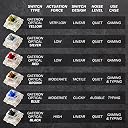
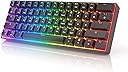
The HK Gaming GK61 USB Gaming Keyboard (Brown) is a compact 61-key mechanical keyboard featuring premium hot-swappable optical switches for durability and customization. It boasts a blazing 1ms polling rate, vibrant 16.8 million color RGB backlighting with 20 adjustable patterns, and smooth pre-lubricated stabilizers for a tactile, silent experience. Designed for both gamers and professionals, it offers cross-platform USB-C connectivity, durable doubleshot keycaps, and an included keycap puller for easy customization.


| ASIN | B07PT9NRRY |
| Antenna Location | Gaming, Office |
| Best Sellers Rank | #109,027 in Computers & Accessories ( See Top 100 in Computers & Accessories ) #571 in Gaming Keyboards |
| Box Contents | Keycap Puller, USB Cable |
| Brand | HK Gaming |
| Brand Name | HK Gaming |
| Button Quantity | 61 |
| Colour | Black |
| Compatible Devices | Laptop |
| Compatible Operating System Family | Windows |
| Connectivity Technology | USB-C |
| Country of Origin | USA |
| Customer Reviews | 4.4 out of 5 stars 4,329 Reviews |
| Enclosure Material | Acrylonitrile Butadiene Styrene |
| Hand Orientation | Ambidextrous |
| Item Dimensions L x W x H | 29.2L x 10.2W x 4H Centimeters |
| Item Type Name | keyboard |
| Item Weight Unit of Measure | 582 Grams |
| Keyboard Backlighting Color Support | RGB |
| Keyboard Description | Gaming |
| Keyboard Layout | AZERTY |
| Language | English |
| Manufacturer | Hong Kong Keyboards |
| Manufacturer Part Number | iGk61 |
| Minimum Required Operating System Version | Windows 7 |
| Model Name | GK61 60% US Layout |
| Model Number | GK61 |
| Number of Items | 1 |
| Number of Keys | 61 |
| Number of Packs | 1 |
| Number of Sections | 1 |
| Power Source | Corded Electric |
| Product Features | Hot-Swappable, Spill Proof, Wrist Rest |
| Recommended Uses For Product | Gaming, Office |
| Series Number | 61 |
| Special Feature | Hot-Swappable , Spill Proof, Wrist Rest |
| Style Name | Gaming |
| Switch Type | Tactile |
| Theme | Gaming |
| UPC | 615867850868 |
| Unit Count | 1 Count |
| Warranty Description | Parts only |
| Water Resistance Level | Waterproof |
S**R
Review as a mechanical keyboard enthusiast
I have been using this keyboard for over a month now I believe. And from my limited experience i can safely comment on a few things Packaging - Ok the packaging for this is pretty shady lol. My box was all dinged up, the sticker that is supposed to hold it close was open and lost all it's adhesive :) But regardless, inside the keyboard was pretty safe and hadn't moved or been damaged at all Build - Sturdy build with no loose parts or rattling' - Aluminum switch plate feels premium and gives a good feel - Keycaps are decent, not the best but didn't expect them to be. I would suggest upgrading to PBT keycaps as this board is pretty much build to be customized. - Cable is of decent quality as well, so is the keycap puller and switch puller - This keyboard also says "pre lubed" like every other mechanical keyboard lol, but it's very minimal and has no effect on the sound/feel even if you wipe it off. I recommend lubing them on your own. I would recommend Petreplus 2700 if you're not looking to spend 5k on 10grams of krytox205g0 lol. I have a review on the lube too, and in my experience, it's a good lube if used correctly. Switches - I have the brown switches. Good, fast, smooth, and sound if very pleasing as well. - Again, pRe lUbEd, so wipe that stuff off, and lube them yourself, that will just elevate the experience. Cons - The PCB and switch plate sit very deep into the case, which is good for sturdiness and security, but then if you want to add foam to your keyboard, that would be a bit difficult. Maybe i didn't do it right, but thats my experience. - The software is janky AF. HK gaming really needs to focus on this, otherwise, their brand image will never be able to get better as their software feels like something from Windows XP. But the keyboard isn't very software dependant, so it isn't much of an issue. There are keys to switch between light modes, but if you want to keep custom lighting then you'll need the software, which is relatively simply to use, even though it looks very very old lol. - This board is a 60% which might be small for a lot of people. I didn't mind it at all, in fact I loved it. I edit videos and photos, and i didn't face any problems, and I love the compact size. But I know most people don't, so listing it here as a con. All in all, I would recommend this board due to its high customizability. You can go for the Keychron V2 hot swap version if you want something bigger than a 60% as well, but this was cheaper than that for me and based on reviews pretty much giving in direct competition as a good budget mechanical keyboard But I am happy with my decision, hope this helped you in making yours too.
S**V
One of the best keyboard for gaming
Best keyboard for it's price. We can change keycaps and also switches in this keyboard. Top for gaming. It has a great look and gives your set up an aesthetic look and all switches are programable and has lots of light effects and can also customize it. Using of the software is good not that simple but can be figured out easily. If you have an 1000 more to spend buy the yellow switches which is more faster than brown. But brown is not bad it is also very good but comparatively yellow is slightly good.
S**.
Very good keyboard, but not for everyone
I bought the Gateron Brown ones. The only objective negative I found its the keycaps and its stabilization. The ABS keycaps aren't as sturdy as PBT ones and the keys wobbles a bit. Doesn't affect its performance but does feel cheap. RGB is great. Arrow keys can be permanently switched on. Gap between keys is appreciated. Great for gaming and typing. The subjective negative is that brown switches aren't good at feedback. The bump you feel is very slight, plasticky, feels almost like annoying pothole on the road rather than a good bump. Compared to metallic 'click' from the blues, these feel nothing. My light fingers could only feel them while I typed slowly, not while gaming nor while typing fast. And its not "silent" you will hear the "clack" when the plastic keycap hits the plastic base when pressed hard, present in every keyboard, which does make loud noise. The only silence is there is no metallic click sound.
J**H
For Gaming And Build Quality
I was looking for this keyboard everywhere but here it was telling mee 7000 but I bought it for 5000 it is very nice deal and all key register well and I have no complain it's switch and stabiliser are nice also I will prefer this over any keyboard
S**E
One of the best Mech Keeb
This is one of the best keyboard at this price point. Everything is great. It would have been the best if they have given it some bluetooth support as well. Wire of the keyboard makes it difficult to have clean set up and portability of laptop while keyboard connected.
B**N
Subjective keyboard
Pros Good quality, strong RGB Heavy Cons I think mechanical keys are tiny TALL keyboard
V**N
Top G
Absolutely goated for being chinese and still lasting more than 5 years and still goin
A**R
Works as expected but I couldnt easily find software to reconfigure keys
This is a great product at this price range. Typing is a little uncomfortable but thats because i am not used to typing on high raised keyboards. Wrist support can be bought for this. The rgb lights are nice and it is working great for mac. Low availability of accompanying software is why i have deducted 1 star. All in all, the keybaord quality is nice and readers should not worry about that. My advice will be to look for softwares which help reconfigure keys before going for this. But even if you dont find that, it wont be the end of the world.
L**A
Sturdy build quality, Reasonable RGB effects and uniformity
Thought I put a quick review. I'm coming from an old Corsair K70 mechanical keyboard with Cherry MX brown switches. Thought I would get a much more compact keyboard for the desk and for gaming. Overall impressions is good. The keyboard case is single piece of plastic which is mostly matte with some gloss highlights around. The plastic case is decently thick so that in tandem with the steel backplate, the entire thing feels really solid and does not creak or flex under reasonable torque. There are no adjustable feet on the keyboard, just 4 large rubber feet. The keyboard is connected via a usb-c cable which is nicely braided so it has a nice look to it. Braided cables has heaps of "memory" to it so it's fairly stiff, but given its going to be connected to your keyboard, which doesn't move, I have no complaints. The keycaps have a matte finish on the top, with gloss-finish on all sides. This is very different to the keys on my K70 which was all-gloss. The matte finish is definitely a winner because it doesn't show fingerprints readily. The gloss-sides however show off grime, dirt, scratches and dust easily. You have to be carefully when removing the keys on this board with the included the keycap puller because it will scratch up the gloss-sides of the keys! The Shine through legends are decent and allow the backlight to shine through. The font is a bit "gamery" but not as bad as some others and I soon got over it quickly. However, the thing you WONT get over will be the white-printed secondary legends on the keycaps. You'll notice that this keyboard has its F-keys, arrow keys and other functions (num-lock, scroll lock etc) as secondary functions. These can be quickly accessed by holding "Fn" in the bottom right and pressing the relevant key. The problem is that these legends are not durable. The appearance of the printing is great; It's nice and crisp. But it fades incredibly easily. I've only used the keyboard for a few weeks and the printed legends on the A-Z part of the keyboard has this dull stained look. So far the legends haven't started peeling, but the white print stains easily. For some it might not be a problem because you'll hopefully remember the location of all the keys by them. But is definitely something for the manufacturer to improve upon on the next iteration. The RGB lighting is cool. All the colours under the rainbow, except for white. The white colour looks more like a light blue. Odd, but definitely not a deal-breaker. The Gateron Optical Brown switches feel pretty marvelous. They are very smooth, with a tactile bump much more pronounced that the K70's cherry mx brown. The downward travel is also smoother, with noticeably less "grit/sandy" friction feeling. This makes the key travel feel much shorter. I'm not sure if its true, but these optical brown switches feel like they have a much shorter travel distance than the mx browns. I got used to it, and am not sure if I prefer it. For typing, i feel like I want a little bit more travel distance for comfort. It feels abrupt as I'm bottoming them out. Perhaps I need more time. The only other thing is noise. It doesn't have a loud click, but you will definitely hear them thud everytime you poke them the full distance down. I found it to be louder than my K70. Lastly, it has no wrist rest. This is the one thing that I missed from the k70. I'm definitely a wrist-rest user. The K70 has an included plastic detachable wrist rest. Although nothing special, it allows me to be a bit "lazy" when playing games on an extended session as I can rest my fingers on the wasd keys and that's all. Without the wrist rest, I certainly felt the strain of holding my hands up on the wasd keys. What I 100% missed is the "detachable" aspect of the K70's wrist rest. If you move your keyboard, the wrist-rest moves with it. Unless you glue your wrist rest to your GK71, every adjustment of the keyboard will require a follow up adjustment to the accompany wrist rest which gets very frustrating. Otherwise that's it. If you are wondering if you should buy this keyboard for $80AUD, then go ahead. There's definitely worse that you could buy. The only problem is the cheap secondary legends printing on the keycaps.
A**R
Best Value 60% keyboard with great customizability
This is a sturdy built keyboard for the money it costs. At half the price of other mechanical keyboards, you get a compact keyboard with the essentials. If you don't want many frills but are looking for a mechanical feel and a 60% format, this is a great buy. I went through the process of lubing each switch/stabilizer and doing some mods. Out of the box, the keyboard sounds just as any other off-the-shelf mechanical keyboard would sound. After lubing and mods, it sounds like a true high-end mechanical keyboard. Taking the keyboard apart showed the admirable production quality. Nothing is high end, but nothing inside is super cheap either. This will be a durable keyboard that doesn't seem like it should run into any problems unless there is an issue with the PCB, which is unlikely. The RGB effects are nice and the customization for macros and lighting is nice. It provides the essentials. The only downside to the lighting is that any colour that isn't red, green, or blue will be an awkward gradient through the keycaps. For example, orange will be a weird red/green mix with only orange right in the center of the key. White is a gradient from blue, to pink, to purple. I find that it looks cool, but it's definitely not good at replicating solid colours. Overall, beautiful keyboard that fits all of my needs. Unless you're a keyboard enthusiast looking to spend $200 on a 60% keyboard, this is your best bet.
D**Z
Bueno
El teclado es de buen material, tiene diversas configuraciones para el RGB.
C**Y
You do not need any more than this. (Brown Switch) (Gamer perspective)
Why i bought this keybaord: 1. I wanted a smaller foot print on my desk 2. I like new tech and wanted optical switches 3. The value proposition here was very intriguing. Potential deal breakers: 1. Lighting - If you are an RGB crazed mad man, you might not want this for VERY picky reasons. The rgb used in this keyboard has two leds for each key. I have no idea why they thought this was a good idea or what they were going for but the downside to it is that you can see both leds depending on what color the board is trying to show. 2. Glossy sides of key caps if you are super picky 3. No media or volume control. (Can be remedied if you download and run auto hotkey on startup of windows. this is more of an advanced thing for someone to do, but anyone can do it, even with your keyboard you are probably using now) Pros (in order): 1. Typing experience (Brown switch, this is my second mechanical keyboard) - For those who dont know, the brown mechanical switches have a tactile bump which is felt as a sort of wall on the key press that you break through. Brown switches are not clicky and the sound they make is muted and low tone which I absolutely love. I came from a logitech 810 that has the G Romer switch, which is Logitech's proprietary mechanical key switch. These switches are very similar but I would say that the Gateron optical browns in this keybaord have a slightly more present tactile bump. I was excited to try out these switches and I love them. I have been playing type racer for a couple of hours today just because of the amazing typing experience and the pleasing low bassy sound that comes from these keys. they are also a big reason why have taken the time to write out such a lengthy review for this product because i just enjoy typing on these switches so much. Truly a pleasure. 2. Gaming (again, this is the brown switch) - I am a gamer so this point is either going to be a pro or a con in this review and obviously its in the pro list. As for the optical switches, i think the lack of input delay actually got me confused when i started playing. I read that input on other keyboards are like 30 ms while optical is bassically no input delay at all. I felt weird at first but i got used to it in a couple minutes and use the keyboard as normally would my G 810. I played first person shooter with this today and the tactile bump was a bit more of a hindrance than the G Romer switch on the 810 but i dont really mind it because i will eventually get used to it and wont notice it anymore. It is different but not different enough to were i wont get over it. If you are into linear switches than obviously you wont want anything to do with the brown switches in the first place. 3. stabilizers - the large keys like space, shift, backspace and enter all feel really solid. the space bar in particular on my G 810 along with the other keys was really lousy and am glad to be rid of it. that space bar was ridiculously clacky where the space bar on this keyboard makes a satisfying THUMP. 4. Lighting - it works. im not that picky or an rgb freak. I like a nice per key back lighting and this makes me happy. The double color you get from the weird leds is odd but its not a big deal. The instructions for how to change the lighting effects with the function + (whatever key) is all in the manual you get with the keyboard. (you can do more with the software but its not easily found and do not think most people will download it because of how you go about finding it) Conclusion and take ways for me: I will never buy a high name brand keyboard ever again. For what is 50 dollars, i got everything i could ever need out of a keyboard where high end brands like logitech would charge 100 to 120 or more for similar offerings. For me, spending extra money on anything else would be a 100 percent waste. I would gain nothing meaningful to me or my setup at all. Regardless of price, these switches awesome (ive only had this and the G Romer switch by the way)
A**R
Excelente teclado mecánico 60% por el precio.
PROS: -El tamaño lo hace portable, lo cual es conveniente. -El tamaño también deja más espacio en el escritorio para usar a placer el mouse cuando juegas. Antes tenía un teclado completo y a cada rato chocaba con el teclado sobre todo en FPS. -Luces brillantes, los LED y el color blanco hacen resaltar los efectos y colores!! -Montones de efectos de luz!!! y varios layers para poner efectos customizados. -Compré el teclado con los switches BROWN, y es un placer super suave teclear en ellos, mucho mejor que sonido agudo de click de otros switches. -El cable es de excelente calidad USB C, con cubierta tejida. -Excelente para programar si te acostumbras a teclear con la distribucion en Inglés. CONS: -Es teclado en Inglés, si estás acostumbrado a un teclado en español entonces requieres configurar éste como teclado inglés internacional para poder poner acentos y la virgulilla arriba de la ñ, de hecho estoy usando este teclado ahora mismo y apenas estoy haciendo memoria muscular en los dedos para sacar los caracteres en español. Pero vale la pena honestamente. -El software de configuración es bastante críptico, te toma algo de tiempo tratar de encontrar cómo funciona y dónde moverle para instalar nuevos efectos. -No tiene pies de goma de los que se sacan para levantar la parte trasera, aunque no es tanto problema en realidad. Al final le puse 5 estrellas porque el precio es un super deal comparado con lo que te dá, y es un super placer teclear en este teclado y se vé increíble la verdad, es fácil ignorar los pocos contras.
Trustpilot
4 days ago
2 days ago