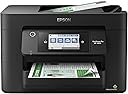
🚀 Elevate your office game with speed, precision, and wireless freedom!
The Epson Workforce Pro WF-4820 is a high-speed, high-resolution wireless inkjet all-in-one designed for busy professionals. It delivers up to 25 black and 12 color pages per minute with sharp 4800x2400 dpi prints using DURABrite Ultra pigment inks. Featuring a 4.3" color touchscreen, auto duplexing, 250-sheet capacity, and versatile connectivity options including Wi-Fi, Bluetooth, and Ethernet, it streamlines heavy workloads with reliable heat-free PrecisionCore technology. Ideal for managers seeking productivity and professional-quality output in a sleek, connected package.


| ASIN | B08DXK91SX |
| Additional Printer Functions | Scan |
| B&W Pages per Minute | 25 ppm |
| Best Sellers Rank | #5,186 in Office Products ( See Top 100 in Office Products ) #13 in Ink Tank Printers |
| Brand | Epson |
| Built-In Media | WorkForce Pro WF-4820 printer, quick setup guide, CD-ROM with drivers, power cord, 4x DURABrite Ultra Ink cartridges (1x Black ink cartridge and 3x color ink cartridges: 1x Cyan, 1x Magenta, 1x Yellow) |
| Color | Black |
| Color Pages per Minute | 12 ppm |
| Compatible Devices | PC, Smartphones |
| Connectivity Technology | Bluetooth, Ethernet, USB, Wi-Fi |
| Control Method | App |
| Controller Type | Android |
| Customer Reviews | 3.8 out of 5 stars 3,189 Reviews |
| Display Type | LCD |
| Dual-sided printing | Yes |
| Duplex | Automatic |
| Global Trade Identification Number | 00010343940260, 00010343941915 |
| Hardware Interface | Bluetooth, Ethernet, USB |
| Ink Color | Black |
| Item Dimensions D x W x H | 16.7"D x 19.8"W x 10.9"H |
| Item Type Name | Inkjet Printer |
| Item Weight | 22.5 Pounds |
| Manufacturer | Epson |
| Maximum Copy Resolution Black and White | 4800 dpi |
| Maximum Copy Resolution Color | 2400 dpi |
| Maximum Copy Speed Black and White | 25 ppm |
| Maximum Media Size | 8.5 x 14 inch |
| Maximum Print Resolution Black and White | 4800 x 2400 dpi |
| Maximum Sheet Capacity | 250 |
| Maximum print Resolution Color | 4800 x 2400 dpi |
| Model Name | Workforce Pro |
| Model Number | WF-4820 |
| Model Series | WorkForce Pro |
| Number of Drivers | 1 |
| Number of Trays | 1 |
| Other Special Features of the Product | Auto-Duplex |
| Output sheet capacity | 250 |
| Paper Size | 8.5 x 14 inch |
| Print media | Envelopes, Glossy photo paper, Paper (plain) |
| Printer Connectivity Type | Bluetooth, Ethernet, USB, Wi-Fi |
| Printer Output Type | Color |
| Printer Type | Inkjet |
| Printing Technology | Inkjet |
| Processor Count | 1 |
| Resolution | 4800 x 2400 |
| Scanner Type | Image Scanner |
| Series Number | 1 |
| Special Feature | Auto-Duplex |
| Total Usb Ports | 1 |
| UPC | 010343940260 010343941915 010343954410 |
| Unit Count | 1.0 Count |
| Warranty Description | 1-Year Limited |
| Warranty Type | limited warranty |
| Wattage | 18 watts |
S**.
Great printer...I thought
This unit has really great reviews and many from small biz owners who say it works great and lasts. I've had it for a month and I'm really happy with it. It's much better than my last one. If it lasts as so many other reviews say, it's a great purchase. **UPDATE** Loved this printer. Only used it a few times. On the 3rd month, I pushed the button to turn on the printer and there was no response at all. I tried everything. Checked all connections and the outlets. It would not turn on at all. I was out of the return window with Amazon, so I called Epson. They told me they are sending a unit to me and to return mine with the box and label in the shipment. But they said they are NOT SENDING A NEW UNIT, BUT A REFURBISHED UNIT! I am not at all happy about this! I purchased a new printer, not a refurbished printer, and I want a new one! So, I'm really unhappy with Epson right now.
L**J
Love & Hate at the same time
I installed, connected to the internet, everything was smooth and the 1st day I printed doc, scanned, sent air etc etc etc, and it was working absolutely great. Next day started asking to perform updates, then it was disconnected to the air computer, I couldn't scan, I connected a cable directly and it didn't work either, becae a nightmare and as last resource, I had to scan through a usb device and then connect to the computer back and forth. Then next days, it was always for updates, downloading more date on my computer as well update the printer, it is like they are spying everything you do with a printer, I just want to use it to print/scan/copy documents or any other info, if it is working just find the 1st day, why these companies begin with harassing the buyer with all these daily updates or connecting hundreds of things to make it work. It was much easier in the past, you just install the program of the printer with a CD and that was it! I had one of those printers before this one and it worked for 12 consecutive years with NO PROBLEMS whatsoever. And the last problem is that IS NOT WORKING AT ALL, I had to stored the printer computer and all my office equipment for 6 months and I plugged in everything and the printer asked for new cartridges, I took them out and they are still full of ink, my fingers completely colored & stained are witnesses & now it says use Epson Support code error 031006 ?!?!?!?!?! There is not a web/ph/any kind of information where do I need to go, I barely use the printer at all, it still has some of the protection plastic and it is already damaged. What a pain. Seriously they should at least add who or where we can ask for help. Now AGAIN buying a new printer because for sure EPSON IS NOT GOING TO HELP ME :((((
W**G
Great addition to my home office.
Love these Epson Workforce All-in-one printers. They are very robust although the last one didn't stand up to the smoke damage from my house fire - poor thing. This one was easy to setup up on my home network and get me printing high quality ourput and print. The touch screen interface is very intuitive and allows quick access to all the functions of the device. Ink usage is pretty good as I made it through most of a ream of paper and that is mostly double-sided! Color is clear and clean, and the scan function is the awesome.
M**T
Epson Workforce Pro WF-4820: A Reliable and Efficient All-In-One Printer Solution!
I recently purchased the Epson Workforce Pro WF-4820 Wireless Color Inkjet All-In-One Printer in black, and it has been a fantastic addition to my home office setup. This large printer offers a perfect blend of functionality, efficiency, and ease of use, making it an invaluable tool for my printing, scanning, and copying needs. The wireless connectivity feature has been a game-changer, allowing me to print from my devices without the hassle of cords or cables. The setup process was quick and straightforward, and I was able to start using the printer within minutes. The print quality of the Epson Workforce Pro WF-4820 is exceptional, producing sharp text and vibrant colors for both documents and photos. The fast print speed is an added bonus, allowing me to complete my printing tasks in no time. The all-in-one functionality has proven to be incredibly convenient, enabling me to scan and copy documents with ease. The user-friendly interface makes navigating the printer's features a breeze, even for those who may not be tech-savvy. In terms of design, the large black printer is sleek and professional, seamlessly blending with my office decor. Despite its size, it doesn't take up too much space and fits comfortably on my desk. In conclusion, the Epson Workforce Pro WF-4820 Wireless Color Inkjet All-In-One Printer is an excellent investment for anyone looking for a reliable and efficient printer solution. With its impressive print quality, user-friendly features, and all-in-one functionality, this printer is perfect for both personal and professional use. Give it a try, and you won't be disappointed!
A**E
Cost friendly Printer
I purchased this printer in 2023 and have been impressed with how easy it is to set up and the quality of the prints. While it still produces great prints, I’ve recently encountered some frustrating issues, including paper jams and black spaces appearing in the middle of pages. I’ve run all the cleaning cycles and printed the cleaning pages, and everything looks good. I’ve also checked both the inside and the back of the printer for any potential problems. Unfortunately, it’s out of warranty, and the repair costs are too high. Despite these issues, I appreciate its ease of use and reasonable price, so I’m seriously considering repurchasing this printer. Overall, I really love it!
H**1
First Rate Office Printer.
This is the second Epson product that we have owned. The previous model was still working after 8 years of dependable service when we replaced it. We tried to move up to an Eco Tank model that we purchased locally. The unit would not connect to our wireless network, so we returned it to the store and purchased this model from Amazon. The overall quality of the output is just as good or even a little better than our old model. This unit is quite a bit faster that our old unit. The unit was also reduced by 34%, making an excellent buy. The jury is still out if it will be good in the ink usage department. Our old unit seemed to need a new cartridge every other week, I would purchased this model again,
T**E
This company has terrible customer service and serious flaws in their printer design
I have never posted a seriously negative review of a product in the past as I try to work with the manufacture to fix their product problems and keep the customer happy. However, after prolonged attempts at resolution with this products issue I have to post something to show my frustration. The company has horrible customer service and does not support its flawed product, so I need to warn other potential customers to avoid my expensive mistake and seek a different manufacturer to purchase your printer and your ink. I bought this printer in December of 2021. It initially worked fine. I left on a vacation in July and returned in August to a long list of items to complete with close deadlines. Many required me to use my printer. Unfortunately, when I turned on my computer, I chose to update the software for the computer and for the printer (automatic requests that I clicked yes on – bad mistake). Once the printer software was updated it rejected the ink in my printer (which has worked previously and was Espon brand). Given very tight deadlines I called all over town and found some new Epson ink 20 miles away. I bought it and returned. The printer rejected the new yellow ink. I called customer service asking for help rolling back my printer software so I could finish my job and was dismissed. Now with a few hours deadline, I had to go buy a NEW printer and new ink (clearly NOT Epson brand), return, install and print. The deadline met, I recontacted Epson and asked them to take my printer back or replace the software as it was useless. I could not even print with black only ink when it rejected the yellow cartridge. They simply ignored me but asked for receipts, etc. to prove I bought new Epson Ink. That required more of my time to scan (with my new printer mind you), fill out forms, and submit. Weeks later they sent me a single new yellow ink cartridge. By then I was traveling again. I returned a month later, the ink was in my mail. I installed it – It does not work so now 6 weeks after the original problem I still cannot use my printer. I suspect to get any help I will need to go through all the same paperwork and hassle and will have no resolution of the software issue, which is the real problem, not the ink. Bottom line – this is a deeply flawed device with very touchy software glitches. The company is so paranoid to protect their ink business that they had made their device(s) unusable. I now see they were sued and they settled that lawsuit a few years ago. What they have not done is fix the problem nor do they want to help customers who have problems. I strongly recommend you not buy this device and seek a different manufacturer (probably none of their devices after reading the lawsuit information and noting they have not agreed to resolve the problem).
E**S
Epson Workforce Pro is the best !
My go to printing choice, always! Works great!
Trustpilot
1 week ago
2 months ago