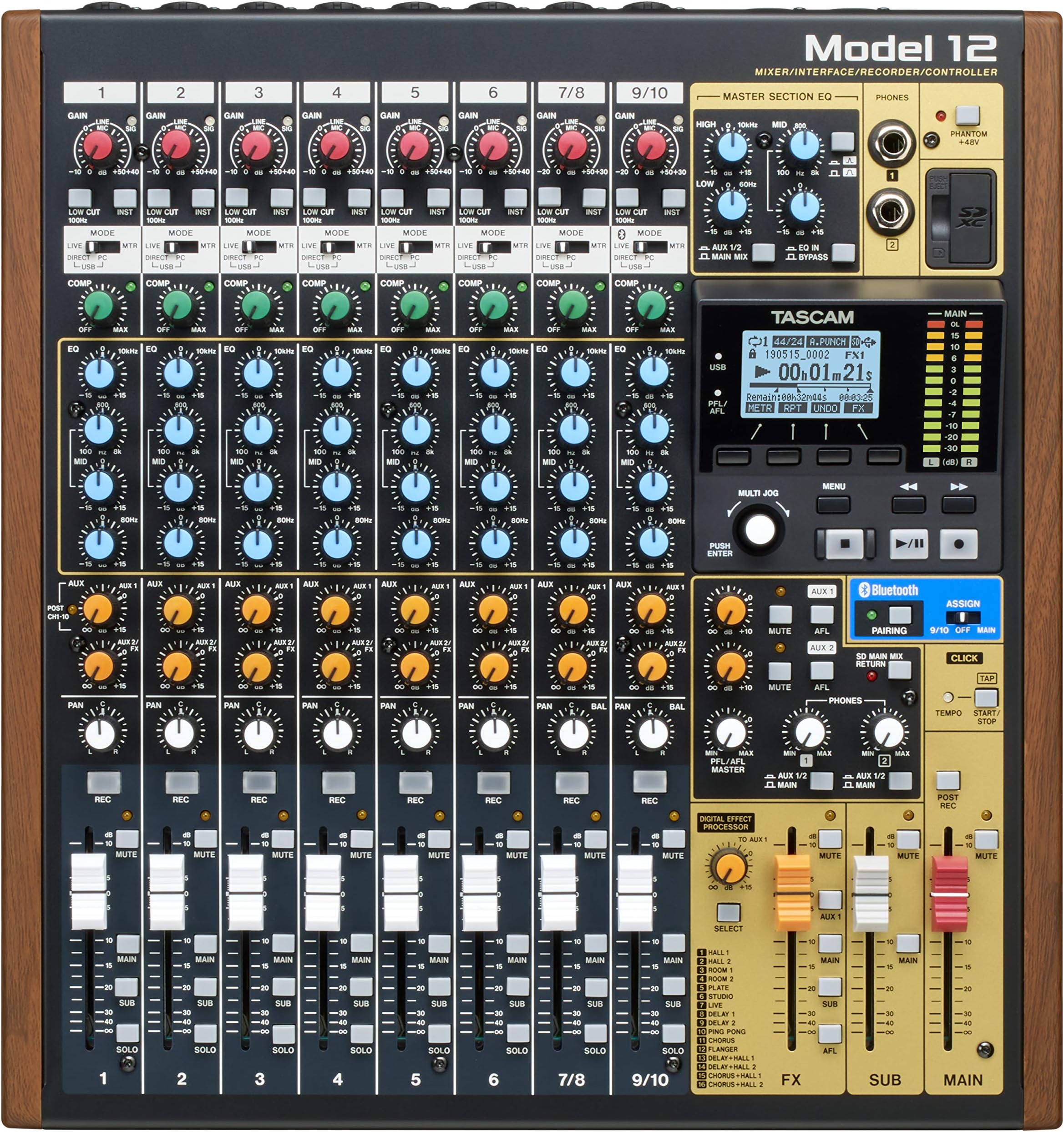
Needs reading the manual, a few times. If you want to make multi-track recordings then this will do it. If you want an interface for a DAW, it does that too, and if you prefer Bluetooth, it does that also. An excellent machine, the 12 channel is the little brother of the 16, and 24 channel. Common sense applied to manual directions is all that is necessary to operate what appears to be quite complex at first. There are some complaints about USB hookup. Well they tell us not to use a long cable! In fact in the box there is a short one, 1 meter long, in fact. If that is not a hint, I do not know what is. Whichever, in my case hooking up directly to the Motherboard USB 2.0 sockets worked as the manual describes. However I will add, I tried to connect to a USB 3.0 upgrade card. That did not work. So yes! read the manual. The clean sound, silence if you prefer, of the powered device over headphone, or monitor, deserves the most marks. Well done Tascam. The Midi In and Out, a great asset! The Sub Out, alternative route to hookup monitors with 1/4 inch TRS cables, very handy, and useful for a host of other configurations. Love the dual inputs 1 - 10, either XLR, or 1/4 inch TRS. All in all, it leaves my old device, Fostex - X26 in the dust! Super value added with the PC hookup options, even if, at this time, I have no need of it. Only thing I would change is the Phantom Power option, currently global on this model, it might work better if managed by S/W to each channel. IOW turn it off for regular hookups. Before you power a new unit make sure the Phantom Power, top rhs of the board, is off! Else you may fry an expensive Mic which does not need the 48 Volts. Tips, gotten from the Tascam Forum, 1. on each channel the Sub Button arms the Headphones bus, IOW you can barely hear stuff without doing that, and do turn the volume, gain, down before tweaking their controls, middle rhs. 2 you do not need to press the Play button as well as the Record button when making a track. Yes in the old days of Tape it was necessary to, but on the Digital unit, it is not! To make a new track, create a song - RTM for more. Hookup your input - Mic or whatever. Use the Meter to set the level/s. Punch both record buttons, first the track one, then the main. When done punch the stop button. To hear what you did, move the Mode from Live to MTR, and press Play. To dub another track alongside, simply arm the next channel with an input, Mode live, set its levels. Then press it's record button, and when ready press the main record button. It is NOT necessary to press the record on the previous channel! Because if you do with no input it will erase track 1. Just leave it on play, make sure the volume slider is up so you can hear the Mode MTR replay as you dub the new track alongside. Effects work ONLY if you disarm all the Solo buttons, and the wee red light LHS of the screen is off. If it is on the Effects do not work. Need increasing the Aux 2 orange button on your chosen channel. Needs pressing the Select button in the control panel - mid rhs . This brings up the FX menu on the main screen. In it be sure to turn on the effect by rotating the Jog wheel to on - Manual Pages 33 / 34. Now press the Main buttons. I found it was necessary to do that both on my channels and on the FX slider. Too, that simply controls how much effect is sent to your Main bus, i.e. the one we chose to carry it. IOW the volume of the effect is still controlled by the Main slider, so maxing up the FX one does not increase the output. A bit sloppy but will save some searching. My headphone first click-less encounter with the Model 12 is now remedied with a full clicking replacement. Thanks Amazon!