⚡ Snap, Charge, Conquer — Power your Logitech like a pro!
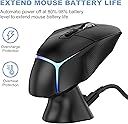
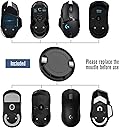
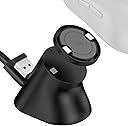
The Soarking Charging Dock is a precision-engineered accessory compatible with top Logitech gaming mice models including G Pro X Superlight, G502 series, G703, G903, and more. Featuring a compact 2.5x2.5x1.5 inch design with a strong magnetic snap-on charging puck and a non-slip, residue-free base, it offers seamless continuous charging at home or on the go. The dock includes a removable 10g weight insert to maintain your mouse’s customized feel, making it the perfect powerplay upgrade for serious gamers and professionals alike.


| ASIN | B08JFXFSJ2 |
| Best Sellers Rank | #1,094 in Video Games ( See Top 100 in Video Games ) #67 in PC Gaming Mice |
| Customer Reviews | 4.2 4.2 out of 5 stars (2,198) |
| Date First Available | September 18, 2020 |
| Is Discontinued By Manufacturer | No |
| Item Weight | 0.353 ounces |
| Item model number | USSKLGTMSSB |
| Manufacturer | Soarking |
| Product Dimensions | 3 x 2 x 3 inches |
B**L
Worth the money
I tried another, cheaper, alternative recently and was disappointed at how the charging insert did not sit flush with the mouse and would drag while in use. I finally bit the bullet and purchased this one and I absolutely do not regret it. The puck that goes on the mouse feels almost like the original. It also comes with an included weight, which I removed, leaving it as light as I originally had my G502. No drag, no issues. It snaps on with magnets that feel like the original. Setup is super easy. You stick the charging base wherever you want it, connect the USB C to the back and then the USB A to a power source. The bottom of the charger has a reusable sticky pad so you don't need to worry about repositioning or leaving residue on your desk. The battery charging, from what I understand, is normal to only charge to 80%. If you're charging this every time that you stop using it, then this won't be a problem. The only thing to note is that the base magnet is pretty strong so you'll have to kind of rotate the mouse off of the base rather than lifting it straight off. That being said, since it's so strong, it holds the mouse just fine when docked. I only tried one other one so I can't speak for the rest of the wireless chargers for the G502, but you won't regret buying this one.
L**H
Good dock, preferable over the Powerplay.
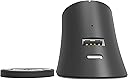
Does what it says, and charges quickly. Was hesitant to buy the Logitech Powerplay 2 because of the price and the fact that the new version doesn't include a plug for the USB receiver and was glad I went with a generic oversized mouse pad and this dock and still came out about $60 less than the Powerplay 2 on it's own. The USB port on the back works well for the receiver for my mouse. Small enough that it's not obtrusive for my desk. The charging disc that you put into your mouse includes a removable 10g weight, too, so you don't lose that customization option.
L**.
Have gpro wireless/superlight? Get this now!!!!
I LOVE THIS THING Pros: suuuper convenient Inexpensive Extremely easy to setup Saves me a usb port Uses a usb c cord like my gpro wireless Adheres to the desk Looks clean and round like the mouse Cheaper than logitech charge pad Doesn't overcharge (stops around 85ish) 10 gram weight can be popped out easily Cons: Has a 10 gram weight in it(??????????????) Adhesive isn't suuuper strong so it's not firm but won't tear apart on removal or damage your surface. If bumped hard can temporarily disconnect (never happened while not getting messed with) No rgb/white version Let me start by hating logitech for using a micro usb cable... Yes its "small" but usb-c would've been solo nice (hell even their headphones use it) Now that that's out of the way, I love this thing, no more mouse running out of battery and having to use a rubbery cable while working or gaming, presents my mouse beautifully on my desk, convenient and NOT EXPENSIVE!? Plus it works with the new superlight!! (Whenever those start existing again haha) I was jealous of the Razer viper wireless for having this feature but now that I can get it aswell I wouldn't think twice about it. Only complaint is the charging adapter has a 10 gram weight..... Why? This is for a lightweight mouse and you want to add 10 grams??? Haha out that went (really easy to fix, used a flathead screw driver and it popped right out with 0 damage to the plastic). Oh and an extra adhesive patch/ stronger adhesive would be appreciated :) Got a logitech mouse and 20-25 bucks? Get this!!!!!
A**R
A great alternative to plugging the mouse in or using the Powerplay mat to charge...
I've been a happy owner of the Powerplay mat, using it with a G Pro and G Pro Superlight. I wanted to try some different mouse mats though, but wanted to be able to wirelessly charge as well. So I purchased this dock, and so far, so good! You replace the puck on the bottom of the mouse, with the one provided with this dock. There is a 10g weight in the puck but it can easily removed. Plug your mouse dongle into the dock, plug the dock in and your good to go. Shows up fine in GHUB, along with it's charge status and battery level. There is a small LED on the back of the dock, showing status...Blue, on and working and orange when a mouse is on it, and charging. Because this LED is on the back, you can't see it directly though. The magnetic connection between mouse and dock is strong. Getting the mouse near the dock, it will snap into place. The magnetic connection is so strong, that if you pull the mouse directly up, and off the dock, the puck in the mouse will stay stuck to the dock, and not the mouse. The trick to keeping the puck in the mouse is, simply give the mouse a small twist and then pull up, or rock the mouse to one side a little, then pull up. As others have mentioned, this charges the same way the Powerplay mat charges...which means slowly. Plus, just like the Powerplay mat, your mouse will never charge up to 100%. This is done to save life the battery over extended time. I was used to all this from having the Powerplay mat, so nothing surprising here with how it charges. For me, and just like with the Powerplay mat, it will charge up to somewhere between 88 and 95% on average... All in all, this is a nice dock. If your fine charging via a cable, then nothing to see here. But if you want the convivence of wireless charging but don't want to pay for the Powerplay mat, this is a good alternative.
M**O
Ya no carga… funcionó por varios meses y ya no funciona
R**7
November 2025 Update: its the end of the road guys, the dock no longer charges my G502 Lightspeed. HOWEVER, I will investigate whether this is an issue with the Soarking dock, or my mouse itself, as my mouse is getting quite old now. I still feel this product is 5 star-worthy because of its performance record.] [Update after 4 years: yes, it's still working great, no issues!] [Update after 2 years: still going strong, no issues at all.] Had this for over 8 months now, has faithfully charged my G502 lightspeed mouse. The included charge puck (necessary for charging the mouse) fits exact and is well made, doesn't snag on my mousepad. The dock has some decent weight to it, but the magnets are quite strong, and usually requires 2 hands to remove the mouse from it. [If you pull the mouse down and off, you can take it off with 1 hand and the puck will stay in the mouse.] Many people miss this detail: the dock charges the mouse to 80-90% only!!! This is a battery protection feature from Logitech. The charging pins on the bottom of the mouse were designed for their expensive Powerplay mat, so it will never charge the mouse to 100%, because keeping the mouse at 100% always would harm the battery eventually. If you want to charge to 100%, you'll have to plug in the mouse directly to charge. [Update: I've let my mouse hit 0% multiple times now, and 30 seconds on the charger dock nets about 5-7 minutes of use, and 2 minutes of charging gets me well over 15 minutes! Using a G502 Lightspeed. The Soarking dock is plugged into a POWERED USB hub, so mine charges fast, yours may charge slower if connected directly to motherboard USB.] Overall, 80/80
H**I
مونتج جميل وفادني بشكل خورافي انصحكم به 👌
A**A
la base cumple lo prometido, carga el mouse pero quitarlo y ponerlo tiene su truco y hacerlo mal hace que la tapadera se quede sobre la base, aparte que el adesivo que trae la base es muy potente, cuidado donde lo pongan, lo puse sobre escritorio de madera, y cuando quise moverlo se trajo la madera consigo.
D**S
A handy charging dock with a magnetic puck that goes on your mouse. Easy to use. Comes with an extra USB-A slot to keep the 2.4GHz dongle closer. Although the last bit is odd - this means the dock has to be connected to the PC. But then you can't charge your mouse when your PC is off, which is counter to its purpose.
Trustpilot
2 weeks ago
2 weeks ago