






CZUR Book Scanner and Smart Scanner (ET16-P)
Product ID: 276405421
Details
- BrandCZUR
- Connectivity technologyUSB
- Model nameET16-P
- Resolution4608*3456
- Scanner typeDocument
⚡1.5 S/P scanning speed
📏A3 & A4 compatible
🖥️Lifetime free OCR software
🚀 Scan Smart, Live Better!
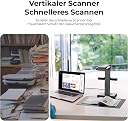
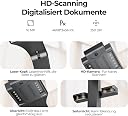
The CZUR Book Scanner and Smart Scanner (ET16-P) is a cutting-edge device designed for fast and efficient scanning of books and documents. With patented Flattening Curve Technology, it delivers high-quality scans in a fraction of the time compared to traditional scanners. Compatible with A3 and A4 formats, it features a lightning-fast scanning speed of 1.5 seconds per page and comes with lifetime free OCR software for easy editing and conversion of scanned materials.
| ASIN | B07JCNQ8DK |
| Brand | CZUR |
| Connection Type | USB |
| Connectivity technology | USB |
| Customer Reviews | 4.3 out of 5 stars 104 Reviews |
| Item Weight | 2 kg |
| Item weight | 2 kg |
| Manufacturer | CZUR |
| Media Type | Book |
| Minimum System Requirements | Windows 8 |
| Model Name | ET16-P |
| Model name | ET16-P |
| Resolution | 4608*3456 |
| Scanner Type | Document |
| Scanner type | Document |
| UPC | 657419964494 |
A**A
Excellent Product
Update: I was somewhat disappointed about the zoom function. As it turns out, you don't really need it. By using some of the software functions, you can get the pages at the level you wish. The support was very good to help me get to this point. I looked at several products. Having used the product to scan several textbooks of various sizes, I have to say this brand is probably your best bet. They have several products of various price ranges. I bought the ET16 Plus because of the auto scan function. It actually work better than described. After you turn the page, if the scanner detects motion, it seems to delay until there is no motion for a few seconds. This is really great when you have two pages that are stuck. So, I love the product and would highly recommend it if you have lots of books to scan. I have lots of textbooks that I must carry around when teaching. I bought this product because I wanted to make life easier when traveling. The product is well made. I was under the impression that it was a US product but it is a Chinese product. The software works very well. It is pretty easy to scan a 500 page book. The post processing takes a little time as can be expected with a searchable pdf file. It is easy to make corrections. Lots of intuitive features. It takes a while to get started if you are careful as I am. The startup documentations needs to be a bit more detailed. The videos are not that good as the lady speaks with a Chinese accent and very fast and low at times, so you have to listen very carefully. Good step by step documentation would be helpful. The user interface is not the same as what is seen in the video as the software is probably more current. But with a little trial and error, the startup productive time is fast. I just scanned my first book. I am not clear how I would insert a page if I missed one when turning the page. Support is from China. They did an auto response, giving 48 hrs because of a large volume of calls. Why would they have a large volume of support calls if the product is good and easy to use? I guess it is because they are in China and there is a time difference. Naturally, you can't wait 48 hrs if you need a problem solved. So some US support is needed. So far I like the product. I think it works well with great correction features. With a little playing around I think it would be very fast to scan a book but not 7 minutes. It takes time to get things right and keep things going as the book does move a bit. The auto-scan feature is very valuable. It works well, detecting page movement. It is fast but movement can duplicate a scan. No problem because it is easy to delete duplicates. Very nice, Apple-like packaging. Tony
P**R
Really useful scanner with many good attributes.
This is an easy to use scanner, especially for scanning books. The automated "find sheet size" and "straighten" features work reasonably well. It has taken me several tries to get the exposure just right, and some dark edges/corners still occur from time to time (as compared to a high-quality flat bed scanner). However, I'm extremely pleased with the ease of use with books. It is much faster than trying to make a book fit a flat-bed scanner and the exposure takes less than 5 seconds (compared to the nearly 1 minute required to scan a page on my flat bed scanner). The "thumb holders" work fairly well, though sometimes the software doesn't 'clear' them from view -- but it works correctly most of the time. I have not used the OCR capability much (yet), but the few experiments with it proved to be at least as good and possibly better than the OCR feature built into Adobe Acrobat Pro. Again, I feel well satisfied with the capability of this scanner. I have a lot of oversized (9x12) books, and though the scan area (double spread) is slightly less than 12 x 18, a hint I read suggested raising the scan-unit up an inch or two. I placed the base of the scanner on a book that raises the base of the unit by about 1-1/2 inches. This has enlarged the scan area sufficiently that my 9x12 books lose no area. The focus of the scan/camera is sufficiently broad that there is no noticeable degradation in the image. My typical project is to scan pages from "song books" for use with my musical instruments. This avoids having to shuffle through a multitude of books just to find one or two songs, as I can then print from the scans and keep the desired pages in a 3-ring binder. The book then can be stored, undamaged. (With the flat bed scanner, I had to cut off the spine of the book(s) to get acceptable scan quality -- which then has another set of issues.) Minor quibble about the software. It isn't 'intuitive" when it comes to finishing a project. On a Mac, once finished, you need to leave the "scan" mode (a little "x" at top left of the scan window) then select the page(s) just scanned from a list (with each page shown as a sequence number), followed by selecting the output form (PDF) you desire. It takes a few seconds (for a couple of pages) to a few minutes for a very long set of pages. You can 'skip' the processing and access the scans directly as .jpg files. (On some projects it was better to drop the jpg files into Photoshop for some touch up, then using PS to save as PDF.) As I gain experience, I expect the output quality to get better as I learn how to adjust the scan parameters. While this is an excellent scanner for books and other "normal" papers, etc., I will probably prefer to use the flat bed scanner for critical and/or very high-resolution scans, particularly of photographs or similar materials.
P**I
It works!
It does the job. Although you have other options if you get creative such as your phone on a tripod and stuff like that, but this thing is dedicated for the job.
B**E
Very good for high-volume scanning
I wanted a scanner to help me digitize and preserve the various logbooks and other documents associated with an aircraft I own. The plane is about 25 years old, and there are almost 40 handwritten and hard-bound books detailing all the maintenance and upgrades it's had over its lifetime, as well as receipts, inspection reports and all sorts of other information that today fills an entire four-drawer file cabinet. I looked at a number of scanners and decided to go with the CZUR for these reasons: 1. It works with my Mac. 2. It's fast and designed for working with hard-bound books. 3. The optics and resolution seemed able to work with the handwritten documents I have. For the most part, I'm happy with the results I've been able to achieve with the CZUR. First and foremost, the scans that come out are top quality. Even though the initial document may have been curved near the spine, the scan digitally "flattens" the page, making it look as though you cut the binding and flattened the page. This same technology also works on folded or curled individual pages, making them appear much flatter than they are. This is a super feature - other scanners I tried either required the pages to be unbound (that is, the binding cut), or they'd render the writing on a curved line and often out of focus. The CZUR is by far the best solution I've seen in this regard. The scanner is good quality and seems to be very well made. It's larger than I expected, but not so huge that you need an enormous space to operate in. Still, it oozes quality and seems to be quite rugged overall. Getting setup was also easy. Although the device comes with the software on DVD, it's also available in a downloadable format on the vendor's website (this was important to me because I have no DVD drive on the Mac where I wanted to use the scanner). It was a simple install once downloaded, and in just a few moments, I was up and running. The scanner connects to the computer with a single USB cable. I put it on a USB-3 port, although I don't believe the device is actually a USB-3 device. The scanner also requires power (a conventional wall-wart) and an optional scan button to activate the scanner, either a foot pedal or a separate external button on a small plate. When scanning books, you tend to need both hands to hold the book open, and the optional foot pedal lets you activate the scanner without taking your hands off your work. The external button works the same way, but the idea is you can mount it such that it can be activated by your knee, elbow or whatever else you like. If you don't use either, there are also scanner controls on the device itself. The scanner also has well-positioned lights that generally illuminate what you're scanning pretty evenly. On larger pages, I did notice there was some light drop-off in the lower left and right corners, but not enough to be objectionable. Still, if you're scanning artwork or something more critical, you might want to invest in a photographer's copy stand with a second pair of lights. CZUR also provides a black mat to scan on so that the software can pinpoint the edges of whatever you scan more accurately. I found that without the mat, I'd get a lot of the background area in the scan in addition to the page I wanted. Once you're setup, I find you can do a full high-res scan of an open document (that is, two pages) in just a second or two. Colors are accurate and exposure seems good, and the laser flash on the page gives you a good clue when to turn to the next page without watching your computer's monitor. The vendor claims to be able to scan a 300 page book in ten minutes, and I'd say this is probably accurate. Definitely a boon to someone like me with hundreds and hundreds of pages to scan. Turning to the software that comes with the CZUR, this is where I found the product to be the weakest. There are a lot of features and capabilities in the product, but they aren't always easy to use. For example, as you scan, you might occasionally see a page that misscans, so you do it a second time...works fine, but it can be tedious to exclude these pages when you go back and combine the images into a PDF. We also noticed a bug in that when scanning smaller booklets using "two-page at a time" mode, the resulting image was displayed in the viewer at a 45 degree angle. There are a lot of advanced features in the software, such as the ability to combine pages into a single searchable PDF. This feature uses OCR to create a search index and it seems to work quite well overall. Of course, you can also take the images from the scanner into software like Adobe Acrobat (or whatever else you like) to manipulate in whatever way you like. To be clear, there's nothing in the software that prevented me from getting the job done - it's just not the easiest to use, and some of the tasks can be frustrating. If the manufacturer reads this review, my advice to them would be to invest in a top-notch UX designer, and you'd have an amazing product. The bottom line is that this is a wonderful document scanner at the price, even with the software shortcomings I pointed out. For anyone with a lot of material to scan, I'd have no trouble recommending the CZUR, even above products that cost several times more.
F**N
Well worth the investment
Okay, it's not magic. Sometimes it scans the finger clips, sometimes the page straightener isn't perfect, BUT, overall I am very, very satisfied with this scanner. It's opened up so much scanning for me, I'm doing books in minutes that I despaired of ever getting to. Results are spectacular compared to smushing an antique book in a flatbed scanner, and much faster. You have to watch the company videos, they all seemed to have a nugget of information that wound up being very helpful. I have 11x14 magazines I'm scanning and it didn't quite catch every inch of the cover, but I put the scanner on a book to raise it an inch off the scanning mat, and that worked great. Needs its own table, I would say 22 inches by 22 inches of clear space near the PC. Beautifully packaged.
Trustpilot
1 month ago
2 months ago