


🔌 Connect Faster, Last Longer, Stay Ahead
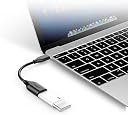
The Anker USB-C to USB 3.1 Adapter leverages USB On-The-Go technology to deliver ultra-fast 5Gbps data transfers while ensuring broad compatibility with top smartphones and laptops. Engineered with aramid fiber for superior durability, it’s trusted by over 10 million users worldwide and backed by an 18-month warranty, making it the essential accessory for professionals who demand speed, reliability, and seamless connectivity.


| ASIN | B01COOQIKU |
| Best Sellers Rank | #33,395 in Cell Phones & Accessories ( See Top 100 in Cell Phones & Accessories ) #187 in Cell Phone OTG Adapters |
| Brand | Anker |
| Built-In Media | Anker USB-C to USB 3.1 Adapter |
| Color | Upgrade_Black |
| Compatible Devices | Cellular Phones |
| Connector Type | USB Type C |
| Current Rating | 2 A |
| Customer Reviews | 4.8 out of 5 stars 14,606 Reviews |
| Finish | Metallic |
| Finish Type | Metallic |
| Input Voltage | 6 volts |
| Item Dimensions | 5.91 x 0.71 x 0.43 inches |
| Item Weight | 9.07 g |
| Item dimensions L x W x H | 5.91 x 0.71 x 0.43 inches |
| Manufacturer | Anker |
| Mfr Part Number | AK-848061067804 |
| Model Number | AK-A8165011 |
| Number of Items | 1 |
| Number of Ports | 1 |
| Package Quantity | 1 |
| Power Plug Type | No Plug |
| UPC | 848061067804 |
| Unit Count | 1 Count |
| Warranty Description | lifetime warranty |
| Warranty Type | 18-month warranty |
N**K
Don't buy cordless adapters
I previously bought multiple usb to usb c adapters. Everytime i would plug them into my zfold it would not read and make me restart my phone. Once I bought this I had no issues and was able to transfer files from my phone to a usb.
F**H
Making contacts using FT8
Worked great as I was able to connect my Samsung S25 FE phone to my Icom IC-705 transceiver inorder to use FT8.
W**R
Works good
Good Quality, Performs as stated. Good value for the price point. I'm happy.
K**.
Works perfectly to connect USB devices to USB-C ports with no hassle.
I purchased this adapter to connect my camera to my MacBook, and it works perfectly! The build quality feels solid, and the connection is secure without any wobbling. Data transfer speeds are fast and reliable, which is essential for transferring large photo files. It’s compact and lightweight, making it easy to carry around in my camera bag. Overall, a simple yet highly effective solution for anyone needing to adapt USB-A devices to USB-C ports.
S**E
Works great, high quality, but too short
This adapter is well built and does provide USB 3.1 speed (5 Gbps). However, it is only 5 inches (12.7 cm) long. This is not mentioned on either Anker or Amazon websites. This is ok to use with a laptop, but not so useful for a desktop.
B**O
Works wih Blue Yeti Pro mic and Galaxy Note9 Smart phone
Trying to find an inexpensive way to connect my mic to my phone for better videos has been a huge investment in research and time - my head is ready to explode. To help you avoid the same situation, gentle reader, and hopefully help you save some time, I submit the settings that worked for my particular hardware/software. Of course, your mileage may vary... HARDWARE Android Smart Phone = Samsung Galaxy Note9 Microphone = Blue Yeti Pro (XLR/USB connections) Anker USB-C to USB 3.1 Adapter, USB-C Male to USB-A Female SOFTWARE (Phone App) My purpose was solely to use the mic for video capture and I did not test the adapter with the voice recorder app that comes with the Galaxy Note9. That being said, the resident Samsung camera/video app will not recognize a USB mic plugged into the USB C port. Go to GooglePlay and get the Open Camera app and install it. Once installed, you will need to change some of the settings in the app to recognize the external mic that you've attached to the USB C port with the handy adapter. I did the following: "Open Camera" App Settings> Video Settings> Record Audio = select ON Settings> Video Settings> Audio Source (tap on it to make a selection) select UNPROCESSED Settings> Video Settings> Audio Channels (tap on it to make a selection) (select STEREO only supported on some devices) These settings were what finally worked with the Blue Yeti Pro connected to the Galaxy Note9 with this adapter cable. NOTE: TO USE THE PHONE TO PLAYBACK THE VIDEO, YOU MUST REMOVE THE MIC FROM THE PHONE. Otherwise, you won't hear sound from the video. I originally tried different settings, i. e., exterior mic and default settings but the sound was horrible. The above settings were what worked for me. YAY!
K**8
Doing the job solving an uneccesary Apple problem.
M1 Macs are fantastic and there are goodness! ACTUAL connectors back on the Mac finally. Except of course for USB A, which what, 90% of the world still uses? I know, I know - who needs a cute thumb drive when you have their "cloud." There is no revenue stream in thumb drives, no shareholder value! Think of the poor poor shareholders and do your part schlubs. In any case at the cost of *another dong-ling* this helps abate the problem. Works as expected. USB connections seem tight and precise. Nice and short, seems flexible enough to last for a while. About as unoffensive as any dongle can be until the rage when you forget it at home or at work or it becomes a special feline project without your knowledge.
B**N
anker quality
functions well, no issues
T**.
Works
Contrary to many other OTG adapters, this works.
P**R
Very useful for file transfer on phones with USB-C
The product: This works great with my Samsung Note 8. I can transfer files to and from my phone quickly to USB sticks, which is why I bought it. Build quality is good and it does exactly what I want it to. Highly recommended. Some background Information on why I bought it: I have always transferred files from an OTG USB stick from my PC to my phone using my trusty Sandisk. SanDisk SDDD2-016G-GAM46 Ultra Dual USB 3.0 Flash Drive However my Note 8, has a USB-C port, so the Sandisk won't fit. Undeterred, I used the adapter that comes with the Note 8, however that didn't work. I contacted Samsung about it, and after some questions about what I was trying to do, they asked me to send my phone away, which I was not prepared to do. (I was also invited to take my phone to a "drop-in" centre, but I didn't believe there was anything wrong with my phone. Anyway, I bought a USB-C Sandisk stick SanDisk Ultra 64 GB Dual USB Flash Drive USB 3.0 Type-C , which worked fine in my phone, but cannot be used while the phone is in its protective case, and the case, although excellent, is awkward to get on and off in a hurry. Samsung Galaxy Note 8 case, i-Blason [Ares] Full-body Rugged Clear Bumper Case with Built-in Screen Protector for Samsung Galaxy Note 8 2017 Release (Black) So I still had a file transfer problem, and needed a solution to allow me to quickly and conveniently transfer files. I had a search on Amazon for USB-C OTG cables and came across this. Being an Anker product, I knew I could rely on great quality and value with excellent aftercare, so I bought it with confidence and, as expected, it worked perfectly.
O**Z
No funciona para lectores de disco.
No funciona mi lector de discos con usb A. Necesita más energía y el cable no lo soporta.
M**O
Ott
Ottimo, funziona perfettamente
S**7
Produkt super
Działa idealnie, dobra jakość wykonania
Trustpilot
1 week ago
1 month ago