Desertcart purchases this item on your behalf and handles shipping, customs, and support to Panama.
๐ Carry Speed & Strength in Your Pocket!
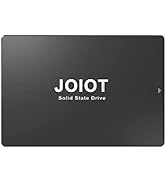
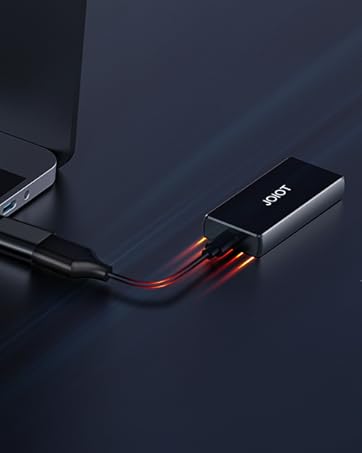
The JOIOT 250GB Portable External SSD combines ultra-lightweight design with rugged aluminum shockproof housing, delivering blazing fast USB 3.2 Gen 2 speeds up to 400MB/s read and 200MB/s write. Compatible across Mac, Windows, Android, and Linux, itโs perfect for professionals who demand reliable, high-performance storage on the move. Comes with essential accessories and a 12-month warranty, making it a must-have for secure, portable data management.


| ASIN | B08CV5GTMS |
| Additional Features | Portable |
| Brand | JOIOT |
| Built-In Media | '1* Portable Solid State Drive, 1*Type-A to Type-C Data Cable, 1*A to C Adapter, 1* Storage bag' |
| Cache Memory Installed Size | 250 |
| Color | (2)250GB |
| Compatible Devices | Laptop |
| Connectivity Technology | USB |
| Connectivity technology | USB |
| Customer Package Type | FFP |
| Customer Reviews | 4.3 out of 5 stars 989 Reviews |
| Data Transfer Rate | 200 Megabits Per Second |
| Digital Storage Capacity | 250 GB |
| Digital storage capacity | 250 GB |
| Enclosure Material | Aluminum |
| Form Factor | Portable |
| Hard Disk Description | Solid State Hard Drive |
| Hard Disk Form Factor | 2.5 Inches |
| Hard Disk Interface | USB 2.0/3.0 |
| Hard disk form factor | 2.5 Inches |
| Hard disk interface | USB 2.0/3.0 |
| Hard-Drive Size | 250 GB |
| Hardware Connectivity | USB 3.1 Type C |
| Hardware Platform | PC |
| Installation Type | External Hard Drive |
| Item Weight | 0.05 Pounds |
| Manufacturer | JOIOT |
| Media Speed | 200 |
| Mfr Part Number | X4-Black-250G |
| Model Name | X4-Black |
| Model Number | X4-Black-250G |
| Number of Items | 1 |
| Read Speed | 400 Megabytes Per Second |
| Special features | Portable |
M**K
Tougher than a Norwegian Elkhound during a Thunder Storm!!
My 6 month old Norwegian Elkhound decided this would make the perfect bone. I looked for my little drive for a few days. Then I had a thought cross my mind. Did the puppy bring this outside? Whelp a day later I decided I better check. I head out to inspect the yard. It had been thunder storming at that point for a few days. Finding all kinds of holes the puppy had dug filled to the brim with water. Mixing with the freshly over turned soil. Which made the contents of each hole kinda like a bad milkshake from McDonalds. While standing there in the rain going from hole to hole checking for my cherished little hard drive. All I could think about was how long it would take me to rebuild another drive with the data this one had on it. Especially if I ended up finding it in one of those dog made lakes. I was on my 4th hole before I saw it there in the lawn.... floating in one of my puppies secret cache of chewable goodies... My heart sank along with one end of the drive into the murky water. I reached down and picked it out of the doggie lake while the water poured out of the drive. I cleaned it up shook it to get the water out. I then left it to dry for a few hours. It wad now time to test and find out if I was buying another drive and start the rebuild of all my data. I plugged in the cable to the drive and started to push in the USB-A side of the cable into my laptop. I wad waiting to see some error while the laptop was trying to mount the drive.... but to my surpirse.... No errors.... could it be true? So I click on the drive it opens and I see all my files. ... but will they work? You bet it did!! I was watching my movies again without skipping a beat .... I have been using that drive now everyday since it was turned into the Titanic.... This is the Perfect little drive! Had to reformat to FAT32 upon first use but works great! Fast enough to stream movies straight into my TV USB A port! Tough enough to be chewable dog bone and go for a swim..... Love it!! DO NOT HESITATE TO BUY THIS DRIVE!! IT WELL WORTH THE PRICE!!
G**S
Speedy, will not boot RPI4, but can be used as rootfs. Is a 4k drive
This drive is pretty speedy! I'm running my Raspberry Pi 4 from it, and I'm quite happy. Note that you can't BOOT the pi from it, but you can have the next best thing.... You can run your RPi from it, but you do have to do the initial boot from the SDCard. Once booted, though, all the disk access is on the SDCard. A couple of things to be aware of: 1) This drive is a 4k sector drive. This means just burning an sdcard image with RPI Imager or Win32 disk imager WILL FAIL. They seem to expect 512 byte blocks. It just writes a corrupted filesystem to the drive. 2) It works fine after boot. 3) I tried everything I could think of, but the RPI4 will NOT boot from this device for some reason. 4) Not all is lost - you can move your / filesystem to the SSD and gain the speed and durability advantages. You will have to book from the sdcard, however. I tried every way possible to boot from it, but could not get it to work. I even manually created a FAT32 boot partition and a copy of a root ext4 filesystem by hand, and it would not boot. Here's how I got it to work. Steps taken on the Raspberry Pi: delete original partition on the SSD and create new ext4 partition with gparted (gparted usually needs to be installed) mount the SSD ext4 partition (I used /mnt/target) copy the current OS partition to the newly created on on the SSD. (I used "sudo rsync -axv / /mnt/target"). This takes about 5 minutes on my pi4B get the PARTUUID of the SSD ext 4 partition you just copied. (I used "sudo blkid" and found the PARTUUID for the partion on /dev/sda) backup /boot/cmdline.txt to cmdline.sd edit the /boot/cmdline.txt, replacing the PARTUUID with the one you just found for the partition you created on /dev/sdaX edit the fstab **ON THE SSD** and replace the PARTUUID for / with the SSID you just put in cmdline.txt. (I used "sudo vi /mnt/target/etc/fstab") Don't edit the regular /dev/fstab! Because of the change above, it will never bee seen. Again! Edit the fstab ON THE SSD filesystem you just created. reboot. You can confirm the device is running on the new SSD by using "findmnt -o -n SOURCE /" and it should show a partition on /dev/sda Has been running OK for me for a while. Search raspberry Pi Forums for more information and detailed instructions.
M**O
Excelente
Bueno, funcional, barato compacto y perfectamente portable. Justo lo que yo queria
M**.
Donโt buy
It isnโt as fast as advertised, the size of the device is good and the size of the hard drive are fine, as advertised. It worked mediocrely for maybe two months and now it is useless. My computer will not recognize the device, no matter what I do to reformat it or get it to reset and work it will not work. I wish I had sent it back when I had time.
P**R
So compact and light and practical accessories
Very impressed and happy with this drive! It really is so compact and light! This 500gb unit shows 477gb of usable storage space (expected and normal for all drives, not unique to this one). I did an initial unscientific test of transfer speed. I copied 9.2gb from my tablet's mSD card (not even from the tablet's internal storage) and it took about 3.5 minutes. I'm not going to judge whether this is extremely fast or slow, but IMHO this was a pretty good, acceptable result. Certainly not disappointing to me. The drive has a nice clear plastic bumper around it that does not add weight or bulk. 2 small cables are provided: usb c - usb c and a USB c - USB. Very very useful with phones/tablet and a pc, and the short length is actually a big plus in my opinion! I'm very impressed by this drive and very happy with the small footprint and extremely light weight.
Trustpilot
2 weeks ago
2 weeks ago