Desertcart purchases this item on your behalf and handles shipping, customs, and support to Panama.
⚡ Dock Your Way to Dual 4K Brilliance!
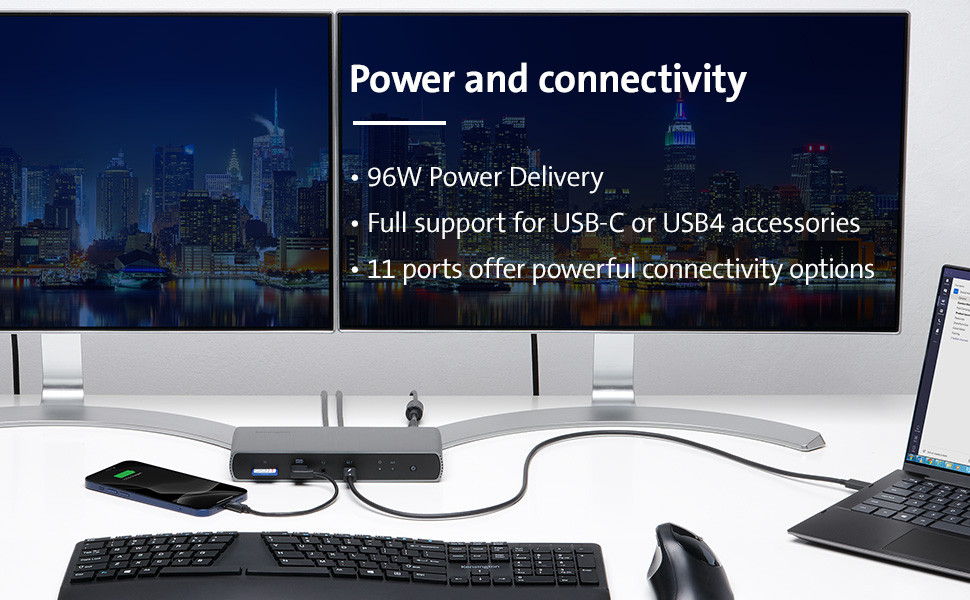
The Kensington SD5700T Thunderbolt 4 Docking Station is a versatile and powerful docking solution designed for Thunderbolt 4 Windows laptops and MacBooks. It supports dual 4K Ultra HD displays, offers lightning-fast data transfer speeds, and provides 90W Power Delivery to keep your devices charged. With multiple ports for connectivity and innovative static charging technology, this docking station is perfect for professionals seeking to enhance their workspace.


| ASIN | B08KRTKX9V |
| Best Sellers Rank | #15,705 in Computers ( See Top 100 in Computers ) #88 in Laptop Docking Stations |
| Brand | Kensington |
| Built-In Media | sd5700t dock, thunderbolt 4 cable, power supply |
| Color | Grey |
| Colour | Grey |
| Compatible Devices | Thunderbolt 4 Windows and Thunderbolt 3 and Thunderbolt 4 MacBooks Laptops (macOS 11 or later) |
| Compatible devices | Thunderbolt 4 Windows and Thunderbolt 3 and Thunderbolt 4 MacBooks Laptops (macOS 11 or later) |
| Customer Reviews | 3.9 out of 5 stars 424 Reviews |
| Global Trade Identification Number | 00085896351757 |
| Hardware Interface | USB Type C |
| Hardware interface | USB Type C |
| Item Dimensions L x W x H | 25.4L x 15.6W x 9.3H centimeters |
| Item Type Name | Kensington SD5700T Thunderbolt 4 Docking Station, Dual 4K, 90W PD - Window and Mac OS (K35175NA) |
| Item Weight | 1 Pounds |
| Manufacturer | Kensington |
| Mfr Part Number | K35175NA |
| Model Number | K35175NA |
| Number of Items | 1 |
| Number of Ports | 11 |
| Product dimensions | 25.4L x 15.6W x 9.3H centimeters |
| Total USB ports | 8 |
| Total Usb Ports | 8 |
| UPC | 085896351757 |
| Unit Count | 1 Count |
| Warranty Description | 3 year |
| Wattage | 90 |
N**U
Good Product
Good product, meet all described specifications. All provided ports are working as per the Spec.
M**Z
日本向けの品番の商品との違いはプラグだけ
本体は同じで電源プラグの形状が日本仕様になっている別の品番の商品より、こちらの方が安価で10,000円くらいお得です。 1,000円程度の日本国内向けの変換プラグを別途購入すれば、問題なく使えます。 会社とかでよく見る3ピンタイプの電源タップがあれば、変換プラグすらも不要でそのまま使えるはずです。 ただし説明書等は全て英語です。 サイズは大きすぎず、電源供給も安定していて、この商品のおかげで配線がすっきり整理できて満足です。
T**S
Excellent performance
I have used other docks that have had reliability issues with thunderbolt connecting sometimes and not others. This has been flawless so far. I am evened using a thunderbolt 2 monitor with a thunderbolt 3 adapter without issue. Everything seems high quality including the cable which has a thunderbolt 4 label. Design is sleek and fits in with the rest of my setup. Daisy chaining off of my thunderbolt monitor has worked flawless. SD reader write/read speeds seemed to be on par with my internal reader on my MacBook Pro. I haven’t tested the gigabit Ethernet yet but everything else is A+.
V**O
Superb
Got exactly what was prescribed
H**1
Thunderbolt 4
Leider war defekt, umgehend wurde zurückgeschickt!
K**.
This dock has no problem when going sleeping mode. Well waked. 180W power enough to supply current.
Today, i got sd5700t, and test all round, i was worried about sleep mode problem, who wrote this. Don't about this problem, I try to make unpleasant environment to meet this problem, for hibernate mode. Well wake up. 180-watt power is for itself operation 90 watt and supply for connect to devices 90watt. The power is enough than other same products, etc. The OWC,. small than 130W. I was fully tested the OWC counterparts, the test scores is thunderbolt 3 controller with extern storages, a little lower for writing speed. OWC score higher for writing speed. but a littler. Yes OWC counterparts also good things, but have no control for sleep mode, so it powers on states, connected all device have consume Energy even no signals. Notebooks goes power off. the Doc work continues. Now only use 1 days. If i find a problem, Tell here. Currently, I find a problem when using USB A port which is located back, three usb port, which speeds 10gbps. When i test speed, very slow and disconnected when testing, the device separated. So i have to initialized. for hardware problem, i will test same H/W dock. Kensington sent another dock, i will compare each docks. I test the dock from exchanged same another dock, find same problem. The problem is related power suppled USB port A, about 900mA. Tested device is extern SSD disk, with 512GB, i guess, USB A port is only used low power devices, for keyboard, mouse, printer, small usb device. I move to the SSD disk to thunderbolt port, then no problem from now. SD5700t have three thunderbolt port 2 port for dual monitor, last for other device for high speed, more power device, extern SSD device. I accept this problem to avoid use USB A port. Thanks. finally, i test LG S8 27inch, 4k monitor to connected DP-ALT mode, Well operate, So I conclude All my tesing is mostly Good, USB A ports a little unstable, but it is the Extern Disk have much eats current more 900ma. thanks again to give me a chance to another same Dock to compare it's operating. More over back to a little money, The Dock discount when i test. I will back to another dock because i finished test. Thinks for Amazon.` My system, notebook is Lg gram 2022,17inch, Intel 12gen, with thunderbolt 4 included. Windows 11 home, Korean. Recently i find this device is unstable and weak at USB A port are, backpanel 3 port and flont one usb 2.0 port, total 4 usb A port have problems, i have to buy new one, i recommand that DONT USE STRESS USB A port if so do lan port will dead,
Trustpilot
5 days ago
2 days ago