


💡 Elevate your space with smart lighting that’s always a step ahead.
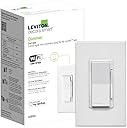
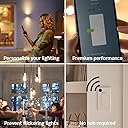
The Leviton Decora Smart Dimmer Switch (2nd Gen) delivers professional-grade lighting control with up to 600W load capacity, Wi-Fi connectivity, and broad smart home compatibility including Alexa, Google Assistant, Apple HomeKit, and Matter. Designed for easy installation with neutral wire requirement, it supports single-pole and 3-way configurations, offering customizable dimming, preset levels, and remote control via the My Leviton app. Ideal for millennials seeking sleek, reliable, and future-ready smart home upgrades.



| ASIN | B08RRM8VH5 |
| Actuator Type | Rocker Switch |
| Best Sellers Rank | #202,589 in Tools & Home Improvement ( See Top 100 in Tools & Home Improvement ) #368 in Dimmer Switches |
| Brand | Leviton |
| Brand Name | Leviton |
| Circuit Type | Single Pole, 3-way, multi-way |
| Color | White |
| Compatible Devices | Dimmable LED, CFL, Incandescent, MLV bulbs, LED strip lights |
| Connectivity Protocol | Wi-Fi |
| Connector Type | Wireless |
| Contact Material | Copper, Brass |
| Contact Type | Normally Open |
| Control Method | App, Voice |
| Control Type | remote |
| Controller Type | Dimmer Switch |
| Current Rating | 10 A |
| Customer Reviews | 4.5 out of 5 stars 1,518 Reviews |
| Global Trade Identification Number | 00078477363263 |
| Included Components | (1) Decora Smart Wi-Fi 2nd Gen Dimmer and (1) screwless single-gang wallplate |
| International Protection Rating | IP00 |
| Item Dimensions | 3.88 x 2.63 x 6.19 inches |
| Item Type Name | Dimmer |
| Lower Temperature Rating | 40 °C |
| Manufacturer | Leviton |
| Model | D26HD-2RW |
| Mounting Type | Wall Mount |
| Number of Items | 1 |
| Number of Positions | 1 |
| Operating Voltage | 120 volts |
| Operation Mode | Auto or Manual |
| Part Number | D26HD-2RW |
| Specification Met | Ul, Fcc, Csa, Nom, Nema Ssl 7a, Title 24 |
| Switch Type | Flow Switch |
| Terminal | Wire Leads |
| UPC | 078477363263 |
| Unit Count | 1 Count |
| Warranty Description | 2-Year Limited |
| Wattage | 600 watts |
E**.
Excellent Quality and Features
Reviewing "Dimmer": Replacing old WiFi dimmer in Master Bedroom. My critical feature was that it would dim low. My previous WiFi dimmer would dim until the bulbs (all dimmable LEDs) would cut out. Newer dimmers don't seem to do that - even when adjusted to their maximum range. I bought two new ones previous to this; one dimmed to maybe 30%, the next to maybe 20%, this one I would say went to 10%. I decided that was the best I was going to get and was acceptable. Besides that aspect, this is a great dimmer - definitely the best of all I tried. I like that it is a push top to turn on, bottom to turn off switch (dimmer adjustment is on the right). I really like that the locator light when the switch is turned off is very dim (some are just too bright for a bedroom). The instructions and software are top par, very high quality, and the software allows for a lot of adjustment and customization. The only issue I had was with Matter. I did the software update and got it hooked up, but it kept disconnecting from Alexa. I didn't pursue a fix to this and instead opted to hook it up to Alexa through the app - which worked fine and no disconnecting issues since. If you're looking for something basic and/or if being able to dim very low is not important to you, you'll find other products on Amazon that will do the job decently for less money. If you are hard set on Matter, read a different review, but if not and you want top of the line and are willing to pay for it, this is a definite buy.
G**C
Works as advertised
Product originally got hung up with some Amazon nightmare where it wasn’t shipped yet but I couldn’t cancel it either, sat like that for about 2 weeks. I eventually bought another one which arrive the next day (really?!). The original one finally showed up the day after the second one arrived. What a pain Amazon. Anyways, the product was in mint condition and packaged well. The dimmer switch had clear and easy to use instructions compared to the competition (great job there, as tech items usually seem to fail in this department). The installation was easy and when it came to linking it up with Apple HomeKit, it was a breeze. Happened right away when I restored power to the switch. Had it for about a week now and never lost connection or have any issues with it directly. Now, that being said, the dimmer switch is great, but like many smart dimmer switches they have glitches with your existing lighting. Like flickering and jumpy step dimming. I have both problems and I want to add, since I have experience with many types of these switches, it’s not really the switches fault. Years ago I found out if you buy cheap LED lights (even though you think you didn’t…you have) you will have some glitches. Now, I have some led lights that I spent almost twice the price as the majority of other lights in my house, they did not have any glitches, they worked smoothly and flawlessly. So maybe keep that in mind. I personally don’t mind the glitches, because I’m saving a fortune using cheaper led lights, I really don’t mind, because when you have over 50-100 led lights in your house, expensive led lights can break the bank fast. I also want to add, that I’ve been using this companies products for a few years now and I really like them compared to the rest. I like the controlled dimming ability and the integration with Apple HomeKit. I recommend this product to my family, friends and all who read this review. Happy shopping!!
R**O
Highly Customizable Electronic Dimmer
I cannot speak to the ease of installation as I had a contractor install them but he did not have any issues installing in my condo built in the 1980s. I paired each of the 3 dimmers I purchased to the app with ease, literally just a minute or two each as the software immediately recognized the dimmer. What I like is the ease and flexibility of customization. You can set each individual dimmer to come on at 100% all the way down to 1% and everything in between to suit your needs. If your use on a particular day varies, you can manually adjust the dimmer at the switch to a higher or lower setting but the next time the dimmer is activated it will go back to your preset brightness (if you like) or it can start at the last setting you left it on. I prefer it to automatically return to preset brightness selected on the app at next activation but its nice that the software allows either setting. The light responds quickly to my ios device when turning on and off plus you can set a graduated delay so it dims to off slowly, over several seconds, which is a cool touch. Lets say your sitting in your favorite chair enjoying television and you want to turn off the kitchen light (or dim it), you can easily do this through the app without the mess and fuss of getting up, pausing the program, etc., just open the app on your phone and select the light you wish to turn off or dim. I have three more of these at another location (in another state) and you can easily switch between the locations via the app. You can turn on and off without being at the actual location. A quality product and good app Ive been very happy with!
G**S
A reasonable replacement for the seemingly deprecated DG6HD
TLDR: This is working well with Matter and Home Assistant over wifi; if I have any issues with reliability I will update. Note: I have many Zigbee "gen 1" Leviton dimmers DG6HD. They are still (mostly) my favorite excepting two things, 1 they seem to be at least softly discontinued, not advertised anymore and hard to find in stock, 2: the D26HD supports double tap to max brightness, which the Zigbee DG6HD does not have. Because of these 2 reasons, I reluctantly tried the D26HD and find it an acceptable alternative; however, I'd still prefer a Thread or Zigbee-based version as D26HD requires a My Leviton account, access to your wifi, access to your precision location on your mobile, access to your wi-fi password, and Internet access, and is harder to set up than Zigbee switches for those who know what is Zigbee and have a Zigbee hub. If you want Matter you have to use My Leviton to set it up first, opt into Matter early access, and upgrade your firmware. This was "easy enough". Not as easy as Zigbee you click one button in Home Assistant and done though. The Zigbee versions also allow access to fade in/out timers, but Matter mode does not, at least in HA as of writing this review; however, you can configure it via My Leviton app. I have not yet tested if the device works when restricted from the Internet in Matter mode. I use this with the DD00R companion for multi-location dimming. I did not want to use the "anywhere" battery-operated switches so utilized existing multi-pole wiring. Wiring is standard. Compared to DG6HD's screw terminals the D26HD uses pigtails -- some find this as a pro, some as con. The DD00R is compatible with the double tap to max on / off, which surprised me since it was made for gen 1 devices that don't support it; HOWEVER, if you double tap the DD00R quickly it recognizes as a single tap while on the D26HD it works perfectly. Using remote control via My Leviton and via Matter through Home Assistant appears instant. I opted to use My Leviton as little as possible so I use Google Assistant integration via Home Assistant instead of My Leviton. In Home Assistant Matter only the on/off and dim level is supported, which for me supports all everyday use case. In My Leviton you can change bulb type, min and max dim power levels, and fade on and fade off time settings in 0.5 second increments and upgrade firmware, which is a "one time" expected use for me. In general, I am anti-wifi for smart devices due to the lower reliability I've typically witnessed and inappropriate for battery-powered devices, but as a wired device it is OK enough, although if Leviton drops cloud support you lose the advanced configuration functionality. I still prefer the privacy-centric features and cloud-free Zigbee DG6HD, but again they seem to be on the way out. A great improvement will be when Matter comes out-of-the-box so you can enroll it without Internet or My Leviton, and if the advanced features can be supported (if possible) via Matter.
A**1
Used for nearly every switch in my house.
I have some version of these switches controlling nearly everything in my house. I started replacing my switches a few years ago with the Gen1 switches and just recently finished out with the Gen2. The only switches that aren't these are my bathroom exhaust fans. I've written quite a lot here so congrats if you make it through to the end. The switches I have in use now are: DW6HD (Gen1 600W Dimmer) DW1KD (1000W Dimmer, Gen1 but still uses leads instead of screws) DW15S (Gen1 Switch) DW4SF (Gen1 4 Speed Fan Controller, also uses leads over screws) D26HD (Gen2 600W Dimmer) D215S (Gen2 Switch) DAWDC (Gen2 wireless dimmer companion) DAWSC (Gen2 wireless switch companion) Overall I am very happy with my switches. I have not had issues with constant dropping as some have said here. The app works well and I really like the Away feature in it though the same can be accomplished through Alexa. Integration with Alexa works fine. Alexa usually picks up a new switch and let's me know it's connected before I can finish entering the name I want for the device. That's not an issue as it updates automatically once I enter the name I like. They also integrate well with Samsung SmartThings. I use that as I was accidentally sent some ZWave Leviton switches when I ordered WiFi ones so I put them to use rather than throwing them away as Amazon suggested. I also really like that for anyone visiting they work just as you'd expect a normal switch to vs using something like smart bulbs where if the power gets cut things can go a bit funny. My OCD also likes that these don't stick out/lean one way or the other when switched on/off. They're very unassuming looking which to me is good. My house is only a few years old, none of the switch boxes are metal and just about everywhere has a neutral wire already in the box. The only places I had issues were in some of the 3-way switches where whoever wired the house seemed to cut some corners and didn't run all the wiring these require, along with not keeping things in their standard place (e.g. red wire hot, black wire traveler, etc.) so for a while some of my 3-way switches weren't 3-way. The Gen2 wireless switch companions remedied this though. Like many others, in general I prefer the screw terminals. However, there were a couple of instances where having the leads was handy. For the neutral wire I did like using the lead as it is more flexible than cutting a piece of 14/2 and using that. In my kitchen dual gang box, which was very crowded even before I changed the switches, it did actually save me some space as I could get rid of the extra rigid wiring and use the existing wire nut already in the box on the house neutrals so I wasn't adding anything. The other instance I preferred the leads was in a bedroom. Whoever wired the boxes liked to strip a portion of the hot wire, loop that around the hot terminal on the switch and then terminate the hot wire on the second switch in the box rather than using a wire nut with two leads coming off of it. Both switches were connected on a continuous hot wire. I was able to cut the wire down to the stripped part and then just nut both switch hot/black wires to the house hot wire. The looping method they used is a pain with the screw terminals on the Gen1, but I've made it work before. The leads made that easier however, overall I would prefer the screw terminals. The wireless switch/dimmer companions are awesome. They solved my 3-way wiring issue and are super easy to setup. I was afraid there may be some delay after pushing the rocker, but it's an instant response. If you're using Gen2 switches and wish you had a 3-way light somewhere you don't these make a really easy fix for that especially since you can stick them to a bare wall with the included adhesive pads. Hopefully the battery life lives up to the stated 5 years, but I won't hold my breath. I also really like the fan controllers. I have pull chain ceiling fans without remotes in all bedrooms and the living room and these make it really to control the fan speed either with the switch itself, voice, or an app. Much better than my short wife trying to stand on something to pull the chain. Gen1 vs Gen2 As stated above, overall I like the screw terminals better than the leads on the Gen 2. Updating the switch firmware is easier on Gen2. In the My Leviton app you can choose to Update All Gen2 switches at once. For Gen1 switches you have to do them individually still. Gets old fast when you have a lot of them. The addition of the wireless switch companions for Gen2 is great. I don't use Apple Homekit so I can't speak to how Gen2 works there. ISSUES Most of the issues I've encountered have been more the fault of the house wiring or some other external factor rather than an issue with any of the switches themselves, but they're not without fault. -- Some LED bulbs just don't play nice with the dimmers. Maybe this is my fault for trying the less expensive bulbs, but I've noticed the EcoSmart from Home Depot don't always dim very well. Other brands work better, but I have yet to find an LED bulb/switch combo that gives 1) the dimming range or 2) dimming smoothness and 3) no flicker on dimmer settings than 100% of an incandescent bulb. You can get one or two, but not all 3. -- I have had some disconnects. I haven't had enough that I'd call it unusable or a deal breaker, but it happens. Most things with wifi will sometimes drop. This is much easier to deal with on the dimmer switches since you can pull out the bottom dimmer rocker and it cuts power to the switch effectively letting you reset its connection. I wish the plain switches had something similar where I could cut their power without having to flip a breaker. Honestly, when a non-dimmer isn't connected I don't do anything. It'll eventually reconnect but sometimes it's a day and sometimes it's a few days. If there was an easily accessible reset button on the plain switch that would make things so much easier. -- I have had 1 switch (out of 26) just up and die on me... so far any way. It was in my super crowded kitchen dual gang box which I think contributed to its death. However, and this is a plus, Leviton support was great. They walked me through some steps (which I had already tried, but I understand they need to check their boxes) and then they sent me a new switch. It was all handled very well, no run around or anything. Also, since it was a Gen1 switch that has been discontinued they replaced it with a Gen2 equivalent. Overall I am very pleased with the switches and how they operate day to day. If the one hadn't died and they could address the resets on the plain switches I'd give them 5 stars all day. I'm not sure who to blame for the dimming, if it's Leviton or LED bulbs in general so for the moment I won't hold that against them. Thank you for coming to my Ted Talk.
K**F
Reliable, Smart and Smooth Dimmer Switch
Why did you pick this product vs others?: Just Know You Need a Neutral Wire I’ve been using the Leviton Decora Smart Dimmer for a few weeks and I’m very happy with it. Installation was pretty simple, but you do need a neutral wire, so make sure your switch box has one before you start. That’s important for the dimmer to work properly. After installing it, I set everything up using the My Leviton app on my Android phone, and it connected to Wi-Fi quickly. The app makes it easy to control the lights, adjust brightness, and set schedules—even when I’m not home. The dimming is smooth with no flicker, and everything has been very reliable. The switch also looks sleek and matches the rest of my Decora-style outlets. It feels like a well-made, high-quality product. If you’re looking to add smart lighting and your wiring includes a neutral, this dimmer is a great choice. Simple to use, convenient, and works exactly as expected.
J**N
Works great with multiple LED's
Tried a TP link and a Kasa smart switch in our master with 6 LED's on the same switch and the breaker would trip. Installed this switch and it worked perfectly.
J**S
Better than V1!
Setup is much better than the first version of the smart dimmers! They also switched to braided wire pigtails as opposed to terminals where solid core wire would be connected directly. At first I was not pleased with this but after an install in a 4 gang box, I see the value. I can place the wire nuts where I like in the box and then easily slide the dimmer in without having to force solid core wire (i.e. Romex). You setup the dimmers first in the My Leviton app. Then I went into the Apple Hone app to add the dimmers to my rooms using the QR code on the device. It all works very well. One area where the documentation and Amazon product listing is lacking is with regard to the remotes. The Amazon listing only shows the wireless remotes. These are only useful if you are adding a new smart dimmer to a single control location box and you want to add another control location that is brand new. If you are adding or replacing a dimmer on a 3 way or 4 way wired circuit you have to buy a wired remote (obviously) but you have to go to the Leviton website to determine which wired remote to purchase. All in all 4.5 stars out of 5 with the deduction because of the wired remotes documentation issue FOR functionality and ease is setup/use. 0 out 5 stars for manufacturing location. It’s time to get out of China everyone!
J**E
Se desconecta constantemente
El producto se ve de buena calidad, es fácil de instalar pero se desconecta de la red y Alexa lo deja de reconocer muy seguido. Tengo muchos dispositivos que se conectan a Alexa y no he tenido ningun problema, incluso otros de leviton. Pero especificamente con el dimmer tengo este problema, intente comprar otro pero le pasa exactamente lo mismo, incluso lo instale en otro apagador para ver is se solucionaba y no.
K**K
Works awesome for 500 w maybe 300 W Halogen light stand.
Easy to set up, gen 2 awesome , not like 1st generation. Matched a dimmer wired remote to it as well. Literature could be less to be desired - confused over which to pair it with , A DD0SR or A DD00R. I’m thinking R Stand’s for wired remote , either way the master or parent device sold here here is a dimmer so connecting it to a humidifier is unadvisable because it’s designed as a dimmer. DD - does not stand for dimmer, S stands for switch , which makes the DD00R the remote dimmer. I believe you could use both, but I used the DD00R which allowed me to control the plug in lamp from 2 or more locations and of course from my iPhone and iPad along with others whom have access with their iPhones. Again better than the first generation, paired immediately with newer app.
D**E
Awesome lighting IoT product from Leviton
I have installed over 25 of the switches and dimmers in 6 different rooms in the last year All have worked from day one. Simple setup using Leviton app and good integration with Alexa app Scheduling so easy I have had problems or questions Leviton customer support was great. I have had 1 switches fail. I Simple call to Leviton resulted in a new shipped out immediately, no questions asked
T**N
Connect nicely to Wifi with no issues.
I love these dimmers for how easy they connect to WiFi. The My Levitón app works well. The app could use options for larger screen fonts and cooler icons, but the app and the switches are easy to use and they work well. For single pole installations, the instructions are included and simple to follow. However for some reason there is not much included literature for 3-way applications. I was not able to make mine work properly in the 3-way scenario until I bought the Levitón companion dimmer for the other switch. Furthermore, I couldn’t find any literature explaining if the companion switch was a necessary purchase, or if I just had it wired incorrectly. In conclusion, I would highly recommend these switches for all your single pole needs, but I’m still on the fence about them in a 3-way scenario.
D**D
Great product and easy to install, set-up and use!
These smart dimmers are easy to install, just make sure for this model you have the neutral wire (usually the white one). It just takes seconds to add it into the app to be able to name and program it. It works seamlessly with our Amazon Echo devices and routines. We have now bought over 12 to make our home smart.
Trustpilot
3 weeks ago
2 weeks ago