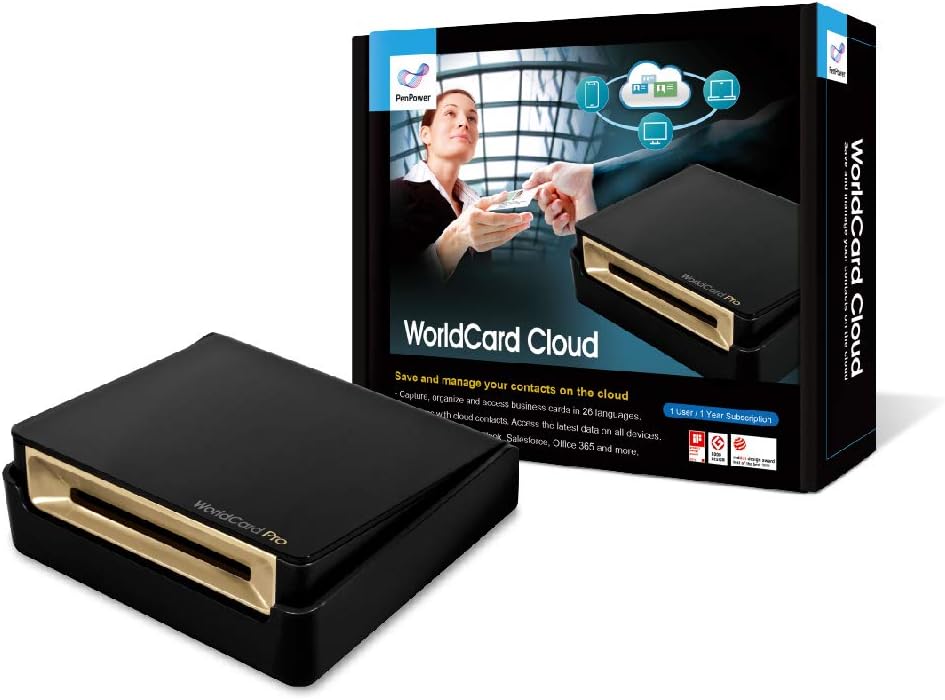
📇 Elevate your networking game—digitize, organize, and connect like a pro!
PenPower's WorldCard Cloud (1-Year Subscription) combines award-winning hardware with powerful OCR technology supporting 26 languages to digitize business cards in seconds. With seamless cloud syncing, multi-device access, and robust integration with major CRM and contact platforms, it transforms your contact management into a streamlined, always-accessible powerhouse—perfect for busy professionals who refuse to miss a connection.


| ASIN | B08W54WMVD |
| Best Sellers Rank | #140,123 in Office Products ( See Top 100 in Office Products ) #4 in Business Card Scanners |
| Customer Reviews | 3.3 3.3 out of 5 stars (790) |
| Date First Available | February 8, 2021 |
| Item Weight | 12.5 ounces |
| Item model number | PPWorldCard |
| Manufacturer | PenPower |
| Product Dimensions | 4.21 x 3.94 x 1.1 inches |
B**M
Works pretty well and is on par with today's OCR technology
I was looking for a business card scanner to help digitize my collection of cards. Based on my background (see below) I knew that there wouldn't be a perfect scanner out there and would have to find the best one available. I have tried a couple out now and this one is the best so far. It was easy to setup, works as it should, and has minimal errors. Setup: The setup is pretty easy and straight forward. Install the provided software (and activate it), plug in the scanner, calibrate it, and start scanning your cards. No OCR technology is perfect so it's important to check the data after the scan to make sure it's accurate. I know that's not ideal, but there is not (and may never be) an OCR software that is 100% accurate. Reason for 5 stars: It's very rare that I give 5 stars to a product that doesn't work 100% of the time but here is why. I am very familiar with OCR technologies and the software that is available in the marketplace and not a single one will be perfect. It's not the software's fault, it's the images you're scanning. It would have to be the most crystal clear image with no pictures or fancy fonts to get a perfect read. After testing out several different business card readers, this one is by far the best and most reliable. It is the best of the best (even though it's not perfect) which gets it 5 stars (I'm open to comments with your thoughts on giving 5 stars to a product that isn't perfect but is the best of its kind). My Background: I am a data consultant and work with large volumes of vendor invoices (up to hundreds of thousands for some projects) and run Optical Character Recognition (OCR) to turn the images into text-searchable documents. I have spent countless days researching the best OCR software available to use at my company, and the best one still isn't all that great. It's not always the software's fault, more often than not, it's poor quality images that are difficult to interpret (O's and zeros often mixed up, etc.). It's crazy to think that in 2016 there still isn't a way to reliably convert images into text-searchable documents, but hey, we do the best we can. Because of this, I knew going into this purchase that unless the business card was white, contained no images, and used a very basic font that it would likely have some errors. Overall I am very happy with this scanner. So far it is the best one I have tried and does a pretty good job. While I may have to make some corrections every now and then, it still saves me a significant amount of time versus inputting the business card manually. If you are looking to purchase a business card scanner then I would highly recommend this one. There are limitations with all OCR programs, but this one performs the best and will have the fewest errors. Writing in-depth reviews to help other shoppers has become a hobby of mine. If you found this review helpful please mark as helpful below. Also, feel free to ask any questions and I will answer them for you!
L**D
Great idea. Poorly executed
Working with a large, spread out group, our company is testing out a number of portable scanners specifically for business card files. The World Card scored at the very bottom. Took multiple scans to get a card correct, the image quality was poor, and the software did a shoddy job of interpreting the data from the card to the file. One star, because we can't give it zero. The Fuji ScanSnap 1100 rated the highest out of the 8 that we tested. Consistent and very easy to use, plus can scan full pages. We did like the size of the World Card, but as stated, great idea, poorly executed. Skip it.
M**K
Overall, happy with the product.
Can't say much of the product itself. Just my experience in trying to get it setup. I received a device that had the activation code already activated (can only be linked to one device). Called Customer Service and it rings a couple times and went to an unmarked voicemail box, so left I voicemail. Was doubtful I would get a return call. So I put in an online service inquiry. Later in the day I received a call back advising they would reset the access code and it was done immediately. They then followed up that everything was working ok. Great customer service if you have an issue. The device itself is sleek and looks nice on your desk. So far the program and scanner work great. OCR works very well, although you still should double check it reads correctly and puts the information where you want. The program is user friendly. Some issues I've had so far are the job title and company are often placed in two separate boxes. So I have to move the title up to the company it belongs to. Second, I am an authorized delegate for my boss and I would like to sync the contacts direct to his Contact list, not mine. Not sure if this is an option with this scanner, my old scanner could do that. This one just exports the files there but that can cause duplicate entries if you Export/Import, rather than Sync.
R**E
very complicated installation of product software, and price also is very high.
K**R
Habe mir den Scanner gekauft um endlich von meinen vielen Visitenkarten in Papierform runterzukommen. Dafür habe ich im Internet nach Tests für diese Geräte gesucht und mich mangels besseren Wissens für den vermeintlichen Testsieger entschieden... Die Verarbeitung des Gerätes ist in Ordnung und es tut was es soll - und zwar auf dem niedrigst möglichen Level... Scannen funktioniert nur hakelig und erfordert einiges an Geduld bis man den Bogen raushat. Der Scanner hat so seine Probleme mit dem Erkennen von einigen sprachspezifischen Buchstaben und Zeichen. Sehr Vieles muss nachkorrigiert werden. Adressen erkennen funktioniert fast nie, Telefonnummern und emails dafür aber immer. Das größte Manko dieses Gerätes ist aber die mitgelieferte Software. Eigentlich sollte es ja möglich sein EINEN SAUBEREN DATENSATZ zu haben und Daten problemlos mit Microsoft Outlook auszutauschen. Das ist leider reines Wunschdenken!!! Gerade die Synchronisation zwischen den mitgelieferten Programm und Outlook kostet mich einiges an Nerven. Nie kann man alle vorhandenen Informationen sauber synchroniseren, immer fehlt igendetwas. Mir ist es sogar passiert, dass das mitgelieferte Programm bein Synchronisieren flugs meine Kontakte in Outlook durch Erstellen von Duplikaten verdoppelt hat. Dadurch habe ich wahrscheinlich mehr Zeit zum Bereinigen verschwendet, als wenn ich brav alle meine Vitenkarten (einige hundert) per Hand eingegeben hätte. Mein Fazit ist, das dieses Grät und die mitgelieferte Software unausgereifter technologischer Spielkram sind, der im Endeffekt meinen Anspruch Zeit bei der Verwaltung meiner Kontakte zu sparen in keinster Weise erfüllt hat. In Schulnoten ist das für mich eine glatte 6.
M**O
Ottimo!!!😊 molto professionale e facile da usare. In breve tempo si impara a usare. Sono molto soddisfatto anche molto pratico
J**H
Good product, you can go for it. Happy after using.
R**T
It is complicated. It requires a paid membership to use. It might already be out of date and time to sign up for a membership even if you wanted to.
Trustpilot
3 days ago
2 days ago