⌨️ Elevate your Mac setup with wired precision and backlit brilliance!
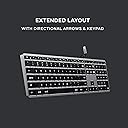
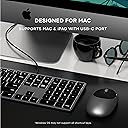
The Satechi Slim W3 Wired Backlit Keyboard is a premium, Mac-optimized wired keyboard featuring a full numeric keypad, USB-C plug-and-play connectivity, and adjustable backlit keys with three brightness levels. Crafted with a sleek aluminum finish, it offers a low-profile, comfortable typing experience compatible with MacBook Air & Pro, iMac, iPad, and more. Designed for professionals who demand reliability, it ensures consistent BIOS access and seamless MacOS function key integration, backed by a 2-year warranty.


| ASIN | B08Q67XPFT |
| Are Batteries Included | No |
| Best Sellers Rank | 19,097 in Computers & Accessories ( See Top 100 in Computers & Accessories ) 267 in Keyboards (Computers & Accessories) |
| Brand | Satechi |
| Colour | Space Grey |
| Customer Reviews | 4.2 4.2 out of 5 stars (519) |
| Date First Available | 15 Jan. 2021 |
| Guaranteed software updates until | unknown |
| Hardware Platform | Laptop, PC, Tablet |
| Item Weight | 429 g |
| Item model number | ST-UCSW3M |
| Manufacturer | Satechi |
| Operating System | macOS, iPadOS, iOS |
| Power Source | Corded Electric |
| Product Dimensions | 42.3 x 11.4 x 1.1 cm; 429 g |
| Series | Slim W3 |
B**U
An excellent keyboard
This is a very high quality, great keyboard. Having tried both the X3 and the W3, I would say this (the W3) is just slightly worse than the X3 (the bluetooth version) in a couple of ways, but is definitely better in one way. In terms of ways in which the W3 is (slightly) worse, firstly the W3 has only 3 brightness levels where the X3 has 10. (However, they 3 levels are still well chosen, and the darkest is not too bright.) Secondly (and slightly weirdly), on the W3 then £ and # symbols are printed the wrong way round on the 3 key. (Since this is basically a US layout keyboard, the # symbol should be printed at the top of the key, not to the side, corresponding to the symbol accessed when pressing shift, as is done on all the other numeric keys on this keyboard, and indeed as is done on the 3 key on the X3, which has the same layout!) Related to this, I (again, only slightly) prefer the X3's key labelling, where they just haven't bothering to include the ALT (€ and £) symbols on the 2 and 3 keys at all, I prefer this as it makes the keyboard look slightly neater and less cluttered. Nevertheless, if you're only going to use the keyboard wired, I'd still get this one, even though the X3 can be used in wired mode. In particular, and one key reason why the W3 is better, if you're the kind of person who regularly uses Del/F2/F12 to break into the BIOS menu, then definitely get this wired model, the W3, as *even when used wired* the X3 cannot consistently do this, and (not always, but often, half the time or more) causes the BIOS to report that there is no keyboard attached. To point out another (very minor) imperfection shared by the X3 and the W3, the lighting on these keyboards is just not quite as beautiful as the lighting on a real Mac laptop keyboard - specifically, there are small overly bright spots here and there around the keys, where the light shows through too much, rather then the really uniform lighting around the keys on real Mac laptop keyboards. Nevertheless in build quality, in looks, and even in the above-mentioned quality of the lighting, this and the X3 are _way_ better than any of the (several) other illuminated external keyboards for the Mac which I have tried recently. Finally, the X3 booklet documents this, but the W3 booklet does not: fn+ESC is the way to swap the default behaviour of the function keys, between multimedia key or function key behaviour. The same key combo works on both keyboards.
S**.
Nice slim keyboard
This is a very nice keyboard, the feedback is pleasant (something that is very important to me!) and the build quality is good! There are only two minor gripes; the first is that the F1-12 keys require the function key to be held down to use them - which is bizarre to me and secondly, the FN key is in the corner instead of control which is a real pain when gaming which is oddly common for some reason.
M**D
Its still a thing of beauty even if its got a wire
Have an employer that uses overkill not to allow bluetooth connection to their laptop? Thinking of going the RF usb dongle route but cant find a decent quality keyboard ( Logitech MX will not work with their dongle as it requires to install drivers and your work laptop wont allow this). This wired keyboard is the way to go and I have zero learning curve as I have a wireless one for personal pC and this wired one for work and its got the same beauty and ease of use. Namely-- - its simply beautiful -The back lighting is great in 4 brightness's ( your apple thingy keyboard doesnt have that) and being wired its always charged - Yes it is solid aluminum casing -The keys are a pleasure to use ( as good as apples) and much better than the Logitech MX keyboard with the horrid rounded indents. This could be priced at £99 like my Logitech Master MX3s and Id still buy it. Its gorgeous and its a joy to use every day
R**C
Less Than a keyboard
This is one of the biggest wastes of money I have spent in a long time. I purchased this keyboard a few weeks ago and it came out of the box with issues. Instead of “Less than” and “Greater than” keys it has 2 “Less than” keys. Other issues – the “Control keys” do not work and instead will paste whatever happens to be in my clipboard when I press control, but not before deleting everything else that has been typed out already. Even if I disconnect it from my laptop and plug it into another computer/phone/tablet it will remember whatever was in the original clipboard from ANOTHER computer and paste the same thing again... but not before deleting any other text that might be in text box first. As well, now it is making clunky sounds on some keys making it sound like a cheap excuse for a keyboard. I have tried to ask the company for help and was ignored. Avoid this product... looks great, but is junk!
W**N
Good back-lit, keyboard
My eyesight isn't what it was and I've found that white letters on a black background help provide the additional contrast I need. The back-lighting also helps, but is sufficiently muted so as not to be intrusive. I like the flat, low profile and the positive actions of the keys. it works well with my iMac, although the '£' symbol is to be found on the shifted '3', (it's a US layout) but I soon got used to that. Seems well-made.
A**X
Worked Well, but Broke After Two Years
I bought this in March 2023 and have used it on most workdays since. I'm disappointed that it's broken just over two years now, with the space key just not working. Other than that, it worked really well and is extremely portable. I liked the size of it, and the premium feel.
P**T
Great Keyboard for Mac
Great wired keyboard which is working with no issues on IMac and MacBook computers. It feels really well made and the backlight is a great.
T**T
Backlight issues
Nice keyboard but the backlight stopped working after a week.. which was the main reason i bought it..
C**N
ATTENTION il est en QWERTY !! Sinon rien à signaler
N**A
Dopo nove mesi di utilizzo quotidiano, posso finalmente dire di aver trovato la tastiera perfetta per me. Ho sempre cercato una tastiera che rispondesse a tre criteri fondamentali: compatibilità piena con macOS, layout internazionale (americano) e una sensazione di scrittura simile a quella di una tastiera meccanica, ma senza la necessità di manutenzione e senza rinunciare alla compattezza. Questa Slim W1 con cavo USB ha superato ogni mia aspettativa. Vengo da anni di utilizzo della Logitech K780 che ho sempre considerato un riferimento per comodità. Eppure, da quando ho iniziato a usare questa tastiera, la differenza è stata evidente. La corsa dei tasti è precisa, il feedback alla pressione è soddisfacente e il comfort di digitazione è tale da rendere difficile tornare a usare la tastiera del MacBook, anche solo per poco tempo a tal punto che quando viaggio me la porto con me pur di non rinunciarci. La costruzione è solida: se la si torce non si piega, non scricchiola e non emette suoni indesiderati, nemmeno sotto una pressione più decisa. Nonostante io abbia una digitazione poco ortodossa nell'uso della barra spaziatrice (uso per abitudine il solo pollice sinistro) dopo mesi di utilizzo quotidiano non si è minimamente deformata né ha dato segni di cedimento. La tastiera è bassa e molto stabile. Vengono comunque forniti due piedini di gomma aggiuntivi, alti circa un centimetro, per chi preferisce una maggiore inclinazione. Personalmente non li utilizzo, ma è una questione soggettiva. Penso che l'unico aspetto migliorabile sia la gestione della retroilluminazione: non sembra mantenere in memoria il livello di luminosità impostato che torna al massimo a ogni riavvio del sistema. Personalmente non lo trovo un difetto rilevante, anche perché la retroilluminazione è ben calibrata e non risulta mai fastidiosa, nemmeno in ambienti bui. Una cosa che ho particolarmente apprezzato è che le dimensioni della tastiera sono identiche a quelle della tastiera incorporata nel mio MacBook Pro da 14": questo la rende immediatamente familiare e perfetta per chi è abituato al formato compatto dei portatili Apple. La differenza si nota però nella qualità della scrittura: la corsa dei tasti è più profonda, simile a quella dei vecchi MacBook e conferisce una sensazione molto più appagante alla digitazione. Segnalo anche che, a differenza delle ultime tastiere Apple, i tasti freccia sinistra e destra sono a grandezza piena come gli altri tasti e non ridotti alla stessa altezza di quelli su e giù. Lo segnalo visto che per alcuni potrebbe essere un problema. Infine, un dettaglio marginale ma da segnalare: il tasto “Eject” in alto a destra, ormai inutilizzato sui nuovi MacBook, rimane lì senza reale funzione. Non è un problema, ma è bene saperlo. La lunghezza del cavo usb è di 150 cm ed è rivestito in plastica nera lucida semi rigida. In definitiva, questa tastiera rappresenta per me un equilibrio perfetto tra funzionalità, qualità costruttiva e comfort. Un acquisto che rifarei senza esitazione.
H**U
WindowsでMacBook USキーボードにできるだけ近く、携帯が容易なキーボードをUSB接続で使いたくて購入しました。その目的はほぼ完全に満たされました。 キータッチはMacBookやMagic Keyboardと同じではありませんが、十分近いです。安っぽいタッチではありません。 F1, F2, ... F12の入力にはデフォルトではfnキーと同時に押下する必要がありますが、fn ESCにより、fnキーとの同時押下は不要になります。これをずっと記憶してくれるとよかったのですが、USB接続を切断するとリセットされてしまうのは残念ではあります。あとバックライトの設定もリセットされてしまいます。
J**N
Wasn't 100% sure it would but... Compatible also with a MacBook Air 2017 model.
T**5
fnキーの固定(ファンクションキーを標準のキーとして使用する)方法がわからなかったのですが、サポートより教えていただきました。"FN機能ロックを有効にするには「Fn + Esc」を押します。"とのこと、たしかにescキーにfn鍵マークの表示が...(^_^;) 無事に動作確認できました。 バックライトが便利で、使いやすいです。長く使い続けたいと思っております。
Trustpilot
3 weeks ago
2 months ago