


Desertcart purchases this item on your behalf and handles shipping, customs, and support to Panama.
๐ฅ Build smart, game hard, and stay cool with the Versa H17!
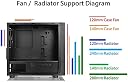
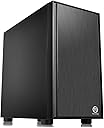
The Thermaltake Versa H17 is a compact, brushed aluminum mini tower case designed for entry-level gamers and PC builders. It supports micro ATX and mini-ITX motherboards, offers tool-free drive bays, ample ventilation with 5 fan slots, and compatibility with AIO liquid cooling. Featuring a full-length PSU cover for clean cable management, it combines premium design and functionality at an unbeatable budget price.




| ASIN | B0797GHT9F |
| Antenna Location | Gaming |
| Box Contents | Computer Case, Fan, Manual, Tool Pack |
| Brand | Thermaltake |
| Brand Name | Thermaltake |
| Case Type | Mini-Tower |
| Colour | Black |
| Compatible Devices | Standard ATX motherboards, Full-size graphics cards, Standard ATX power supplies, Multiple storage drives |
| Cooling Method | Water |
| Country of Origin | USA |
| Customer Reviews | 4.6 out of 5 stars 866 Reviews |
| Enclosure Material | Aluminium |
| Fan Size | 120 Millimetres |
| Global Trade Identification Number | 00841163001059 |
| Hard Disk Form Factor | 3.5 Inches |
| Internal Bays Quantity | 2 |
| Item Type Name | Thermaltake Versa H17 Black SPCC Micro ATX Gaming Computer Case CA-1J1-00S1NN-00 |
| Item Weight | 10.16 Pounds |
| Manufacturer | Thermaltake USA Direct |
| Manufacturer Part Number | CA-1J1-00S1NN-00 |
| Material | Aluminium |
| Model Name | Versa H17 |
| Model Number | CA-1J1-00S1NN-00 |
| Motherboard Compatibility | m-atx, micro atx , mini-itx |
| Number of Items | 1 |
| Other Special Features of the Product | Easy Cable Management, Ample Ventilation, Tool-free Design, Covered Power |
| Power Supply Mounting Type | Rear Mount |
| Recommended Uses For Product | Gaming |
| Supported Motherboard | m-atx,micro atx,mini-itx |
| Total USB 2.0 Ports | 2 |
| Total USB Ports | 3 |
| UPC | 841163001059 |
K**A
Tiene un ventilador!!!
Cumple su propรณsito. Incluye un ventilador.
J**M
Best case 40$ can get you!
I'm not sure why the last reviewer gave 1 star since his cons are all wrong. This case has a perfect cable management setup and also has 5x 120mm fan slots. I mean, you paid 40$ for a case, you get a premium design, sturdy case, plenty of room for air cooling or any AIO water-cooling kit... even your powersupply as his own hidden compartment. I have not doubt in mind that this case is the best gaming case you can get for that price. I bought this case for my kids and didn't want to invest much on it since I already have a gaming PC for my needs. Well let me tell you that my Fractal Define Nano S is not "that much" greater than this case. Of course there is a difference but you can buy 3 Thermaltake case like this for the price of one Fractal case.
P**.
well made,great value
Bought a few of these now for work very well made small and compact perfect to build with micro boards .
R**E
Quality Case - Budget Conscious Price
Needed to add some extra storage to my wife's PC and her OEM case wasn't setup to handle it. What's more, the OEM case had a single exhaust fan and no option for adding an intake fan or anything. (I'm looking at you ASUS). So I went looking for a replacement - wanted something that looked nice, would be easy to build in, and not too expensive. The Thermaltake Versa H17 definitely fit the bill. This is my first Thermaltake case. After my experience with the H17, I expect it won't be my last. (I'm giving serious consideration to moving my home server to a V21 cube chassis.) I'll go into detail about my experience with building in the case. First I'll mention, if you're re-using old parts or if you're on a tight budget and you've got / are getting a wired power supply instead of modular, the case is ideal. The H17 doesn't use traditional drive cages of any kind to mount drives - no doubt a cost saving measure - and instead uses a system rubber washers + screws where you can mount a 3.5" hard drive to the floor of the case under the PSU cover and second 3.5" hard drive under the top of the PSU cover. With this mounting system instead of drive cages, this leaves TONS of space to neatly tuck away your unused power supply cables. You mount 2.5" drives in the same basic fashion as the 3.5" drives, except the drives can mount on either side of the case's motherboard tray. I chose to mount drives to the back side of the tray to make cable management easier. The motherboard tray has a very large cutout to make access to the CPU backplate a breeze, should you ever need to. The side panels go on and off without any issues at all - unlike many other cases I've used over the years. Behind the motherboard tray there is PLENTY of room for cable management - especially when you include the space under the power supply cover. There are plenty of zip-tie points to help keep your wires tidy as well. If this case is missing anything it would be rubber grommets and velcro straps, however, including these would only end up increasing the price of the case. Let's talk for a minute about fans and cooling. With having a mostly solid front panel, there is going to be some restriction on the amount of air coming into the chassis. However, because the ventilation holes are on the front of the panel (instead of on the sides of the front panel like some other cases) the incoming air doesn't need to make a directional bend and lose pressure. The front of the case is listed as supporting up to 3 x 120mm or 2 x 140mm front fans along with 1 x 120mm or 140mm top fan (featuring a magnetic dust filter) and 1 x 120mm rear exhaust fan - a 3 pin basic black Thermaltake fan is included here. Only including the one fan is another cost saving measure on Thermaltake's part. When I purchased the case, I ordered 2 x 120mm Cougar Vortex PWM fans to use with it in addition to a 120mm Cryorig fan that I already own. While I don't think most people will need to add three fans to this case, I do highly recommend you get at least 1 decent fan to include as a front intake. My original plan was to include all 3 fans in the front of the case and leave the top fan location vacant. I changed my mind on this during the build for 2 reasons. 1 - The wires for the buttons, LEDs, and ports on the top of the case are attached to the front panel. When you install the fans too high up in the case, it becomes difficult to route these wires into the case. 2 - After I noted the position of the top fan location is in a more "forward" position relative to the CPU, I decided to put the 120mm Cryorig fan there as an intake fan. If the position were more toward the back, I'd have instead configured it as an exhaust fan. If I'd have made this fan an exhaust where it's located, I'd literally be stealing cool air that's coming into the chassis and exhausting it away from the CPU before it has a chance to make use of it. This is not withstanding that positive air pressure is best for managing dust. If this computer had a tower style CPU cooler (such as a Cryorig H7 or CoolerMaster 212 EVO) instead of a stock downdraft style cooler, I would not have added the top fan at all as this would just cause turbulence. If I were going to ding the score of this case for any reasons at all, it would be these points about the fan mountings. However, I don't feel it's appropriate to deduct from the score of this case at all. Here's why. As this case is a budget case, I don't expect many people who purchase it to plan on using 360mm AIO coolers - which could be difficult due to the wire issue that I mentioned - and in all honesty, I think the cooling configuration I've got in place right now is likely more optimal than my original plan for 3 fans in the front of the case. Running the 3 fans in the front would only have blown extra air under the power supply cover. Having the top fan more forward winds up being a plus because running an intake fan here alleviates any problems this case would have with pulling in sufficient air to keep things inside cool. All-in-all, if you're looking for an attractive case (especially if you don't want a windowed side panel) that is high on build quality but low on price, I would highly recommend you consider the Thermaltake Versa H17.
M**T
Good case for no fancy things.
It delivers what I want so far. Great material without any fancy lighting, heat ventilation seems fine to me until now. My CPU and GPU temperatures are not overheating. Just make sure you tidy you internal cables and choose the optimum cooling system and this case will serve you well.
Trustpilot
2 days ago
2 weeks ago