🚀 Elevate Your Driving Experience with Smart Tech!
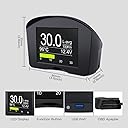
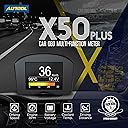
The AUTOOLX50 PLUS is a cutting-edge multi-function car OBD smart digital meter designed for 12V OBDII diesel vehicles. It features a versatile LED display that provides real-time monitoring of coolant temperature, fuel consumption, and engine speed. With the ability to read and clear fault codes, this device simplifies vehicle diagnostics. Its safety alarm functions ensure you stay informed about critical vehicle conditions, while the 2.4" HD screen offers enhanced visibility. Backed by a 3-year warranty, the AUTOOLX50 PLUS is the ultimate tool for modern drivers seeking precision and convenience.


| ASIN | B01HET7ANE |
| Best Sellers Rank | #177,826 in Automotive ( See Top 100 in Automotive ) #603 in Automotive OBD-II Engine System Diagnostic Tools |
| Brand | AUTOOL |
| Customer Reviews | 4.0 4.0 out of 5 stars (425) |
| Date First Available | 30 July 2016 |
| Item Weight | 191 g |
| Manufacturer | AUTOOL |
| Manufacturer Part Number | x-50 |
| Manufacturer reference | x-50 |
| Product Dimensions | 10.16 x 10.16 x 7.62 cm; 190.51 g |
S**M
Happy with the purchase-Works great.
M**.
Montato ormai da un anno per tenere sotto controllo la temperatura della mia auto che ne era sprovvista.... funziona alla perfezione, è in grado di leggere anche gli eventuali errori della ventralina e dare un codice di riconoscimento del guasto
J**.
Para Toyota Prius 2010 funciona genial, marca la temperatura de agua.
C**H
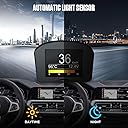
The Autool x50 PLUS works perfectly with my 2008 Honda Pilot (OBD Type ISO 9141-2). It was delivered fast and looks great and is very simple to hook up, just one connection. The display has an auto turn on, it turns on when you start the car and an auto shutoff, shutoff time is adjustable up to 20 minutes after the car is turned off. The display is easy to see, day and night. The brightness level, is controlled by a light sensor and it is not manually adjustable. I have mine is setting in front of my instrument panel and the display brightness is just fine day or night. After installing the Autool x50 PLUS, I had some question, So, I emailed the seller “OBDIIShop” and they replied as quickly as hour later a couple of times, BUT, never longer than 24 hours, they appear to be closed on the weekends. The reply emails were very helpful in answering all my questions. Their customer service is great! The Autool x50 PLUS has Lots of customization options. The X50 PLUS has four area’s/positions on the main display. The Position 1 (Largest read out) can display MPH / Km/H speeds, coolant temperature in F or C, Fuel in MPG or LPH and many other read outs are available by just by toggling the switch below the display to the left or right. Position 2 and 3 (Smaller readouts in center left and right of display) can be configured to show multiple different measurements (Position 2 and 3 only display metric units NOT US/imperial units), I did not find this an issue because, I have mine set for Voltage and Engine RPM, Position 4 only can configure instantaneous fuel consumption or engine rotation progress bar display. I used mine mainly for Speed with the Speed Alarm on the Position 1 and MPG, (to prevent a heavy foot during acceleration) on the progress bar display. Both the large/primary and the progress bar display can easily be seen with a quick glance. The MPH speed alarm setting can be set in the Menu “Settings” under OverSpeedSet”. The easiest way to set it, is to convert the MPH you want the alarm sound at (use the internet for conversion), to Km/H and enter that speed into the ”OverSpeedSet”. The nicest thing about the speed alarm is the speed readout changes from white to red when you go over the speed alarm limit. If you don’t want the alarm to turn on just set it to 160 that is 99.41MPH, or use a higher number if you drive fastest than this. AVG and Current MPG are accurate, BUT you will need to go into the setting menu and make sure your “Engine Size” is correct and the “KPH” is set show your correct vehicle speed in MPH or Km/H which ever one you use while driving. After that you need to go through a few gas full ups and manually figure you gas mileage and then adjust the “Fuel Adjust %” in the menu settings, the more you do this, the AVG and Current MPG / Km/H Display will be more accurate. You have to do this even with “SCAN GAUGE”. I also have a SCAN GAUGE, but for information at a quick glance, the Autool X50 PLUS can’t be beat. “OBD Diagnose” lets you read and reset OBD scan codes, also you can read the real time active data that is available to your OBDII port, just go to Menu, “OBD Diagnose”, “DATA Stream”. It is great way to see why your Check Engine light is on. There are a lot of features in the Autool x50 Plus and I haven’t used them all, like the “Driving Test” Menu that check braking time and distance and Speed test.
A**G
Ich hatte viele Head-Up-Displays, was nett ist, aber die Reflektionsfolie wird bei flach stehender Sonne zum extremen Blender. Also habe ich das X50 testweise bestellt, aber NICHT zurückgeschickt, denn es hat mich absolut überzeugt. Man kann frei programmieren, was angezeigt werden soll, 4 Parameter in vorgegebenen Zonen. Weitere Parameter sind über das Menü abrufbar. Es gibt nicht zu meckern. Allein eine etwas höhere Refresh-Rate bei der Geschwindigkeitsanzeige wäre wünschenswert. Dennoch KEIN Punkteabzug, dafür ist es insgesamt einfach zu stimmig und zu gut. Was auch geil wäre; ein Mini-Display rein für die km/h-Anzeige in Briefmarkengröße. Aber das hat ja damit jetzt wenig zu tun. :-) Absolut empfehlenswert und vom Preis her der Knaller. Habe weitere bestellt und werde meine 4 Kfz alle damit ausrüsten!
Trustpilot
2 weeks ago
1 month ago