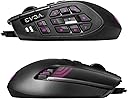
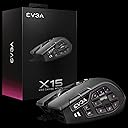
๐ฎ Dominate every MMO with precision, speed, and style โ donโt get left behind!
The EVGA X15 MMO Gaming Mouse is a wired, right-handed mouse designed for MMO gamers seeking extreme customization and speed. Featuring a native 8,000 Hz report rate powered by a 32-bit Arm Cortex-M33 microprocessor, it delivers ultra-low latency input. Its 16,000 DPI optical sensor ensures pixel-perfect accuracy, while 20 programmable buttonsโincluding a unique physical E-Shift systemโoffer unparalleled control. The ergonomic design supports long gaming sessions, complemented by customizable 3-zone RGB lighting and 5 onboard profiles stored directly on the mouse. Despite some reported hardware durability issues, it remains a top-tier choice for MMO enthusiasts craving advanced functionality and responsiveness.


| ASIN | B09CRN2BMS |
| Additional Features | Ergonomic Design, RGB Light |
| Antenna Location | MMO Gaming |
| Best Sellers Rank | #20,508 in Video Games ( See Top 100 in Video Games ) #775 in PC Gaming Mice |
| Brand | EVGA |
| Button Quantity | 20 |
| Color | Black |
| Compatible Devices | Personal Computer |
| Connectivity Technology | USB |
| Customer Reviews | 3.5 out of 5 stars 1,123 Reviews |
| Enclosure Material | Plastic |
| Global Trade Identification Number | 00843368066925, 04250812437990 |
| Hand Orientation | Right |
| Hardware Platform | PC |
| Included Components | Mouse Only |
| Item Dimensions L x W | 4.86"L x 2.82"W |
| Item Type Name | Gaming Mouse |
| Item Weight | 290 g |
| Manufacturer | EVGA |
| Mfr Part Number | 904-W1-15BK-KR |
| Minimum Required Operating System Version | Windows 10 |
| Model Name | X15 |
| Model Number | X15 |
| Mouse Maximum Sensitivity | 16000 dots_per_inch |
| Movement Detection | Optical |
| Movement Detection Technology | Optical |
| Number of Buttons | 20 |
| Operating System | Windows |
| Power Source | Corded USB A |
| Range | 200.0 meters |
| Special Feature | Ergonomic Design, RGB Light |
| Style Name | X15 |
| UPC | 843368066925 |
| Unit Count | 1 Count |
| Warranty Description | 3 year |
C**S
A great but flawed mouse, but more great than flawed.
First off, dislikes. The scroll wheel stopped working on one of the three I've bought. This is apparently a known issue, but it's only happened on one of my mice, and I honestly usually disable scroll wheel bindings [in game] anyway. It has a tendency to misfire if I use the scroll click button or left or right on the scroll wheel. This is true of any mouse that I bind things to those buttons on and is not unique to this mouse. You can RMA it back to EVGA if this happens. I'm waiting on a replacement for that mouse to arrive as of this post. I bought three because I wanted a backup and one for a laptop that I rarely use. 9 and 10 buttons are awkward to use, but useful for rarely used hotkeys, or system buttons like enter. It has a learning curve if you're coming from a 3x4 MMO mouse or new to MMO mice in general. So why such a high rating? Positives outweigh the negatives by a lot. It has 20 buttons, and that's nothing to scoff at. Most MMO mice aside from the Logitec G600 have fewer. There's no button where your thumb rests on the center, meaning it is easy to avoid accidentally pressing buttons when you use the top buttons due to squeezing the mouse. This is especially a thing if I use the ring finger button. A couple of the eight buttons I have to bend my thumb to reach, but this is true of the top and bottom of the back row of 3x4 mice as well. It's not unique to this mouse. There are five top facing buttons intended for bindings, right and left on the scroll wheel, and pressing the scroll wheel in, plus you can program the DPI buttons to be bound to something else. I never change my DPI in game, so that's a useful feature. Plus, you can put that elsewhere if you need it and still want those buttons to be bound another way. The 9 and 10 buttons are a good place for it. That's ten different inputs for hotkeys on the top side of the mouse. I don't know of any other mouse that has that. It pretty much means I only have to worry about movement keys on the keyboard. WASD, Shift, and Ctrl. Along with a few odd menu keys for stuff like weapon wheels, map, and inventory. Plus, you've got eight easily accessed hotkey buttons on the side, and two that you have to stretch a bit to reach. [9 and 10]. There's also a switch on the bottom that disables the ring finger button. I usually set that to V which is melee in most games, but it's nice to be able to disable it for some games. The mode switch feature is neat, but I don't personally use it. They call it "shift" and it allows for the bindings to be different if you hold down a particular button. The software is fine, not great, but does the job. I've had no issues with it. It has updated at least once since I bought it. The mouse does sometimes not enable bindings, but this only happens when I boot my system, and very rarely. It's never an issue when I'm using it, and I can tell when it happens because the RGB doesn't come on. The fix is just to unplug and plug it back in. You can also disable RGB entirely, which is normal for mice like this. Overall, it's the best gaming mouse I've had. There are small things I'd improve, but the overall functionality outdoes other mice I've tried, including the G600, due to the amount of inputs on the top of the mouse.
A**R
Static electricity causes mouse to freak out and disconnect.
Year 4 Update 3: The quickest way I've found to eliminate static is touching any grounded unpainted exposed metal on an electronic device like the back of a plugged in PC for half a minute or so to drain the static from your body, and it solves the disconnection problem for a while at least. Using a plastic or leather mousepad not made from fabric can also reduce static. If that's not enough, you can disassemble the mouse then ground yourself and touch all the components inside to drain the static from the mouse. You can also use a grounded desk mat, sit on a grounded sheet, or use an ESD wrist strap. Maybe even mount some kind of bare wire to the surface of the mouse grip, and run that wire along the USB cord and have it connect to ground on your power strip. The real kicker is, this was a problem with computer accessories that had mostly been solved by the late 90s, but eVGA engineers are still making the mistake a quarter century later! It really is still my favorite mouse in every way, except for this glaring design flaw. Year 4 Update 2: I'm 100% certain now the problem is a component inside the mouse that's improperly grounded and building up a static charge that disrupts the internal components, causing constant disconnects. If you're having problems with the mouse, try using the mouse without your mousepad. In winter with the heat on it can get very dry indoors leading to more static buildup. Year 4 Update 1: After a while the previous fix also stopped working. I took the mouse apart and inspected everything and it looked fine so I put it back together and surprisingly it worked fine again. I've come to the conclusion some part in the mouse is building up a charge and simply touching the components dissipates it. I've done this 2 times now and each time it "fixes" the issue for several months. Whatever the case, it's not a software problem, it's a physical defect somewhere in the mouse causing a static charge buildup. Grounding the components solves it, at least temporarily. No idea how to permanently fix this. Year 3 Update 2: I've managed to repair the random disconnecting problems on my X15. A forum post on eVGA's community forums suggested that the problem may be the 3 tiny wires connecting the scroll wheel sensor to the mouse's main board. It looked fine to me and wasn't loose, but I went ahead and reflowed it anyway and my disconnection issues disappeared. It's been going for a week now without issue. Unfortunately that same poster also mentioned the disconnection problem came back after a few months with leads me to believe it's poor quality solder along with the fact that this part is vibrated constantly from daily use of the scroll wheel. It's working fine for now, but the next time it starts acting up I'll probably try and replace it with some good quality solder to make the fix permanent. Year 3 Update 1: On 3rd mouse now (2nd replacement), it's developing disconnection problems now too. People on EVGA forums said it may be the solder points near the mouse wheel that can break with use which can cause disconnects, but after opening mine I didn't notice anything wrong in that area. At a loss what to do besides yet another round of RMAs. eVGA has ended production of the mouse and stopped resupplying Amazon and other retailers. They've completely given up on fixing this mouse. Next mouse I'm not sure where to go. EVGA is too unreliable, and Logitech hardware is ancient and outdated, requiring a software crutch that needs to run all the time. I may end up giving RedDragon or Corsair a try next time. Year 2 Update: My overall opinion on the mouse remains unchanged, it's still my favorite mouse, but I did run into some issues. After a year of use my unit would sometimes disconnect by itself and reconnect. It would also interfere with other USB devices connected to my PC, resulting in me misdiagnosing the problem and having to upgrade my entire PC, while still having the same problem until I finally realized it was the mouse. People on EVGA forums have been having issues with these disconnects for a long time, firmware and software updates fixed it for some, but not for others. Seems the only surefire way to fix it is RMA. Everything's been fine since. Original Review: I saw the X15 on sale for 50% off and took a gamble, having just returned a G600 a month ago. I unboxed it, installed the software, configured my layout, and hit apply. Then I swapped it over to my other computer and was pleasantly greeted with all my mappings still intact. Apparently there's no software mode or onboard mode for EVGA mice. All settings are always stored onboard as soon as you hit apply. Simple and easy to use software with a full feature set. My new favorite mouse. There's also a tiny switch under the X15 that disables the ring finger button. The button acts like a Shift key for the mouse, in that when you hold it down, you can have a 2nd set of mappings on all the buttons. This key can be remapped or disabled in software on both mice, but the switch on the X15 actually physically prevents the button from clicking, so you don't get the wrong sensation of having clicked something if you accidentally grip your mouse too tightly. Very nice touch. The X15 is a tiny bit bigger than the G600 so it may be slightly cumbersome for those with smaller hands. The X15 also has a braided cable, whereas the G600 has just a plain plastic cord. This is no longer on sale and has gone back up to regular price, but if I had the choice I'd still get it since it actually works. Background on the G600: I bought a Logitech G600 years ago, and the software was absolutely atrocious. It was so limited that it lacked even basic multimedia function mapping like volume up/down and couldn't store settings properly in the onboard memory. I wasn't 100% sure it was a software issue since I had purchased a refurbished model, and convinced myself maybe the onboard memory on my G600 was just defective. Fast forward to this year (2021), I gave Logitech another chance since it's been 10 years since its original release. SURELY they must've fixed the hardware and software by now. NOPE. When the G600 first launched in 2012 it had only basic keyboard key mappings for its buttons. Logitech updated LogitechGamingSoftware to Logitech G Hub with multimedia and macro functions, but only in software that has to be running for it to work. The hardware is still the same from 2012, meaning the G600 still cannot store multimedia keys or macros on the onboard flash memory. If you ever have to reinstall your PC, kiss your settings goodbye because that's all in software, not in the onboard storage. If you want to use the G600 on another computer, kiss those settings goodbye, you'll have to redo almost all of them. I can't believe Logitech can't fix this crap after almost 15 YEARS since launch (as of 2025). Insanity.
B**N
Comparison from the perspective of a G600 user
As a Logitech G600 user, I was disappointed that it was discontinued, so I wanted to try this one. First impressions: 1. It is somewhat larger than the G600, kinda uncomfortable on my palm, but I bet I'll get used to it. 2. The "E-Shift" button is smaller and significantly harder to press. You have to press the middle of the mouse for it to activate. 3. The software is not terrible and works fine for configuring, but it doesn't have that same polished feel. I don't know how much the 8000hz report rate will help, but cool I guess. Haven't noticed anything different. The placement of the numbers on the side are really weird and I don't know if my thumb should be on the 5 or the 10 at rest. I don't know why they don't advertise the E-Shift functionality because it's exactly what I was hoping for. The marketing material wasn't clear whether that was a button or not. If I were to ask for anything in a second iteration of this, I would request that the E-Shift button be press-able at the tip of the mouse instead of the center. I will come update my review if I encounter any of the static electricity problems others face. ---------------- Update 1 Incredible news! The configured macros, rebinds, and profile are stored on the mouse. I configured it at home on Windows and brought it to work where I use Linux. The same config worked ---------------- Update 2 Unfortunate news. The scroll wheel scrolls down and up at the same time when scrolling up. Scrolling down seems to be fine, but up is the problem. Dropping my rating from 5 to 4 stars. It's too early for this kinda thing to break
P**F
Shocked, Surprised, Satisfied
I've built about 15 computers, I have probably 10tB of games installed and from the moment I wake up to the moment I fall asleep, I'm at a computer desk. I've used every cheap mouse on the market, and my main mouse for awhile was a steelseries rival 600. I used to have this really weird play style when I gamed where I would go half mouse, half controller, which is fine for games like Overwatch where I don't need too many buttons, but this wouldn't work well with my setup on other games that needed more buttons, but the skills of my left hand on a controller far surpassed the skills they had on a keyboard, and I was too stubborn to practice. That meant I needed a mouse with more buttons, so I ended up getting a Razer Naga Trinity, because there were at least 2 different types of sides that I could change up. I found that I didn't like the 12 buttons on the side, I couldn't help but fat finger some of them, so I ended up using the side that had 6 buttons on it and my grip formed to that handle (which was fat and heavy). I used that mouse to the end of it's life (only 10 months, Razer has failed to impress me, the left click only worked half of the time by the end) which left me looking for another mouse to be my new main. I found the X15 and thought the same thing that you probably thought, "EVGA makes mice?" so I decided to give it a chance, especially since it was 50% off as well. Now, the software to setup might scare a few people at the start, but once you get whatever you want mapped out, set your perfect DPI (I only need 3, but it's memory stores way more than that), you're golden. Honestly the only times I've opened the EVGA app since I bought the mouse has been to mess with the RGB. First thing I'll admit was the grip seemed to seriously lack, and I was almost ready to ship it right back and try something new. Yet in the first 10 minutes I found that when you first use the mouse, if your hand is completely clean and dry, the mouse will slip right out of your hand. But let's be real, this mouse isn't meant for clean freaks, it's meant for the Mountain Dew chuggin' cheetoh destroyin summbisch that's readying this review. This mouse thrives with a dirty hand. No lie, with just a bit of skin oil you'll have a pretty solid grip (had it for 6 months now, and I completely forgot about the first time I held it until I was writing this.) The clicking is smooth, the left to me at first had an audible springy sound...hard to describe, no one else could hear what I was talking about because it was that subtle, but over time after it was broken in it has resolved itself (and I mean like...headphones work too). Changing grip might have been the hardest thing having come from a much wider mouse, but this one isn't as heavy as the naga trinity. At first I didn't know what to do with my pinky, but over time I stopped relying on the pinky and my hand broke it's old muscle memory and adapted to the shape of the new mouse. I will admit I have completely upgraded my left hand as well, as it turns out the only thing that made me better was the analog stick, so now when I game I have an Azeron in one hand, and the x15 in the other. Now, I have too MANY buttons, but all of the complaints I've had with the other mice in my life, has been completely solved. I even macro'd a few of the buttons I don't use elsewhere to make editing on Adobe Premiere a little easier. I would recommend this mouse. Even if it never is on sale again, I would easily buy another one.
A**N
I cannot reccomend this
I was going to give the mouse a pass on it's poor software that has very few options and seems to only support rapid fire so it's actually not possible to press and hold a button because it just rapidly spams the button over and over -- But I just cannot reccomend this mouse. There is some defect in the hardware that progressively make the mouse disconnect for some reason and the rate that this happens increases over time. I was able to overcome the poor software by using autohotkey but after a few months the mouse would just disconnect randomly for no reason, in the middle of games and also when it hasn't been touched for hours. It got so bad that it was constantly disconnecting and reconnecting over and over and was unusable. I was able to get an RMA replacement through EVGA but then that one started doing the same thing after 1 month. The layout and general mouse feel is really great but the hardware has some sort of flaw that makes the mouse progressively get worse so because of that I would say to avoid this mouse. I read others report the same thing and thought that it wouldn't happen to me, big mistake on my part.
K**S
UPDATE Finally -ALMOST A Mouse I Can Love and no Sad Software to run. (Thanks -A Lot- EVGA Team!)
The below review still holds true, but it has developed a random disconnect and reconnect sequence about every 15 to 90 minutes. Takes about a second, but disrupts and closes whatever transaction you are in I tried and tried to submit an RMA through EVGA and the pure BS you have to go through - just to log in is the worst I have ever encountered in over 25 years (and I have been a registered user there for over 3 years) Every time I try to go to my products page (or any page) it puts me back at the login screen and sends me a verification code, ONLY to do it again and again while getting nowhere. I even disabled my ad blocker and still nothing but rinse and repeat. Boy, talk about a loop of insult upon insult (I wonder if this is the email equivalent of "let's see how long it takes BEFORE they give up" strategy. Well it has worked, for now... I am nothing if not persistent. I will try calling and see if that helps. (More to follow!) May 7 2022 Fit and feel is both quantifiable and personal. Function is the resulting end product. I really like the way it feels, I cannot reach 2 buttons w/o shifting my hand position, but that is too minor to complain about because all the rest are so functional and it is still 8 & (16 shifted) more than I had. And I love the way it programs. It is so darn easy and compared to Razer and Corsair, it is light weight on system resources. It is a wonder to behold (well, that might be a slight exaggeration) ~(:>) and easy for this old man to program it, to do just what I want โ when I want it. Simple and robust, two things I appreciate in life. I am still new to this programming software, but so far it has been user friendly, instead of a pain in the brain and a convoluted mess. The X-15 and the EVGA Unleash Software is so direct and easy to understand. It has 5 profiles onboard making it easy to assign various keys and buttons to the function you want and change it on the fly. Just pick it from the scroll down list and when done - don't forget to hit 'accept' so it loads it into that profiles memory. On to the next profile, or just go play! That is why I love this, I take my playtime seriously (ironic, Hmm) - and it appears that EVGA does too. I even bought a back-up. From the feel of the switches, easy yet crisp, to the ring shift key (lockable and also fully programmable). This is what I have wanted for so long in a mouse with the right software. I hope you enjoy it as much as I do! Long live the X-15!!!
J**S
Best G600 replacement great value.
Is this the most advanced mouse out there? No. Is it the best replacement for the discontinued G600 Logitech mmo mouse? YES! This has everything the g600 had and a polling rate that you can actually use for competitive fps. Something the g600 didn't have. All at an affordable price. Some reviews complain about the button feel. They are not the same as a 150 dollar mouse but they are more than completely adequate. If yot adjust to them you don't notice any issues. The grip is a proper handful like the g600 but a little different feel. The Corsair and razer MMO mice are hot garbag and have. Poorly written insecure spyware apps. EVGA respects you and its software programs the mouse then you close it. No start-up apps or data gathering software that always ends up as a system vulnerability and bloat. It's easy enough to navigate and you add your settings to the internal memory of the mouse. Is this a revolutionary product, no but for the people with aging g600s it's what whe have been waiting for without needing Logitech apps and from a reputable company. It's an mmo mouse that you can fps with. It's easily worth the money and a breath of fresh air to be treated like a customer mot a product.
M**E
IGNORE THE OTHER REVIEWS. IT'S A GREAT CHOICE FOR CHEEP
Ok, the comments will tell you it sucks, and is week... but I'm here to tell you, if you are wanting to test out a multi-button mouse, or use it for gaming, it will last you, and work great. I have had it for about half a year now, and only now has one of the buttons broke... BUT IT'S MY FAULT. I DROPPED IT ~7 TIMES, AND IT SURVIVED THE FIRST 6, AND BEING TAKEN ACROSS THE WOURLD SEVERAL TIMES. The software has a few annoying quirks, but it works great, and has enhanced my performance immensely, and is a great product. Ignore the run on, if you can. I need to get back to work.
ใ**ใ
KVMใจไฝฟใใชใ
ใฟใชใใใๆธใใใฆใใใใใซใๅคงใใใใฆๆใกใซใใใ่จญๅฎใขใใชใๅใใใฅใใใใชใฉใฏใใฎ้ใใงใใใใใใใซ้ขใใฆใฏๆ ฃใใใฐใชใใจใใชใใจใฏๆใใพใใใใ ็งใจใใฆใฏKVMใไฝฟใฃใฆPCใๅใๆฟใใใจ่จญๅฎใๅๆๅใใใ็นใ ใใฏ่จฑใใชใใงใใKVMใไฝฟใใใใใใใฎใใฟใณใๆฌฒใใไบบใซใฏใใ่ฃฝๅใ ใจๆใใพใใ
J**N
Nice mouse
Original look and a great alternative to logitech g 600 mouse. The tertiary button give an edge in game
J**F
EVGA software doesn't work. Doesn't save.
The EVGA software is not fit for purpose. It just doesn't save your mouse settings at all. Whatever you configure will be deleted, when the software is closed or when the mouse is replugged in.
J**R
otimo!!!
bom mouse
E**C
Excelente mouse con muchos botones
Muy buen mouse, se siente super comodo, y los botones son super practicos para videojuegos, tuve un tema con el cable en varias ocasiones que se me desconectaba y reconectaba el mouse y tuve que cambiarlo personalmente, pero desde el ultimo cambio de cable ya no he tenido problemas
Trustpilot
1 week ago
5 days ago