Desertcart purchases this item on your behalf and handles shipping, customs, and support to Panama.
🔥 Upgrade your binge game with Roku 4K — Stream smarter, not harder! 🎬
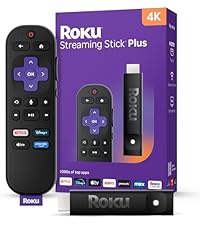
The Roku Streaming Stick 4K transforms any compatible TV into a powerhouse of entertainment with stunning 4K UHD resolution, Dolby Vision, and HDR10+ support. Featuring a long-range Wi-Fi receiver and a voice remote with TV control, it ensures seamless streaming and effortless navigation. Its compact design fits neatly behind your TV without blocking HDMI ports, making it perfect for any room or on-the-go viewing. With access to 500+ free channels and top streaming apps, it’s the ultimate upgrade for the modern viewer.


| ASIN | B09BKCDXZC |
| Best Sellers Rank | #5 in Electronics ( See Top 100 in Electronics ) #1 in Streaming Media Players |
| Brand | Roku |
| Built-In Media | Power adaptor, Roku Streaming Stick 4K, Two pre-installed AAA batteries, USB power cable with Long-range Wi-Fi receiver, Voice remote with TV power, volume, and mute buttons |
| Color | Black |
| Compatible Devices | Television |
| Connectivity Technology | Wi-Fi |
| Connector Type | HDMI |
| Controller Type | Remote Control, Voice Control |
| Customer Reviews | 4.7 out of 5 stars 98,984 Reviews |
| External Testing Certification | Não Aplicável |
| Form Factor | TV Stick |
| Item Dimensions L x W x H | 3.7"L x 0.8"W x 0.45"H |
| Item Highlight | Compact 4K Streaming Device for TV with Roku Voice Remote & Long-Range Wi-Fi - Free & Live Local News, Sports |
| Item Type Name | 2021 Streaming Stick 4K |
| Item Weight | 25.54 g |
| Manufacturer | Roku |
| Memory Storage Capacity | 16 GB |
| Mfr Part Number | 829610004853 |
| Model Name | Roku Streaming Stick 4K |
| Model Number | 3820R2 |
| Number of Items | 1 |
| Number of Packs | 1 |
| Other Special Features of the Product | Dolby Vision, TV Control |
| RAM Memory Installed | 1 GB |
| Resolution | 4k |
| Special Feature | Dolby Vision, TV Control |
| Supported Internet Services | Hulu, Netflix, Pandora, Prime Video, Vudu |
| UPC | 829610004853 |
| Unit Count | 1 Count |
| Video Codec | H.264/AVC, H.265/HEVC, AV1, VP9, HDR10/10+ |
| Video Output Resolution | 4K UHD (up to 2160p at 60fps) |
| Warranty Description | For any Roku Smart Home device, Roku streaming player, Roku Streaming Stick, or Roku audio device, Roku warrants the hardware against defects in materials and workmanship under normal use for a period of one (1) year from the date of purchase ("Warranty Period") if used in accordance with the provided documentation. If Roku determines that the device’s hardware is defective during the Warranty Per… |
X**R
Bought Two—and Glad I Did
I’m a big fan of these Roku Streaming Sticks. I ordered two, and I’m actually using one right now while on vacation in Venice Beach. Setup is quick and easy, the interface is simple to navigate, and streaming has been fast and reliable. The picture quality is excellent, and I especially like having one familiar, easy-to-use streaming platform regardless of which TV I’m using. The remote works great and eliminates the need to juggle multiple remotes for basic TV controls. For the price, these are hard to beat. Small, fast, easy to set up, and they just work. I liked the first one enough to buy two, which probably says it all.
D**J
Love my Roku!!
I love this Roku Stick!! I wish I would have bought this years ago. I look forward to using it everyday! I have, been using my laptop connected to my TV via an HDMI cable...to watch movies, TV shows, etc. But, that was putting unnecessary wear & tear on my laptop...just to watch streaming video. This will extend the life of my laptop, as I now have Roku!! Don't worry if you don't have enough HDMI inputs on your TV....you can buy an HDMI splitter/A-B switch on Amazon for around $12. I had to do that, & it works great. My TV only has 2 HDMI inputs. Picture & Audio quality are excellent...& seem to better than when I was using my laptop. I downloaded the Roku App to my Android phone....& it's great! The main advantage for me, is I can plug my WIRED headphones into my phone & listen to movies, music, etc...that way, & it sounds excellent. The interface looks like the Roku remote control. I can also plug my phone into my Bluetooth speaker (aux IN)...& listen to content that way too. The remote control on the Roku App on my phone, works very well. So happy with this purchase!! You also get tons of free movies, TV shows, etc...included for free; the Roku channel is great. You can subscribe to many different apps as well. I subscribed to "Howdy"...for only $2.99 a month, & you get great movies...without any commercials at all. Not bad at all. The only cons are: it will occasionally stop in the middle of a TV Show, if you haven't shown any "activity" in awhile. I think this is only happening on Peacock, so I'll look into that further. The other con, is the tag they have on the remote control. I have no idea why they have a tag...I've never seen a remote control with a tag on it before now. It's not real bad, but the tag does make contact with your hand occasionally. Hopefully they will stop using a tag. They're are other ways of "branding" a product...like a simple logo, etc. Other than these 2 cons...I highly recommend buying this.
L**Y
Easy Replacement and Works Great!
I bought this Roku Streaming Stick 4K to replace my previous Roku that had stopped working. It was easy to set up and get running, and it was nice not having to figure out a complicated installation process. The compact size is perfect because it doesn't take up much space behind the TV, and the voice remote is very convenient for finding shows and navigating through the different streaming services. The picture quality is excellent, and everything streams smoothly. Sound quality is also great. I’m very happy with this replacement and glad I went with another Roku. If you already like the Roku system and need to replace an older device, this is a great upgrade!
S**N
This is the one you want
There are multiple different Roku products and it can be difficult to pick the one that is the best. I had read multiple different reviews from multiple sites and this one was the one most highly recommended. It has a “stick” that you place into the HDMI port instead of a cumbersome little box that you have to place in front of the T.V. and point the remote at. The best feature is the voice control on the remote. It works perfectly. You can say, “Watch UTube Videos for Cats”, and it will open up right there instead of having to type all of this in the search engine after you go to the UTube app. You can say the name of a movie and it will show you what apps this movie is available on. There is no way I would buy a Roku without this voice control feature. If you have a Roku that does not, you can buy a Roku remote separately and pair it with the one that you have. I have always just had cable T.V. and I never really knew anything about these streaming devices. Now I don’t know how I ever lived without it. The best feature is that when our Direct TV dish goes out when it is storming outside, I can switch easily to the Roku and stream it instead through the Direct T.V. app through my internet, which is supplied through a cable underground to my house. You can do this same thing if you have other cable providers that allow you to stream through an app, like Xfinity. The Roku offers its own free shows and movies. Many of the apps also are free and there is an unlimited amount of different programs you can watch. You can pay a small fee to watch certain movies or a monthly fee for certain apps, like PBS, to get unlimited access to all of their library of shows. We have yet to purchase anything since there is so much available to watch. There is nothing we feel like we are missing out on. You can pair multiple Roku devices in your home to the same email account and you can place a password on it so no one can purchase anything without knowing this password. I am now going to buy a small Roku enabled T.V. for my bathroom to watch when I am in the jacuzzi. Since I can stream all of my Direct T.V. shows on it through their app on the Roku, there is no reason to have to have to place a cable box or wiring or even buy a separate T.V. and an additional Roku device. You do have to have functioning internet to use the Roku and you want to make sure that the strength of the signal will support streaming. We have had no problems with the basic internet service we get through AT&T. This Roku is the easiest device I think I have ever set up in my life, so don’t worry about this. This is not a concern. Everyone should have one of these if you have internet in your home. It is an awesome device and we love it. We watch the shows on it that we stream, just as much as we watch our regular cable provider shows. We have even considered getting rid of our cable completely when the contract is up. You can pay a small monthly fee to certain apps like Hulu that offer the same shows that you like. I highly recommend this. Don’t hesitate to buy it. The price has come down so much in the last year that these are affordable now and it will open your T.V. world up to so much more it has to offer.
T**A
Fast, snappy, and completely hidden behind the TV just keep your phone handy!
If you want to upgrade an older streaming setup without cluttering up your living room media console, this Roku 4K Stick is an amazing choice. We used it to replace our older, bulkier 4K Ultra box, and the performance hasn't skipped a single beat. It connects effortlessly, boots up in seconds, and handles streaming apps smoothly. The picture quality is crisp, and the interface is incredibly easy for everyone in the household to navigate. The hidden design is great because it keeps the wall mounted TV setup looking clean and free of extra wires. However, there is one design change from the older tabletop models that is worth noting: the remote finder option. If you lose the controller in the sofa cushions, you cannot just walk up to the TV and press a button to locate it. Instead, you have to launch the Roku app on your smartphone to make the remote beep. The app works wonderfully, but I really miss having the option to quickly tap a physical button on a device when my phone isn't within arm's reach. Aside from that minor design limitation, it is an absolute workhorse of a streaming device and an excellent value.
G**G
Amazing device!!!
Amazing device! Had an older Samsung that would not connect to my WiFi . Bought this streaming so now can watch tv. Much less expensive than buying a new tv. Bought another one to go on my nearly new LG tv which kept disconnecting from WiFi and was a pain to keep connecting and then recently wouldn’t connect at all. Added this device and yay it works. So easy to use. Good job at extending WiFi. Recommend this to anyone having trouble with their tv connecting to WiFi.
"**"
Nice
The clumsy interface on my "smart" TV and related apps were getting on my nerves. Roku has a much cleaner interface, especially if you turn off all the annoying recommendation lines (which, to be honest, you'll have to turn off monthly as they add another one in typically millennial, needy fashion). The apps don't lag or crash nearly as much as "smart" TV apps. The remote is good, and many apps support the voice-control feature. However, that Bluetooth connection drastically cuts battery life. Unfortunately, like every remote these days, it comes with ANNOYING, non-programable shortcut buttons for apps you don't use, don't subscribe to, and most-importantly DON'T WANT. Accidentally grabbing the remote wrong or dropping it can not only interrupt your show, but it can download an annoying app you're just gonna have to delete again to keep your menu icons how you like them. Why's it got to mess with my icons if there's a shortcut button, huh? As the battery gets low, it can have issues controlling TV volume, particularly with Vizio TVs. Fortunately, the device should warn you on-screen that the remote battery is low (uses Bluetooth to transmit battery levels). What's really great is the review button that acts as a 10-second rewind or a limited Back button, unlike the more powerful arrow Back button. There's also a contextual * button that accesses a variety of menu-driven features. If your TV supports commands through HDMI, you can use the stick to control Power and Volume without having to aim the remote. In needs USB power to run. Instructions say a red LED will illuminate if your TV's USB port has enough power, but I see no red light (or LED for that matter), and it runs just fine off of TV power. It comes with a plug-in charge block if you need AC power. If your TV's USB goes off with the TV, you might want to use the charger to reduce start-up time, but many TVs have their own start-up time without a quick wake feature. It also can detect (on many TVs) if the HDMI output it's plugged into is on the wrong setting and underperforming. Picture and sound quality are as good as your TV and WiFi signal. Some apps offer to reduce playback to HD or even SD if signal is compromised. As a stick, it's hidden quite well and not likely to be knocked about. There's no need to find shelf space or install a resting caddy. It's also portable, so you can take it on vacation if you have access to a TV with an HDMI port. The Bluetooth connection means you don't need line of sight to the I/R part of the remote. The biggest drawback of sticks is they can run hot. You will need an e-mail address to create an account with Roku, but you need one for most streamed services anyway. This gives you access to Roku's huge library of Live TV (some channels will let view on-demand). It's so vast, you might wish the remote had numbers so you won't have to scroll. You can assign favorites and hide channels to make channel surfing easier. It will also connect to an existing Roku account and port over your apps and layout (but may port the starter how-to app to other devices along with the paid-placement apps that came pre-installed). Roku does have an all-in-one feature like many platforms. And just like those platforms it actively BLOCKS connection to your streaming accounts unless you subscribe through THEM (so they get a kickback). You can still individually access other apps, but all-in-one service has to be through an all-in-one bill. It's got its limits, but overall it's one of the best interfaces out there. Even the third-party streaming apps for Roku tend to be more-robust than on other platforms.
V**S
A top choice for straightforward, high-quality streaming
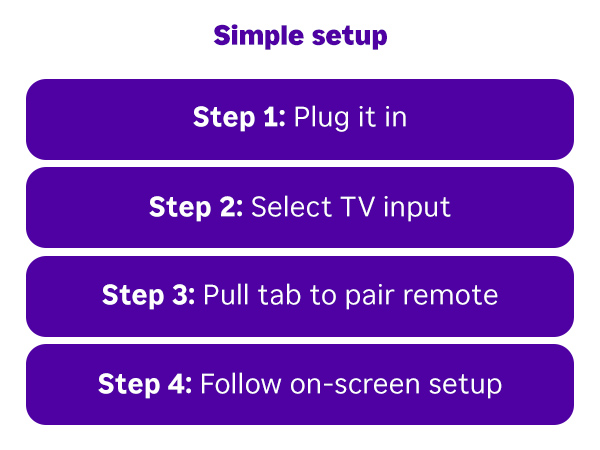
I’ve been using the Roku Streaming Stick 4K for some time now, and I can confidently say it delivers an excellent streaming experience while keeping things simple and affordable. Below is a breakdown of my experience, with both the positives and a few things to be aware of. Setup & Ease of Use ---------------------- The setup is extremely straightforward. Plug the stick into an HDMI port, connect the included power cable, and follow the on-screen prompts. Roku’s interface is one of the cleanest and most intuitive in the industry. Even non-tech-savvy users can get it running within minutes. Performance & Streaming Quality ----------------------- - Picture Quality: The 4K resolution looks crisp, and Dolby Vision + HDR10+ support provides excellent brightness and color depth. Movies and shows look noticeably better on compatible TVs. - Wi-Fi: Roku’s long-range Wi-Fi upgrade really helps. Even in rooms far from my router, streaming remained smooth with very little buffering. - Responsiveness: Menus are fast, apps load quickly, and switching between services is seamless. Content & Apps -------------------- - Roku supports all major streaming platforms: Netflix, Disney+, Hulu, Prime Video, Max, Apple TV+, YouTube, and more. - It also shines with free content: The Roku Channel offers a huge library of free movies and live TV channels. It’s a nice bonus that doesn’t require additional subscriptions. - The search function is universal – it checks across all apps and lets you compare prices (if a title is available on multiple services). This saves time and money. Remote Control -------------- - The voice remote is compact and simple. Voice search works well, although it’s not as advanced as Alexa or Google Assistant. - Dedicated shortcut buttons for popular streaming services are convenient, but they can feel limiting since you can’t reprogram them. - The remote does control basic TV functions (power and volume), which means fewer remotes on the coffee table. Pros: - Excellent 4K streaming with Dolby Vision and HDR10+ - Long-range Wi-Fi improves stability and reduces buffering - Wide app support, including niche and free content - Intuitive, user-friendly interface - Compact, portable design (great for travel) - Affordable compared to other 4K streamers - Remote can control TV power and volume Cons: - Remote lacks customizable buttons and advanced controls - Voice assistant is good but less powerful than Amazon Alexa or Google TV - Requires creating and signing into a Roku account to activate - Requires to use Roku power adapter Overall Verdict ----------------- The Roku Streaming Stick 4K strikes a great balance between affordability, performance, and ease of use. It’s perfect for anyone who wants reliable 4K HDR streaming without overcomplicating things. If you’re looking for raw power, gaming options, or a highly advanced smart assistant, you may lean toward Apple TV 4K or Nvidia Shield. But for most households, this little device covers everything you need at a fraction of the cost.
Trustpilot
1 month ago
2 weeks ago