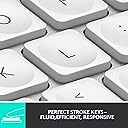
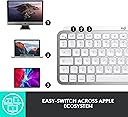
⌨️ Elevate your Mac setup with the keyboard that works as hard as you do.
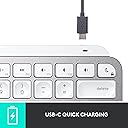
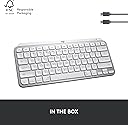
The Logitech MX Keys Mini for Mac is a sleek, compact wireless keyboard engineered for Apple users seeking precision and portability. Featuring a Mac-optimized layout, smart backlit keys, and multi-device Bluetooth connectivity, it offers up to 10 days of battery life on a single USB-C charge. Designed with ergonomic comfort and sustainability in mind, it seamlessly integrates into any professional Apple ecosystem.


| ASIN | B098JF32PT |
| Additional Features | LED Lights, Portable, Rechargeable, Ten Key Less, Wireless |
| Antenna Location | Personal |
| Best Sellers Rank | #35 in Computer Keyboards |
| Brand | Logitech |
| Built-In Media | User Manual |
| Button Quantity | 19 |
| Color | Pale Grey |
| Compatible Devices | Laptop |
| Connectivity Technology | Bluetooth |
| Customer Reviews | 4.5 4.5 out of 5 stars (1,275) |
| Enclosure Material | Metal |
| External Testing Certification | Não aplicável |
| Global Trade Identification Number | 00097855169587 |
| Hand Orientation | Ambidextrous |
| Item Dimensions L x W x H | 11.65"L x 5.19"W x 0.82"H |
| Item Type Name | MX Keys Mini for Mac |
| Item Weight | 1.5 Pounds |
| Keyboard Backlighting Color Support | Single Color |
| Keyboard Description | Membrane |
| Keyboard Layout | QWERTY |
| Manufacturer | Logitech |
| Model Name | Logitech MX Keys for Mac |
| Model Number | 920-010389 |
| Number of Keys | 64 |
| Number of Sections | 1 |
| Power Source | Battery Powered |
| Style Name | Keyboard |
| Switch Type | Linear or Tactile |
| Theme | Computing |
| UPC | 097855169587 |
| Unit Count | 1.0 Count |
| Warranty Description | 1 Year Limited Hardware Warranty |
E**G
Great Keyboard
I pair this Logitech keyboard with a Mac Studio, and it works great. I used an Apple keyboard for many years with an older iMac and considered getting another when I upgraded to the Mac Studio. After doing some research, though, I decided to switch to this Logitech and haven’t looked back. The Logitech’s keys are slightly concave and have a nice feel to them. Being concave, they help keep your fingers centered on the keys. They keys are fairly quiet (though not totally) when typing. I think their noise level is comparable to the Apple’s keys. You can recharge the keyboard with a USB-C cable while still using it. With the Apple keyboard, you have to swap out the batteries when they run out. The keyboard looks nice and matches the esthetic of the Mac Studio and the display I bought. The keys are backlit when in use, if that matters to you. The backlight turns off when the keyboard is not in use. It doesn’t seem to eat up the battery any faster than the batteries lasted on my Apple keyboard. A couple of the function keys don’t work the same as an Apple’s do, but it’s not a major problem for me. Specifically, you can’t control screen brightness up or down with the function keys, and apparently you can’t map those functions to the same function keys Apple uses (although I could be wrong on that—I’ve only done a cursory investigation into it). When I first set up my new computer, I had to open the display settings in MacOS to make the brightness adjustments. For me it was just a case of set it and forget it. Also, the F3 key doesn’t provide the Mission Control function that lets you see all of your open apps and documents in a minimized view. I do use that function a fair amount, but Control + Up Arrow on the Logitech performs the same function, so I’ve not yet explored whether that can be mapped to the F3 key. Overall, I’m pleased with the Logitech keyboard and have no regrets about getting it instead of an Apple.
B**N
Excellent, solid, clicky keyboard for Mac, easy setup
Unlike the keyboards Apple sells, and other Apple-style keyboards I've used, this one has well-designed keys and a smooth clicky action that enables accurate fast typing with no weird glitches, repetitions, or irregularities. The software it comes with lets you adjust a number of settings (my one complaint is the backlighting made it hard to see the characters on the keys, basically making them white on white, but I've adjusted it more to my liking). I also like that it speaks directly to my Mac system so I can monitor the power level in the bluetooth dropdown, unlike the Macally keyboard I'm replacing where I was always taken by surprise when it suddenly died. It's not super-lightweight so if you like to carry your keyboard around or type in your lap this may be heavier than you like -- but I like the solidity of it: it never slides around on my desk unless I deliberately move it somewhere. It can connect to 3 different devices, easy switching between them. There are certainly cheaper Mac keyboards out there, but probably not better ones.
M**V
Overall a solid keyboard.
Rarely leave a review but this is a solid product, have been using it for almost 2 years every day with my mac and PC, drop it few times still works just fine, covered it all up in potato chips - no stickiness after cleanup somehow which was a problem for magic keyboard, I like it more than a magic keyboard and this one has some nice extra features such as 3 device switch and led lighting. Had 0 issues with connectivity.
A**1
Great Keyboard but DON'T Install 'Options" Software
I have the compact and full-size keyboards (MX Keys S for Mac and MX Keys Mini for Mac). I'm writing this review on the full-size keyboard. I really like both. I like the full-size because it has a few extra controls that the mini does not, for example you can adjust your mac screen brightness and forward/reverse audio track. Both keyboards have backlights that turn off after some amount of time of inactivity and turn back on when you move your hands over the keyboard (to save battery presumably). USB-C charging. Long battery life. Sleek aesthetic that matches my space grey macbook air and macbook pro. ABSOLUTELY DO NOT INSTALL LOGITECH OPTIONS SOFTWARE. It is maybe the WORST bloatware I have ever encountered. I learned that maybe 2 or 3 Logitech keyboards ago. As long as you don't install it you should have basically no problems. The Logitech keyboards I have from years and years ago still work, but I either gave them away or replaced them with these never versions with the backlit keys. One complaint I have is that on my new (less than 1 month old) full-size keyboard I have noticed that the backspace key makes a pretty annoying squeaky sound during certain presses. I'm going to search online and see if other people have reported this and if there's a fix or send it back in to Amazon for a replacement. I read some 1 star reviews and there were people (amateurs) complaining about the Options software or an inability to adjust keyboard backlight brightness. They said they couldn't get the software to make it work. There are buttons on the keyboard (both full-size and compact) for adjusting the backlight brightness of the keys, so I'm not sure what their problem was, but it was not the keyboard's fault. Summary: Great keyboard. Get the full size if you have the space and extra $20-30 or whatever. Watch out for squeaky keys - there are some people online who have taken their problem keys off and applied some lubricant which is probably what I'll do because sending it back means it'll likely just end up in a warehouse or the garbage and would be wasteful. Better than the Apple Magic Keyboard and less expensive.
R**L
update: gave this keyboard 5 stars again because I found a solution. To pair the Bolt and Unifying receivers with your MX keyboard and MX mouse requires at minimum Mac OS Mojave to install the Bolt App 1.0.7948 and LogiMgr 8.54.147 of which these older apps are no longer available from Logitech and you need to find them from 3rd party downloaders. However, short version, once paired Bolt and Unifying Receiver you can delete the Logitech apps and move the receivers (Bolt and Unifying) to another machine and they remained paired. The paired info is stored in non-volatile memory so what that means is that you can pair your Bolt and Unifying receiver on a newer Mac or your friends Mac and then just insert them into your older Mac that is running Sierra. Although it is a bit late for me as I had to patch install Mojave on my Mac mini (4 times) and searched for older versions of the Bolt App and Logi options app (for unifying pairing) with the Bolt App crashing my Mac repeatedly, the good news is that I did un-install the Bolt App afterwards but leaving the Logi Options app installed to control the speed of my MX Anywhere 3 mouse. update: All kinds of problems - reduced my overall rating to 2. So I've been pairing this keyboard with my MacBook 12" and was hoping to pair it with my Mac mini to give me a working cluster of computers as I switch between them all with my HDMI switch. This keyboard does not pair with my Mac mini mid 2010 and even though I managed to upgrade my Mac OS to Sierra. This keyboard doesn't work with the unifying USB neither and even though I probably could buy the Bolt USB I won't be able to pair it with Bolt because the Bolt software needs at least Catalina to pair and my Mac mini only max updates to Sierra OS. So sad really.... You would think all bluetooth works with ALL Bluetooth. Original Review:I have been a logitech keyboard users for more than a decade now. For a long time Logitech thought that the K380 was good enough replacement but I hated the chicklet keys. This new MX keys mini is a very good replacement for the K811 keyboard in both the size of the keyboard and the size of the keys. With the ability to connect up to three devices I currently have it connected to my MacBook 12", my iPad pro and my iPhone 8 plus; well not concurrently but selectable and switchable amongst 3 devices. I have the black version forthcoming. Currently this keyboard which is the mac version will be used for my music composition MacBook. The black one which is arriving in November will be used with my everyday Macbook 12" computer and my VR PC. The keys on this MX mini are wonderful as they feel like every logitech keys on every logitech keyboard through every generation. A soft clickable keyboard that doesn't make a lot of noise and has just the right amount of key depth to each click of the keys. I'm a touch typist and I love the feel of this keyboard as the words spills out of my brain and on to the review box without having to look at what I am typing. I will be buying several for back ups as I won't be left high and dry like the K811 and K810 keyboards that were discontinued and replaced by the k380. There is only one problem with this keyboard though and if you look at the back of the keyboard you will notice that it is actually quite thick and that is the battery and component bar that acts as a keyboard riser. So if you have a keyboard drawer that just holds your keyboard, the actual thickness is just a little over 1/2 an inch. Don't let the photographs fool you on a thin keyboard like the K811 but nevertheless it is still quite thin but has a large battery rechargeable bar. My K811 is breaking down, not only the battery doesn't last as long but some keys don't quite respond until you press it two or three times of which it is terrible because you get all these spelling errors when you are a touch typist. Once my mx mini black keyboard arrives, I will be ordering at least two more to keep for the next decade. Trust me that once you become addicted to a logitech keyboard you will never go back to the standard Apple smart keyboard. The ability to connect up to 3 bluetooth devices gives you the luxury of typing on your phone, you iPad and your mac by just a single press of a key. Yay for Logitech!!
P**L
la tecla del enter del teclado numerico, sin tocarla, con solo pasar el dedo se ejecutaba, no se si es un defecto del que me llego o es que todos son asi
D**A
The Logitech MX Keys S for Mac is hands down the best keyboard I’ve ever used. From its sleek Space Grey design to its exceptional functionality, it pairs perfectly with my MacBook Pro and iPad. Typing Experience: The typing experience is fluid and precise, mimicking the feel of a premium laptop keyboard. The keys are perfectly spaced and offer just the right amount of tactile feedback, making long typing sessions a breeze. Backlit Magic:The backlighting adjusts automatically based on ambient lighting, and it’s incredibly responsive. Typing in dim environments has never been easier or more enjoyable. Connectivity:Connecting via Bluetooth is seamless, and switching between devices is a breeze. It works flawlessly with my MacBook Air, iMac, and even my iPad. Plus, the USB-C charging makes it super convenient. Build Quality:The keyboard feels sturdy and well-crafted, with a premium look and feel that complements any Apple setup. Overall, the Logitech MX Keys S for Mac is worth every penny. If you’re looking for a reliable, feature-packed, and stylish keyboard to enhance your Mac experience, this is it! Highly recommended.
M**N
This is exactly what I have been looking for in a keyboard for my new Mac Mini. Soft-touch keys with just the right amount of travel, a separate number pad, and most critically having the arrow keys separated from the QWERTY board and the number pad. This types like a dream, and is capable of all the Mac macros and shortcuts I need. The backlight is a nice touch, and the available app helps set up custom shortcuts. Why pay $100 more to get the Apple version - unless you really really want the Touch ID. The heft of this is something, it's really well made. Nice angle, and the rubber pads on the bottom help keep it in place. It's such a slim, sleek, and quiet keyboard! Recommended 5/5.
L**Z
the Mx keys mini keyboard for Mac is fantastic. i really like low profile keys and the ones that come with this keyboard are perfect for typing. the battery lasts a really long time, it can conveniently switch between device on the fly, and it's super portable. the build quality is sturdy but has a little give. it has a beautiful aesthetic, and pretty light. overall im very satisfied with this purchase and have had no issues using it with multiple devices.
Trustpilot
3 weeks ago
3 weeks ago