Desertcart purchases this item on your behalf and handles shipping, customs, and support to Panama.
🖨️ Print smarter, save bigger, and stay connected—your office’s new MVP!
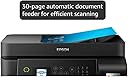
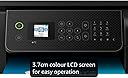
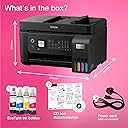
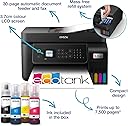
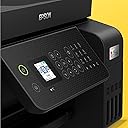
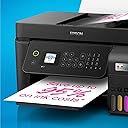
The Epson EcoTank ET-4800 is a compact, multifunction inkjet printer designed for home and small office use. It features ultra-high capacity refillable ink tanks that provide up to 7,500 colour pages per set, drastically cutting printing costs by up to 95%. With wireless, Wi-Fi Direct, and Ethernet connectivity, plus a 3.7cm colour LCD and 30-page automatic document feeder, it supports efficient print, copy, scan, and fax tasks. The included Epson Smart Panel app enables remote control and maintenance, while Micro Piezo Heat-Free Technology ensures energy-efficient, reliable performance.


| ASIN | B09GL23WKB |
| Additional Printer Functions | Copy |
| B&W Pages per Minute | 33 |
| Best Sellers Rank | 842 in Computers & Accessories ( See Top 100 in Computers & Accessories ) 4 in Ink Tank Printers 172 in Inkjet Printer Ink Cartridges |
| Box Contents | Printer |
| Brand | Epson |
| Brand Name | Epson |
| Color Depth | 24 bpp |
| Color Pages per Minute | 15 ppm |
| Colour | Black |
| Compatible Devices | Laptops, PC, Smartphones, Tablets |
| Connectivity technology | Wi-Fi |
| Control Method | App |
| Controller Type | iOS |
| Country of Origin | China |
| Customer Reviews | 3.9 out of 5 stars 884 Reviews |
| Display Type | LCD |
| Dual-sided printing | Yes |
| Duplex | Automatic |
| EU Spare Part Availability Duration | 3 Years |
| Hardware Interface | Ethernet |
| Ink Colour | Black |
| Item Dimensions D x W x H | 34.7D x 37.5W x 23.7H centimetres |
| Item Type Name | Multifunction Printer |
| Item Weight | 5 Kilograms |
| Manufacturer | Epson |
| Maximum Copies Per Run | 30 |
| Maximum Copy Resolution Black and White | 1200 dpi |
| Maximum Copy Resolution Color | Élevée |
| Maximum Copy Speed Black and White | 33 ppm |
| Maximum Print Resolution Black and White | 33 dpi |
| Maximum Sheet Capacity | 100 |
| Maximum Supported Paper Size | A3 |
| Maximum print Resolution Color | 4800 x 1200 dpi |
| Model Name | EcoTank ET-4800 |
| Model Number | C11CJ65401 |
| Model Series | EcoTank |
| Model name | EcoTank ET-4800 |
| Network Connectivity Technology | Wi-Fi |
| Number of Trays | 1 |
| Other Special Features of the Product | Auto Document Feeder |
| Output sheet capacity | 100 |
| Paper Size | 8.5 inches |
| Power Consumption Size | 12 Watts |
| Print media | Glossy photo paper |
| Printer Output Type | Colour |
| Printer Type | Inkjet |
| Printing technology | Inkjet |
| Processor Count | 1 |
| Product Warranty | 1 Year |
| Resolution | 4800 x 1200 |
| Scanner Type | Photo |
| Special feature | Auto Document Feeder |
| Specific Uses For Product | Home use, small office use, document management, remote printing |
| Total USB Ports | 1 |
| Unit Count | 1.0 count |
| Warranty Type | Limited warranty (with optional extension) |
| Wattage | 12 watts |
J**G
Great so far…
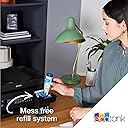
My old HP Multi-function printer was ruined during a house move so I was looking for a quality replacement. I have alway bought HP as I like the software and quality of the kit but was fed up with the cost of the ink and print head cleaning. After much research, I saw the Epson ink tank printers scoring highly in a number of independent reviews. It seemed to me that the initial cost of the machine was off-set by the low cost of ink over the long-term. The features of the ET3850 were exactly what I was looking for; quality printing (including auto-duplex), scanning and wifi printing from mobile devices. It was easy to set up and the ink filling process was easy and spill-free using the foolproof fittings which differed for each colour to avoid mistakes. Connecting it to my wifi network was also easy although it did take a little time to update its firmware early in the process. I have 2 minor niggles when comparing it with the various HP models I’ve owned: 1) the software is not as user friendly or as comprehensive, but it works, 2) pressing the off button does not switch the machine off, you have to then use the menu buttons to change an option and then confirm with the ok button before it switches off. Although some might find this a benefit, I find it annoying that I have to press 3 different buttons to switch it off. On the plus side, as well as good quality printing, the machine seems to be able to print decent quality when started up even when it hasn’t been used for a while. I found that the HPs often required head cleaning and test printing which wasted paper, time and expensive ink! So far, I haven’t had to do this at all. Overall, I think this model is good value when looked at over a two or three year period and hope it last much longer than that. Having owned and used it for a few months now, I would buy it again.
D**S
Fantastic printer overall
Build Quality The EcoTank ET-3850 feels pretty well-built. The automatic document feeder on top is probably the only part that isn't sturdy and feels a bit thin and flimsy, and it squeaks when moved. The design is fairly user-friendly, as it allows easy access to the ink tanks and paper jams. Be warned though that the scanner’s lid doesn’t have a dampener, so it'll slam shut if you don’t raise it slowly and make sure it’s in the locked position. Ink The Epson ET-3850 has four refillable ink tanks that yield a large number of prints, meaning it is a perfect choice for high printing volumes. It's easy to see the ink levels from the front of the printer. However, it is important to keep an eye on the ink levels as letting the ink levels run too low or emptying the tank can introduce air bubbles into the print tubes and damage the printer. Print Quality Print quality is pin sharp for black and white documents. Coloured is still good, although not as impressive as the black and white due to some graininess. It is still head and shoulders above a previous all-in-one printer I had. App Features The Epson Smart Panel app is very useful to have. It allows you to print, copy, scan (You can scan with both the scanner on the printer itself and scan something from your phone's camera). You can also carry out most maintenance tasks from the app, including nozzle checking and print head cleaning. Overall I considered several printers, including a Canon Pixma model, but decided with the ET-3850 in the end - while both offered outstanding page yields and low costs per print, the Epson was both faster at printing and produced higher-quality scans.
M**L
Difficult to set up, and many issues. It is clearly overpriced.
I got this to replace an HP printer that tied you into an ink contract. That I couldn't work with. I went with this Epsom because of the ink refil system. Which incidentally is very straightforward. The instructions for this Printer are very vague and even the removal of the safety packaging took hours of research on the internet with many other people having a similar issue and not getting an understandable response from either Epsom or anyone else. It refused to print photos which is one of the reasons I bought it for saying I was using the wrong paper. Bizarrely, It actually printed a perfectly good half page before deciding this. The scanner refused to work stating there was a paper jam. There was no paper jam! indeed there was no paper anywhere near the printer other than the document it was refusing to scan. After about 20 times going through to process to unblock a non existant paper jam. it finally started to work. I honestly cannot believe how much I paid for a very poor quality printer. It really is worse than the cheapest model around. I will in due course need to replace it, it simply isn't up to doing the job anywhere near as good as a printer coster £40 or so. I'll be interested to see how long the inl last which is possibly the only redeeming feature.
P**P
Great printer for ink management
This is a great generic printer/scanner/copier/fax machine (even ignoring everything past "printer"), although the colours are a little too washed out at times - the black isn't black enough, the colours aren't really VIBRANT (even on photo paper) For the way EcoTank works, this is fantastic, the ink levels being visible and being able to be topped up before they run out is a genius idea, and makes it a million times better than other colour printers, especially the ones where the colours are all in the same cartridge (which is a HUGE waste of money), which makes the ink management a breeze Strangely the setup wasn't as easy as it states in the box, I tried it on the mobile app but it never connected to the wifi, resetting it and plugging it in was MEANT to setup everything, but it was then "forced" to be used wired rather than wireless... but once it was setup and on the network (lots of manual entry) setup on my work Mac was stupidly easy, it just did it, while the Windows install was a complete pain in the butt! Once it's setup though it's really simple to print to, from multiple devices, and when it's on wifi it can live anywhere that's useful or out of the way My reason for not giving it five stars is a bit odd, as they don't properly "announce" my requirement, but more hint at it - I need to print on card stock, and this listed that it printed on 300gsm photo paper, so I thought it should print on 300gsm card, but alas, it did it once and then never fed the card again... trying 250gsm had the same result, but the only one that ACTUALLY worked is 200gsm, which is not quite stiff enough for real card printing
F**E
So Easy to Set Up - And A Great Price - Get the Epson Cash Back as Well
After having massive problems with a previous rival printer and connecting it to my internet, i was apprehensive about setting up this new printer. There was no need, it was so easy. Downloaded the app by using the scanner on my mobile; takes you through the set up process and it is a breeze. Just takes about 15 mins mainly to get the ink to 'charge'. Then set it up on my old (very) and new computers. Again so easy and quick. Printed a few pages and quality looks spot on. Nice display and easy to use controls. First days usage and so far impressed. Will update in a few weeks to let you know how i am going on with it.
H**K
Outstanding printer
Installation Not too bad. There was a wifi issue that was a nightmare and had me resorting to a USB cable at one point, but this has been fixed in a recent firmware update and the printer works flawlessly. If you want to print borderless (eg full-page photos), you do need to install on a perfectly flat surface to avoid the pages being fed through at a slight angle it seems, leaving some uneven white borders. Interface Quite straightforward, decent driver and software with plenty of presets or customisable. If you want photoshop etc to handle colour management, you can definitely do that. For general printing, the "automatic" colour management seems to work really well. Quality Honestly better than I was expecting. Buy some matte or gloss photo paper if you want rich colours and so on, it will handle it beautifully. Ink I have now printed over 900 pages, 2/3rd in colour of which numerous would've been full-colour photographs. That has used about 1/4 of the colour inks and under 1/8th of the supplied black ink in the bundle (there is one extra black bottle), so I think the claims of 6-7.5k pages per refill set (£41 from Epson, £25 on Amazon when I bought a spare set), is about right for more office-type use cases.
T**S
Good printer, shame about the functionality & connection etc.
Very little printing so far, but the quality looks excellent. The packaging was great, the ink-filling was flawless and with no mess at all, and the set up of the printer was simple with the app. HOWEVER... The app crashed every single time it came to installing the computer. I gave up after six attempts (and five deletions & reinstalls) and went to the Epson website to install from there. App now deleted, never to be used again. After four attempts with the process appearing to run smoothly but no printer driver actually being installed, I resorted to their technical support. After 45 minutes and more installations, they discovered that the printer cannot cope with multiple wifi signals. Oh, and it doesn't like MacBooks very much. Still, we got there, I said 'Thank you' and got down to printing. Or not. No double-sided option was available, and it would not print via USB cable. I then spent another hour with a different technician on yet more installations (!!!) until we were able to obtain a 2-sided print option. They also managed to resolve the USB cable option BUT at the expense of wifi connection. So, I paid £350 for a wifi printer that will not print via wifi! Essentially, it's a good printer, but DON'T buy this if: 1. You have more than one wifi signal in your home. 2. You have an old home with thick walls that require a wifi booster. Nope. No can do. Epson cannot cope with that! 3. You use a MacBook. 4. You like the option of wifi AND USB connection. It's one or the other. It's been a complete ballache, I've lost most of my day with the set-up and subsequent problems, and I shall never, ever buy Epson again, but at least the pages of text I printed look good.
H**Z
Nifty little printer with much lower running costs than I'm used to.
This replaces a laser printer I've had for a number of years. The cost of running the laser became prohibitive, or rather not a good use of money. So far I've been very happy with this printer, a much smaller footprint, and very similar functionality (scanner, etc). The ink seems to last a while and is cheap enough to replace. The colours are obviously not as vivid, although I've not tried photo paper with the printer yet. Top marks. Economical and good value.
R**L
Kann man kaufen
... gerne wieder und habe das Gerrät immer noch und läuft ohne Klagen. Benutze es ca. 1 x im Monat
V**N
Parfait
S'adaptent parfaitement
M**S
Drucker
Das ist ein sehr gutes Gerät. Druckt hervorragend und hat mir schon eine Menge an Geld erspart an Tinten-Patronen.
K**N
Stopped printing within a month, still waiting for Amazon to return product been over two weeks
Printing blank pages
E**C
Économique à l'utilisation avec ses réservoirs
Très bonne qualité d'impression tant sur du papier ordinaire ou du papier glacé photo. Il faut juste s'assurer de bien régler les paramètres. Le recto verso fonctionne bien avec un temps de séchage entre les couches. Le scanner n'est pas très rapide mais très correct. Le logiciel de scan ne permet pas de réglages avancés mais il fait le travail. Fonction copie autonome bien pratique et plus vite disponible qu'une imprimante laser.
Trustpilot
1 week ago
2 months ago