Buy anything from 5,000+ international stores. One checkout price. No surprise fees. Join 2M+ shoppers on Desertcart.
Desertcart purchases this item on your behalf and handles shipping, customs, and support to Panama.
🚀 Scan smarter, not harder — your desk’s new best friend!
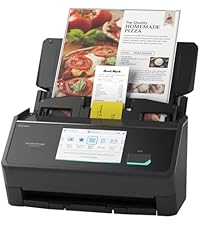
The ScanSnap iX1300 is a compact, high-speed duplex scanner designed for professionals who demand efficiency and space-saving innovation. With up to 30 pages per minute scanning, Wi-Fi and USB connectivity, and versatile media handling, it streamlines document digitization. Its intuitive ScanSnap Home software centralizes management of documents, photos, receipts, and cards, making it an essential tool for modern workspaces.


| ASIN | B09FX5SRQT |
| Best Sellers Rank | #3,871 in Office Products ( See Top 100 in Office Products ) #6 in Document Scanners |
| Brand | ScanSnap |
| Color Depth | 48 bits |
| Connection Type | USB |
| Connectivity Technology | USB |
| Customer Reviews | 4.1 out of 5 stars 950 Reviews |
| Item Dimensions D x W x H | 4.5"D x 11.7"W x 3.3"H |
| Item Type Name | Scanner |
| Item Weight | 4.4 Pounds |
| Light Source Type | LED |
| Manufacturer | PFU Limited |
| Media Type | Paper |
| Minimum System Requirements | Windows11 / Windows10 (32bit/64bit), Intel, or Intel-compatible processors, macOS Monterey 12 or later, iOS 16.0 or later, iPadOS 16.0 or later, Android 10.0 or later, ChromeOS 138.0.7204.178 or later |
| Model Name | iX1300 |
| Optical Sensor Technology | CIS |
| Product Dimensions | 4.5"D x 11.7"W x 3.3"H |
| Resolution | 600 dpi |
| Scanner Type | Document, Receipt |
| Standard Sheet Capacity | 50 |
| UPC | 097564309915 |
| Unit Count | 1.0 Count |
| Warranty Description | 1-Year Depot warranty |
| Wattage | 17 watts |
A**R
If I could give 10 stars, I would
I’m probably crazy but 20 years after college I still was holding onto my college notebooks and I refused to throw them out. We needed the space and so I decided to scan them with a printer/scanner combo. With over 25 classes of notes, it was taking an hour per class PLUS the notes were not duplex so I had a scan of the odd and even pages. As with just about any printer, I basically need to fix it every time I use it. The printer/scanner experience is just a trash fire. After so many paper jams and not trying to lose my sanity, I started looking for another solution. It didn’t take long to find this amazing scanner. Amazon delivered fast and the install was effortless on my Windows 11 PC. The instructions are so easy to follow, you connect it with a physical wire and then immediately it shows you how to set it up for wireless. It just works EVERY TIME. This thing is fast. As I stated earlier, it was taking me an hour to scan a single class of notes with my printer/scanner. This scanner completed all of my 25 class notes in under 3 hours. Plus all the scans look beautiful AND they are duplex (front and back of pages) in PDF format. The software is so easy to use. I’ll admit that the first few scans required some adjustment but once I got it tuned it was perfect. I was also afraid of getting any new devices since space is at a luxury in my home office. This thing is small. It folds up and I can slide it into a drawer. Everything about this device is awesome and just well designed. If you need a scanner look no further. It isn’t cheap but you a definitely going to love what you are getting if you pick up this scanner. Just the time saved during the holiday season more than made up for the cost.
S**P
ScanSnap iX1300 — The Compact Powerhouse I Didn’t Know I Needed
I’ve had the ScanSnap iX1300 for a little while now, and I’m honestly blown away by how good this compact scanner is. It’s small, but the moment you feed a page into the front, it wakes up instantly, pulls the document in, scans both sides fast, and sends it straight to ScanSnap Home without any fuss. The automatic paper handling is one of my favorite parts — the feed arm pops out on its own when you open the top, and the return tray actually slides out during scanning to catch the pages, then tucks itself back in when it’s done. It feels incredibly well‑designed. The setup was simple, the wireless connection has been rock‑solid, and the ScanSnap software is surprisingly powerful. It even names documents automatically based on the first line if you want it to. The scan quality is excellent — better than I expected from something this compact. I’m very picky about how my equipment works, and this scanner has been perfect for my needs. I’m really happy with this purchase and wouldn’t trade it for anything.
S**H
Compact Scanner That Gets the Job Done
I’ve been using the ScanSnap iX1300 for a while now, and it’s been a really solid addition to my setup. The setup process was quick and straightforward, and I had it up and running without any headaches. One of the biggest wins for me is the dual-sided scanning. It saves a ton of time when working through stacks of documents, and everything feeds smoothly without constant adjustments. The image quality is also impressive. Scans come out sharp and clear, whether it’s documents, photos, or receipts. I also like how compact it is. The portability makes it easy to move around or tuck away when not in use, which is perfect if you don’t have a ton of desk space. At the same time, it still feels sturdy, so the durability doesn’t seem like a concern. As for compatibility, I had no trouble connecting it to my laptop, both wirelessly and through USB. Everything just worked without needing to mess with settings. Overall, it’s a reliable scanner that balances performance and convenience really well.
A**N
Garbage
If you want something to destroy everything you try to scan, this is the perfect device for you. My biggest problem with this device, and the reason it is now sitting in my garbage can, is how much it loved to eat and crumple documents. Didn't matter if I tried to use the front or top loader, it typically crushed it at least half the time. Old Christmas cards in the front, regular 8x11 on top, didn't matter. Always a good chance the rollers would pull it in funny and spit it out creased, folded, or crushed, with a terrible scan. Today it turned legal documents into a crumpled mess, and I snapped the top loader trying to get them back. I guess I should not have trusted it with 6 pieces of paper. Other problems I've had, and while I will never buy from this company again: While setup isn't too difficult, it is tedious. WiFi scanning is a joke. Never once could I just turn it on and scan to my computer. Needed to use the USB cable, get it reconnected to the WiFi, and then could keep going if I needed it to. Rarely needed to scan more than the one document, so typically not helpful. The program interface looks like it was designed on Windows ME, and it works like it. Did not feel user friendly, way too many options with technical jargon, and why it would not just scan straight to My Documents without trying to create extra subfolders is beyond me. It also tries to read the document and autofill things, which it always got wrong, and made very difficult to edit. I want it to scan documents, enable some minor adjustments, and save to the correct folder. Why that is the last thing their program wants to do is beyond me. Finally, spring came off the back flap last month, so it would not stay closed. Could not for the life of me get it back in, there's no help online for this problem, and tech support was worthless. This is one of my biggest regret purchases, and I will never trust a ScanSnap with any important, or my money, again.
R**K
Easy setup and quick scanning experience
Exiting how simple it was to get started. I unpacked it, installed the software online, and within a short time, it was ready. It connected to WiFi smoothly. I disconnected the USB, loaded some documents, and hit the scan button. Saved everything as PDFs without any issues. Very pleased with how it works.
B**N
Simple to use and amazingly fast.
I had a stack of historical documents that needed to be scanned and was trying to use a manual scanner to slog through it. This device wasn't cheap but I figured I'd splurge and see if it performed as promised. I hadn't even had the thing out of the box more than two hours and I was finished. Couldn't believe it. Installed the software from the web, powered it up, hooked up the USB then configured it for WiFi. It connected no problems, disconnected the USB and loaded up my first stack of documents. Hit the scan button, saved to a folder as PDF. Great quality, the software is basic but offered fantastic editing options like rearranging the order of pages when you stacked them wrong. The scanner copied both sides at once and detected if it was blank or not. I am absolutely amazed at how easy it was to setup and to use. Folds up nice and compact for storage when you are done. WiFi means only one cord going to it. I'm loving this thing.
G**W
For a home scanner (or low usage business scanner), this is a good option at a reasonable price.
A comparison: I had a fuji scanner prior to this a 6130 which is a more business oriented and sturdy scanner. I had to give that up when Microsoft upgraded me to windows 11 without my approval. Ricoh bought Fuji scanner division. My Scansnap IX1300 is not as sturdy, but it is lighter and fine enough for home use. I was able to connect it to my wifi and by wifi to my personal PC easily. You don't have to be a network engineer to figure it out. It actually scans much faster than my Fuji. Now two 8.5 x 11 pages being scanned both sides in about 4 seconds where the fuji would be closer to 10. It also has a front feed which is good for things like receipts and business cards. If there is a shortcoming it is in the software where I found it a bit trying to figure out how to get it to save with the naming convention I wanted, but I did figure it out. I'm not sure what the feeder capacity is, but I've done about 10 pages successfully. The one contact I had with their support was impressively good, real people real fast with real concern and real knowledge. Bottom line is for a home scanner (or even a low usage business scanner), this is a good option at a reasonable price. Color seems to be good and resolution is high enough, but I do not do a lot of color scanning, so I can't give a good reference for that.
B**N
A Smart Investment in Organization and Efficiency
The ScanSnap iX1300 is an outstanding compact scanner that truly delivers on performance, convenience, and ease of use. Despite its small footprint, it packs powerful features that make document management effortless. Setup was incredibly simple—within minutes it was ready to go, and the software integration was seamless. The scanning speed is impressive, producing crisp, clear images with excellent color accuracy. I especially love that it handles double-sided scanning in a single pass, saving both time and hassle. The compact size is a major plus—not only does it fit perfectly in a home office or small workspace, but it’s also lightweight and portable enough to take on appointments, making it a versatile tool for professionals on the go. And with its reasonable price point, it offers tremendous value without sacrificing quality. The quiet operation is another nice touch, especially when scanning larger batches of documents. The included ScanSnap software is intuitive and makes it easy to organize, store, or share files in just a few clicks. Whether I’m scanning receipts, important documents, or photos, it consistently delivers reliable results. Overall, the ScanSnap iX1300 is a smart investment for anyone looking for a high-quality, compact scanner that combines speed, efficiency, portability, and affordability. It has made staying organized so much easier, and I highly recommend it!
L**S
Amazing Scanner
This scanner is amazing, so small yet can scan multiple items into your laptop or phone in seconds.
C**N
Performs quite well, easy to use
I really love this product. It is great at scanning numerous documents quickly. The only thing I notice is that I have to unplug and replug the scanner in the usb port to start up the software if you are not doing one scan after another.
B**C
Excellent hardware but latest software lets it down
The hardware is fine, but the software is slow initially to boot up (hence only 4 stars). After the first scan is done, things speed up and scans are fast. The original software was called "ScanSnap Manager" which was superior is performance and features to the current software called "Scansnap Home". ScanSnap scanners have excellent build quality. I have the older models X1100, X1300 and iX500 and now the iX1300. The latest software (ScanSnap Home) does work with all the older models. The iX1300 is particularly good for scanning cards and passports and is a better choice over the iX1600. The scans produce searchable PDFs and are devices I use every day for my records management. UPDATE. I have a MacBook Pro M1, but after use I have downgraded from 4 to 1 star. The WiFi connection is unreliable. The Hardware is excellent, but the software hopeless on a Mac. Looks like the software is built for Intel but runs on a Mac via Rosetta 2. Support is hopeless (they all pass the buck). Ricoh needs to build a native version of the ScanSnap Home software for the Mac. The software lets the product down. I have tried every thing over the last several months. I also recently purchased an iX2500 which suffers from the same problem as the iX1300. The scanner works fine when connected with USB cable. The only way to get the WiFI connection working again is to reboot the Mac. I am running all the latest software MacOS 26.01, ScanSnap Home 3.2.0(6).
J**R
Software nightmare
The hardware might be OK - the software install is a convoluted nightmare
M**T
Compact et efficace.
Je l'utilise depuis 3 jours et je l'apprécie beaucoup. Très facile à utiliser. J'ai scanné des papiers, des reçus et des photos. On peut mettre jusqu'à environ 25 feuilles ou photos à la fois. Je n'ai eu qu'un seul bourrage de papier, mais il faut dire que le papier était très épais. J'ai scanné les feuilles une à la fois et je n'ai pas eu de problème. J'ai aussi essayé de mettre plusieurs photos à la fois et ça l'a très bien fonctionné. Je cherchais à scanner plusieurs photos rapidement et facilement, et pour cela, ça fonctionne très bien. Pour les photos d'archive ou celle qui demande un traitement particulier, je ne pense pas que ça soit le meilleur scanner pour ça.
Trustpilot
1 month ago
1 month ago