


Desertcart purchases this item on your behalf and handles shipping, customs, and support to Panama.
🖌️ Unlock your creative flow anytime, anywhere with Deco Fun S!
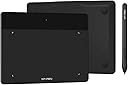
The XP-PEN Deco Fun S is a versatile 6x4 inch graphic drawing tablet featuring 8192 levels of pressure sensitivity and broad OS compatibility including Windows, Mac, Linux, Android, and Chrome OS. Designed for plug-and-play ease, it supports popular creative software and is ideal for digital art, online teaching, OSU gaming, and remote work. Lightweight and compact, it offers professional precision and seamless connectivity via USB, backed by a one-year warranty and lifetime support.


| Active Surface Area | 24 square inches |
| Additional Features | Electromagnetic Resonance |
| Asin | B0924F5J3W |
| Best Sellers Rank | #1,883 in Computers (See Top 100 in Computers) #16 in Graphic Tablets |
| Brand | XPPen |
| Built In Media | 1 x Digital Pen |
| Color | Black |
| Compatible Devices | Multiple devices running Windows, Mac, Android, Chrome OS, and Linux operating systems, including Chromebook |
| Connectivity Technology | USB |
| Customer Reviews | 4.5 4.5 out of 5 stars (1,164) 4.5 out of 5 stars |
| Item Dimensions L X W | 16L x 21.1W centimeters |
| Item Weight | 260 Grams |
| Manufacturer | XP-PEN |
| Mfr Part Number | DecoFunS |
| Model Name | Deco Fun S |
| Model Number | Deco Fun S |
| Native Resolution | 8192x8192 |
| Number Of Items | 1 |
| Operating System | [Multiple] |
| Pressure Sensitivity | 8192 Levels |
| Screen Size | 6 Inches |
| Software Update Supported To Date | unknown |
| Specific Uses For Product | Drawing, Painting, Sketch, E-signatures, Online Teaching, Remote Work, Photo Editing, OSU Game, Content Creation on Chromebooks |
| Target Audience | Teachers, Students |
| Unit Count | 1 Count |
| Warranty Description | one-year |
User
Recommend it
It is easy to install and work with, good for kids, compact
User
Good
It does its job
User
Pretty good but not perfect.
Works sometimes it freaks out but does the job,The application doesn't save your previous settings.
User
Superb....!
Amazing product
User
Great Support
The supplier is so helpful; the tablet didn't work properly at start as my pc was unable to automatically install the driver. I've sent the support an email and replied to me very promptly. They followed my case till the driver issue was solved at my pc; the tablet works great now..
User
.
الحجم لطيف صغير نوعا ما، لكن وجدته مناسب التعلم عن بعد
User
Extremely Difficult to Set Up
Easy to install the driver, but configuration is a nightmare. The instruction manual is very confusing and doesn't really help at all. Might just throw it away as it is not usable.
User
Too small
The Quality of the product is good however the drawing area is quite limited, not aligning well with the screen size, causing confusion.
User
Amazing quality for price!
I bought this tablet to get more into digital drawing and take back and forth between school(a.k.a getting beat up in my bag) and it work perfect! Next to no lag when drawing, I even use it to sign online documents and it's a dream! I'd recommend this to beginners and intermediates alike! I'm used to having a pen display but this is so smooth I dont mind watching my laptop screen!
User
Great
Works well and great price
User
Ela vai aparecer alguns riscos que é devido a ponta da caneta mas nada que possa prejudicar
Muito bom a qualidade é muito boa já estou com 4 meses de uso e nada de defeitos. Recomendo vc comprar!
User
مستخدمة في التدريس الاونلاين
المنتج رائع
User
Studying Smarter, Not Harder: My XPPen Deco Fun S Review
As a medical student, taking clear and organized notes is crucial. Enter the XPPen Deco Fun S drawing tablet, my budget-friendly alternative to an iPad. Here's my honest take:Pros:Portable Powerhouse: This tablet is impressively thin and light, making it a backpack-friendly study companion. It feels surprisingly durable despite its sleek design.Virtual Note-Taking Champ: Ditching paper was a breeze. I use the Goodnotes app to write notes directly on PDFs and slides, keeping everything organized and searchable.Intuitive Software: While downloading the driver is necessary, setup was straightforward. The drawing experience is smooth and responsive, though mastering it takes some practice (especially for newbies).Budget-Conscious Choice: Let's face it, an iPad can break the bank. This tablet offers great value for its price, making it a fantastic option for students on a budget.Cons:Micro-USB Blues: The Micro-USB connection feels outdated in our Type-C world. Carrying a separate adapter adds unnecessary bulk.Small Drawing Area: The drawing space, while decent, can feel restrictive for detailed note-taking. If you have larger handwriting or prefer bigger canvases, consider sizing up.Overall:The XPPen Deco Fun S is a solid choice for students looking to embrace digital note-taking. It's portable, affordable, and does the job well. However, the smaller drawing area and Micro-USB connection might leave you wanting more. Weigh your needs and priorities carefully before making a decision.
Trustpilot
2 weeks ago
4 days ago