Desertcart purchases this item on your behalf and handles shipping, customs, and support to Panama.
🚀 Elevate your IT command center with effortless 16-server control!
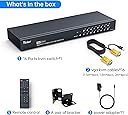
The Yinker 16 Port KVM Switch is a 1U rack-mountable console that enables centralized management of up to 16 servers using one VGA monitor, keyboard, and mouse. Featuring 16 included 2-in-1 VGA & USB cables, 3 USB 2.0 hubs, and dual control via panel buttons or IR remote, it supports resolutions up to 1920x1440 and is compatible with multiple OS platforms including Windows, Mac, Linux, and more. Designed for professional IT environments, it offers plug-and-play installation and reduces cable clutter for streamlined server management.


| ASIN | B097YB33LN |
| Actuator Type | Push Button, Rotary |
| Best Sellers Rank | #11,783 in Computers ( See Top 100 in Computers ) #25 in KVM Switches |
| Brand | Yinker |
| Brand Name | Yinker |
| Circuit Type | 2-way |
| Color | Black |
| Compatible Devices | Windows (10/8/7/XP/Vista), Mac, Linux, DOS, Netware, Unix, Online Games |
| Connectivity Protocol | Vga |
| Connector Type | VGA, USB |
| Connector type | VGA, USB |
| Contact Material | Copper |
| Contact Type | Normally Open |
| Contact type | Normally Open |
| Control Method | Remote |
| Control Type | remote |
| Controller Type | Panel Button/IR Remote |
| Country Of Origin | China |
| Current Rating | 2 Amps |
| Current rating | 2 Amps |
| Customer Reviews | 4.4 out of 5 stars 11 Reviews |
| Included Components | KVM Switch + 16-pack KVM Cables + IR Remote + Power Adapter + User Manual |
| International Protection Rating | IP56 |
| Item Dimensions | 42.9 x 13.5 x 4.3 centimeters |
| Manufacturer | Yinker |
| Material Type | Metal |
| Model | 1601UK-CH |
| Mounting Type | Rack Mount |
| Number of Items | 1 |
| Number of Positions | 16 |
| Operating Voltage | 12 Volts (DC) |
| Operating voltage | 12 Volts (DC) |
| Operation Mode | ON-OFF |
| Operation mode | ON-OFF |
| Part Number | VGA-kvm |
| Specification Met | IP56 |
| Switch Type | 2-way Switch |
| Terminal | Physical |
| UPC | 796042176840 |
| Unit Count | 1.0 Count |
| Upper Temperature Rating | 80 Degrees Celsius |
J**N
Wish I'd bought 1 years ago!
Easy to install, works just as described. Wish I had bought 1 years ago to replace my old PS/2 keyboard and mouse connections.
J**Y
問題無く動作します
問題無く切替動作します。セレクト部、赤のLEDが眩しすぎるのが唯一残念ですが、この価格で適度な長さのケーブルが組み合わせて付属しているのも素晴らしいです。
E**E
Works well
Worked well except one particular cable that didn’t work for some reason. Luckily I had a spare port so had a spare cable. Otherwise I’d have to order a spare cable
R**Y
Control 16 devices/computers/servers with 1 monitor, keyboard and mouse
Basic KVM, rackmount or desktop. Had to remove the pre installed rubber feet to get it in my rack, most would just include them in the bag, but not a huge issue. Have it setup with 5 devices now, will add another 8 later this week.
T**E
Works as described, overall happy with it
This device helped remove a load of clutter from my home lab and has more inputs than I need, which is great for expansion. The variety of cable sizes provided was perfect for me, I appreciate that it comes with a few different lengths. However, there are a couple of ways that this product could be better. If the manufacturer is listening, here's some thoughts on improvements that would warrant a 5 star review instead of 4: 1. All of the buttons are bunched together on the front. This makes it impossible to put a label next to each one. Not the end of the world, I just printed out a key and taped it to the left side but would much prefer if they were spaced out enough to put a label next to each button. There is plenty of room on the front panel if it was laid out a bit better. 2. I wish there was some way to mute the loud beep that occurs when you change inputs. In a noisy data center I see the benefit but in my home lab where I've made an effort to choose quiet devices it's a problem. I'm tempted to disconnect the speaker/buzzer myself and may do so at some point. 3. If I have the power cut to the device, but one of the connected devices is powered on, power is still supplied to the unit. This seems wrong to me, since the unit has it's own power supply. This means it's using power from the connected device's USB port. Perhaps there should be a diode to prevent this? Not sure but again, it just seems wrong... Overall happy with it though as it's a nice upgrade from my previous device with only 4 ports.
Trustpilot
1 month ago
1 month ago