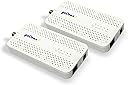
Desertcart purchases this item on your behalf and handles shipping, customs, and support to Panama.
⚡ Upgrade your home network to pro-level speed and zero lag!
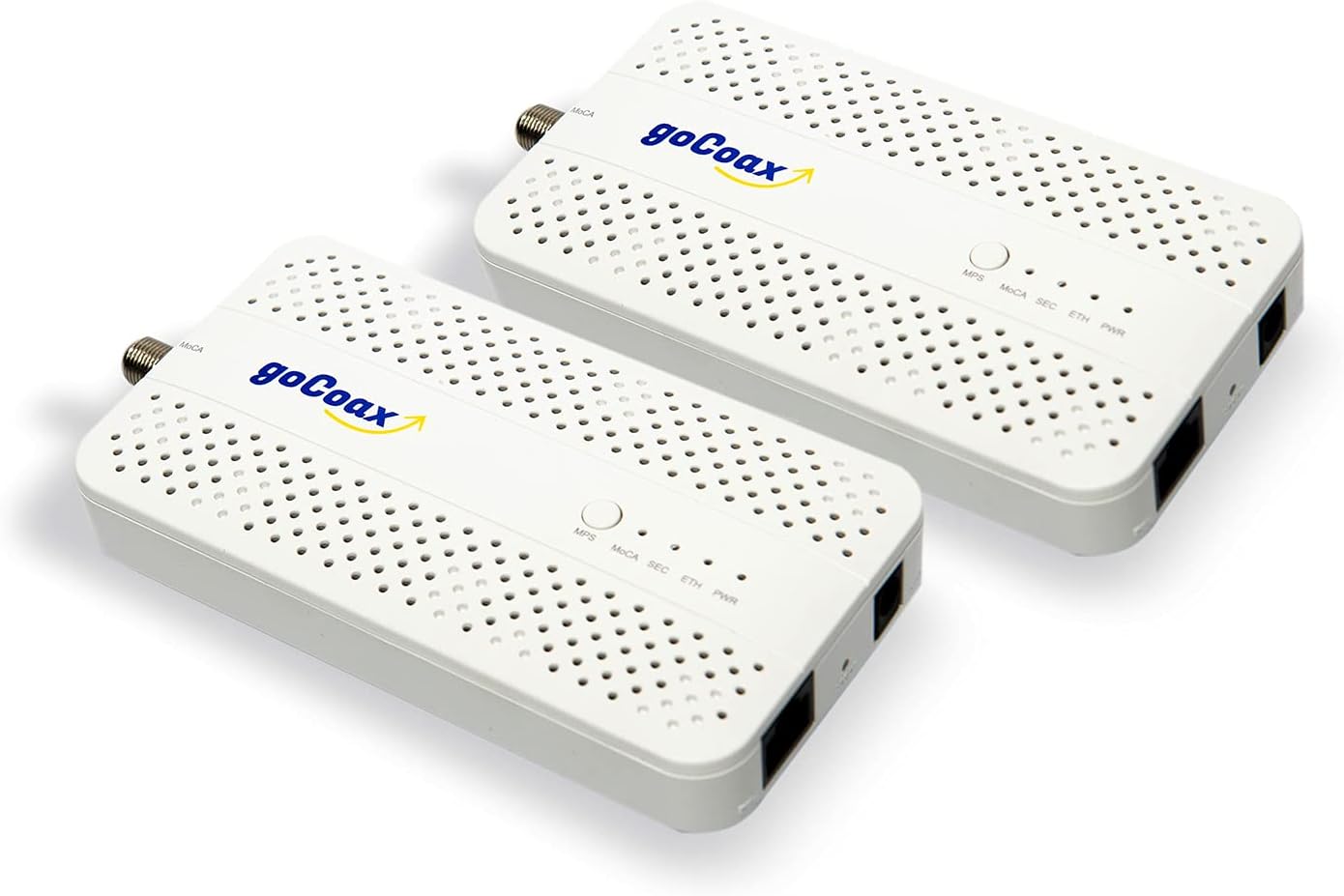
The goCoax MoCA 2.5 Adapter 2-pack leverages your home's existing coax wiring to deliver ultra-fast 2.5Gbps Ethernet speeds with sub-3ms latency. Designed for gamers and 4K/8K streamers, it offers plug-and-play setup with included cables and broad compatibility across major ISPs and devices. Perfect for eliminating WiFi dead zones and creating a reliable wired backbone without new wiring.


| Asin | B09RB1QYR9 |
| Best Sellers Rank | #24 in Computer Network Adapters |
| Brand | goCoax |
| Color | White |
| Compatible Devices | Desktop |
| Customer Reviews | 4.5 4.5 out of 5 stars (630) 4.5 out of 5 stars |
| Data Link Protocol | Ethernet |
| Data Transfer Rate | 2.5 gigabits_per_second |
| Hardware Interface | Ethernet |
| Item Dimensions L X W X H | 5.47"L x 5.47"W x 0.71"H |
| Item Weight | 0.72 kg |
| Manufacturer | goCoax |
| Mfr Part Number | WF-91HG-ZM71 |
| Model Number | WF-91HG-ZM71 |
| Number Of Items | 2 |
| Number Of Packs | 2 |
| Unit Count | 2 Count |
User
Perfect for Verizon FiOS – Keeps TV Guide Working Without Using the FiOS Router
I purchased the goCoax MoCA 2.5 Adapter with 2.5GbE specifically for my Verizon FiOS setup so I could use my own router and still retain full TV functionality, including the program guide and On Demand. It worked exactly as intended.Instead of being forced to use the FiOS router just for MoCA, this adapter provides the MoCA network over my home’s coax while my own router handles the internet. My FiOS TV boxes get guide data, updates, and On Demand services just like they would with the Verizon router, but without the monthly rental fee or network limitations.Setup was very straightforward. I connected the adapter to the coax near the ONT and my personal router, and everything came online quickly. The TV guide populated normally, channel data loaded fast, and there were no issues with DVR or interactive features.The 2.5GbE port is a big bonus, especially on a gigabit FiOS plan. Network speeds are extremely stable with low latency, and it provides a reliable wired backbone across existing coax lines in the house. It’s essentially the best of both worlds: full FiOS TV functionality plus the performance and control of a high-end third-party router.If you want to eliminate the FiOS router but still keep the TV guide, On Demand, and MoCA connectivity for your set-top boxes, this adapter is an outstanding solution. Rock-solid, fast, and a smarter long-term setup for FiOS households.
User
Fantastic, just do your homework beforehand
I'll start this review off by saying I'm super happy with my purchase. Setup took me, an IT professional, about an hour, but that will vary based on your local wiring. My biggest recommendation for any one purchasing is to do some homework first on setting up MoCa and what roadblocks you may run into. Below is a summary of my existing setup and a high level overview of the steps I took to get setup, along with my final thoughts. I include some basic latency testing and speed testing information near the bottom. For anyone interested in the MoCA splitter and filter I used, I have included links below.Background: I use an Asus AiMesh Wi-Fi system in a house built in the late 1800s. Basically every room was added on at some point by a person with some free time and spare lumber, so nothing is to code, or even remotely associated with any other room in the house. I've wanted to run Ethernet throughout the house since I moved in, but due to the inherent challenges of multiple, hard-to-access crawl spaces and no attic, I was left with very little options outside of my office other than a spotty mesh Wi-Fi systemMy goal:Having just upgraded to fiber, I had a house full of unused coax cable. I wanted to send Ethernet over this, and effectively "wire" in my access points. However, I wanted to ensure that if a future owner or myself wanted to return to copper/cable internet, that it wouldn't impact this setup.-- What I bought:- 2-pack of goCoax- 1 pack BAMF Coax MOCA-compatible Coax Splitterhttps://www.amazon.com/dp/B017T9KF1S- 1 pack PPC MoCA POE filterhttps://www.amazon.com/dp/B07SLD9QPH-- How I accomplished it:- OUTSIDE:First, I had to crack open the Spectrum box on the outside of my house. Inside, there were a bunch of disconnected coax runs and a single filter connection coming from the outside line to my internet line, along with another "filter"-type device that had a ground line connected to it. I removed their filter and ground connection, and replaced it with the BAMF 4 way splitter on the "In" connection. I also connected the PPC filter in between the outside line and the BAMF filter (so it looked like line from road -> PPC filter -> BAMF "in" port on 4 way splitter). Finally, and this is super important, I connected the ground wire I had removed from the Spectrum filter/bracket to the new BAMF splitter, which has two spots, one on each side, to connect the ground wire. While a ground wire isn't 100% required, it's very important to preserve your equipment.From there, I connected all of the coax runs I wanted to use to the "Out" ports on the BAMF splitter. I then made sure everything fit in the box and closed it up.- INSIDE:Took a two foot piece of Coax and connected it to the coax wall jack where my access point was. Powered up the goCoax unit, connected the two foot piece of coax to it, and ran the Ethernet line to my access point's WAN port.Where my cable modem was originally hooked up and my primary router was, I hooked up the other goCoax box, powered it up, and ran the Ethernet cable to a LAN port on my primary router.Power cycled my access point and waited.Within a few moments, the Ethernet and MoCA lights both lit up on both goCoax devices, and I ran some ping and speed tests. Was getting my max internet speed at the access point, with zero dropped packets. Pinging another device on my network, I averaged 3-4ms of latency with no jumps. Moved a large file between devices at 100MBps, not quite 1Gbps speeds but way, way faster than my Wi-Fi had been. That access point is now getting the fastest speeds I've ever had in that part of the house with super low latency, and I can use it as a jumping off point for additional Ethernet runs.-- SUMMARY:For $60 a piece, these devices are amazing. They required zero setup in terms of configuration, all plug and play, and the most time consuming part was prepping the existing coax setup in my home by adding the MoCA splitter and filtering the outside line. These two steps for essential for ensuring the coax was actually tied together, and that the MoCA signal was not escaping into the outside line. I have some other coax runs in my home and I'll absolutely be buying more of these goCoax units to equip there. I was skeptical at first, but now I'm a total believe in this product. If you have a house full of coax cable and want to put it to good use, this is absolutely the product to buy!
User
Simple installation and great performance
Installed quickly and easily. My daughter moved into a new apt with an Xfinity setup in a closet. Xfinity provided a router with wifi and the option for cable TV via pre-installed coax cable to the different rooms. We connected one MoCA adapter to the Xfinity router's ethernet jack in the closet, then to the coax cable that fed her bedroom. Then, installed the second MoCA adapter to the coax jack in the bedroom with an ethernet cable to her gaming PC. Yes! Lightning fast >1MB/sec for sweet gaming!
User
Works like a charm, but older homes will need some additional work
TLDR: These do exactly what they said they would do, and I couldn't be happier. For those interested in details, feel free to read on.I own a home built in the 1990's. We moved in 10 years ago, and I purchased my own cable modem and Wi-Fi router at that time. Everything was generally acceptable until I started working from home full-time. We recently cut the cable service, moving to 1 Gbps fiber.Our gateway is on the South wall of the house, on the bottom floor. I upgraded our Wi-Fi router to future proof our home network and make sure we could continue using my NAS device (not supported by the gateway out of the box). Speeds were great throughout most of the house, but our master bedroom and my home office are on the second floor near the North wall of the house. Speeds were unacceptable there, given the recent upgrades.I purchased this 2-Pack to see if I could get the benefit of ethernet through the whole house. Installation was just as expected, but I was unable to get signal. Given that my house has older coax (5.6 throughout), I discovered there were also older splitters and junctions. I disconnected the external line from the line coming in from our old provider, and replaced all splitters and junctions with newer tech (very inexpensive), and now I have 1 Gbps speed ethernet coming directly to our master bedroom. I also managed to repurpose my old Wi-Fi router as an Access point upstairs, so we're getting 1 Gbps wired speed, alongside ~400 Mbps Wi-Fi speed throughout the house now. I couldn't be happier!Just know that if you have an older home, with older cabling, you'll probably need to replace some components to get things up and running.
User
A Seamless and High-Quality Networking Solution
I recently upgraded my home network with the goCoax MoCA 2.5 Adapter, and it has been an absolute delight. The first thing that impressed me was the sheer quality of the product. In the world of networking, where reliability and performance are key, this adapter stands out. It's well-built, robust, and gives off a sense of durability right from the get-go.One of the best aspects of this adapter is its simplicity and effectiveness. It's a 'plug-and-play' device that requires minimal setup. From the moment I integrated it into my network, it just worked flawlessly. There were no frustrating configuration issues or compatibility problems, which is often a concern with network adapters. The 2.5GbE Ethernet port is a notable feature, offering high-speed data transfer that's perfect for streaming, gaming, or any heavy internet usage.Another aspect worth mentioning is the absence of any notable issues. Often, with networking equipment, there might be occasional glitches or drops in performance, but that hasn't been the case here. This reliability is something I truly appreciate, as it allows for a seamless internet experience without the need for constant troubleshooting or adjustments.However, a piece of advice for anyone considering this adapter: make sure to use a high-quality splitter that can handle the 5-2500Mhz range. This is crucial for ensuring that you get the most out of the adapter and avoid any potential bottlenecks in your network setup.In summary, the goCoax MoCA 2.5 Adapter is a top-notch choice for anyone looking to enhance their home network. Its high-quality build, ease of use, and reliable performance make it an excellent investment. Just remember the tip about the splitter, and you'll be set for a smooth, high-speed networking experience.
User
Well worth the money
These moca adapters work well. I can pull about 1 gbps down through them with an older 200 foot coax cable run in between. They do have their issues on first setup. It works best to have them both connected to a small coax cable so it sets up fine. After it worked as it should.
User
Vastly improved my network performance from my downstairs office, 300mbps w/wifi to 2100+mbps w/MoCA
tl;dr - get a coax explorer before buying to make sure you have a solid coax connection between the two rooms you wish to connect. This thing works as advertised with speeds up to 2135mbps achieved on a 2gbps internet plan. Just make sure all portions of your home network can handle these speeds or you'll have a bottleneck to slow you down. I might also update this review later if I purchase a third adapter for another room in the house for a roommate.Longer Review with context:I recently moved into a house I'm renting that has 0 ethernet wallports and needed to find a creative way to wire directly to my service provider's router (ziply). I bought a 2 pack of these and initially wasn't getting a signal through what I thought was a coaxial cable that would lead to a central coax hub back to the outlet in my office. Per the provided troubleshooting instructions, I tested the MoCA adapters by plugging each adapter on to either end of a disconnected coax cable and verified there was no issues with the adapters themselves. With that my worst fears were confirmed and I found that the coax cable I was hoping lead to my office was actually to the cable box outside. There were also 4 other cut coax cables in my network closet by the router upstairs which I've now assumed are home runs to each different coax port. I popped on over to home depot, got a "Coax Explorer 2 with Remote Kit" for testing and a "Coax Cable Installation Tool Set" in order to turn those cut wires into functional ones. NOTE: I'd highly suggest getting at least a Coax Explorer BEFORE buying this to test the coax connections you wish to connect to the adapters. Once I had working cables it was very easy to track down the correct cable to the correct outlet and BOOM my MoCA adapter was working perfectly! Reading all these reviews I didn't expect more than 1000mbps over one of these, however I was able to clock speeds up to 2100mbps which is at capacity for what I'm paying ziply for which is an advertised 2gbps. My roommate was so impressed they may also get an adapter to hook up their room. I'm still unsure if there will be any interference as I think these cables are just long coax cables run through the walls (not terminating anywhere to cause interference aka home run) but i've obviously been wrong before haha.I've attached a couple screenshots to this review. The first should be just a speed test while using the MoCA Adapter, the other is my speedtest history showing my switch from my Wi-Fi 6e Adapter to this wired connection setup. NOTE: You will only be able to get speeds over 1gbps by connecting to the interface on your router that is rated for faster than 1gbps. My router in particular has a 10gbps interface that I am connected to over the MoCA Adapter. You also need a network adapter capable of handling these higher speeds. You can find if your adapter has the capacity by opening the system information portion of windows. As you can see by my last screenshot, my Network Adapter can handle up to 2.5gbps.Overall I'm super happy with this purchase and the product itself has no issues. I'd say my headaches were entirely my fault due to a lack of preparation. I highly recommend this product if you've got a solid coax connection that can make it to your router.
User
Rock-solid reliability and speed – exactly what I needed!
I purchased these GoCoax MoCA 2.5 adapters on January 31, 2026, after struggling endlessly with a competing brand. The other adapters worked just long enough to get a connection, but they would drop within five minutes, requiring a manual reboot every time.I decided to switch to GoCoax, and to my surprise, they have been fantastic.I currently have Spectrum internet (500–600 Mbps down and 20–25 Mbps up). I am using this setup in a separate room from my router, and I get the full speeds I am paying for over the wired connection.The best part is the reliability. I installed them on January 31, and as of May 5, I have not had to reboot the devices a single time. They have been running flawlessly.Important Tips for BuyerBuy Splitters Separately: Keep in mind that these adapters do not have a built-in splitter or secondary coax port like some competing models. If you need to split the coaxial line, you will need to purchase MoCA-compatible splitters separately.Great Value: Despite having to buy the splitters, the low cost of the adapters themselves makes this a fantastic deal.Bottom line: If you are looking to build a reliable MoCA network in your home, the GoCoax MoCA 2.5 adapters are perfect. Highly recommended!
User
Die Lösung
Um WLAN im ganzen Haus (massiv, Stahlbetondecken) verfügbar zu machen habe ich jahrelang mit Repeatern und DLAN experimentiert, eher wenig erfolgreich und sehr schwankend von der Signalqualität. Dann nutzte ich die vorhandene FM-Verteilung, um mit mehreren Access-Points auf den Etagen zu arbeiten. Die Signalqualität hat sich verbessert, aber der Datendurchsatz war aufgrund der verbauten CAT5-Kabel auf 100mBit/s begrenzt. Bei einer Renovierung fielen mir die alten, seit Jahren ungenutzten SAT-Dosen ins Auge und die Frage stellte sich: könnte man vielleicht...?Bei den bekannten Elektronikspezialisten bin ich zwar fündig geworden, aber dort handelte es sich hauptsächlich um Geräte, welche einen Breitbandfilter/-splitter integriert haben und dadurch recht kostenintensiv waren.Schon eigenartig, dass es wohl nur dieses amerikanische Produkt gibt, aber gesehen und bestellt. Die passenden Steckeradapter gleich dazu, da auf den Fotos klar das Netzteil mit US-Stecker zu sehen war.Der Rest ist plug & play. LAN-Kabel vom Router zum goCoax, dann COAX-Kabel am Multischalter ab- und an den goCoax angeschraubt, Netzteil eingesteckt. Im Wohnzimmer mit beiliegendem COAX-Kabel an die SAT-Dose und den goCoax, AP per LAN-Kabel angeschlossen, Netzteil eingesteckt und Injektor des AP mit Spannung versorgt.Die Verbindung kam in Sekunden zustande und es stehen jetzt die vollen 400Mbit/s vom Router stabil zur Verfügung.Inzwischen kam noch ein Switch hinzu, um die Geräte im Heimkino direkt mit LAN zu versorgen.Ich bin begeistert und empfehle gerne weiter.
User
Great
This is a great item for people who dont have a waiting wall conduit or a lan outlet. Seller was also helpful with the shipments. Worth the price
User
Worked perfectly in the UK
I live in the UK so there was a risk that my coax cable wouldn't be high enough quality to support MoCA very effectively. I decided to take the plunge anyway and thankfully it paid off.These worked perfectly to get a wired network up into the loft. I have a 900 Mbps fibre connection to the house and the coax seems to cope with that just fine. I've not bothered testing higher speeds because most of my network equipment is rated for gigabit ethernet.Note that you will need to buy plug adaptors, but the devices support UK voltages so no need for transformers.
User
These work great, with a couple minor hick-ups.
These are well built and very easy to install. Once plugged in, the indicator lights will let you know that there is a signal. I have one downstairs in our server room and two in other locations throughout the house (three stories). The signal is strong and I get the odd random hick-up like it has dropped signal. They don't happen very often so it's not a huge concern. Overall, this is an excellent product.I have gig internet and my computer gets between 950-1000 on a direct ethernet connection. With these, I am usually around 500-600 in the same area.
User
Sehr gut! Würde ich weiterempfehlen
Die Übertragung funktioniert tadellos. Eine Einrichtung war gar nicht nötig. Einmal anstecken und die beiden Geräte hatten sich gefunden. Ein Gerät hängt an dem Router, das Zweite an einem WLAN Repeater. Überdenken repeatwr können wir verlustfrei auf die gesamte Bandbreit des Internetanschlusses zugreifen.Top Produkt!
Trustpilot
3 weeks ago
4 days ago