Desertcart purchases this item on your behalf and handles shipping, customs, and support to Panama.
โจ๏ธ Elevate your typing game โ comfort that keeps you ahead!
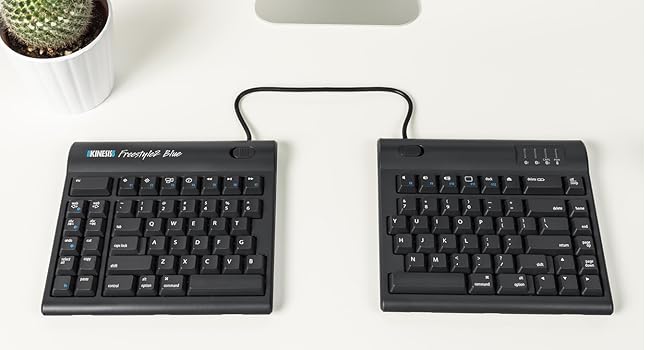
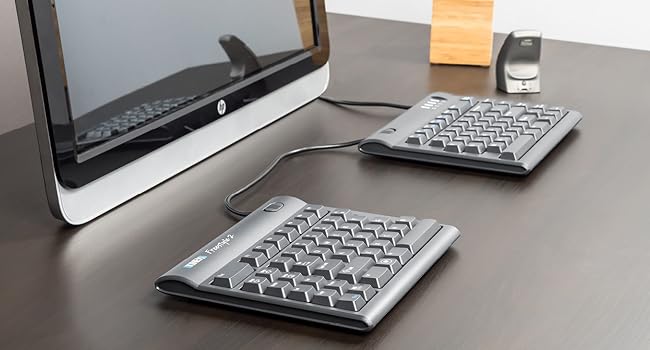
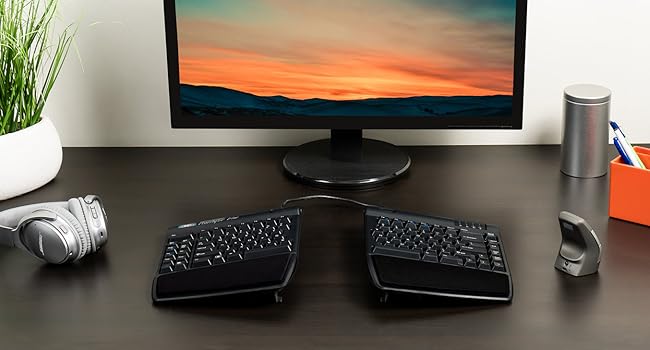
The KINESIS VIP3 Tenting Accessory transforms your Freestyle2 Ergonomic Keyboard with three adjustable tenting angles (5ยฐ, 10ยฐ, 15ยฐ) and integrated cushioned palm supports, promoting neutral wrist positioning and reducing repetitive strain. Compatible exclusively with all Freestyle2 models, this lightweight, precision-fit add-on enhances ergonomic comfort for programmers, typists, and office professionals seeking healthier, more productive workdays.


| ASIN | B008BVNQW4 |
| Additional Features | Ergonomic |
| Antenna Location | Programming, Typing, Office Work |
| Best Sellers Rank | #661 in Computer Keyboards |
| Brand | KINESIS |
| Built-In Media | Left and Right v-Lifters, Palm Supports, Cushioned Pads |
| Color | Black |
| Compatible Devices | Freestyle2 keyboard |
| Compatible Operating System Family | Linux |
| Connectivity Technology | Freestyle 2 |
| Customer Reviews | 4.5 out of 5 stars 915 Reviews |
| Enclosure Material | Plastic |
| Global Trade Identification Number | 00607998820001 |
| Hand Orientation | Ambidextrous |
| Item Dimensions L x W x H | 9.75"L x 2.75"W x 2.75"H |
| Item Weight | 8 ounces |
| Keyboard Description | A split, low-profile keyboard with a separate number pad and cushioned palm rest, specifically the Freestyle2 Keyboard. Keyboard Description A split, low-profile keyboard with a separate number pad and cushioned palm rest, specifically the Freestyle2 Keyboard. See more |
| Keyboard Layout | QWERTY |
| Manufacturer | Kinesis |
| Mfr Part Number | KIN-FS-VIP3 |
| Model Number | KIN-FS-VIP3 |
| Number of Sections | 6 |
| Power Source | USB power |
| Recommended Uses For Product | Programming, Typing, Office Work |
| Special Feature | Ergonomic |
| Style Name | Tenting with Palm Supports for Freestyle2 |
| Total USB 2.0 Ports | 1 |
| UPC | 607998820001 607998720011 |
| Unit Count | 1 Count |
H**.
Excellent ergonomics, much cheaper than doctor appointments
I type all day, every day. I got repetitive stress injury in my wrists from bad typing posture on a godawful generic keyboard. Then I got a Microsoft Ergonomic Keyboard (the 2012-3 model), which ultimately traded one injury for another: my wrist RSI went away, but in exchange I got RSI in my thumb from the VERY stiff spacebar of the Microsoft Ergonomic Keyboard. (Over the course of 2 years, I probably pressed that spacebar a million times. Once per word....) Microsoft's keyboard is a lot cheaper, until I add the cost of the doctor's appointment plus a thumb brace I had to wear for a while. (Could've been worse if I'd have kept using it...stiff keys on an ergonomic keyboard is a BIZARRE design decision, Microsoft. I hope their latest model is softer.) Anyway, the Freestyle's keys are much softer, my thumb RSI went away. That alone was worth the price. It's much better for my wrists than Microsoft's was too, because it's so adjustable. It's a lot smarter (and cheaper) to be able to adjust your keyboard's width, height, etc, than adjusting the dimensions of the furniture around you! (The height of your office chair elbow rests, the spacing of your elbow rests, the height of your desk....) I tend to use it widely spread apart, so it's the same width as my shoulders, and my arms are straight. But I also change it from time to time, just based on whatever's comfortable in the moment, and I suspect that's ergonomically helpful, being able to adjust positions all the time. This keyboard never locks you in any one position. Been using it over a year now, no problems at all. Just plug it in and it works.
P**P
An essential addition to the kinesys freestyle2 keyboard.
The quality of the plastic moulding is excellent. The precision of the fitment is the best I've seen - think LEGO. There are three tilt positions and personal preference will determine which is best for you. I had it on the highest (to relieve excessive pronation) for a while but lately I've changed desks and seating arrangements so am trying the 'flatter' setting . You cannot lock the lifters into position so if you bump the keyboard hard enough the legs will fold into a lower position - doesn't every keyboard do that? If you tend to adjust your keyboard position a lot you have to remember to lift the whole keyboard and put it down you can't just shove it across the table in its highest position or the legs will fold. That's because the rubber feet on those legs are quite tacky which ensures the keyboard stays exactly where it is while typing. The wrist wrests work well and support the weight of my manly wrists perfectly. They come with a stick on gel strip so that overall the wrist is in a good neutral position. if you're looking for a lot of elevation from the wrist wrest then you will need to tilt the whole keyboard, eg using an articulated pull out keyboard tray for example.
T**O
VIP3 tenting is perfect addition to Freestyle 2
I first didn't like the Freestyle 2 (for Mac) as much as my more expansive, Kinesis silent mechanical keyboard that sits in a desk keyboard drawer - however, once I attached the VIP3 tenting accessory, wow, the Freestyle 2 keyboard is really, really comfortable. I have the tenting at the lowest angle and the palm rests are perfectly positioned under my palms with perfect finger extension - assuring consistent hand placement. I chose not to attach the included padding, preferring the slight texture provided by the plastic rests (my wrists stay in place with minimal effort to otherwise slide about in reaching for the more distant keys. I feel this is a required item to make the Freestyle 2 perfect. Amazon was great, too. Upon arrival, one key pad would not securely attach; after some guidance failed, Amazon quickly sent me a new set that perfectly fit.
J**W
Plastic? I don't need no stinkin plastic! Okay maybe I do.
I feel that this kit is a definite must buy when buying the Freestyle keyboard. With a split keyboard design, unless you buy 2 mouse sized rests, you're going to have a hard time finding wristrests that properly support your hands. And proper hand support means supporting the heel of your hand, not your wrists themselves. Putting pressure on your wrists will put pressure on the carpal tunnel and will actually aggravate the tendons and nerves in the tunnel, making your symptoms worse. You want to support the heel of your hand on the squishy part. This kit does a good job of that w/ built in wrist supports and a stick on soft layer. I do have some issues with the kit though. First off, it's way expensive for what it is. I feel like it should be $25 or so. It's just a prop-up kit, and wrist rests made of plastic. But I understand that they probably don't move as much inventory as Microsoft and other companies, thus the price. Another issue is that the stick on soft layer is sort of like a neoprene layer, so I imagine it'll get dirty, and probably harbor lots of bacteria if you have sweaty hands. I don't have sweaty hands, so it's not much of an issue, but I can imagine it getting pretty funky if you do. I think it would've been better to have a non-porous soft material that could be cleaned by wiping it off. The feet on this kit aren't very grippy either, so the keyboard has a tendency to move day to day. Not too big of an issue, but for the price, it should grip better. All in all, I think the keyboard needs this kit with it, but I gave it 4 stars because of the stuff mentioned above.
A**R
Perfect accessory for the Freestyle2 keyboard
This tenting lift accessory has made the Freestyle2 keyboard the perfect choice for my arthritic wrists. Assembly and charging is very easy, and the variety of positions and angles you can adjust the keyboard to is amazing! If you buy the keyboard, I highly recommend the lift kit. I have the keyboard split about 6-7" apart which leaves a good gap in between for my mouse.
T**R
Canโt use on multiple computers concurrently but still a great keyboard
I am working from home and have my work computer next to my personal computer. I was hoping this keyboard would let me work on one computer then switch to the other then switch back, but you can only have one computer on at a time - toggling the buttons to switch to the other computer while both computers are on doesnโt work,and thatโs what I was expecting. But if one computer or the other is off, then it switches just fine. I like having only one keyboard โ saves space! โ and not having to switch USB cables from one computer to the other and I like having one less chord to get tangled up in. The keyboard has a nice feel too. I would buy this again.
S**S
A must-have for the split keyboard for better ergonomics
I am glad I opted for the somewhat pricey add-on tenting for my split keyboard. My split keyboard was purchased to help me keep my shoulders relaxed with wider spacing than the conventional single keyboard gives a person. I bought 20" cord version instead of the 9" version. However, without the tenting add-ons, the keyboard is going to be flat just like any other keyboard, and our arms are not naturally laid flat on a surface when we sit. When we relax the arms on a tabletop or desk, we naturally roll our wrists slightly toward the outer wrist bone. That slight movement outward relaxes muscles and tendons that we otherwise stiffen in order to keep the hands flattened. With the tenting add-ons, the keyboard has that slight tilt I need (on the lower setting) that allows my whole arm, all the way to the shoulder and neck muscles, to rest. No tension to build up in my shoulders and neck from sitting in an unnatural position. Ergonomics, body mechanics, is very important. The slightest changes toward a natural position for all-day sitting at a desk can really make a big difference. Side note: My arms, shoulders, wrists, neck are benefiting from the few things I've done to alter my desk and chair positioning. I bought a footrest and a lumbar support in addition to the keyboard and tenting pieces. All of those things have made a world of difference for me.
S**O
Overpriced and works 80% of the time - but falls over often
Its frustrating this overpriced piece of plastic is a required add-on for the Freestyle Keyboard to become ergonomic. For some reason, the design does not allow the various angles to lock into place, so it can, and sometimes does fall over. The only point of this product is to keep the keyboard at a steady angle but it doesn't even do that consistently! The design isn't horrible though, and works well about 80% of the time - which I'd tolerate if it came with the keyboard or cost $10. Its nice that the VIP3 can easily and quickly connect and disconnect for portable transport though. Easy to assemble and disassemble. Hey Kenesis - if you are listening, have the angles lock into place and the cost would almost be justified. This is a mechanical engineering and design choice issue. Its not rocket science but it appears the lack of adequate competition has resulted in a product that is just OK. Potential wasted. The VIP3 and its Keyboard is one of the better ergonomic systems on the market, but that's not saying much. Sad, but true. On a minor note, I did find thorough research that the best ergonomic position for keyboards is horizontal (tenting) and vertical (negative tilt). The VIP only allows for tenting. Most keyboards do not do both at the same time, but the VIP can't do negative tilt at all.
A**ใผ
ใชในใใฌในใใฏ็ขบใใซใใฃใๆนใ่ฏใ
ใชในใใฌในใใฏ็ขบใใซใใฃใๆนใ่ฏใๆฐใใใพใใใๅพๆใไปใใ้จๅใฏไบบใซใใฃใฆใฏไธ่ฆใใ็ฅใใพใใใๅพๆใใคใใใจๆ้ฆใฎ่ช็ถใช่งๅบฆใไฟใใใใฎใงๆฅฝใชๆฐใใใพใใใๅ็ใชใกใชใใใฏใใใปใฉๆใใใใชใใงใใๆๆ น็ฎก็ๅ็พคใจใใๆ้ฆใๅทใใฆใไบบใฏๆกๆใใใ่งๅบฆใซๆใไฟใฃใฆใๆนใ่ฏใใใใงใใฎใงใใกใชใใใๆใๆใใใใใงใใ ๅพๆใใคใใฆไฝๆฅญใใใฐใใใใฆใฆใใ็ตๅฑไธ็ชไฝใ็ถๆ ๏ผ้ซใใฎใไฝใใฎใๆใใใใใ ็ถๆ ๏ผใซๆปใใฆไฝฟใฃใฆใๆ้ใ้ทใใงใใ
K**I
Its is a very comfortable product.
The stands are very helpfull and non slip. Do a good job of reducing carpel tunnel.
B**K
Essential addition for a Kinesis keyboard
This is not an optional extra but essential addition to the Kinesis keyboard, please factor this into your purchase of a Kinesis keyboard.
J**S
If you have a Kinesis Freestyle2 Keyboard, these are REQUIRED.
Let's not mince words. Kinesis left these OFF their keyboards because some workplaces may want to buy the Keyboard, but don't want to put the extra money into genuinely making them Ergonomically Sound, unless there are complaints. So, to keep more corporate clients happy, they sell the keyboard without the tenting or palm rests. This VIP3 kit is THE ONLY way to get your keyboard to work the way YOU need it. Just putting them on, and laying the legs flat, you get a 5 degree tent. Comfortable for those who aren't quite so damaged by the ancient forms of keyboard that hurt your carpal tunel injuries. Raise the smaller leg plate, you get 10 degrees of tent. This is what the past 25+ years of Ergonomic Keyboards tented at, back when they were single boards. This is where most of us will feel completely comfortable, and type at our fastest. Now flip up the LARGE flap to a vertical position. Welcome to 15 degrees Tent. This is where you're headed if you have severely damaged your wrists and shoulders from typing for long periods of time. This is the most extreme this keyboard tenting set goes to. If you need more than this, you have some serious damage to your hands, and need a special kit... Which Kinesis DOES make, but this isn't it. Overall, there aren't enough stars for this product. There should be absolute underlines that this is necessary for all Kinesis Freestyle2 family keyboards. The price? Does it scare you? It shouldn't. This kit doesn't just provide you with some legs or some comfort... it's the complete set of adaptation devices required to turn a Freestyle2 model Keyboard from a simple split keyboard, into a full-blown ergonomic therapy device. Palm rests, palm PADS to soften the time your hands rest there, (these are replaceable as well, which is good to know.), and the full range of tenting angles you need when you first encounter your need for repetitive stress disorders from typing. These are not an optional product. Are they sold separately? Yes. But if you got into the split key keyboards for ergonomics, you're going to genuinely hurt until the VIP3 kit is installed. If you're a gamer who just wanted a flat keyboart that operates at shoulder distance... hey... Go ahead and skip these, because the Kinesis brand split keyboards are fantastic for this. Writer? Accountant? Just plain old do a lot of typing? You're GOING to end up encountering a Kinesis board you fall in love with. You are GOING to be faced with Freestyle Pro or Freestyle 2 families. Freestyle2 is thinner, lighter, and there are more models for what you may need. If you go Freestyle2, like I did, there are no options. Get the VIP3 WITH it. Your wrists, shoulders, knuckles, and fingertips, will thank you. And within' minutes? Your typing speed will go through the roof compared to how fast you typed while in pain.
S**A
These are good
Makes the keyboard more functional
Trustpilot
1 month ago
3 days ago