🚀 Power up your productivity with ultra-fast, reliable USB expansion!
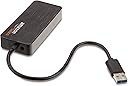
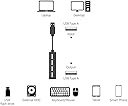
The AmazonBasics HU3641V1 4 Port USB 3.0 Hub delivers four super-speed USB 3.0 ports with up to 5 Gbps data transfer, backed by a 5V/2.5A power adapter for stable charging. Its auto-switching power modes and compact design make it an essential upgrade for professionals needing reliable multi-device connectivity and fast data handling in a sleek, modern package.
| Additional Features | Powered |
| Asin | B00DQFGH80 |
| Best Sellers Rank | #8,801 in Our Brands (See Top 100 in Our Brands) #2,303 in USB Hubs |
| Brand | Amazon Basics |
| Built In Media | Ac Power Adapter, Amazonbasics 4 Port Usb 3.0 Hub, Instruction Manual, Usb A To Micro Usb Adapter |
| Color | Black |
| Compatible Devices | Tablets |
| Customer Reviews | 4.3 4.3 out of 5 stars (4,503) 4.3 out of 5 stars |
| Data Transfer Rate | 5 gigabits_per_second |
| Enclosure Material | Plastic |
| Global Trade Identification Number | 00841710104851, 00841710158380 |
| Hardware Interface | USB, USB 3.0 |
| Item Weight | 5.76 ounces |
| Manufacturer | AmazonBasics |
| Mfr Part Number | HHU3641V1SZPR00 |
| Model Number | HU3641V1 |
| Number Of Items | 1 |
| Number Of Ports | 4 |
| Operating System | Windows Vista |
| Total Usb Ports | 4 |
| Unit Count | 1 Count |
| Upc | 841710104851 841710158380 |
| Warranty Description | 15 months |
User
Great hub for what I need.
If you need more USB ports than you are able to access on your computer, this is a great product for you.I run programs that require an iLok license USB key. The iLok takes up a lot of port space on my MacBook Pro, so if I need to plug in another USB device, it needs to be low-profile or it will not fit. This hub solves my problem. I can move my iLok to the hub and keep other USB devices such as my external hard drives or interfaces plugged directly into the computer. The USB Hub has four ports so you can put four USB devices into the port and all four of those devices will go into one USB port on your computer.The Amazon Basics USB 3.0 hub does support USB 3.0 speeds – up to 5Gbps. You can run any compatible USB device on the hub and it will support it. It is backwards compatible so any other USB devices you need to run will work with this product.The USB hub is also powered. Because it is powered, it means that the USB port on your computer isn’t powering four devices at the same time. This is a great feature if you are running devices that require quite a bit of power to operate. It can charge your phone (I have done so many times), but it doesn’t supply enough power to charge a tablet.The hub is pretty sturdy. I have been using it for a little over a month, and it is still working perfectly.While the hub is $18, this is a pretty comparable price when you look at other powered USB hubs. I don’t need more than four USB devices to be plugged in at the same time, so this was a great product for what I needed. Other products have way more ports that I needed, and I didn’t want to pay for more ports that I wouldn’t use.There is only one con with this product. The cable from the hub to your computer is a little short. However, this is easily solvable with a USB extender. I have not used an extender but if you need more length, you may want to consider your options.All in all, this is a great product for what it is intended to do.
User
Surprisingly works as expected
I am surprisingly very happy with this product. I was very wary of purchasing an Amazon-branded electronics product...Amazon isn't typically the brand I look for in electronics, or for any product for that matter! I ended up buying the Amazon brand over other hubs because of its ability to use either USB bus power or AC power, which is convenient if you own a laptop and plan on using the hub away from the desk at times. Some hubs are only USB bus powered, but techies caution against these hubs since it puts a strain on the computer.The hub is entirely plastic, except obviously for the electronics components, so it is susceptible to cracking if you are clumsy with it. Otherwise, it does not look cheap. It has a nice decal on the top (almost looks like a wood finish).The functionality is as expected. It seems to maintain USB 3.0 speeds but it also works on USB 2.0 (and 1.0, but I do not have a 1.0 computer to test it on).If you have it hooked up to AC power, it will keep your devices powered even when disconnected from the computer. This could be handy if you wanted to use it to charge your phone, etc. It does warn you that it may not charge some products (probably tablets). I have not used it for these purposes, though, so I cannot vouch for this. It is probably BEST to always charge your products with the original charger, as you might put a strain on this USB hub since that is not its intended purpose.It does have a limit for how much power it can provide. Some powered USB devices require to be plugged directly into a computer. One specific device like this is the Apple Superdrive. It is notorious for not working with USB hubs. Some hubs provide enough power for it to work, but the AmazonBasics hub does not (even when connected to AC). Therefore, if you have a USB bus powered device, check that it doesn't require to be plugged directly into the computer. If it does, it may not work with this hub.
User
Nearly perfect!
Initially, I bought this for my laptop, since it only had one built-in USB 3.0 port. Setup was easy, and it works almost flawlessly.'Almost', because sometimes it has issues recognizing items that are already plugged into the hub when the laptop is booted up. The wireless mouse hub is slow to be acknowledged, and my USB microphone [Blue Yeti Pro] has to be unplugged and plugged back in to be used. MOST devices I plug in are recognized immediately, and transfer times are blazing fast. Your mileage may vary with items that are already plugged into the hub when you boot up your device. It could be a Windows thing, or maybe even an issue specific to my laptop. Since I can't be sure if it's 'me' or 'it', I dinged the hub for one star. If not for that, it'd be a five star product for certain.It also makes a great hub for multiplayer Rock Band on my Xbox 360! My original Rock Band USB hub died a few years back, and I just never bothered to replace it. So, really, having two usages for the hub is just a bonus!In summary: If you don't need a lot of extra USB ports, but you absolutely need them to be USB 3.0, this is a great option!
User
This is my second USB hub, and my first ...
This is my second USB hub, and my first USB hub that is powered. I purchased this product entirely out of necessity as my computer is having serious issues, including multiple cracks in the screen and I have been unsuccessful connecting an external hard drive directly into it. This USB hub did exactly as advertised, which is exactly what I needed of it. I was able to connect an external hard drive, two USB flash drives, and charge my phone simultaneously while backing up my computer at USB 3.0 speeds. The only similar product I could find locally in a brick and mortar retail store was priced approximately $10 more than the Amazon Basics USB hub, and with Prime shipping, it was worth it.The included power cord was long enough to reach an outlet halfway across my living room and does the job it needs to. Everything is small enough to pack and take on the go for the regular traveler, as well. Overall I am very impressed with the quality that the Amazon Basics hub was able to provide for the price as it compares to the other similar products available on the market.This USB hub was tested on a system running Windows 8 (64 bit) and was able to connect a 1TB Western Digital My Passport portable hard drive and two 16GB flash drives with no problems.I intend to continue to use this product going forward and will continue to test the product with multiple devices to determine its durability and will update as necessary.
User
Great addition to the PS4
So I bought this one to use in conjunction with my PS4. The two ports there are just too limiting and I wasn't about to trust a simple non powered USB hub to do the job in which I was about to put this one in charge of. So once the hub was in hand I mounted underneath my desk using some 3 mm double sided tape and ran AmazonBasics USB 3.0 Extension Cable - A-Male to A-Female - 3.3 Feet (1 Meter) to my PS4. Now I have a Logitech G710+ Mechanical Gaming Keyboard with Tactile High-Speed Keys - Black, a Blue Microphones Yeti USB Microphone - Blackout Edition and a cable to keep my ASTRO Gaming A50 Wireless Headset charged. Keep in mind that I run the charging cable to the headset and still have the receiver plugged directly into the PS4, otherwise it will keep on beeping every few seconds forever and ever. I have a small cable connected to the extra USB plug in the keyboard for charging the controller in case of desperate need. All of that thanks to this simple and small hub. Definitely recommend this one to anyone that has a lot of peripherals that need to be connected to your PS4 console and to any other device. Will be buying another to hook up to my PC and mount it up front with ports facing out underneath my desk for easy connection for my phone, thumb drives and what not instead of using the ports on the pc case.
User
Works alright. wouldn't recomend it as a powered hub
I have been using it as a easily accessible USB port set for my computer. I had originally bought USB cables to extend the range of the cords of things that were hooked into it.When It had a keyboard and mouse plugged into it I used it to format installation media for my computer. I spent about a week in a half reformatting my computer. The USB hub had no trouble accessing the flash drive to reformat it and write the new installation media to it. I also used the HUB as connection for a backup external hard drive for transferring the old data files back onto the computer after the new OS install.The only issue I had was when I used the hub as the access port for the installation media. The Computer could pick up the Flash drive and install the OS off of it. The computer didn't always recognize the HUB in time to be able to select the flash drive connected to it as a boot device.I have settled down to one OS again. I now have a keyboard, mouse, headphones, and controller hooked to it at all times. That maxes out its ports. It isn't having any issue with it.I am glad I bought this when I did. One of the USB ports on my Tower case went out. This easily takes its place and more.update (20180205): it is still working fine. i have been using it almost constantly since i bought it. biggest issue i have ran into is the power cord keeps coming loos from the adapter. just the littlest movement of the hub will cause the cord to pop loose from it.
User
Compact, nice long power cord, great design, great price
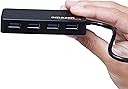
I wanted to set up an external display for my Mac with webcam and a USB port for a headset. To keep it clean I was looking for a small, powered hub I could velcro to the back of the display. This fit the bill perfectly.I've bought quite a few AmazonBasics items and the quality has been consistently high. Their design is utilitarian, sometimes a big clunky but effective.I like that the four ports are all along one side; makes them easy to reach from the side of the display. The power adapter cord is plenty long to reach down to my battery backup; probably 5' or so but I did not measure it.The only "drawback" is that the USB pigtail is fixed, so rather than just using a long A-B USB cable it was necessary to get an A-male to A-female USB extension cord. Not a terribly big deal but it meant buying one; I have tons of long A-B cables just sitting around but no extenders of adequate length.For my purposes USB 2.0 would have been fine but the price was right on this USB 3.0 and it lets me use a USB 3.0 thumb drive or other device without having to plug it into the Mac directly.
User
Caution, I ran into CRC errors when using this hub!
I love Amazon and hate to one star one of their products, but I have encountered a serious issue with this USB hub. When attached to Western Digital 3TB Passport Portable USB drives, during spinup after the drive was asleep, it appears to throw CRC errors. These errors have the potential to corrupt your hard disk data.Linux Kernel- 4.10.16-200.fc25.x86_64...May 25 22:09:21 media kernel: sd 4:0:0:0: [sdd] tag#0 FAILED Result: hostbyte=DID_OK driverbyte=DRIVER_SENSEMay 25 22:09:21 media kernel: sd 4:0:0:0: [sdd] tag#0 Sense Key : Aborted Command [current]May 25 22:09:21 media kernel: sd 4:0:0:0: [sdd] tag#0 Add. Sense: Information unit iuCRC error detected...It threw these errors for all four drives attached at the same time, on multiple occasions.I run ZFS and once this happens, the pool gets corrupted and needs a scrub. Pending I/O to the pool hangs until the drives are reset.Yes, I was using the included 5V adaptor in both cases.Yes, after it happened the first time, I swapped in a second Amazon Hub that I had, and it happened there as well.The CRC error has never happened before with other hubs, and it hasn't happen since I stopped using the Amazon hub.The reason why I switched to this hub was to get better performance out of my USB drives. I was getting in the 50MB/sec read range before using this hub, and using this hub I was getting >200MB/sec across the four drives. A great improvement showing how this hub does out perform other USB 3.0 hubs. Unfortunately, the idea of data being corrupted is unacceptable, and I am now looking at other options.It is possible if your drives never go to sleep that you will not hit this issue. It is also possible that this issue is a strange interaction of the hardware I am using, the drives I am using, and the hub, and does not happen in other combinations.I posted this review because I run ZFS and do frequent backups and was able to catch the corruption without any data loss. Others may not be so lucky, so I wanted to share my experience as a cautionary tale.
User
Powerpoint plug not compliant
Returned as powerpoint plug not AU/NZ compliant
User
Mouse, printer, phone, Ext HD, all worked without power!
I bought this for my Dell XPS 13 (L321X) 2011. One of my 2 USB ports stopped working so I needed that USB Hub.I was able to use my Dell wireless mouse and my WD Passport external HD without any problems. I could read the 4K videos on my HD as if I was reading the same vids directly from my laptop, with no noticeable difference. As my laptop can't even read 1080p 60fps at full speed, I have to slow down the videos to be able to read them properly, and I could read them at the same speed I usually do on my laptop.I added a printer and a phone. My phone was charging and my printer was usable. I could still use my mouse and my HD.And the USB hub was not even powered!The item is very light but looks like good quality, especially for a powered USB 3.0 Hub at that price! I just received the item so I can't say anything on durability but I have high hopes.I would definitely recommend this item!
User
Excelente producto y precio
Funciona de maravilla, llegó en tiempo y forma en empaque original. Es diseño es compacto, ligero y muy elegante. Viene con un elimimador de baterías por si se requiere voltaje extra. Llevo meses usándolo conectándole una tarjeta de audio externa, 2 discos duros externos y un mouse y teclado inalámbricos y jamás ha fallado ni ha tenido problemas de transferencia de información. El precio es muy bueno para algo de tan buena calidad
User
Excellent powered hub that fixed WMR issues I was having.
I bought this powered hub while searching for a fix to the loud static noises and loss of tracking that I was experiencing on my Samsung Odyssey+ WMR headset. For a lot of users, when adding an extension cable even as short as the AmazonBasics 6' cable I was using they may experience a number of different issues. This is caused by the lack of voltage over the USB cable whether it be from a weaker USB port or through the use of an extension cable. In my case the issues that were introduced by using a extension cable were solved by adding this powered HUB however this was only when setup up a certain way. I have to run my extension cables from my computer to the powered HUB and then to my WMR headset. If I place the powered hub between my motherboard USB port (ASUS Maximus IX Hero) and extension cable I still have issues. For many people, having to run a 120V extension cord to the powered HUB which sits 6' away from my computer is not possible AND I've read of some users that this did not solve their issues. In my case it did and I highly recommend this product because of that.
User
Does not come supplied with and AUS suitable power supply
Had potential for what i needed, but no UAS power supply was a bummer
Trustpilot
1 month ago
3 days ago