Desertcart purchases this item on your behalf and handles shipping, customs, and support to Panama.
๐จ Elevate your digital canvasโcreate, edit, and impress without limits!
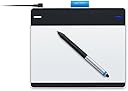
The Wacom Intuos Pen and Touch Small Tablet (Old Version) is a compact, highly responsive graphics tablet featuring a battery-free pen with 1024 pressure sensitivity levels and a 6.0 x 3.7 inch active area. It supports multi-touch gestures for intuitive navigation and includes four customizable ExpressKeys for enhanced productivity. Compatible with both Mac and PC, it comes bundled with creative software like Autodesk Sketchbook Express and ArtRage Studio, making it an ideal tool for digital artists and photo editors seeking precision and portability.
| ASIN | B00EN27U9U |
| Active Surface Area | 6.0 x 3.7 |
| Additional Features | Pen |
| Best Sellers Rank | #106 in Computer Graphics Tablets |
| Brand | Wacom |
| Built-In Media | Autodesk Sketchbook Express & ArtRage Studio |
| Color | Black |
| Compatible Devices | Personal Computer |
| Connectivity Technology | Wireless |
| Customer Reviews | 4.5 out of 5 stars 1,585 Reviews |
| Display Type | LED |
| Global Trade Identification Number | 00753218991126 |
| Item Dimensions L x W | 8.3"L x 7"W |
| Item Weight | 0.68 Pounds |
| Manufacturer | Wacom, Inc |
| Mfr Part Number | CTH480 |
| Model Name | CTH-480/S0-CX |
| Model Number | CTH480 |
| Native Resolution | 1920x1080 |
| Operating System | Mac OS, Windows |
| Pressure Sensitivity | 1024 Levels |
| Screen Size | 7 Inches |
| Special Feature | Pen |
| Specific Uses For Product | personal |
| Target Audience | Teacher |
| UPC | 799491918733 753218991126 807320200758 |
| Unit Count | 1.0 Count |
| Warranty Description | 2 years |
N**.
NO WIRES, NO HASSLE, NO PROBLEM!
This tablet is a revolution from the recent versions of the bamboo tablet it fell very good to use and comfortable to work with i recommend this to anyone who is an artist or just looking to spice things up with photo editing. DURABILITY/CARE:this tablet should last the average user depending on usage for a good 2 years with proper care and cleaning.I higly recommend keeping the black cotton bag that is mostly given with each model of the tablet it will keep your tablet protected and scratch free. you should also turn off your tablet when not in use as it save power and prevents any glitches with the framework. FEEL/USE: the tablet consist of an aluminum surface that is smooth to the touch and works as a mouse. the aluminum cover seems to be oil free so it should not require that much of a clean just very now and then should service. From using this tablet is seems a bit crammed but after 1 day or so it was so easy too get used to. INSTALLATION: installation is supremely easy just read the directions carefully dont rip everything off and pop in the installation disk. after installing the tablet you should really set your preferences for which hand you want to work with and what is best for you with the pen and touch features. NOTE: you have to buy the wireless acessory kit it dose not come with all models of the tablets and ranges for about $39.99 on both Amazon and the Wacom site.if you do not buy the kit you will be unable to use the tablet the kit includes a lithium battery, a wireless usb connector, and im guessing another battery for charging it. TABLET PRICES- small/touch-84.99 medium/touch-185.99 no touch/small-69.99 PLUS wireless accessory kit-39.99 and shipping and handling SOFTWARE- you are able to choose a free software bundle after installation do not not throw away the plastic with the CD installation disk you are able to choose from a few photo editing programs to get you started and used to the fell of the tablet. AUDIENCE: ANYONE!! CONCLUSION: this tablet is very intuitive and easy to use when editing or just drawing on various programs such as gimp or simple things such as mspaint you can count on this tablet to keep you in check plus being wireless people of all genres can finally enjoy the freedom of having no wires to getting in way and making your workspace clunky and can enjoy drawing and editing in peace.
M**N
Some Details that I'm Shocked that Wacom Doesn't Tell You in the Discription
Excellent drawing tablet. I was afraid the Wacom Intuos Pen & Touch SMALL Tablet would be too small, but I'm quite happy with the size. Perfect size for drawing and will fit in a small backpack easily. Very sturdy build. Light weight, but has rubber pads on the bottom so it doesn't slide on a table top or smooth surface. The software that comes with the Pen and Tab are very cool actually. Spending some time with the settings (5-15min) I was able to program the pen buttons to allow me nearly 50+ keyboard shortcuts labeled for multiple different programs. https://www.youtube.com/watch?v=RbXnJvfSfq4 The above video although geared towards Adobe Photoshop (PS) shows what I'm talking about. Using the "Radial Menu" you have a ton of options to a simple "2 or 3 click library of hot key type elements. I have used the Pen & Touch with PS for a while now and it's very nice! For Adobe Photoshop: YouTube "drawing tablet in photo shop" and related. the pressure is very helpful with many applications in photo editing / digital art work. For Everything Else: The Pen & Touch can be used to navigate your OS and other programs. I have a separate button casting for Firefox that allows me to scroll, navigate back and forward between pages, switch tabs, close tabs, new tabs, etc. all from the two Pen buttons in combination with the Radial Menu. Conclusion: Pros- Excellent Price Good Sturdy Build Accurate/Sensitive Light Weight Not as Small as I Thought USB Cable is Good Length for Laptop Cons- Every so Often the Pen Appears to "Glitch", but I've Found that it is Actually just bits of Pen Tip that are left on the Drawing Surface; a Quick and Thorough Wipe Down will keep the Cursor from "Glitching" USB Cable might be too short if you have a desk top tower that is on the floor I Recommend this Product!
B**N
Nice pen and tablet - but not for screen share and collaboration
First off, I'm not into digital graphic design, deal with CAD or use this for any other reason that I've seen reviews and questions pertaining to this item. I manage a global technical team and often hold remote conference calls with screen sharing capabilities (e.g. Cisco Webex), and often in those calls, we want to whiteboard parts of the conversation. Whiteboarding complex process flows or idea descriptions with a mouse or a traditional touchpad is pretty horrendous, hence my thought of a digital pen and tablet to assist with that. I thought it was a pretty decent idea, but it hasn't really panned out in actual practice. The size of the tablet is quite adequate for drawing small items. By default, it keeps the pen writing area on a 1:1 ratio with your screen, which makes sense. However, I believe there is a configuration option to scope it to a certain area to break that 1:1 relationship which might make more sense when you're trying to do what I am doing since my screen dimensions are quite large and the pad is a bit small in comparison. It basically feels like you're trying to write a teeny message on an already fairly small pad. I chalk that up to user ignorance on my part, though. The actual writing takes a bit of getting used to and depending on what application you use, there's a slight delay when putting the tip down and actually writing. The initial touch seems to select the area and then allows you to write. If you write right away, it doesn't quite catch the line due to the slight delay, which results in an incomplete line. The smaller the picture, the greater the unanticipated effect. If you extend on multiple monitors as I do on a Windows machine, I've found that I can only write with the pen on the primary monitor. There might be a configuration required to change that, but I haven't found that and it is quite annoying as I usually share my extended monitor and subsequently can't whiteboard on it in this configuration due to this limitation. Aside from my hacker attempt at making this use case work, the bundled software seems really cool and the pen and tablet seem very nice. The additional "touch" feature is also very nice and provide a much larger touch pad to maneuver the mouse. The tablet is quite light and portable and has anti-skid feet. The pen is a bit too light for my taste, but appears to work relatively well. 4 stars for the equipment and the bundled software - 2 stars for my poor attempt to make it work for my particular use case.
E**D
00 and I was very pleased to receive it within the week
I am an aspiring graphic designer and I really wanted to purchase a graphics pad to be able to have more functional options while designing on Photoshop. I purchased the Wacom Intuos Tablet after a couple of weeks of research looking for something affordable and practical for a first-time user. On amazon the prices for different versions of the Wacom Intuos pad ranged from around $89.00 to nearly 200.00 (at the time). The Small Tablet with touch capabilities gave me the most features for the low price of roughly $100.00 and I was very pleased to receive it within the week. First impressions were strong seeing the sleek design and well-made quality of the tablet. The software was very straightforward and after fiddling with the user preferences, I saw that this device allowed a great deal of user-customizability. There are four keys on the top of the tablet that can be set to any command on the computer. The mouse-touch works perfectly and the tablet could actuallybe used permanently as a mouse if you wanted. Using it on the art software it came with, Sketchbook and ArtRage Studio, I found the interface to be extremely smooth with the pressure sensitivity of the pen being impressively responsive. Everything is adjustable and can be easily accessed in the Wacom Center. My only issue is that when doing art, I like to see what Iโm drawing directly on the paper with my hands but Itโll take some time for me to get used to the hand-to-screen coordination. Itโs difficult at first for sure, but Iโve made a good amount of progress in the past week of on and off drawing every couple of days. Itโs a lot easier than I thought it would be. Being a first-time user, I can say that this exceeded my expectations and I am very excited to move forward with my digital art!
J**E
Super easy to use, and very powerful
I love this, and use it instead of a mouse most of the time. I got it with Photoshop in mind, but I use it for almost everything now. The price is almost unbeatable. Just the programs alone it comes with are worth the price of the tablet. I do strongly recommend the Wireless Kit because it makes it look so much neater and works great. The 4 programmable buttons can be programmed to do about anything, and can differ between applications. The two buttons on the pen are my favorite though. I always have one set to my Radial Menu, because I love the Radial menu and use it often because it is like 8 more buttons that are easy to access. This tablet is a great start to using tablets for photo editing or anything. This tablet alone comes with up to 4 programs, and Photoshop Elements (which comes with it) is worth $100 alone, and I do not know the values of the other programs, but they are worth more than $100 easily. It feels so natural to use the pen and tablet. It took a little getting used to because the cursor moves to the corresponding place on the tablet. I mainly use Photoshop CS6 which has many different features that can be adjusted by the pressure sensitivity. I love this tablet and would recommend it to any friend, and it was easily worth the money. (And put the money that you saved by ordering it on Amazon to buying that Wireless Kit)
O**T
10/10 -- Great product, all artists need this!
This product is INCREDIBLE! I've pursued artwork of all styles for over a decade, and I have yet to find any tablet to match this for the price and quality. Below I have listed the pros and cons of this Wacom pen and touch tablet. --Pros: -Pressure-sensitive, so each line is thicker or thinner depending on how heavily you press the pen down. -Lightweight and portable tablet with pen holder for easy transportation and placement. -Small tablet size. (Now I know, that can be a con for some of you wide-stroke artists, but the small size allows you greater versatility when finding a spot to put your pad when drawing, as you may be like me with limited desk space). The pro to the small size is you can virtually put the pad ANYWHERE and not have a bulky brick to deal with and move around. -Free software. This tablet comes with Sketchbook Express and ArtRage studios, both very excellent programs for the budding or experienced artist. -The pen has NO BATTERY! My last graphics pad included a pen that needed one AAA battery to work with the pad. This one has since passed the arcane era of battery-powered pens and simply works as long as the pad is plugged in to your computer. Hooray! -The Price. $100 for a smashingly powerful tablet and pen is a bargain if I ever saw one. In the graphics pad/tablet world, expensive does not always mean excellent. My last pad was $40 more...and had far less features. SO! -It includes finger touch. You can swipe your fingers on it to resize your painting or rotate it or zoom in/out, an extremely useful feature (as I'm sure all you artists can understand.) --Con: -It IS small. As I said, some of you artists need more room to sketch your vast paintings and pictures, and this little guy doesn't have time or space for any of that. You will notice there is 1 con to this. This pad kicks butt, and is extremely useful. You need this tablet.
M**X
Great pen, touch iffy.
I'm using the Pen & Touch on a 2013 iMac running OS X 10.9.1. I previously had a Wacom Graphire for years that I'd still be using if I could have made it work with 10.9, but I wasn't able to. The stylus is great. The active area is about the same height as my old tablet but much wider, as is the fashion these days. The tablet surface has a nice texture that isn't too slick and the pen moves on it nicely. The touch aspect, however, is a disappointment. I have an Apple Magic Trackpad which is smaller but a much nicer touch experience. Two-finger scroll on the Wacom is ignored about a quarter of the time and many of the gestures seem hit-or-miss. Touch has also several times just stopped working: the pen works, but touch is disabled until I unplug and replug the tablet. (I have the tablet plugged directly into my iMac.) The Wacom lacks the animations of the Magic Trackpad when, for example, switching between full-screen apps or going "back" in Safari. So, four stars for the pen, two for the touch.
B**N
Great first tablet
Works great, bought Art Rage 4 after it came in the mail because it was half off, tablet works great and accurately, before it came I was worried about the screen mapping, hoping it would act as a mouse instead of mapping the screen - I found out there's actually a toggle for it in the options but realized very, very quickly that the screen mapping is 100% more accurate and feels more natural when drawing. To those reviews saying the surface is weirdly textured, it's not at all, it feels just like a smooth piece of regular paper, you wont be needing to buy a screen protector, I bought one just in case and haven't used it, the surface barely eats at the nibs through lots of use, so don't listen to those reviews about needing a protector, it's a waste of $6-10 (do not buy from POSRUS, it's literally paper shaped plastic). I would definitely recommend this as a first time tablet, but I turn the touch pad options off because it's awkward to use, it you have to really stretch out your fingers to get a small bit of zooming, when you can just keybind (Art Rage 4 already has this from the start) the modifiers on the tablet and drag the pen in a direction to zoom/rotate. The software installed quickly and easily, options are easy to understand, the extra nibs are attached to the middle detachable piece in the back, it'll look like a weird design but it's actually the nibs. After much use my first nib is only barely slanted a little, like a regular pencil after a lot of usage, but only just slightly.
E**O
Not supported anymore (confirmed by Wacom)
You won't be able to use this as Wacom doesn't provide a driver that supports this device anymore. This was confirmed by their support. These shouldn't even be sold. Unfortunately, I have to return mine.
C**O
Into games? this tablet is great for beginners (even programmers!)
great entry level tablet as it does almost everything you need it to do! I needed one of these for my game design/development course even though I am aiming towards the programming side. My college splits in 2 after first term, the first side specializing in arts (modelling, texturing, lighting, design, animation, etc) while the 2nd side specialized in (AI, frameworks, mathematics, debugging, fundamentals and so on) This tablet also comes with free downloadable programs including art rage and autodesk sketchbook (which are great!). The tablet features four programmable buttons to do what you want it to do, kinda like shortcut keys, the pen offers 2 programmable buttons as well. The tablet also comes with 3 replaceable pen nibs (yes they do wear off). This is the best budget tablet on the market for drawing.
A**R
Five Stars
excellent !
Y**G
Great tablet, do some research before giving up on the software issues
This is my first tablet, but I found it very intuitive and easy to use. I'm using it for drawing and the precision and pressure sensitivity are great, the price is pretty good for a beginning tablet, and the size was decent. I had to reinstall the drivers once, but didn't run into any issues after that. I also ran into the issue with the shaky lines, but it was easily solved after a quick google search, and it had to do with Windows, not the tablet drivers. I also recently upgraded to Windows 10, and it works without any issues there. If you're having problems with software, I suggest looking up the issue online rather than trying random things and then giving up on it, as some of the negative reviews seem to have done, since it's very likely other people have had the same issue as you.
J**N
Amazing Product aside from a Small Glitch
This tablet is a great tool for artists, allowing for users to draw lines and circles naturally without the hassle of using a mouse. Ordered by Amazon Prime fulfillment, and while they did offer 2 day free shipping, they expected the item to be in almost two months later. However, to my surprise the item was received a week later! Packaging is well done, and accessories are included with the tablet, though my complaint is that there is a lack of physical manuals for the tablet itself. The USB cable is quite short. (I recall reading it's about 3 feet or so.) So it isn't expected to be too far away from the computer itself. The short length can cause problems for some users, who place their PC further away. However, I have noticed some slight glitches when using the tablet, such as the cursor snapping to a random location on the screen when drawing something. Glitches are rare and resolve themselves, but I would have hoped that there would be none at all. Overall, good product for the price. Loving it so far.
Trustpilot
4 days ago
1 month ago