Desertcart purchases this item on your behalf and handles shipping, customs, and support to Panama.
⌨️ Elevate your workspace with the clicky compact keyboard that keeps you connected and in control.
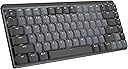
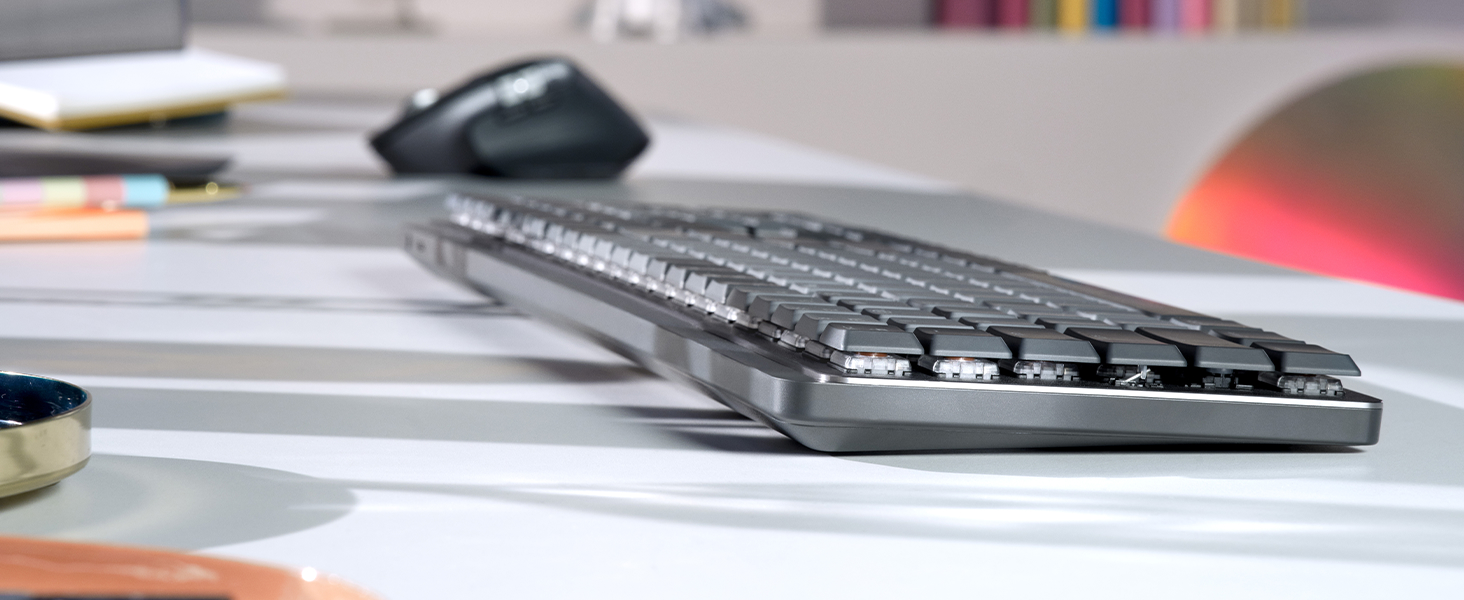
The Logitech MX Mechanical Mini Wireless Illuminated Keyboard features 60 low-profile clicky mechanical switches for tactile, audible feedback. It supports multi-device Bluetooth pairing across major OS platforms and offers smart backlighting that adapts to your environment. Built with sustainable materials and a premium metal frame, it delivers up to 15 days of battery life with USB-C quick charging. Designed for professionals seeking ergonomic comfort, seamless workflow, and a compact footprint without compromise.


| ASIN | B09LJTPXCF |
| Additional Features | Illuminated |
| Antenna Location | Office |
| Best Sellers Rank | #21 in Computer Keyboards |
| Brand | Logitech |
| Built-In Media | Logi Bolt Receiver, Master Series MX Mechanical Wireless Illuminated Performance Keyboard, USB Cable, User Documentation |
| Button Quantity | 60 |
| Color | Graphite |
| Compatible Devices | PC |
| Compatible Operating System Family | ChromeOS, Linux, MacOS, Windows |
| Connectivity Technology | USB-C |
| Customer Reviews | 4.4 out of 5 stars 916 Reviews |
| Enclosure Material | Information Not Available |
| Hand Orientation | Ambidextrous |
| Item Dimensions L x W x H | 13.2"L x 5.9"W x 2"H |
| Item Type Name | Keyboard |
| Item Weight | 1.9 pounds |
| Keyboard Backlighting Color Support | Single Color |
| Keyboard Description | Mechanical |
| Keyboard Layout | QWERTY |
| Keyboard Plate Material | Metal |
| Manufacturer | Logitech |
| Mechanical Keyboard Switch Model | logitech_romer_g_tactile |
| Mfr Part Number | 920-010552 |
| Minimum Required Operating System Version | ChromeOS 137, Mac OS 13 Ventura, Windows 11 |
| Model Name | MX Mechanical Mini Master |
| Model Number | 920-010552 |
| Number of Keys | 104 |
| Number of Sections | 8 |
| Power Source | Battery Powered |
| Recommended Uses For Product | Office |
| Series Number | 920 |
| Special Feature | Illuminated |
| Style Name | Clicky (satisfying click) |
| Switch Type | Clicky |
| UPC | 097855174628 |
| Unit Count | 1 Count |
| Warranty Description | 1 Year Limited Hard Warranty |
K**K
Truly hits the perfect balance for key feel
Incredible overall feel while typing. I'm seriously writing this review in part because it's so enjoyable to type on this keyboard. The sound of the click is exactly right. It's just loud enough to be distinctly audible with each keystroke, but not any bit louder beyond that. And the tactile feedback of the keys is just enough as well -- there's exactly enough feedback -- just enough to always help you register the keystroke, but not so much where it gets hard to type accurately after a while without lots of effort and unnaturally added focus. The setup was also basically instant. Turn it on and laptop helps you connect it to bluetooth. Incredibly straight forward. Very high quality materials on the frame, key covers, and also the USB charging cord. Overall well worth the money. I had to return the Keychron K10. Hoping to get away with a $70 keyboard, but the difference between this keyboard and that is really truly night and day. There's a reason why this costs more than double. Gladly willing to pay this premium for a product that I use this often.
D**N
Premium Feel, Compact Form – Logitech MX Mechanical Mini
This keyboard delivers the perfect blend of mechanical key feel, wireless convenience, and premium build quality. The clicky switches are satisfying without being overly loud, and the compact size frees up desk space without sacrificing functionality. Pros: Excellent mechanical switches — tactile, responsive, and consistent. Compact layout saves space while keeping essential keys. Backlit keys with adjustable brightness for low-light use. Multi-device pairing works seamlessly across macOS, Windows, and more. Solid metal top plate adds a premium, sturdy feel. Great value and portability versus other top mechanical keyboards. Cons: None so far — performs exactly as promised. Notes from Use: Paired it with both a MacBook Pro and a Windows desktop — switching between devices was instant. Typing is a joy, with satisfying feedback and no missed keystrokes. The backlighting adapts well to different lighting conditions, and battery life has been excellent even with illumination on. The smaller footprint leaves more room for a mouse, which is great for tight workspaces. Verdict: A top-tier choice for anyone who wants a compact, wireless mechanical keyboard without compromises. Perfect for both productivity and casual use. 5/5 stars. Photos/Videos: Side profile highlighting low-profile switches. Backlit keys in a dim room. Desk setup showing the compact footprint.
V**T
Highly recommend this clicky keyboard to anyone looking to transition
Great keyboard, set up was so easy took no time at all, Bluetooth connection was great. Love the click sound it makes. Not to loud, just right and super satisfying. The reason I love this so much is because the key set up is exactly how the keyboard was that my work provided so there was new new learning where certain keys were. The transition to using this keyboard was super smooth highly recommend.
A**Y
It scratches the brain
For my first mechanical keyboard, I went with Logitech since I’ve used their products for years and can trust their versatility and reliability. Yes, other companies have way better options. And yes, Logitech also has other mechanical keyboards like their Gaming Keyboards, that are marketably better. But personally, this keyboard is honestly such a good option and checked all my boxes. I chose the Clicky option, which is Logitech’s version of the blue switch. I preferred the physical “click” of the keys, unlike the red switch or Linear. And wanted an audible sound, unlike their brown switch, Tactile, which is more “thonky” or muted. If that helps anyone in their decision making. From my few days of using this keyboard; My Pros: - The backlighting’s “hand awareness” is such a nice little detail. - Versatility with 3 device options to switch seamlessly to made easy. — Window/Mac compatibility unlike Logitech G keyboards (only windows compatibility), that allow me to use a Windows laptop, MacBook and iPad without issues. (only this model specific, Logitech has an only Mac option!) - Customizable buttons using the Logi Options+, which is free to download via Logitech’s website. My Cons: - It is a fingerprint fiend! The plastic matted keycaps attract so much oil and it is so noticeable. - From my knowledge, you can’t change the keycaps or the switches like other mechanical keyboards. But don’t quote me on that! - Because of the “hand awareness” mentioned in the Pros, the backlighting doesn’t stay on for ambient lighting like other RGB’s. All in all, it’s a great option. But like I said before, there are so many other great options out there too. It’s a big market! Personally, I went with something I’m comfortable with and know that I can rely on. But it took a lot of research on my part. I can’t speak for anyone about their shopping habits or purchases but I do want to say, research your options before buying! And if possible buy it, then return it if it’s not your style.
R**S
Very good - not $160 good
I did a lot of research before buying this keyboard, looking at a lot of other mechanical keyboard, watching sound test videos with different switch types, and ultimately it came down to trusting logitech, good reviews, and the fact that I already had the MX Masters mouse so sharing the logitech bolt receiver is convenient. 2 weeks into using this, I can say that it's a very good keyboard but I'm hesitant to say it's worth $160. Here's the breakdown. This review is for the blue key 'clicky' switches Build quality: 4/5 It's pretty good, I was shocked how heavy it was but that's good, it sits firmly on the desk. Key's have a very slight wobble to them, which loses 1 point on build. It's not a deal breaker and it's not that bad to be honest, but it is there. The key texture is nice, somehow soft feeling - which it's hard plastic but I don't know how else to explain it. The top casing is a blast textured aluminum with a polished chamfered edge that is subtle but striking if you take the time to appreciate it. I wish more of this metal was used in the bottom casing but also you don't look at the bottom of your keyboard so who cares. Battery life: 5/5 It really is the best in the biz and even with the backlighting on I'm experiencing great longevity. I don't think anyone else is matching this battery life. This was delivered on 1/29/2023 and I use it for work (8 hours a day, 5 days a week minimum). Here are the charging updates: Update 4/11/2023: I just charged it for the first time yesterday and I do have the backlighting on. Update 6/6/2023: I'm charging this for the second time now. Looks like frequent use can expect to charge this ~4-6 times a year. Switch feel (blue 'clicky' keys): 4/5 I think I had the wrong expectations here, which I feel silly for since I watched numerous videos demoing the sound. It's a 'clicky' sound. I was imagining that dramatic 'SLAP' sound you hear on a typewriter when the printing arm whacks the paper. Well, this is a keyboard, not a typewriter, and 'clicky' is exactly the sound it makes. Like a mouse click, but a little more. I think I really wanted something more, or maybe deeper. That said, it feels very good and the sound is not bad, just manage your expectations if you're like me. Watch the videos, the sound is pretty accurate. I thought maybe people were just bad at recording or had bad mics and I kept telling myself it would be more dramatic in person. It is not. Backlighting: 4/5 There is certainly cooler lighting out there with all the RGB individually addressable key lighting and all that on gaming keyboards, so this falls short compared to that. These keys are addressable (don't know if you can control that yourself, but the presets do utilize some individual key effects) but they are just normal white. This is not something I care about, I'm 33, this is for my office, not my dorm room. The lighting is just fine and the effects are sorta cool but I just leave it in static mode. The smart illumination is really something - it just turns on if your hands are hovering over the keyboard and not even touching. How do they do that? Light sensor maybe? Proximity sensor? There is no visible sensor anywhere so they did a great job concealing it if there is one and the effect is very accurate. One area of improvement that sorta has more to do with overall keyboard design is that there is considerable light bleed out of the bottom, but that is due to the design being open under the key to view the switches rather than the keys being nestled into the top casing. Take this for what you will, I like the open design but maybe they could have isolated the lighting better. Connectivity: 5/5 Disclaimer - I only use the bolt receiver and not bluetooth. It is faster than BT, as BT has a max capability of 34ms response time but usually sits between 100-300ms, and bolt is 1ms. Just use the bolt. I know it takes up a port but it's way better. I think that's about it, I mean it's a keyboard. It's good and functional but it's not life changing. I would probably pay a little over $100 but not $160 for this.
J**Z
Quality, Functionality, Beauty
I love this keyboard. I have stayed away from Logitech keyboards for my desktop in the past. I got a Logitech MX3 series mouse and it was excellent but their keyboards always looked a little...too plastic. I have a couple of their K400R model keyboards at home for interfacing with the large televisions and they function flawlessly, but the keys feel a little mushy and they look...too plastic. This MX Mechanical Mini is a quality keyboard with full functionality and it can switch connections among three separate devices while keeping them all paired simultaneously. I don't think any common HID hardware other than the Logitech MX series, has that function. Bluetooth is flawless and painless. Connecting to anything is a breeze. If you use the Logi-Bolt receiver it gets even better for one of those three connections. My MX Mechanical Mini holds a charge well, maybe too long. I charged it up and have had it a bit less than a fortnight now and charged it once more a couple days back. I was worried that the keys' backlighting would be a noticeable power drain but it isn't. I use a GNU/Linux based desktop and the MX Mechanical keyboard pairs and functions flawlessly with that PC. Well built, nice looking, functional...you won't regret this purchase decision.
Z**7
Backlight settings constantly reset
Update 2/27/23 I would give this keyboard ZERO stars if I could. The backlight functionality is useless. It constantly goes to sleep, constantly resets your brightness settings, etc. I spend too much time each day re-adjusting this thing. They should never have given this keyboard backlights if they insist on implementing it this way. Horrible. Just horrible. ------------------------------------------------- This is a decent mechanical keyboard (I got the clicky version) I like the look and feel of it and it types well enough. I do not like the fact that the backlight settings reset to default if you turn the keyboard off and on, reboot your PC, wake your PC from sleep, etc. Every time this happens you must adjust your backlight brightness and effects to whatever you had it set to. Very, very, very annoying. They also set the fn F1 and fn F2 keys to decrease and increase brightness which on a PC is a fairly useless feature, in my opinion. Most folks set their brightness on their PC once and then forget it. These keys could have been set to something else like sleep mode or email app, etc. You can re-assign those two keys so it's not a deal breaker. There is also a lock PC button on the upper right corner which is great unless you use the numpad a lot. I've accidentally hit the lock button a few times already. But I'm sure I'll get used to it as the layout is slightly different than the keyboard I replaced it with. Overall a good keyboard with a couple annoying aspects. I'm sure they can fix the backlight issues with a software update. The ability to switch between multiple devices is a nice feature and works as described. UPDATE 12/22/22 After speaking with Logitech support they suggested replacing the keyboard for the backlight levels resetting issue. I just got the replacement today and the backlight levels still reset to default after turning the keyboard off and on or restarting the PC. Since I Logitech support suggested it was defective I thought there was a chance but in retrospect I think they were just passing the buck. I have a feeling the backlight is acting as designed. I even posted TWO questions to the Amazon listing for this keyboard and both were immediately answered by Logitech support saying "contact Logitech support" and then they deleted my question. I was curious if other users had this same issue. THEN I would have known that it's acting as designed instead of wasting time with an unnecessary product exchange. I like the keyboard except for that one thing and Logitech could easily solve this with a firmware update. But based on other reviews for their keyboards it sounds like they don't listen to their users.. UPDATE 2/4/23 After a couple updates the backlight issue still persists. Several times throughout the day I have to increase the backlight to maximum brightness. It is ridiculous that they even give you the ability to change brightness if it's just going to reset in a couple hours. Also, the activity timeout is way too short. If you stop typing and take your hands away from the keyboard it turns the backlight off in 5 seconds. Once you start typing (not before) the backlight turns on. They claim this has an ambient sensor (doubtful) and a motion sensor. The motion sensor does not work when it's sleeping, you have to touch the keyboard (actually you have to touch part of the metal plate under the keys, to get the backlights to come on. This would appear to be a capacitive sensor rather than motion. Regardless LogiTech doesn't care about any of this and has no intention to resolve. Once their products are out the door you can forget about meaningful firmware updates to fix issues. Probably the last Logitech keyboard I'll buy based on this experience.
G**N
Amazing Keyboard! Only wish the software worked for Android and iOS
### Exceptional Keyboard for Productivity and Style! I've been using the Logitech MX Mechanical Wireless Illuminated Performance Keyboard, and it's been a game-changer. This keyboard exudes quality with its heavy and premium feel, making typing a pleasure. What's truly remarkable is the battery life. With the backlight on, it lasts a full month on a single charge; turn off the backlight, and you get a whopping 10 months of usage – incredible! The USB-C connectivity is fast and reliable, and the sleek design adds a touch of sophistication to my workspace. The six lighting customizations allow me to personalize my typing experience, and key remapping is a fantastic feature for customization. However, there's a drawback – the Logi Options Plus software doesn't work on Android, limiting some features on the go. Also, my workplace restrictions prevent me from downloading the software, so I can't unlock its full potential there. But even without it, the keyboard performs excellently; you just can't customize it as extensively. In summary, the Logitech MX Keyboard is a top-tier choice, offering impressive battery life, USB-C connectivity, and customization options. It's highly recommended for productivity and style!
B**G
i received keyboards but its not clicky switch
on this keyboard there is no Clicky Switches.its not good
B**M
Best Mechanical Keyboard so far
Few things I like about it: 1. Easy connectivity to switch between devices 2. Minimalistic Design 3. Good battery life. 4. Personally, I like the feel of the clicky switches. Switches are ultimately a preference choice. Personally, I tried all three of the switches and these are my recommendation If I were to rank them based on typing feel, it would be Clicky -> Linear -> Tactile Quiet. Clicky: Best typing feel of them all, can accurately feel that I have pressed the button, noise is a bit loud so make sure to check with people around you before you decide to purchase it. Linear: Feels like a normal keyboard, instead of a mechanical one. However, it is very smooth and nice to type as well, noise is the smallest. Tactile Quiet: The weirdest feeling out of them all, this is supposed to be a compromise between the two so maybe that's why it feels weird, it's not mechanical enough that you get that satisfying feel and noise every time you press a key. So sometimes I am not sure if I have pressed it. On the other hand, it is not smooth enough to have a normal keyboard feel.
L**T
Awesome keyboard, using it everyday
I use this keyboard as my main driver every single day for multiple hours and it has never failed me. I charge it once every 2 months and it holds charge very very well in the meantime. The wireless dongle works at lightspeed and the Bluetooth connectivity is very good, especially with the ability to connect to 3 different devices at the same time. Finally, the clicky version has a very satisfying and not annoying clickiness to it that makes typing on it very interesting and enjoyable. Overall a great keyboard which I would recommend to anyone without a doubt.
D**P
Got a keyboard which was not as in the picture
The leftmost “shift” key is smaller and there’s an unexpected key between “shift” and “z” keys, which makes difficult to type fast.
L**G
Take Your Typing to New Heights!
This Logitech MX Mechanical Wireless Illuminated Performance Keyboard is amazing! The clicky switches provide an ultra-responsive feel that I just love. I also appreciate the backlit LED for a custom look, plus the wiresless logi bolt secure Adapter makes it feel like direct USB connection. also having the ability to pair multiple devices to the same secure adaptor also makes it incredibly convenient to use. It’s a fantastic way to get the best out of my gaming setup. Highly recommend!
Trustpilot
1 month ago
1 month ago