Buy anything from 5,000+ international stores. One checkout price. No surprise fees. Join 2M+ shoppers on Desertcart.
Desertcart purchases this item on your behalf and handles shipping, customs, and support to Panama.
๐ Upgrade your network, upgrade your game โ donโt get left behind!
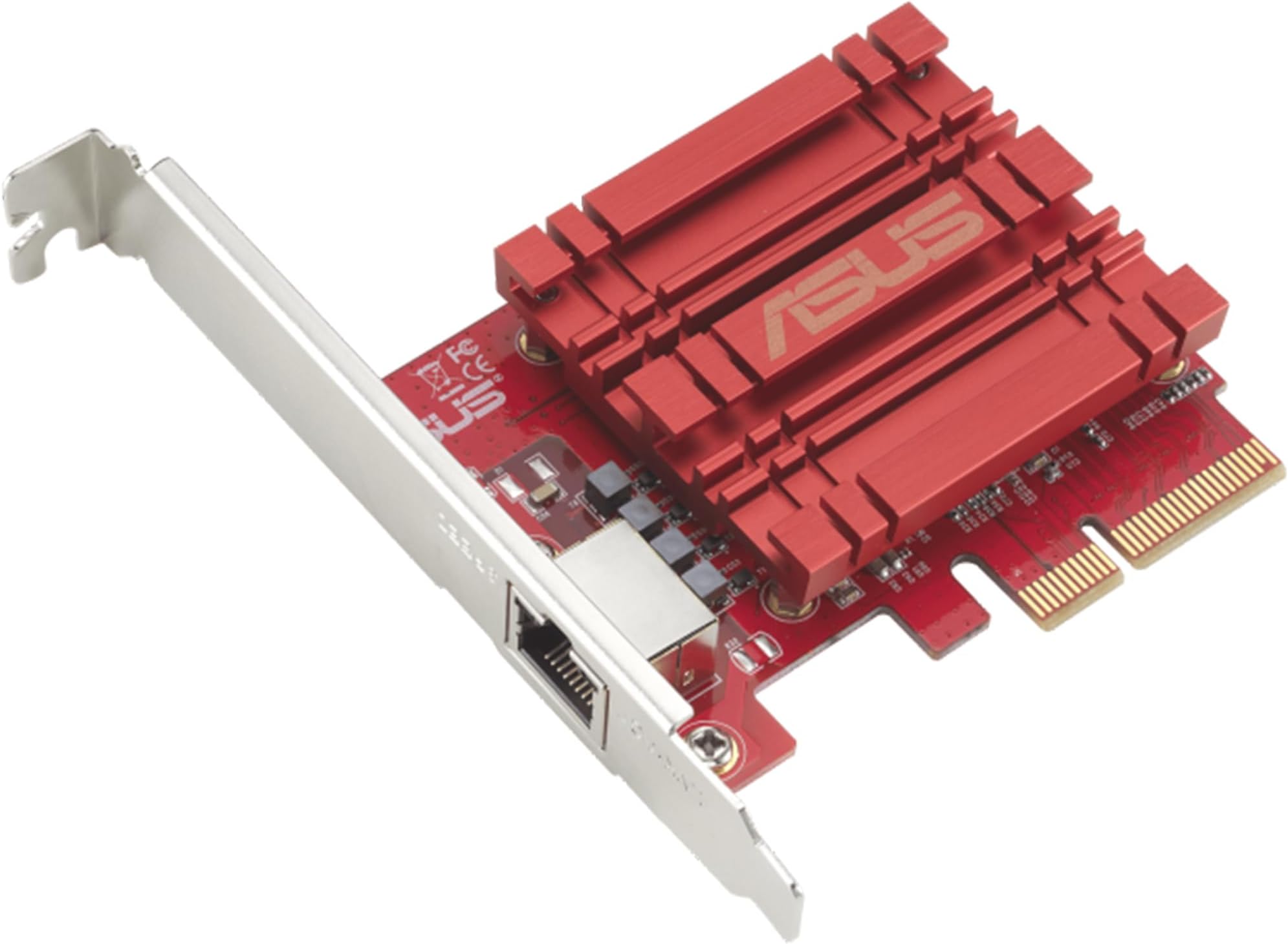
The ASUS XG-C100C is a PCI-E x4 network adapter delivering ultra-fast 10Gbps Ethernet speeds with full backward compatibility. Featuring a single RJ-45 port and built-in Quality of Service (QoS), it ensures prioritized, lag-free data transfer across Windows and Linux systems. Ideal for professionals and gamers seeking to future-proof their desktop networking with a reliable, plug-and-play solution.

| ASIN | B072N84DG6 |
| Best Sellers Rank | #40 in Internal Computer Networking Cards |
| Brand | ASUS |
| Built-In Media | Quick start guide, Warranty card, XG-C100C 10G PCI_E Network Adapter, support CD (user manual and ultility) |
| Color | Clear |
| Compatible Devices | Computers |
| Compatible Operating System Family | Linux, Windows |
| Customer Reviews | 4.1 out of 5 stars 739 Reviews |
| Data Transfer Rate | 10000 Megabits Per Second |
| Global Trade Identification Number | 00889349620045, 04712900620078 |
| Hardware Interface | Ethernet |
| Item Dimensions L x W x H | 4.73"L x 3.33"W x 0.81"H |
| Item Type Name | ASUS XG-C100C 10G Network Adapter PCI-E x4 Card with Single RJ-45 Port (XG-C100C) |
| Item Weight | 0.2 Pounds |
| Manufacturer | ASUS Computer International Direct |
| Mfr Part Number | XG-C100C |
| Minimum Required Operating System Version | Ubuntu 16.04 Xenial Xerus, Windows 10 |
| Model Number | XG-C100C |
| Product Dimensions | 4.73"L x 3.33"W x 0.81"H |
| UPC | 889349620045 689341096318 |
| Unit Count | 1.0 Count |
| Warranty Description | 2 years warranty |
M**K
Unlocked Full 5Gb Speeds and Beyond, Perfect Upgrade for Gamers
Hereโs an upgraded version with gaming included and a bit more impact: โธป I recently added the ASUS XG C100C 10G Network Adapter to my setup, and it has been a huge upgrade for my home network. My motherboard only supported up to 2.5Gb speeds, which was holding me back from fully utilizing my 5Gb internet at home. After installing this adapter, I was finally able to unlock those higher speeds and even surpass the 5Gb mark, which was exactly what I was hoping for. Installation was straightforward and hassle free. It fit perfectly into my system, and the drivers were easy to install. Within minutes, everything was up and running, and I immediately noticed the performance boost. As a gamer, this upgrade has made a real difference. Downloads are significantly faster, game updates that used to take a while now finish quickly, and overall network responsiveness feels much smoother. Latency is stable, and I have not experienced any drops or interruptions during online gameplay, which is huge for competitive sessions. The connection has been extremely reliable across the board. Whether I am gaming, streaming, or downloading large files, everything feels faster and more consistent. It handles heavy network usage without breaking a sweat. Build quality is solid, and it runs reliably without any issues. If you are limited by your motherboardโs network speeds and want to fully take advantage of high speed internet, this adapter is absolutely worth it. Overall, this is a great investment for gamers and anyone looking to upgrade their network performance and future proof their setup.
S**L
So far no issues except annoying network boot
I installed 3 of these. Of course this is just day one, but some of the negative reviews I read, don't apply at all (at least to me, on 3 different computers... one AMD 2 intel). Some of the reviews that say that this card doesn't initialize and you have to wait, or that it disconnects or drivers are horrible etc... this was a very clean plug and play. I downloaded the latest drivers from ASUS... but popped the cards in 2 windows 10 machines, and 1 windows 11 machine. On the 2 windows 10 machines (which are also intel), it tries to boot from the network card. I tried to disable this in the bios but it still tries, this is annoying because it takes like 30 extra seconds to boot. You can click ESC to skip it but if you have a monitor that doesn't show you what is going on you can assume something is wrong or stop it during boot. I need to figure out how to get it to skip this, I am sure there is a way. Full disclaimer still waiting on my other 10G switches, so I haven't tested them out at full speed yet, but on my1G network they work just perfect like the internal NICs always have.
A**R
Did not work out - here is what I ended up doing
I decided to upgrade my home network, so I can access my NAS faster. Given that I had bought a new switch, this NIC card, and a new NAS, I couldn't easily troubleshoot why I wasn't getting the speed to the NAS or why the Internet was dropping. I ended up swapping out every new component, until I discovered that it was this card that was causing all the issues. Issue #1: I couldn't achieve the transfer speed using iPerf3 test. Issue #2: Internet connection was very slow, and Google Speed Test would not run. However, I was able to use the card to transfer files from my NAS to my PC at 1GB/s, which is very close to 10Gbps. If I needed this network card just for internal transfer, then I would've been ok. But, I also needed this card for my Internet access, and that's where it was a no-go for me. I switched out to Intel X550, and without changing anything else, my Internet connection is working fine. I had read some other comments stating that CAT 7 cables are causing problems, but I am only using CAT 6A cables to the Internet. I also upgraded the firmware to the latest, but it didn't help. I do wonder if the card is dropping IP addresses when the buffer is set 'incorrectly.' Either way, after having spent a lot of hours sweating over how to make this card work, I finally gave up and returned the product. Intel card is 3 times more expensive, but I am glad that it just works. I have an ASUS motherboard, which is working very well, so I am a bit disappointed by this experience.
S**E
Works great in unRAID
I installed this on my unraid server to obviously get 10gbps connectivity, hooked it up to an unmanaged 10gbps switch, alongside my desktop so I could move files between it and my NAS at approx 1.25 gigabytes a second (10,000 / 8). Common misconception is that you need cat 6a or at least cat 6 to transfer at those speeds. I'm using a 50 foot cat 5e cable and it works just fine. As long as the distance isn't too much, cat 5e is able to do high speeds. I was running out of pcie slots on my server motherboard so I got an m.2 to pcie slot adapter. Aside from needing to take off the bracket of the NIC, it works perfectly since m.2 is 4 pcie lanes just like this card. Haven't had any issues with this. Only thing I would recommend considering before buying, is that RJ-45 uses more power than SFP+ so if you're just starting to build out your multi gig network, consider looking into fiber too. You can get a lot of refurb or used SFP+ gear online for cheap, and it would probably save you some on your power bill. I sort of regret buying the 5 port 10gbps rj-45 switch I have. I love the speeds, but power is so expensive where I'm at that 24/7 powered stuff makes a difference.
T**Z
There are no Wake-On-Lan 10GbE Cards
Like many others here I was surprised when this card came with no Wake-on-LAN functionality. Spent a fair amount of time looking around for a card with such header and what I learned is that there are no 10GbE LAN cards with WOL header -- and the ones that claim they have one are likely just fake baits. This card performs really well, supports jumbo frames and easily hits 950-980MBps (that's bytes) transfer rates, so - yes, it actually is a good purchase. It might be possible that the Aquantia technically supports WOL, but I understand there are other technical limitations at this point preventing pretty much all manufacturers from supporting this explicitly, like supplying enough power to this card. If you're wondering how to solve the issue now - one recommendation I've seen is to keep the onboard LAN still connected.
A**L
works as advertise..
Asus brand but appears to be rebranding. Need driver (not WIN 11 native).. Works well easy detected by Unify system.. color is a little off.. my rig has red LED so no that bad, wish will be black instead..
R**N
Perfect
Great way to get a 5 gig connection with room to upgrade later.
H**.
Finally an affordable 10GbE card.
Finally an affordable 10GbE card. I actually replaced a dual port Intel 10 GbE with this. The Intel card frequently overheated, while this one doesn't. No issues with Win10 or Linux support, and it's having no trouble hitting expected transfer rates. This card also supports 2.5/5 Gbit rates, as well as directly attaching to another 10GbE card. You don't need a 10GbE switch to use it. Also, if you're using CAT 5e/6, I strongly suggest at least CAT 6A. It is the same price but is more stable for higher bandwidth. [Edit - 2/2021 - Windows update] Aquantia was acquired by Marvell in 2019. ASUS does not appear to be keeping their Windows drivers up to date, so you should just get them directly from Marvell (search for AQC107 drivers on Marvell's site and you'll find both firmware and windows drivers). This can be applied to any AQC107 based NICs. [Edit - Linux info] For a bit of background, this card, as well as the Gigabyte GC-AQC107 (10GbE Network Adapter Pci-E X4 Card with RJ-45 Port) and manufacturer Aquantia AQtion 10G Pro NIC use the same Aquantia AQtion AQC107 chipset. The only mild difference between the cards is the size of the heatsink, so pick whatever looks like the best option. In Linux, the driver for this is called atlantic. This driver was added to the default Linux kernel as of version 4.11. That means that it is baked in to Ubuntu 18.04 and later. And for those wondering about sustained transfer rates/overheating, I've done iperf3 testing and am able to transfer at a continual average rate of 9.37 Gb/s for at least 10 minutes. $ iperf3 -c host -t 600 Connecting to host giver, port 5201 [ 4] local 192.168.3.244 port 33486 connected to 192.168.3.152 port 5201 [ ID] Interval Transfer Bandwidth Retr Cwnd [ 4] 0.00-1.00 sec 1.09 GBytes 9.40 Gbits/sec 488 844 KBytes [ 4] 1.00-2.00 sec 1.09 GBytes 9.39 Gbits/sec 254 1000 KBytes ... [ 4] 598.00-599.00 sec 1.09 GBytes 9.38 Gbits/sec 413 1.01 MBytes [ 4] 599.00-600.00 sec 1.09 GBytes 9.37 Gbits/sec 127 1.10 MBytes - - - - - - - - - - - - - - - - - - - - - - - - - [ ID] Interval Transfer Bandwidth Retr [ 4] 0.00-600.00 sec 655 GBytes 9.37 Gbits/sec 184641 sender [ 4] 0.00-600.00 sec 655 GBytes 9.37 Gbits/sec receiver iperf Done.
D**R
Problรจme de conflit au redรฉmarrage
La carte utilise son propre drivers ร l'inverse du modรจle Tx401 qui utilise directement le driver du fabriquant. JE ne sais pas si c'est cela qui est en cause mais une fois la carte installรฉ dans le pc avec le driver d'ASUS, au prochain arrรชt/Dรฉmarrage, il y a un conflit avec le CPU empรชchant le pc de dรฉmarrer. JE n'ai pas rencontrรฉ le problรจme avec la carte TX401
R**B
This is my second!
Great hardware. Performs well at 10gb. Installing on Windows10 was simple! This is a repeat purchase.
S**S
รtimo
Produto recomendo ๐!
M**L
Bom
Nada a dizer funcionamento normal
L**S
Sehr gute Netzwerkkarte
Die Netzwerkkarte kann man sehr schnell in ein bestehenden PC oder Server einbauen. Sie wird nach der Treiber Installation problemlos erkannt. Es ist jederzeit ein Einkauf wert.
Trustpilot
1 week ago
1 month ago