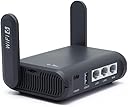
Desertcart purchases this item on your behalf and handles shipping, customs, and support to Panama.
🌍 Stay connected, secure, and ahead—your pocket-sized Wi-Fi 6 powerhouse!
The GL.iNet GL-AXT1800 Slate AX is a compact, travel-ready Wi-Fi 6 router delivering dual-band speeds up to 1800 Mbps. It supports up to 120 devices simultaneously and features pre-installed OpenVPN and WireGuard for fast, secure browsing. Running on OpenWrt 21.02, it offers advanced customization, NAS file sharing, and seamless captive portal handling—ideal for professionals who demand reliable, private connectivity anywhere.


| ASIN | B0B2J7WSDK |
| Antenna Location | Home |
| Antenna Type | Fixed |
| Best Sellers Rank | #307 in Computers & Accessories ( See Top 100 in Computers & Accessories ) #25 in Computer Routers |
| Brand | GL.iNet |
| Built-In Media | Ethernet Cable, GL-AXT1800 (Slate AX) router with 2-year warranty, Power Adapter (US Plug), User Manual |
| Color | Black |
| Compatible Devices | Personal Computer |
| Connectivity Protocol | Wi-Fi |
| Connectivity Technology | Ethernet, Type-C |
| Control Method | App |
| Controller Type | App Control |
| Coverage | Moderate to Large |
| Customer Reviews | 4.5 out of 5 stars 3,804 Reviews |
| Data Transfer Rate | 1800 megabits_per_second |
| Frequency | 5 GHz |
| Frequency Band Class | Dual-Band |
| Item Dimensions L x W x H | 4.92"L x 3.23"W x 1.42"H |
| Item Weight | 245 g |
| LAN Port Bandwidth | 1000 Mbps |
| Manufacturer | GL.iNET |
| Maximum Upstream Data Transfer Rate | 1200 megabits_per_second |
| Mfr Part Number | GL-AXT3000 |
| Model Name | Slate AX |
| Model Number | GDB008W3-050400ZX |
| Number of Antennas | 2 |
| Number of Ports | 3 |
| Operating System | OpenWrt 21.02 |
| Other Special Features of the Product | Guest Mode, QoS |
| Router Firewall Security Level | High |
| Router Network Type | hybrid |
| Security Protocol | WPA3 |
| Special Feature | Guest Mode , QoS |
| Unit Count | 1 Count |
| Voltage | 5 volts |
| Warranty Description | 2 Years |
| Wi-Fi Generation | Wi-Fi 6 |
| Wireless Communication Standard | 802.11ax |
| Wireless Compability | 802.11ax |
S**G
Work from anywhere setup your VPN and tunnel into your home ISP!
Have used this for about 1yr and travel with it. I set this up with wireguard and a stay@home Opal-SFT-1200 GliNet router. Works beautifully. It performs at fast speeds enough for streaming on various devices, easy to setup and manage and tweak to your needs! The range varies based on building structure but i have had no issues and i live in a 3FL house signal strength has not been an issue. Connecting is virtually seamless. As a few months ago my VPN link wireguard broke between the two devices and Bernard Lo from support helped me troubleshoot a recent issue with having recently placed pihole to be the DNS of all my internet traffic. * Bernard * from GLiNET support was throughout and he was able to run some tcpdumps techniques to identify port communication between the routers and traffic and determined that the port forward was not working so my main ISP router was not forward as it should. THE FIX was i reset both routers to factory settings. Reverted the main router DNS to automatic (serve it from main router). Enabled the VPN wireguard configuratio between the GL-iNET routers and it worked. Systematically 1 variable at a time i once again changed DNS of main router and VPN continued to work. With Pihole now filtering traffic as the DNS. I communicated this to support and Bernard ran another test and indeed VPN was active and working. However, the wireguard client was not using pihole to filter traffic as it should and Bernard after testing changed the server config DNS which ultimately finally pushed client to route DNS through pihole. Everything is currently working as it should and i am beyond grateful for this support and the guidance. Absolutely recommend anyone to invest in their routers.
A**N
Perfect travel router
We bought the GL.iNet Slate AX (AXT1800) for my blind grandmother so she could still use her Amazon Alexa while staying at a Hilton hotel, which only offers Wi-Fi that requires a sign-in page. This little router worked beautifully. It handled the hotel’s captive portal with ease, and once connected, every device — including her Alexa — worked exactly like it would at home. We’ve also used it to connect our Nanit Baby Monitor, which is notoriously picky about hotel or guest Wi-Fi. The Slate AX had no problem getting it online, keeping the video feed stable and secure all night. Setup was surprisingly simple, performance was fast and reliable, and the connection stayed solid through multiple devices. It’s compact, well-built, and powerful enough for way more than just travel. If you’re tired of fighting with hotel Wi-Fi or need to connect smart devices like Alexa or baby monitors while away from home, this router is a must-have. Absolutely worth every penny.
C**L
I like their support. My first one was a dud and they responded well. I own three GL.iNet routers.
I'm going to cover mostly their good support, because my first one had a faulty usb port for the power and I was quickly contacting their support to find answers. They were very responsive and clear in their instructions. There were some videos I sent them to demonstrate the issue and they quite quickly stepped me though the process of getting an RMA and a new device. It didn't take too long. The lady I worked with was very polite, and virtually drove the process along for me, making me get it done promptly, because honestly I was dragging my feet and procrastinating on jumping through some of the hoops you have to do in these RMA processes. If was to pick an experience to highlight in this area though, I would say these guys were very supportive and encouraging as I went through the process. Since then I been slow to get it up and running, but I dived in with both feet recently and finally got it configured correctly, so that I can take it on the road with me and use it with public wifi while travelling. Lacking experience with configuring routers was my biggest issue, but with the advent of AI, a few conversations with AI about setting it up and it was solved. All hail our new machine overlords! They make tech troubleshooting so much easier. The thing runs hot, all accounts I have read so that is expected behavior. I love that FL.iNet use a customized openWRT interface that gives me fine control over the router. I dragged it out during a blackout when the kids where tearing their hair out over no internet, and connected it to my cellphone hotspot, and the kids were happy connected to the router and getting a signal several rooms away from where i had it set up in my bedroom. I would say that is good range. Steady connection. I like it. I'll get out on the road with it soon, but I think I've mastered the whole network settings now after some lessons with AI assistance.
S**O
If you're looking for a reliable, portable, and versatile router for your on-the-go connectivity!
Five Stars! A Game-Changer for Our Little League Livestreams! As a small family team dedicated to capturing and sharing our kids' sporting adventures, finding reliable and versatile internet connectivity has always been a major hurdle. Enter the GL.iNet GL-AXT1800 (Slate AX) – this little powerhouse has been an absolute game-changer for our streaming setup, and we couldn't be happier! For years, we've wrestled with spotty phone tethering, unreliable campground Wi-Fi, and the dream (now reality!) of using our Starlink Mini on the go. The Slate AX handles it all with such incredible ease and stability. Whether we're tethering to our phones for a quick game recap stream from the sidelines, plugging into a borrowed WAN connection at a tournament, or finally utilizing our Starlink Mini for those more remote locations, the connection has been consistently solid and dependable. What we appreciate most as a busy mom and pop operation is the simplicity and portability. The Slate AX is compact and lightweight, making it a breeze to throw in our gear bag. Setting it up with each different connection type has been surprisingly straightforward, even for us non-techy folks. The interface is intuitive, and we were up and running in minutes each time. The difference in our stream quality has been night and day. No more dropped connections mid-game or pixelated messes! Our family and friends watching from afar can now enjoy clear, uninterrupted streams of every exciting play, every goal, and every victory (and maybe a few learning moments too!). This has truly enhanced the experience for everyone involved. Beyond the reliable connectivity, we also appreciate the security features offered by GL.iNet. Knowing our data is protected, especially when using public Wi-Fi or tethering, gives us real peace of mind. Here's what we absolutely love: * Versatile Connectivity: Seamlessly switches between phone tethering, WAN, and our beloved Starlink Mini. * Rock-Solid Stability: No more dropped streams or frustrating interruptions. * Portability: Small, lightweight, and easy to transport. * Ease of Use: Simple setup and intuitive interface. * Enhanced Stream Quality: Clear and consistent video for our viewers. * Security Features: Added peace of mind knowing our connection is secure. The GL.iNet GL-AXT1800 has truly been an invaluable addition to our little sports streaming endeavor. It has eliminated the connectivity headaches and allowed us to focus on what truly matters – capturing and sharing our kids' passion for their sports. If you're looking for a reliable, portable, and versatile router for your on-the-go connectivity needs, especially for streaming, look no further! Highly recommended!
R**N
Great travel router, but a little big
I'm very happy with the performance of this router. I had the Slate model for years. This is very similar but bigger and better. I was starting to have trouble with the Slate not being able to connect to every wifi network and decided to upgrade. I'm glad I did. The AX has no problem with the newest wifi6 networks when acting as a repeater. It also provides a much stronger and faster connection for clients. The software is very similar to the Slate. I use the built in WireGuard VPN software to connect to my home network. The Slate would top out at about 10 Mbps, but this one maxes out my home connections speed at about 25 Mbps. According to the specs, it should be capable of much faster, but I just haven't had it connected to a fast enough source to test this yet. It does everything I need, and I'm very happy with it, but I do have a few criticisms. It is substantially bigger than the Slate. It still fits the bill of a travel router, but definitely takes a lot more room in the luggage. It also has substantially higher power requirements and I'm not thrilled with how it's delivered. This unit takes 20 watts and delivers that with a 5 volt 4 amp adapter. The Slate could run off just about any USB adapter. Try to find an adapter that delivers 4 amps though, or a cable that can handle it. The adapter is big with a thick wire. So, on top of the AX being bigger than the Slate, the power adapter is huge compared to the Slate. I'd say the power adapter alone takes up as much room at the old Slate router. I feel like they should have increased the voltage rather than letting this thing draw 4 amps. That's what the fast cell phone chargers do. They jump up to 9 volts to reduce the current requirement. That approach doesn't require a heavy power brick and thick wire. I attached some images with the old Slate and new Slate AX side by side.
G**.
The cost is not closely comparable to its value, it is worth more than their asking price.
This thing is more than just a travel router, pretty simple to put to use, total control changes by use of a switch. its powered by usb, so pretty much any thing can keep it running one thing it needs though is ventilation.
D**D
So far, so good. International Travel pending
I read some of the reviews and comments AFTER buying so I was a little worried. I will respond to some of them here. Overall the device is working as promised and for the weight is quite handy! 1. Power Supply: The supplied power is just a normal USB-C power supply. I've successfully run this device with my laptop power supply and by plugging it into my simple power bank. As I write this it has been plugged up to my power bank from about 8 AM to 11 AM and it's only lowered it by 4 or 5% (20k mah powerbank.) When using advanced featured like the USB port and anything else that might cause it to draw more power, you may run into the limit of the device you plug it into. Check your junk drawers! The shipped power supply only comes with one set of plug for your country, however, I happened to have (from some other device I got, apparently) several other country adaptors that snap right into the thing. However based on the above paragraph, I likely wont be traveling with the supplied Power Supply 2. VPN: So far I've only used NordVPN thru OpenVPN with a minor dip in speed (maybe 10mbps.) I'm not a VPN genius but nord reports its working as intended and my IP address reports correctly. I've only tested this domestically, will report back after my international trip. The phone app is a little confusing about VPN set up and this is echoed online with others with similar questions. Something about the configuration stored on phone vs device. I'm a techy person so I figured it out, but I don't think it was actually a big deal. 3. Reliability: I saw some say it was unstable or didn't maintain connection. On this current domestic trip I plugged it in to the wall the second I got there and left it on. Now going on three days straight it is still performing with no change. I unplugged it and came downstairs to work in the hotel lobby (attached to my power bank) and it reconnected immediately without me having to use the app. Realistically I likely wouldn't leave this thing plugged in when I am not in the room or space where it is using it. There was a little bug when I initially tried to connect it to the hotel wifi but I think that was because I was moving too fast or my phone was trying to change connections to working wifi. It seems once you hit connect and order the device to work...it will. While I was piddling with my phone trying to reconnect to the device it had already connected itself to the hotel's wifi. I'll be traveling internationally with this next week and with two people's worth of devices so I will update! Other notes: It does generate a little heat if you plan to use this clandestinely. Think what you might feel through a coffee cup with a heat sleeve on it if it was poured 20 minutes ago. There doesn't seem to be any fan. Software has a lot of neat little features and the wizards to help you connect are actually decent.
M**Y
First died, replaced, best option so far
I got this for a remote location, to tether a phone via USB as the internet source. The main problem with this device is that the first one died after a few months. The power light stopped coming on. I tested its power supply (which worked fine on other devices) and tried other power supplies on the router. So the problem was the router. I suspect a small power glitch fried the router. (At this location, power often switches between main, battery backup, and generator. So the power signal is not the cleanest.) More on that below. I tried replacing it with an Asus RT-AX3000 router. Asus routers are among the few big brands that accept a phone tethered via USB. (Netgear routers do not support that, at least not with their stock firmware.) But the Asus was super flaky -- I got USB tethering working twice out of a few dozen tries. Could not figure out the recipe to get it to work. So I will be returning it. In sharp contrast, the GL-AXT1800 worked for this purpose with a minimum of fuss. It even usually reconnects after reboots of the phone or the router -- most of the time. But sometimes I need to unplug and re-plug the USB cord to get the phone+router to go back to tethering. Unfortunate for when the device is remote. Another significant issue is that the USB port on this router does not supply quite enough power to keep the phone charged reliably. So I tried 2 options: (1) keep a wireless charger underneath the phone and (2) use a Y-splitter USB cable to provide additional current from a separate power source. The wireless charger works sometimes but not reliably. So far the Y-splitter seems to work slightly better, but it seems to exacerbate the problem of the phone and router not reconnecting after a reboot or power cycle; I sometimes have to manually unplug and re-plug the USB cable to get them to talk to each other. Again, not ideal for when the device is remote for long periods, which is often. By the way, I tried 2 different USB Y-splitters and got different results. One was a CY USB-C to 2 of USB-A 3.1 connectors (which BTW gets poor reviews). The other is an ANRANK which has 1 USB-A 3.0 male (for data), 1 other USB-A male (for power), and 1 USB female (that a USB-A to USB-C cable connects to the phone). That ANRANK USB-A cable works better so far, but it does involve yet another cable since I have to plug a second cable into the chain to complete the connection. After trying the Asus router and giving up on it, I got a replacement for this GL router. But to avoid frying this one, I got a Furman AC-215A power conditioner AND an Anker 331 surge-protecting power strip, and plugged the router power supply into both of those. Fingers crossed. The router menus and setup are among the best I've used, and quite easy to set up, comparatively. If this router produced enough power to keep the phone charged (essential for this purpose), if it didn't die after a few months, and if tethered reconnection was more reliable, I'd be inclined to give this device 5 stars. I hope their next upgrade has more robust power circuitry. Looking forward to the future WiFi-7 version, with improved power handling.
A**S
Awesome travel router!
Packs a lot of features and speed in a tiny package! I can just chuck it in my bag and I have my personal network with me wherever I go. The Wi-Fi is very reliable and the range is surprisingly decent considering the size and power draw. I also don't need to carry a dedicated power adapter for it as its USB type C power connector is compatible with my phone charger. The software (OpenWrt with a custom UI) is also very clean and easy to use. The 3 gigabit RJ45 ports also add a lot of utility as one is a WAN port which is very useful if you want to use it as a repeater and have a very solid connection. The microSD and USB 3.0 ports are also very useful if you need to travel with a lot of fast storage that you don't want to keep plugging in and out of all of your different devices. In the end, if you are looking for an almost no compromises but very compact travel router, I don't think there is a better product. It is also sufficiently powerful enough to be used just as a home router too! I would also like to say their technical staff are very nice and quick with their help on their forums and I'm sure they will try their best to help you!
S**E
Perfect!
Excellent device, great coverage. Easy to setup, WireGuard support natively. If you want a fast, power efficient router with built in vpn support, look no further.
M**N
Fel artikel levererats
Fel artikel levererad. Vad som levererades var en Slate AX (AXT1800). Kommer att returneras. Inget fel på produkten men inte vad jag beställde.
M**A
المحول ليس
المحول لايطاق مع الفيش تبع السعودية تم ارجع المنتج
S**T
This one just ditched Mikrotik from my TOP #1 place in best routers.
Living in Germany has its costs when it comes to internet connection. Not only do you have to wait for someone for 2 months, or sometimes even more, to come and swap 2 cables which enable your internet, but the internet here is also still from the 20th century (AKA DSL). It's true, it has somewhat improved, but it's still DSL. However, that's beyond the scope of this router. The reality is, having internet in Germany means there's a 90% probability that you will have a Fritzbox. It's not bad, in fact, it's a good device. Without it, you wouldn't even be able to connect, as it also has a DSL modem in it. But the problem lies in its price. Fritzboxes are astronomically expensive. Hence, the ISP will ship you (for 5EUR/mo.) the most basic model they can offer. This model will not only lack a 5Ghz band, it's also quite slow, and since all of your neighbors will likely have the same router, all the channels are filled with noise, which makes watching a Netflix TV show or a YouTube video on your Apple TV (or any other TV in general) a nightmare. However, this router is a savior. You just plug it in, do a very basic configuration (like setting a password, SSID and security key for your WiFi) and voila, you can enjoy your maximum speed over WiFi ax on the 5Ghz band, without constant changes of the channel and loss of connection. Not to mention the multi-WAN feature, which is useful while traveling. It allows you to plug in several or different internet sources, maintaining the same internal network and the same SSIDs wherever you go. It also features a failover system, so if your cable drops, it can use your WiFi-repeater or a mobile phone tethering, or whatever. Another feature is the VPN. It allows you to connect to a VPN provider (NordVPN is preconfigured and all you have to do is to create a username and password and fill it in) using OpenVPN or WireGuard protocols. It can also act as a VPN Server, so if you want to work from the Maldives and appear as if you're back home, it's never been easier. It might be best to have 2 of them. By the way, you can create VPN Policies, like splitting the devices you want to use VPN and the ones you don't. This way, you can connect your TV to a country where there is no YouTube Premium, for example... But I didn't tell you this 🤫. There is also an AdGuard app, which filters ads at the DNS level by blocking undesired well-known URLs, which makes your web pages load faster. It doesn't block everything perfectly though, and sometimes can block something useful, but 99% of the time it is good. Lastly, you can easily ssh into this device and gain access to the OS at the root level because it has nothing else but a Linux kernel inside. And when you know what you're doing, you have full access. Yes, there is also a dedicated UI to configure the OpenWRT (which is the base OS for this router). P.S. It also has tons of other features which are mentioned everywhere. In this review, I tried to respond to the potential questions that I personally had before buying it. If you need a powerful router, just buy this one, and you will never regret it.
Trustpilot
3 weeks ago
2 weeks ago