


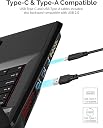


SABRENT USB 3.2 Type-C and Type-A to SD Express 7.1 Card Reader (CR-SDX7)
Product ID: 463750231
⚡985 MB/s max transfer speed
🔄Full-duplex read/write via USB 3.2 Gen 2
🛡️Durable aluminum build with heat dissipation
Desertcart purchases this item on your behalf and handles shipping, customs, and support to Panama.
🚀 Elevate your data game with the fastest SD Express reader on the block!
The SABRENT CR-SDX7 is a cutting-edge SD Express 7.1 card reader delivering ultra-fast data transfers up to 985 MB/s via USB 3.2 Gen 2 and PCIe 3.1a. Its durable aluminum design ensures heat dissipation and longevity, while broad compatibility spans SD Express, legacy SD cards, and OTG smartphones. Equipped with versatile USB-C and USB-A connectivity and supporting major operating systems, it’s engineered for professionals demanding speed, reliability, and seamless workflow integration.


| Additional Features | Lightweight |
| Asin | B0B61WMCFY |
| Best Sellers Rank | #1,115 in Computer Memory Card Readers |
| Brand | SABRENT |
| Color | Black |
| Compatible Devices | Smartphone |
| Connectivity Technology | USB |
| Customer Reviews | 3.5 3.5 out of 5 stars (35) 3.5 out of 5 stars |
| Data Transfer Rate | 985 megabits_per_second |
| Global Trade Identification Number | 00840025253216 |
| Hardware Interface | Secure Digital Card, USB 3.2 Gen 2 |
| Item Type Name | SD Express card reader |
| Item Weight | 2.2 ounces |
| Manufacturer | SABRENT |
| Media Type | SD Card, UHS-1 |
| Mfr Part Number | CR-SDX7 |
| Model Name | CR-SDX7 |
| Model Number | CR-SDX7 |
| Number Of Items | 1 |
| Operating System | Microsoft Windows, macOS, Linux, and Android/iOS smartphones |
| Unit Count | 1 count |
| Upc | 840025253216 |
| Warranty Description | 1 year limited |
User
a fast and reliable card reader
I've been using this SABRENT USB 3.2 Type C and Type A to SD Express 7.0 Card Reader (CR SDX7) for about 8 months now (although, not heavily used). So I would say it seems quite durable :)One of the best features of this card reader is its support for USB 3.2 technology. This allows for fast data transfer speeds of up to 10Gbps, which is perfect for transferring large files such as 4K videos and high-resolution images. The card reader also features a USB Type-C interface, which provides compatibility with a wide range of devices including laptops, tablets, and smartphones.Another great feature of this card reader is its support for the SD Express 7.0 standard. This is the latest version of the SD card standard, and it offers blazing-fast read and write speeds of up to 985MB/s, which is up to three times faster than the previous SD card standard. This makes the SABRENT USB 3.2 Type C and Type A to SD Express 7.0 Card Reader an excellent choice for anyone who needs to transfer large amounts of data quickly and efficiently.The card reader is also very easy to use. Simply insert the SD Express 7.0 memory card into the reader, and then plug the reader into your computer or other device using the included USB Type-C to Type-A cable. The card reader is also compact and lightweight, making it easy to take with you on the go.Overall, I have no complaints so far, but please know that my review is based on light use of the last 8 months, so I am not sure how would this hold up for heavy use.
User
Useless
This thing is useless, doesn't have a micro slot and seems all the express cards are micro and they dont make express micro to full size adapters, so I have no idea what they heck this is for?
User
Solid build quality, but slow backwards compatibility.
Very well built, and a clean, minimalistic design. Read speeds for SD Express cards are as advertised. The one SD Express card I have is rated at 850MB/s, and this reader delivers. The thing is (yes, there's a thing) it is slow for UHS-I cards (maxed out at 106MB/s), and even slower for UHS-II cards (could not get over 74MB/s), so it is difficult to recommend as a one-stop reader if you are in the process of switching over to SD Express, especially if you have a lot of UHS-II cards. If you are all SD Express and want a card reader that will still work with the older protocols, then this is a great option.A few things to note about read/write speeds. The included cable is important to achieve fast read/write speeds (assuming the rest of your system is up to spec). The cable is short (20") and not particularly flexible. Good for a laptop, but not ideal for a desktop or AIO. If you want a longer cable, make sure to get at least USB 3.1; a regular USB-C cable will not do.
User
Extremely high speed data transfer, great for all files, but really flies with photo and video.
When my 2015 MacBook Pro had the built in card reader port, it was extremely convenient, but far from blazing speeds. Popping a card from my camera, and instantly transferring it to my computer was an excellent way to speed up my workflow. The slower speeds were a necessary trade off. While this was a workable solution, technology doesn’t sit still. Camera sensors gained more megapixels, and much larger files made the data transfer very slow. The next generation of MacBook Pro’s ditched the reader port, and if you use the newer cameras, you can record non compressed RAW photos, which really open up post processing. One of my DSLR’s actually recorded both RAW and JPEGS, so you can view them with less time wasted on transferring, but still view the compressed JPEGS, as they are easier to move around. Now there are larger capacity cards, to give you the room for bigger files, but you still need it way to move them around. This reader will take the large capacity cards, but remains backwards compatible. With the super fast USB 3.2 protocol, which this reader fully supports, large files will flow incredibly fast, and you are back to the convenience of fast transfer, and getting your workflow onto your computer for post processing and looking over your photos and videos. The latest computers brought back the card slots, but with this ultra fast reader, I am able to work with my files again, with high speed transfers, and don’t have to upgrade my 2019 MacBook Pro, to a 2021, until I am ready to, to ready. Highly recommended!
User
Not fully compatible with non-express type UHS-II cards
This reader might work as advertised with an actual SD Express card. Unfortunately, non-express UHS-II V90 cards do not work as advertised. A card rated at 300MB/s which achieves 250+MB/s sustained speeds on a standard UHS-II card reader, is only able to hit 50-60MB/s through this reader. There is no point in using this reader unless you actually have SD Express cards.
User
High-speed in an aluminum body
SABRENT USB 3.2 Type-C and Type-A to SD Express 7.0 Card Reader (CR-SDX7)My husband wanted a card reader, so I got him this one. The selling point of this reader is that it supports SD Express (SD7.x) PCIe 3.1a/NVMe cards. He said he wisheshe could report performance data for one of those, but he’s waiting until he’s got a device that needs one. The two main reasons he wanted this were 1) it easily operates at the highest speed for any card that is SDHC or newer; 2) the all-aluminum body is durable and complements his performance desktop system. Cards are easy to insert and remove and the card end extend about 1 cm when fully inserted. It comes with two cables, one for USB-A and the other for USB-C. It works without special drivers on his Windows 10/11, Ubuntu Linux, and FreeBSD systems. He’s happy with this.
User
4 months later, will not work
Bought in October to download my trail camera pictures. At first, worked great! Four months later, reads pictures but will not let me erase. Same problem I had with last unit. Paid a little more so I would not have the issue.
User
write protect failed
the write protect failed, so now I can't write to any of my cards with this. At least fail so I can write to all cards instead of becoming a paperweight.
User
Not for microSD Express card, slow for UHS-II card.
This is a review for the model CR-SDX7 SD Express card reader.Some cautionary notes for intending purchasers:1. This model supports only full-size SD cards. It does not natively support microSD cards; and, at the time of writing, no adapters exist that enable microSD Express cards to be used in a full-size SD Express reader. MicroSD cards of the non-Express variety can be used with their conventional microSD-to-SD adapters.2. If the SD card is UHS-II (rather than Express), it can be read or written, but only at UHS-I speeds. If the SD card is UHS-I or below, it can be read or written as normal.Apart from the above cautions, the build quality is good, solid aluminium. Connection to USB host is via a built-in USB-C socket which can operate at USB 3.x 10Gbit/s speeds, falling back to USB 2 if the host does not support USB 3. Two 0.5m connection cables are supplied: one for USB-C host, the other for USB-A host. These cables are of good quality.
User
Stop working when writing 2 to 5GB of a 10GB file
It stops working when writing large file, when reaching size of 2 to 5 GB of the 10GB file. The speed slow down to 1/10 after writing for about 1GB and then stuck at 2 to 5 GB, inconsistently.
User
Keine Funktion.
Keine Funktion. Wurde nicht richtig erkannt.
User
Not compatible with Micro SD Express cards
No compatibility for Micro SD Express cards.
Trustpilot
3 weeks ago
2 weeks ago