Desertcart purchases this item on your behalf and handles shipping, customs, and support to Panama.
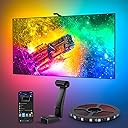
🎬 Elevate your binge-watching game with cinematic lighting that’s smarter than your average glow!
The Govee Envisual TV Backlight T2 is a 16.4ft RGBIC LED strip designed for 75-85 inch TVs, featuring dual cameras for ultra-precise color matching and immersive edge lighting. With 60 LEDs per meter and double light beads, it delivers vivid, natural lighting that syncs in real-time with your TV content. Controlled via Wi-Fi and Bluetooth through the Govee app or voice assistants, it offers multiple modes including music sync and holiday themes, making it a must-have smart lighting upgrade for modern home theaters.


| ASIN | B0BCQBVSDT |
| Additional Features | Color Changing |
| Best Sellers Rank | #13,934 in Tools & Home Improvement ( See Top 100 in Tools & Home Improvement ) #132 in LED Strip Lights |
| Brand | Govee |
| Brand Name | Govee |
| Bulb Base | E12 |
| Color | Multicolor |
| Connectivity Protocol | Bluetooth, Wi-Fi |
| Connectivity Technology | Wi-Fi |
| Control Method | App, Voice |
| Controller Type | App Control |
| Customer Reviews | 4.5 out of 5 stars 6,845 Reviews |
| Form Factor | String Lights |
| Included Components | Light kit inlcuded |
| Indoor Outdoor Usage | Indoor |
| Indoor/Outdoor Usage | Indoor |
| Item Dimensions | 3.94 x 3.94 x 3.94 inches |
| Item Length | 16.4 Feet |
| Light Color | Multicolor |
| Light Source Type | LED |
| Manufacturer | Govee |
| Manufacturer Part Number | H605C112 |
| Material Type | Plastic |
| Model Number | H605C |
| Number of Items | 1 |
| Number of Light Sources | 2 |
| Occasion | Anniversary |
| Power Source | Corded Electric |
| Product Style | Modern |
| Seasons | All Seasons |
| Smart Home Compatibility | Smart Home Compatible |
| Special Feature | Color Changing |
| Theme | Movie |
| UPC | 810088344688 |
| Unit Count | 16.4 Feet |
| Voltage | 12 Volts |
| Water Resistance Level | Not Water Resistant |
| Wattage | 48.0 |
| Wireless Communication Technology | Bluetooth, Wi-Fi |
| hanging_pattern_layout | Linear |
R**E
Hell yes
I was really, really hesitant about buying these. Since many "smart" things are overhyped, and ease-of-use issues and feature limitations often take away from marketing claims, and since every environment can be different, results can certainly vary and they might just possibly suck. In my case I have a very "busy" media room, where instead of a blank wall behind my television there's equipment, wires, pictures, objects, shadows, etc. So I was VERY wary about throwing these lights into the mix. Plus I was worried that the whole thing would just be distracting and annoying. Well I was wrong on all counts, these are awesome. Installation was a little tedious, but that was more because of my particular setup. My television has additional equipment and extensive wiring behind it, (a normal backlight for the tv area, three HDMI cables, network cabling, center speaker & wires, a projector, a power strip, power cables for all, etc.), so getting the light strips into place took two people to get it all measured, centered, and affixed correctly. This took the most time, (probably an hour total), but if it wasn't for the complexity of my own system, I think it would've been pretty painless. The light strips are affixed with double-sided tape already attached to the strips, (3M brand, good quality), so cleaning the adhesion areas on the television is key. Although Govee includes a couple of cleaning pads, it really isn't enough. I used some denatured alcohol and my own rag to get the areas fully cleaned. Once I measured the centerpoints of each strip and my television, attaching was easy with two people. The strips fit my television perfectly. Once attached, getting the Govee app installed and linked to Alexa was also easy. Figuring out the app features was a little tedious, as that section is rather bloated. There are quite a few "features" that I will never use, so it was all rather distracting there. Getting the lights on and into "video" mode was simple enough though. Included are numerous bright orange pads that are used to calibrate the camera sensor. It's an important step so don't forget it - putting the pads on the television and going through the calibration process gets the whole system dialed in correctly. Directions for this are included in the box, and also available in the app itself. The pads get placed in corners and centers of the television, and the camera remembers these spots so it knows the range of the television lighting. (Attached video shows the pads in place on the screen.) As for performance, my biggest hesitation was fearing that they'd be distracting and annoying, but they aren't at all. So far I've used these for movies, television shows, and Formula One races, both in daytime and at night, and I have zero complaints about any of it. They particularly shine in movies, as the immersion factor increases greatly. On the downside, my only real complaint is that the overall room lighting has a very substantial effect on how the lights perform - if there's any light reflections on the television screen it effects the brightness of the light strips. In my case - when the room lights were on, half the strips were at full brightness and the other half rather dim. I learned that shutting off the lights in the room gets it all back in trim, but that kind of sucks because I don't always watch the TV in darkness. But I guess it's no fault of the product itself because it does what it's supposed to do, (reads the light on the screen), and if that light balance is off, well... so are the light strips. Perhaps there's a way to counterbalance that in the app, but I haven't found it yet. Attached video shows a VERY color-intensive intro to the show Narcos Mexico. I suggest looking at the television itself instead of the lights, because that's what you'd normally be doing anyway. The video is an extreme case with all of the rapid color and scene changes, and I wish Amazon would still let you upload more than one video because I have other examples that aren't so intensive. (Really stupid, Amazon!) All in all, I'm totally satisfied and it's a definite positive addition to the media room. A side note for Formula One fans - anyone intending to use this with the lighting controls for the F1 Multiviewer app, well... they won't work. These lights don't have the LAN API feature necessary for the F1 app to change the lighting colors. (Boo!)
B**S
So much more than what I was expecting!
A while ago I bought an inexpensive screen backlight. It amounted to a generic strand of LED strip lighting that came with a cheaply-made remote control. All it really was was strip lighting, like what my teenage daughter put up in her bedroom. Well, there was one exception. The set I bought for my TV failed within a year. When this lighting set popped up as an almost-expired Lightning Deal, I bought it right away, only because of the good experiences I've had with other Govee products. When it arrived, I was amazed at its quality and capabilities. Unlike the previous strip of lights, the Govee lights were sealed. Also, instead of a single run of lights, which required some awkward bends at each corner, these lights consisted of four strips with built-in wires for corners, making the installation easier and more professional looking. The list of features is astounding. There are enough lights to make the result as bright as I need it, and everything is adjustable through their smartphone app. Thanks to the included camera, actually, there are three cameras built into the single sensor; I can have the lights around the TV change with the picture with no discernable delay. I also have the option to have the lights display a single color that matches the average color of the entire picture at that moment, and I prefer this: the color differs around the screen, depending on what is being displayed on that particular edge at any given moment. For example, if the TV is displaying a blue sky on top, a green field on the bottom right, and a house on the left, then the lighting will show blue on top, green on the right, and house-color on the left, And the match is not just the primary color, but the shade that matches the screen. The result is a picture that is easier to watch in a dark room because there is a smoother transition from the TV display to the darkness surrounding it. Installation took about an hour. It could have gone more quickly, but I was taking my time. However, I did learn one thing that would have made things go more quickly for me and might help you out as well. One installation step is to temporarily apply some large orange blocks to the edge of your TV screen and use the app to define the edges for the cameras by moving little dots to the edges of what the camera sees. What worked better for me was to have a brightly lit picture on my TV and move the dots to the edges without bothering with the blocks. Time will tell if these lights last longer than the previous set. However, based on what I've seen between the two sets and my experience with other Govee products, I expect they will, and by a good amount. And, until then, I have a much better set of lights and a more impressive TV.
E**C
Well made for the price. More economical than the box they have now.
Does exactly what I expected and more! Since I bought this, Govee has released AI filters for movies and it does an even BETTER job with color accuracy than when I first set it up. It really is a sophisticated way of implementing AI into your product. Also, You can create scenes and custom profiles. Honestly I don't use 80% of that stuff because I have no need, but everything that I have tested at length works perfectly. Lights are responsive and the camera seems to be high quality. It even has a microphone so you can listen to music and the lights react to the beat. Caution: DO NOT press too hard on the light strips when applying them to the back of your TV. I think I pushed a single LED diode through the clear diffuser and the light did not look right when that specific LED was shining on the wall. I fixed this by placing a tiny amount of masking tape over that specific diode because all the light strips were already on the TV and I'm pretty sure that was my fault. I would suggest also plugging in the LED strips first to make sure they are working properly before applying them to your TV. Be careful when applying and the product is otherwise flawless in my opinion and well made.
T**Y
Pretty good, with one small flaw for the price
It’s fairly bright in our living room at every color, and color saturation is pretty good. It was relatively simple to set up, although the calibration was a little broken but thankfully I didn’t need to calibrate it much. It connects to your phone that you can use as a remote control but you can also use the buttons on the unit itself. My main complaint is that it doesn’t seem to do dim colors all that well, and for some reason you can’t calibrate color tones so it will see the same color in a movie over and over, but display a slightly different shade each time. Still fun, and relatively inexpensive if you get it on sale compared to the competition. The colors switch relatively quickly and it isn’t distracting 99% of the time.
A**R
A World of Difference
Since installing the light strip, the viewing experience has been absolutely magical. The entire wall lights up with a relatively responsive glow based on whats on screen. Especially engrossing in colorful scenes like animations, but offers fantastic ambiance with any other scene (e.g. fires, flashlights moving, cool snow scenes, vibrant background colors). A very affordable alternative to HDMI-input color strips. Its not as responsive to within the millisecond as those HDMI inputs, but at a fraction of the price its an excellent product. If you set it up correctly, have a dark area without external light sources, and have sufficient white space behind the TV to defuse the colors - this is a must buy. Installation: The strip installation is a breeze, but actual calibration is where one would need to take special focus. You need to be sure you setup app setting's light direction, color calibration (against a nuetral white screen), saturation and brightness levels, and most importantly play with calibration of the camera. You will get a few orange squares to adhere to TV screen to pinpoint the cameras angles. I personally found better results by moving the calibration points closer inwards into screen by a few inches. Meaning the orange squares place the calibration too close to edge of the TV and this did not provide the best result. I recommend playing around with these points and running a few color test videos on YouTube. Also, keep in mind this technology works by using a camera to see the TV screen. This technology works best in absolute darkness - any reflection on the matte or glossy screen display from outside lights will negative impact your color accuracy. I find the light strip isn't as impressive in the daytime. Support: This is the real reason I am writing the review. Govee support has been impeccable. I had issues getting my camera to work correctly as one of the two lenses was not reading input correctly. They provided instant solutions and sent a replacement for the defunct piece. I was impressed by how swiftly they had resolved my issues, no questions asked. Moreso than the product itself, this impressive support will ensure I buy more Govee devices.
B**L
Movie Theater Vibes at the Sound of My Voice! Your Guests Will Want One Too!
This has surprisingly helped lower my electric bill! I use these lights every evening while watching TV, and they provide the perfect amount of illumination, so I rarely need to turn on the room lights. The soft backlighting creates a cozy, movie theater-like ambiance that’s perfect for relaxing. The best part is the smart home integration. I have it connected to Alexa, and it’s always a hit with guests. Saying, “Alexa, turn the TV backlight on,” never fails to impress, and it works flawlessly every time. It’s one of those features you don’t realize you need until you have it and now I can’t imagine my entertainment setup without it. Highly recommended!
J**T
The undisputed king in immersive lighting.
Setting up a TV in this house is a routine that always goes like this - unbox, inspect, mount, install Govee backlight. In the world of immersive TV lighting, Govee is the standard that all others aspire too, and THIS backlight kit is why. From the installation of its quality made LED strips with their excellent adhesion to mounting the control module, the entire process is intuitive and is supported by an app that encompasses all Govee products for a sense of device control and cohesion that feels organic. ( and without demanding a bunch of sus permissions) Connectivity between this app and connected devices is simple and is made even easier thru what they call, "dreamview", which is basically a way to control multiple Govee devices at once. Functionality is smooth and user control is put at the forefront for a truly customizable experience. And speaking of an experience - these light strips are such a leap forward in color vibrancy, accuracy and motion from the T3 lite ,that Im on the verge of upgrading every TV set in this place! Color transitions are smooth and the expanded color pallete is immediately noticeable. Govee included a duel fish eye lens camera in this kit and WOW! The difference is so stark that I cant go back. Ive been championing the T3 lite for years and most people who view it in motion get one of their own soon after , but this.. This is what it looks like when a company holds nothing back and throws everything into improving an already stellar device for the sake of making the absolute best product they can. And in this case, it is a resounding success!
I**K
Govee Envisual TV LED Backlight T2 - A Mesmerizing Upgrade for Your Viewing Pleasure!
I recently added the Govee Envisual TV LED Backlight T2 to my home entertainment setup, and I am absolutely thrilled with the results! This LED backlight is a game-changer, creating a mesmerizing ambiance that enhances my TV-watching experience. Here's why I'm giving it a glowing five-star review: Vibrant and Immersive Lighting: The Govee Envisual TV LED Backlight T2 transforms my living room into a cinematic paradise! The vibrant colors and dynamic lighting effects add a whole new dimension to my TV viewing, making it feel like I'm part of the action. Easy Installation: Setting up the LED backlight is a breeze. The adhesive tape on the back ensures a secure and hassle-free attachment to the TV. The T2's design is versatile, fitting TVs of various sizes with ease. Responsive to Content: One of the standout features is the backlight's ability to sync with the on-screen content. Whether I'm watching movies, gaming, or even streaming content, the LED lights adapt to the colors on the screen, creating a truly immersive experience. Smart Control via App: The Govee Home app adds a layer of convenience. I can easily customize the lighting effects, colors, and brightness directly from my smartphone. The app also allows for voice control, making it even more user-friendly. Music Sync Feature: The T2's ability to sync with music is a party game-changer! The lights dance in rhythm with the music, turning my living room into a dynamic and energetic space. It's a fantastic feature for entertaining guests. Quality Build: The build quality of the Govee Envisual TV LED Backlight T2 is impressive. The materials feel durable, and the LEDs themselves emit a bright and consistent glow. I appreciate the attention to detail in the construction. Affordable Luxury: Considering the impact it has on my entertainment experience, the T2 is a budget-friendly luxury. It adds a high-end feel to my setup without breaking the bank. In conclusion, the Govee Envisual TV LED Backlight T2 is a must-have for anyone looking to elevate their TV-watching or gaming experience. It's easy to install, visually stunning, and packed with features that make it a standout choice in the world of LED backlights. I wholeheartedly recommend it for anyone looking to add a touch of magic to their home entertainment setup. Five stars without a doubt!
O**B
Great product and arrived very quick
B**O
Top cinema
Ótimo produto Boa qualidade
S**C
The last step in completing your home theater, video, audio, and now lighting..!!
The springs a whole new dynamic to your TV experience whether your watching videos, television, movies or video games. It helps you feel like you're more part of what's going on on the screen. I have it accompanied on each side by Govee Lyra lamps configured with it, and also a set of their Hex lights off my back left, and two sets of their Y lights off to my back rear that I only sync when watching movies or playing PS 5, otherwise they are colour patterns etc. With almost 20 various Govee lighting covering almost every single one of their products in my one Mediaroom/man cave alone it is absolutely incredible how it can transform a room from soothing, to cool, to party mode, and it's also easily programmable in their app which of surprisingly heard people complain about although it is as simple as an app can be, so I'm always puzzled by that one complaint that comes up from time to time. You have to buy this unit, and I have a blue wall behind my TV which is not helping the colour accuracy so I should probably paint it but it's still produces some pretty darn accurate colours and is superior to the Phillips version which uses HDMI as you can't take advantage of smart TV functions with their technology unless you're using a separate box like Apple TV etc. of which I do have, but I prefer the Govee ecosystem as it much more affordable and just as good quality. They are the new kings in town taking over the home lighting industry, especially their permanent outdoor lighting which I have yet to get into, but I will. It's just that my house is so large that it will cost a small fortune as I like to go all out when I do things. Trust me just buy this T2 set up, set up the left side of the screen first then complete, then go back and set up the right side of the screen and complete it is the simplest way IMO to get the best coverage of your screen for the dual camera. I have an 85 inch TV, and the kit I got is for 75 to 85 inches meaning I don't have as many LEDs as would be preferred, but there are 60 LEDs per metre which is a heck of a lot and they are bright and the best quality I have ever seen. I've had many LEDs in my life working in the theatre industry for 30 years so I've seen my fair share of various technologies And you will be taking videos and pictures and bragging to your friends about this kit. It also has game mode which makes it super responsive which I would only recommend for when you're actually playing games otherwise it's too sensitive. The coolness factor is off the charts and you get used to it pretty quick, I could not imagine a TV without this backlight system, you simply could not rip it out of my hands. I got it on sale for 179, and then it had another $40 clip and save coupon I believe, so they constantly go on sale keep an eye out for that, don't pay regular price, and it is sold and shipped by Govee so you have full support by them who don't charge PST by the way... 😉
A**A
Great product
I use this LED backlight a lot and it’s very bright — colours pop and the lighting definitely adds atmosphere whether I’m watching movies or gaming. Setup was fairly easy and the app gives good control over effects and colours. One thing to be aware of is the camera-based colour tracking. If you have a glossy TV bench, the camera reflects off that surface and confuses the tracking, so it doesn’t pick up the colours properly. Because of that, I don’t use it with the camera in my setup anymore — it works great just as a bright, colourful backlight, but the colour-matching feature only works well on non-reflective surfaces. Overall, solid brightness and fun lighting, just not ideal if you wanted accurate colour tracking off a glossy surface.
M**Z
Hermosas luces y con calma se configuran bien.
Compre estas luces con un poco de temor porque algunas reseñas son muy buenas y otras no lo son tanto y hablan de que es difícil de configurar. Incluso me anime por esta versión aun siendo mas elevado su precio contra otra de la misma marca pero mas barata suponiendo que en esta al ser versión mas actual se corrigieran esas dificultades. la compre para una pantalla de 55" y le queda perfecto, antes de empezar a pegar medí el tamaño de las tiras contra mi pantalla y las tuve que pegar muy cerca de las orillas para que no me quedaran grandes. trae todo lo necesario para su instalación y un par de instructivos uno de inicio rápido y otro mas detallados y los dos con códigos QR que te llevan a un video para la instalación. la instalación es sencilla, se debe de limpiar donde se va a pegar las tiras, incluye las toallitas con alcohol para que quede mejor. Las cintas ya están armadas y dentro de un despachador que facilita y mucho pegarlas. la cámara solo va sobre puesta sobre la pantalla con una forma muy bien pensada y no tiene dificultad y por ultimo el modulo central que trae adhesivo doble cara y solo se pega por detrás y se conecta la tiras led y la camara con sus cables usb c. sin dificultad se conecta al celular por bluetoth y después a wifi. Donde mas me atore en en la configuración por que te indica el manual y el video pegar 8 almohadillas de color naranja (incluidas) e indicarla a la cámara manualmente donde están los puntos,. lo intente 2 veces y no me gusto el resultado pero en youtube escribí la marca y modelo y encontré un video que simula poner las almohadillas en la pantalla y mientras trascurre el video hice nuevamente una configuración y en automático me tomo las almohadillas y el resultado fue genial. solo se debe de calibra la calidez de los blancos como explica el manual y eso se hace en la aplicación desde el celular. lo que note es que los colores blancos en la pantalla los reproducía muy rojos/naranja (calido) y baje la calidez de la luz al lado mas azul y listo. tiene muchas, pero deberás MUCHAS opciones de iluminación y de programación. se pueden establecer horarios, rutinas, emparejar con Google home. me pase 2 horas probando diferentes configuraciones y no termine. solo y lo tengo que mencionar es que vi comentarios de personas que se quejan del retardo al reflejar los colores. es definitivo que si existe pero es muy breve, hablo de fracciones de segundo y considerando que los colores los reproduce después de que la cámara los registra es muy comprensible y solamente es perceptible si es que te estas concentrado en eso. Nadie mas de mi familia lo nota. Por ultimo se ve muy bien ya configurada
Trustpilot
1 month ago
1 month ago