Buy anything from 5,000+ international stores. One checkout price. No surprise fees. Join 2M+ shoppers on Desertcart.
Desertcart purchases this item on your behalf and handles shipping, customs, and support to Panama.
⚡ Power your productivity with the sleek Surface Dock — where speed meets style.
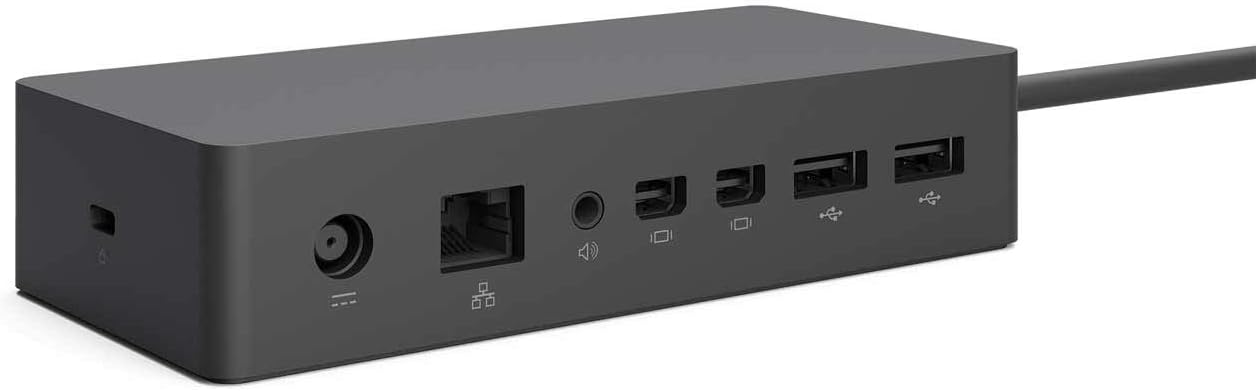
The Microsoft Surface Dock transforms your Surface device into a full desktop experience with dual HD video outputs, four USB 3.0 ports, and gigabit Ethernet connectivity. Its minimalist design uses a single magnetic cable for fast data, video, and power transfer, reducing desk clutter and enabling quick setup. Compatible with Surface Pro 3/4, Surface Book, and Surface Book 2, it’s the essential hub for professionals seeking seamless multi-device productivity.


| ASIN | B01BOVBQ4C |
| Best Sellers Rank | 7,626 in Computers & Accessories ( See Top 100 in Computers & Accessories ) 61 in Docking Stations |
| Brand Name | Microsoft |
| Colour | Black |
| Compatible Devices | Microsoft Surface Book, Microsoft Surface Pro 3, Microsoft Surface Pro 4, Products: Microsoft |
| Country of Origin | China |
| Customer Reviews | 4.4 4.4 out of 5 stars (679) |
| Global Trade Identification Number | 00885370996425, 00889842013771 |
| Hardware Interface | Ethernet, USB 3.0 |
| Item Dimensions L x W x H | 13L x 6W x 3H centimetres |
| Item Weight | 550 Grams |
| Manufacturer | Microsoft |
| Manufacturer Part Number | 1661 |
| Model Number | PD9-00011 |
| Number of Ports | 4 |
| Product Warranty | 2 year manufacturer |
| Total USB Ports | 4 |
| UPC | 885370996425 889842013771 |
| Unit Count | 1.0 count |
N**L
Excellent docking station for the surface pro 3 or 4.
This is actually quite brilliant though design wise almost too functional looking. It gives power, 4 USB 3.0 ports 2 extra display ports, a gigabit Ethernet port and media jack for the surface pro 4 (and 3). It's very solid, has a rubber underside to prevent slipping and a single magnetic lead to attach to the surface pro. It makes it a good alternative to a desktop. Only comment is like most of the surface accessories it's a bit pricey so look for online offers.
E**L
Expensive but does the job, no surprises.
I was a bit uncertain of what would be in the box as none of the reviews made this clear. The unit comes complete with its on power supply, so if using at work, you can leave your original power supply at home. The unit plugs into the surface pro where the original power supply fits and the this lead has extra functions over the standard lead as all of the functions of USB ports, network cabling and display ports come through the lead. The USB port on the surface pro is therefore free although with 4 ports on the dock you should not need it. The display port is also free, so potentially you could run three screens, but I have not tried this myself.
B**N
Not perfect but pretty invaluable
I purchased one of these so that I could connect two monitors and a keyboard to my Surface Pro 4. I initially plugged it in without monitors so that I could use the extra USB ports and it was fine. However as soon as I plugged in a monitor to the dock it killed all network connectivity (although plugging a monitor directly into the Surface was fine). I looked this up on various forums and it became apparent that this was a well known fault, so I requested a return and was very promptly (i.e. next day before I'd even returned the item) sent a replacement by Amazon. Happily, I can report that this new device now works perfectly with 2 monitors, a USB keyboard, an Ethernet cable, and several other USB devices. It does require that you work from a wired connection when you're docked which can be quite annoying if there's only Wi-Fi (although I haven't updated the firmware yet, so this may have been resolved). The downsides (other than the aforementioned Wi-Fi issue) are that the monitor sockets are mini-DP. Given that even the Lumia 950 dock has HDMI and that DP monitors are generally more expensive, this is a bit annoying as DP to non-DP cables can be a bit of a lottery - but it's not a showstopper. It also worth mentioning that you can continue to use the Surface as a monitor even when docked (so it's basically a 3 monitor PC). On the bright side this is a very compact device, which can be viewed as simply a heavy power supply. Connectivity is via a cable that plugs into the Surface's power socket which makes it easy to leave on your desk and dock at your leisure, but it's also light and small enough to fit in a laptop bag. It allows me to use my Surface like a desktop when I'm at my desk, then just unclip it and walk away with it like a tablet for meetings. Highly recommended and actually delivers on the promise of a high-powered premium compact desktop device.
L**R
Essential for frequent users; offers significant extra connectivity
An expensive but, for some, necessary expansion dock for the Surface Pro 3 and 4 but its appearance does nothing to enhance the ulta-slim Surface Pro; its blocky design could possibly benefit by being smaller and less rectangular and a change from its all black colour. It not only provides an extra 4 USB 3.0 ports but 2 HDMI ports that potentially support 4K graphics and a Gigabit Ethernet port. There is also an audio socket either for headphones or powered speakers. A USB-C port would have provided some benefit if the connector's bandwidth supports it and if included. It uses its own substantial power adapter which connects via a common form of co-axial socket and also powers the Surface Pro via the same magnetically-connected port as the standard power adapter, which it replaces. Its PSU, which is virtually identical in size to the hub, has some extra power to offer and appears not to get become quite as warm as the standard power unit when used for a few hours. It is no shrinking violet and is far heavier than it would appear. A normal 4-port USB hub has been sometimes used in the past - it was originally purchased to use with another laptop - but it obviously does not provide the same connectivity as the dock although several USB adapters could be purchased to provide the same functionality as this but they would consume most or all of the hub's ports. There is currently no single alternative to this Dock that provides similar connectivity. If you frequently use the Surface Pro and need some or most of the Dock's additional connectivity, then this is something to consider as it is so useful. It adds so much extra to the Surface's connectivity that it transforms the Surface Pro into a virtual desktop PC. There are reports that it cannot simultaneously support two 4K monitors but that is because some of the Surface models may not fully support MST (multi-screen technology); the top-of-range model may!
E**T
Bonjour Le dock ne charge pas la tablette Cordialement
J**R
good product
C**G
Diese Dockingstation erweitert mein altes Surface 3 enorm. Es hat schon immer gestört, das nur ein USB-Anschluss an dem Gerät war. Jetzt kann man Tastatur und Maus über USB anschließen und hat den Anschluß am Gerät noch frei. Auch das Laden über die Dockingstation klappt wunderbar. Alles in allem macht das Gerät incl. des mitgelieferten Netzteils einen sehr wertigen Eindruck und war als refubished ungefähr 80% unter dem Normalpreis. Auch erwähnenswer ist, das der Verkäufer superschnell versendet. Einen Tag nach der Bestellung hatte ich das Gerät in Händen, 3 Tage früher, als von Amazon gesagt.
V**O
Verwende die Dock Station für ein älteres Microsoft Surface Modell. Obwohl gebraucht funktioniert es bestens. Auch optisch ist nicht zu erkennen, dass das Gerät gebraucht ist. Der unschlagbare Preis lag bei etwa 20% vom Neupreis (der mir für meine Zwecke zu hoch gewesen wäre).
B**N
Works like a charm
Trustpilot
1 month ago
2 months ago