


Buy anything from 5,000+ international stores. One checkout price. No surprise fees. Join 2M+ shoppers on Desertcart.
Desertcart purchases this item on your behalf and handles shipping, customs, and support to Panama.
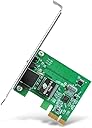
⚡ Upgrade your desktop’s network game—speed, stability, and style in one sleek card!
The TP-Link TG-3468 is a high-performance Gigabit PCI Express network adapter delivering up to 1 Gbps wired speeds. Featuring a 32-bit PCIe interface and dual bracket design, it supports a wide range of Windows operating systems from XP to 11. Engineered for easy installation and reliable, lag-free connectivity, this Ethernet card is the perfect upgrade for professionals seeking fast, stable, and versatile desktop networking.


| ASIN | B003CFATNI |
| Best Sellers Rank | 1,202 in Computers & Accessories ( See Top 100 in Computers & Accessories ) 2 in Network Cards |
| Box Contents | Gigabit PCI Express Network Adapter TG-3468, Low-profile Bracket, Quick Installation Guide, Resource CD |
| Brand | TP-Link |
| Brand Name | TP-Link |
| Color | Verde Smeraldo |
| Colour | Verde Smeraldo |
| Compatible Devices | PC, notebook |
| Compatible Operating System Family | Windows |
| Compatible devices | PC, notebook |
| Country of Origin | Netherlands |
| Customer Reviews | 4.6 out of 5 stars 14,533 Reviews |
| Data Link Protocol | 1000BASE-T |
| Data Transfer Rate | 10000 Megabits Per Second |
| Data link protocol | 1000BASE-T |
| EU Spare Part Availability Duration | 1 Years |
| External Testing Certification | FCC, CE, RoHS, BSMI, VCCI |
| Global Trade Identification Number | 06935364001049 |
| Hardware Interface | Ethernet |
| Hardware interface | Ethernet |
| Item Dimensions L x W x H | 16L x 2.8W x 13.5H centimetres |
| Item Part Number | TG-3468 |
| Item Type Name | TP-Link NE000644 TP-Link TG-3468 Gigabit PCI Express Network Card |
| Item Weight | 100 g |
| Manufacturer | TP-Link |
| Manufacturer Part Number | PCI-E |
| Minimum Required Operating System Version | Windows XP |
| Model Number | TG-3468 |
| Product Warranty | Default Manufacturer Warranty. Please contact us if you require further details |
| Product dimensions | 16L x 2.8W x 13.5H centimetres |
| UPC | 767531764145 840460604796 |
| Unit Count | 1.0 count |
K**S
Great option for an additional Ethernet port
Great option if your motherboard’s Ethernet port no longer works, provides fast speeds and a stable connection. Super easy installation - I didn’t need to install drivers either as my pc is running windows 11.
J**C
A full (or adjustably half) height PCIE card which even fits in the small PCIEx1 socket
I thought my onboard network adaptor was playing up with random network drops, so decided to buy this to bypass the onbaord one. This card comes as a full height card, though also comes with a half height backplate which you can swap to if you are fitting into a machine with half height slots. The card itself is very small which is perfect since you should have no issues with it blocking up space or airflow if for example you had a graphics card in an adjacent slot (I don't mean double height card of course!) I went into BIOS, disabled the onboard network card, then switched off and opened up the case. As you can see from the photo, the card fits nicely into the small PCIEx1 slot (I'd always wondered what would really ever use those slots and my question is now answered!) On booting up Windows 10, this was automatically detected as a Realtek Gigabit network card and configured automatically without need of the driver disks. Though I did manually update to the ones on the disk since they seem to be a couple of years newer than the ones detected by Windows 10. In terms of performance, it seems to run just as well as the existing onboard 1Gbit adapter. I noticed no network drops during my time and I could see it connected and transferring data at the 1Gbit speed. For £9, this is a great network card and if you're in the situation of needing one, I can definitely recommend this one.
P**T
Recognised Immediately
I'm using this on a Windows 7 Professional 64-bit PC. I couldn't use the port on my motherboard so just bought one that was good enough from the present reviews. Hardware installation was easy and straightforward, turned on PC, took about 30 seconds to get connected after logging on. Got it working in under 10 minutes from opening the parcel. Came with a small guide and an installation CD. The claimed complient OS are: Windows: 98SE, ME, 2000, XP, Vista, 7 Linux Novell (When I've installed Ubuntu 12.04 on it, I'll update this review. Came in strong anti-static bag, which is considerably stronger than the ones I've been getting from the Seagate 3.5 drives recently. The only nag is that the ethernet clip preventing accidental disengagements, is facing upwards when connected to the network card. This is a problem for me and perhaps to others is that the PCIE x1 slot is the first and most upper slot on the motherboard. The access to the card slots are indented by 1cm to the rest of the rear of the PC case. Proving difficult removing the cable and you're trying to get a finger between the clip and the underside of the card slot enclosure-type. And if your PC is low down from your position, you're unable to see the flashing LEDs of their activity. Besides the physical complications for me, I'd recommend this to Windows 7 users, due to the fluidity of installiation. I saw that the 3 reviews giving this 1* did not state their OS.
M**S
Easy to fit and works fine once the drivers have been installed.
This is a pretty good network card slightly let down by the driver CD which has no automatic install . On Windows 7 certainly the device driver has to be installed, maybe Windows 10 would do this automatically. Being an IT professional and used to installing device drivers I had no problem. It is reasonably easy if you know how to get to the control panel, the open the system Applet and use device manager to find your new card which will have a yellow question mark by it. Pop the supplied CD into your PC's DVD drive then right click on the device in device manager. Choose browse my PC and navigate to the directory for your card the TG-3468, this information is printed on both ends of the box. Click OK and the driver will install automatically. Once installed the card worked perfectly on our system. Ours is a 1 Gb/s network and the card automatically set itself for 1 Gb/s. This is a 1 bit wide PCIe card but you can put it in any slot, in our PC all the slots were 16 bits wide and the card worked fine in one of them. You are supplied with a half height bracket which you will need to fit if yours is a small form factor case, ours was not so the full height bracket already fitted was perfect.
T**R
Drivers on a mini CD
You will need an external cd drive if you don’t have a case mounted one. This wasn’t as quite straight forward as it should have been, A freshly installed and updated version of windows 11 pro, could not detect the card when inserted into the motherboard. After downloading an installing the TP link drivers from the support site for the correct version of this card V4.0 the card was still not detected, even older drivers from the sight didn’t work. Device manager only found a generic BT device, no wifi. One set of the online instructions said to install the cd, there was no CD when i first opened the box or so I thought, pulling the plastic try out revealed a mini cd , installation instructions and a product card… yes I know not something you’d normally do when opening a box like this. I grabbed a usb cd drive and it took no more than 5 minutes to install both drivers and get the card working after a frustrating day of fiddling. If you want to use the on board Bluetooth you will also need a spare usb header on your motherboard. The supplied bracket didn't fit my case snuggly and required a little bending on the tongue otherwise it doesn’t fit all the way down in the socket. These few problems aside the card works faultlessly and has a strong connection to the wifi hub. This card is better than the copy version of it which I installed on a friends machine. Hence the reason I still have it 5stars , at time of purchase it was on offer and made excellent value for money. It’s Bluetooth 4.0 and above, so far I’ve not come across an incompatible BT device
M**R
5 min install, great performance
I've had a problem with my motherboard network connection for a while now, it just wasn't working and despite looking around the web non of the solutions I tried worked. I've been using WiFi for a while but while it's fine for general browsing it's not very good when I want to move large files around my network. This card works brilliantly, it comes with the standard sized plate attached and a smaller plate is included in the box. Installation took less than 5 minutes, I plugged it into a spare port and when I loaded Windows 10 it was up and running right away. I connect to my router via some TP Link Powerline Adapters and I'm getting great speeds with this card, much faster than my WiFi connection. Given the low cost I wish I'd purchased this sooner instead of hobbling along with WiFi!
L**O
Great product
Coming from a old WiFi 5 card was amazed by the speed difference I mean obviously depends on your isp but I was reaching 300mbps easily from far from the router very good product whilst it does have the mediatek chip it gets a lot of hate but if you have windows realistically your fine it shouldn’t cause a issue very easy to install looks slick good overall
S**D
Well built card with noticeably better performance than last generation
It took a bit of research to make sure this was the right card for my partners PC and a bit of research into how to fit it will also be worthwhile unless you are experienced in replacing and fitting such cards. It will help with understanding the type of fitment used for the Bluetooth connection to the motherboard for example. The card itself feels like a quality item - well finished, no skimping and worth the bit of extra money over the basic ones. It was easy to fit the separate antennae, but do ensure you have enough room/height for them before you start. Performance is really good, a noticeable improvement over the 10 year old card this one replaced. Do watch out for the difference between WiFi 6 and 6E. It transpires our recently procured Sky router only supports the former, so we can’t get the very best out of the new card. One last tip - if you’re on Windows 11, remove any Bluetooth mouse and keyboard from the system before you fit the new card, then re-pair them once it’s in. This does mean that you will need a spare wired set to see you through the install process.
B**Ć
Awesome device
Works as described, plug and play. Immediately recognized by Windows 11 and working at full speed (1 Gbit/s).
A**I
Easy to install
Package arrived without any damage and on time. Installed the WI-FI card and then the driver. no issue so far. Thank you for this quality product.
T**S
Plug and play, worked first time
Needed an additional network card for a PC used for security (Dell Optiplex desktop). This one comes with a full size and a half size bracket (I needed the half size to fit the case and PCI express). Changed the bracket, installed and worked first time without issue.
C**O
Archer TX55E
Pessimo acquisto. Rispetto al modello precedente le antenne sono più piccole e la qualità del sequale Wi-Fi ne risente o comunque il segnale è più debole.
K**N
Reliable, Cheap, and Just Works — Perfect for Adding Gigabit to Old Desktops
Bought this to revive an older desktop that had a flaky onboard NIC. Plugged it in, booted into Windows 10 — detected instantly, no driver needed. Ethernet came up at full gigabit speed and it's been rock solid since. No weird compatibility issues, no disconnects, no driver hunting — just clean, stable performance. I’ve tested sustained transfers over LAN and this card keeps up no problem. Also appreciate that it comes with both full-height and low-profile brackets. I used the full-height one, but it’s nice that it’s not an afterthought. Honestly, for the price, there’s no reason to mess around with Realtek garbage from no-name brands. TP-Link nailed it. It does exactly what it says, quietly and reliably. Would absolutely buy again if I needed more.
Trustpilot
1 month ago
1 month ago