Desertcart purchases this item on your behalf and handles shipping, customs, and support to Panama.
🚀 Unlock lightning-fast 4G Wi-Fi and never miss a beat!
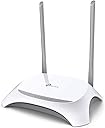
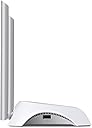
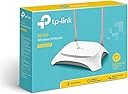
The TP-Link TL-MR3420 is a sleek, single-band 300 Mbps Wi-Fi router designed for seamless 3G/4G mobile broadband sharing. Featuring 5 fast WAN/LAN ports, a USB 2.0 port for modem connectivity, and dual backup modes, it ensures uninterrupted internet access for up to 32 devices. With easy setup via a WPS button and advanced WPA2 security, it’s perfect for professionals seeking reliable, flexible connectivity at home or in small offices.
| ASIN | B003WK62OS |
| Antenna Location | Indoor/Outdoor |
| Antenna Type | Internal |
| Best Sellers Rank | 200,149 in Computers & Accessories ( See Top 100 in Computers & Accessories ) 1,542 in Routers |
| Box Contents | 3G/4G USB modem |
| Brand | TP-Link |
| Brand Name | TP-Link |
| Colour | Black, White |
| Compatible Devices | Personal Computer |
| Compatible devices | Personal Computer |
| Connectivity Protocol | Wi-Fi |
| Connectivity Technology | Ethernet LAN^USB 2.0^DC-in jack |
| Control Method | Touch |
| Controller Type | Push Button |
| Coverage | Standard Wi-Fi coverage (several dozen feet indoors, up to 150 feet or more in open spaces, at 2.4 GHz) |
| Customer Reviews | 3.9 out of 5 stars 4,038 Reviews |
| Data Transfer Rate | 300 Megabits Per Second |
| EU Spare Part Availability Duration | 2 Years |
| Frequency | 2.4 GHz |
| Frequency Band Class | Single-Band |
| Frequency band class | Single-Band |
| Global Trade Identification Number | 00119459189065, 06935364051495 |
| Has Internet Connectivity | Yes |
| Is Electric | Yes |
| Is Modem Compatible | Yes |
| Item Dimensions L x W x H | 28.8L x 22.6W x 7.1H centimetres |
| Item Part Number | TL-MR3420 |
| Item Weight | 270 Grams |
| LAN Port Bandwidth | 300 megabits_per_second |
| Manufacturer | TP-Link |
| Manufacturer Part Number | 2325214 |
| Maximum Upstream Data Transfer Rate | 300 Megabits Per Second |
| Model Name | TL-MR3420 |
| Model Number | TL-MR3420 |
| Model name | TL-MR3420 |
| Number of Antennas | 2 |
| Number of Items | 1 |
| Number of Ports | 5 |
| Operating System | Linux |
| Product Warranty | 3 Years |
| Recommended uses for product | Indoor/Outdoor |
| Router Firewall Security Level | Basic |
| Router Network Type | hybrid |
| Security Protocol | WEP, WPA-PSK;WPA2-PSK |
| UPC | 777060005336 916727890223 682851723798 778890697937 172302834123 119459189065 163120528196 777104569237 723921146007 320127552672 748690326146 854587033407 777304566166 501390738448 845973051495 |
| Unit Count | 6.00 Count |
| Voltage | 220 |
| Wi-Fi Generation | Wi-Fi 4 |
| Wireless Compability | 802.11n |
| Wireless communication standard | 802.11n |
A**E
Very Skeptical At First
And I still am given my previous less than satisfactory experience with TP-Link products especially when it comes to their Wireless Access Points and Repeaters - Not because they make bad products, But their firmware was excruciatingly buggy. While I only managed to get my unit set up last night after work, It has been very easy to set up and configure and I literally had it going out of the box within 10 mins after a cup of tea or two. When booting up it takes a minute or two for the router to detect any 3G or 4G dongle and connect to the internet but thats a very minor issue compared to the bugs ive experienced on their products. Obviously the 'loading time' of the dongle could be sped up a little but so long as it works properly then I will be happy. I'm currently running this with a Huawei E367 testing out an EE data sim which was purchased at the same time. Since the dongle only supports 3G so theres no hitting anything above 10-20mbps. Speedtest reports between 5-6mbps but that's in the dead of night. The E367 is capable of hitting 21mbps but it has never gotten close which means its either the router that's capping the speeds, The ISP or just a bad dongle. I have seen LTE dongles going cheap on ebay and im tempted to purchase one for fun and have a play around. Ive heard that these routers use the PPP Protocol which creates massive overheads and stops the internet from running at its full speed. It seems ok so far, No problems to report but I wont keep my head held to high because shoddy firmware could easily strike again. After Im done with EE I will most likely move back over to 10GB a month from 3. Reason why i hesitate going back to Three is they throttle their connection HARD. I was with them for almost two years. net performance was good at first but the speed just totally dropped and it got to a point where Id be around 256k or 1/2 meg speeds. I'll see how this plays out over all - bad firmware could still kill the device for me. TP Link need to update their firmware a little more, Their last update was back in 2012, Im using an EE simcard but yet the dongle connects to T-mobile and there are no options of adding your own Access point to their profiles. Gonna give this a few weeks and report back when i have the other dongle in
E**N
Sanity Saver!
Just moved to a new house and arrange for BT to connect up my broadband the day we moved in but with the engineer just not pitching up and no-one contacting us we've been left without broadband for, as it transpires after many lengthy phone calls resulting in suspension of disbelief as to how inefficient and ludicrous a company can be, over a month and a half from the original what was meant to be straight-forward engineer visit - i.e. one requiring only a trolley full of Cif and J-cloths, rather than a chainsaw and a lawyer. This little box, in combination with a little Three dongle (with them providing magnificent 3G broadband signal in our area with 02 only managing 1 pip on rectumnet, gives us back proper Internet with the simplicity of only having to connect up to our Home Wifi. Setup was a breeze, with the box recognising the dongle strait away and connecting up without issue. The Wifi signal is amazing also, giving us just below full strength on the ground floor with the box up on the 2nd, where my old Sky 'router' had trouble getting a single past the balustrade. The UI is easy to use & easy enough to tab through (if mouse is missing), Wifi settings come with it pre-enabled & are easy to tweak. The unit also looks great with decent build quality (insofar as consumer routers ever do have good build quality) The only issue I had was that the router doesn't seem to be able to report the 3G signal strength for the dongle I purchased (E3231v2), and I also can't see any interface allowing you to see any texts sent to the sim e.g. for 3 account activation, which just means I'll have to pull it out and stick it in a laptop to activate; but these a minor issues when considering the ease and brilliance of the product.
B**B
Compatibility, Signal Strength and Firmware Updates.
After some initial confusion about firmware updates I was very impressed with this router. I would have rated 5/5 if it wasn't for the firmware issue as it's not mentioned in the manual. Vote useful if you need a firmware installation guide, I have included below. Compatibility - Purchased a 3 network (using in the UK) Huawei e353 dongle and it worked straight out of the box with no firmware updates. Had an old e1550 dongle by Huawei that I couldn't get to work, even though was stated on the TP-Link website that it was supported. Signal Strength - I love in a large old 3 bed flat with solid brick walls between every room and I get full signal on my mac, and cheap £100 tablet in every room. THERE IS NO INSTRUCTIONS on how to do a firmware update. So, for those people who have dongles that should be compatible with this device and cannot figure this out, here's how: Download the latest firmware from the TP-Link site. Save it to desktop for ease of access or wherever you please. Plug in the router and connect to you're PC/Mac via the ethernet cable as described in the user manual. Type the TP-Link IP address (192.168.0.1 is default) and enter you're user/account name and password (admin, admin is default). Look down the left hand side menu and select 'System Tools'. In this drop down menu select 'Firmware Upgrade'. Copy and paste the location of the firmware upgrade you downloaded or select browse and locate the file that way. Click upgrade. VOILA. Hope this helps someone.
C**R
Short-lived and unreliable ~ the world's first disposable router?
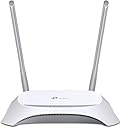
Firstly an aggravation that can't really be blamed on TP-LINK. There seem to be a lot of 3G dongle grrrrrs - no-one ever seems to be able to use pre-pay 3G-4G 'out-of-the-box.' This could well be an operator issue. Most if not all English networks now hoover up yet more personal data [so they can lose it in a hack] before they permit you to use their SIM card. This router is not equipped to deal with interaction and so quite understandably SIM and hence access won't work. You can't really blame TP-LINK for this.. You can now get EU 3G pre-pay data SIMs quite easily. Operators assume a ludicrously limited set-up so you may never receive these txt prompts. Unless the SIM is locked to an IMEI number my advice would be to pop a new pre-pay SIM card into a regular phone or other device which accepts SMS messages, hand over all that lovely personal data so the operators can share it with a spotty teenager later and install the SIM in the dongle once everything works... Having said that I would not recommend this router. I had this for three months. It was initially bought as ISP backup. I can't comment on that now as I can't remember reliably. Once that episode was over [thanks very much VM] I reused it as a basic access point for about five or six wifi clients. I'll grudgingly forgive TP-LINK for omitting 5GHz wireless and gigabt network because the thing is so cheap. My gripe: poor reliability. For two and a half months it operated well until I began to suspect an intrusion attempt; the network segment kept failing, log-ons were unreliable and internet was bumpy but I couldn't find any sign of intrusion. After several harrowing episodes the router started to lock up which helped isolate the issue. The fix was to restart the device using the physical switch which TP-LINK had thoughtfully provided [probably in anticipation.] It has failed in so little time: once it got to a point where it required a restart every morning it was disposed of [which is where a scheduled reboot function in the firmware might have saved it.] [by the way it's the later curvey version - seems to be a photo mismatch on the page]
E**S
Very pleased - great value and works very well.
I use it with [Huawei E3256 USB Mobile Broadband Modem] on the Three network. When I plugged in the dongle the router did not recognise it. To get it to recognise the dongle I when to the TP website and downloaded the latest firmware which I installed using a PC and the included Ethernet cable. Very simple and installation takes less than 1 minute. The router now recognises the dongle and had performed flawlessly. It is very fast - I had 10Mbs showing on 3G using Three network. I have a MIFI dongle on Three and in the same location I get 25% faster speeds, more robust signal/responsiveness, no drop-outs, no high-pitched charging noise that the MIFI gives off when plugged in. Pros - good range. quick to re-establish connection if either router or dongle is unplugged. Good menus. Lots of security and other settings on offer. Looks good on the window sill. Cons - none really. The router is not large by any stretch but I think they could have made it even smaller because it feels quite hollow (but not flimsy).
J**E
Good device, does not work with Spain Movistar prepago ZTE MF110
I am writing this review from Mallorca for you UK people who require connectivity whilst in Spain. I have a Movistar ZTE MF110 prepago dongle and have used it successfully for 3 years, one computer at a time. This modem was never supported in TP Links website but neither was my British Telecom (BT) UK 3G dongle but by luck this clever little box found a way to use the BT dongle. Unfortunately the device could not find a way to connect to the Movistar prepago. I can only surmise it was because I needed the Movistar escritorio software to perform some hand shaking because it was a pay-as-you-go (prepago) device. Because this little box has a WAN port I was able to connect my laptop to the wan port, connect the dongle to the laptop and use Internet connection sharing to get internet access into the TP link device. Once this was successful, all my apple devices had complete access. So the moral here is ensure your 3G dongle is supported before you buy. I did contact customer support but got absolutely nothing back, not even an acknowledgement that my email was received. I am returning this to Amazon only because my dongle is not compatible and with the configuration that ended up working doesn't require a wireless router with a 3G port. It connects really well with my apple devices and connects all over the villa we are at so this WOULD BE dynamite with a working 3G device.
G**Y
Compatibility Issues
The router itself is a good router, easy to set up and has excellent wireless coverage. The problem lies with the list of compatible USB dongles - it includes some that are incompatible. In my case a Huawei E3231 from'3'. Contact support and you will be advised to upgrade the firmware but it still doesn't work. I was also advised to get the dongle unlocked and then even connect using a USB cable - all in vain! I managed to borrow a Vodafone dongle and that is compatible. Unfortunately I had to wait too long before I was able to test the router otherwise it would have been sent back to Amazon. So I am now deciding whether to sell the router on ebay or to sell the unlocked '3' dongle, keep the router and buy a TP-Link dongle which you would like to think is compatible. My advice would be to test your dongle before you buy but since it only seems to be available through online retailers, your only hope will be if you happen to know someone with one of these routers.
M**L
Bought for trip abroad
I went to stay in Malta with a friend for a couple of weeks. The apartment block she lived in was new, and had not been cabled, so her internet was by 3G Dongle. I bought this (they have the same plugs and voltage in Malta as UK) and crossed my fingers that it was compatible, as she couldn't tell me anything about model numbers for the dongle. On connecting it up and switching on, there was no internet. After logging into the unit and going through the menus I found that there was no built-in settings for any Maltese providers, but after a while I was able to find the settings on the internet and enter them manually. Once I did that, it worked perfectly. If I couldn't log my phone, tablet and netbook into wireless internet, I'd have been a very unhappy man!! Her other friends are well chuffed because they can now log their phones in when they visit, and the deal she's on (10Gb/month) means that she's not going to hit her data limit. Because it also has 4 wired ethernet outputs, I was able to hard-wire it into her PC, making that a more reliable connection, too. This item can also take an ethernet input (for example from a single wired-only output ADSL or cable modem) which would probably enable to get the cheapest possible internet deal when her building is cabled up. Quite simply, this product does what it says it will, at a low price and that's all you can ask. Another friend over there wanted to see about a similar setup, and from the straightforward dongle at 10 euros/month for 10Gb, it went to 25 euros if they provided this sort of wireless equipment, which, for me, shows what a simple, cost-effective upgrade this is. £32 was a small price to pay for free accommodation for a fortnight, and it will continue to do service at her flat, at least until it gets cabled up.
S**S
Very Good
Range is Quite good and Satisfactory Stable Wifi Connection with Good Bandwidth
C**K
Quick and easy configuration for sharing a 4G connection.
This unit does exactly what it says on the tin. It was used to share a 4G connection after we moved house waiting for NBN. Connected to our existing Netgear Orbi wireless network with no problems and works really well.
J**K
works great. i'd order from here again
works great . i'd order from here again. thank you
J**.
unkompliziert und zuverlässig
Ich habe mir die Kombination aus TL-MR3420 und MA260-USB-Stick für 3G-Empfang, ebenfalls von TP-Link, gekauft. Ich wollte neben einer Internetanbindung über Satellit auch noch ein Backbone über 3G (4G funktioniert in meinem Empfangsgebiet gerade einmal Outdoor) zu überschaubaren Kosten. Meine Erfahrungen beziehen sich also ausschließlich auf diese Kombination. Die beiden Komponenten tun was sie sollen und sie tun es zuverlässig und gut. Die Konfiguration des TL-MR3420 ist für jeden, der sich halbwegs mit der Materie auskennt machbar, ein Browser-basiertes Interface bietet genügend Einstellmöglichkeiten und ist dabei sogar recht übersichtlich. In meinem Fall wurde der Router so konfiguriert, daß er nur bei Ausfall des Satellitenmodems automatisch auf 3G umschaltet. Die Zusammenarbeit mit dem MA260-USB-Stick ist dabei kein Thema. Einfach den Stick anstecken, nach ein paar Sekunden wird er erkannt und die Verbindung ist in der Konfigurationsseite des Routers adminstrierbar. Der 3G-Stick wird auch dann erkannt, wenn eine aktive USB-2.0-Verlängerung und 5 Meter passive Verlängerung zwischen die beiden Geräten gesteckt wird. So ist der Stick gute 10 Meter vom Router abgesetzt montierbar um die Empfangsleistung optimieren zu können. Der USB-Anschluß am Router kann allerdings nicht in Verbindung mit USB-Datenträgern verwendet werden, er ist ausschließlich USB-Modems vorbehalten, aber das ist für mich kein Nachteil. Der TL-MR3420 funkt im WLAN-Bereich ausschließlich im 2,4-GHz-Band. Dafür ist die Reichweite ausgezeichnet und die Verbindungsaufnahme mit zwei von mir als "schwierig" bezeichneten Billig-Tablets hat bisher immer geklappt. Aussetzer bei den diversen Verbindungen sind bei mir keine aufgetreten, weder in Verbindung mit dem Satellitenmodem, noch mit dem 3G-USB-Stick oder im WLAN-Bereich. Auch eine von mir bewußt provozierte Überlastung des Netzwerkes hat der Router weggesteckt. Da ging dann solange nichts mehr, bis wieder der Normalzustand hergestellt war, ein Reset oder sonstiger Eingriff war nicht notwendig. Technisch gesehen gibt es also nichts auszusetzen. Das betrifft auch die Verarbeitung und den für das Gehäuse verwendeten Kunststoff. Für den Preis geht das alles in Ordnung. Insgesamt eine für mich ausreichende und überzeugende Kombination, die meine Anforderungen erfüllt und preislich im Rahmen bleibt. Gut: - einfache Konfiguration - wenn man sich halbwegs auskennt - keine Kompatibilitätsprobleme zwischen TL-MR3420 und dem MA260-USB-Stick - technisch unauffällig und in Ordnung - preislich im Rahmen Weniger gut: - noch nichts nachteiliges bemerkt
G**4
Une installation totalement simplifiée.
Ce produit a été acheté pour: 1:améliorer la réception 3G dans une résidence secondaire en campagne; 2 distribuer le wifi dans toutes les pièces; 3 connecter internet 3G sur le hub du réseau interne de la maison. Ces 3 objectifs sont atteints, l'appareil a été placé au grenier pour une réception maximale avec une clé 3G. Un portable est nécessaire lors du paramétrage. Pour la mise en route il suffit de saisir l'adresse IP de l'appareil indiqué sur la notice explicative, qui est bien rédigée. Après l'affichage de la page TP-Link, le code de la carte sim est demandé, le réseau 3G est en connecté. Le signal Wifi traverse 2 planchers bois avec du BA13 en plafond sans perte. Avant l'installation, le smartphone ne se connectait pas dans toutes les pièces, maintenant l'ensemble de la maison reçoit la 3G, et le réseau RJ45 est bien servi. Il reste 3 RJ de libres sur le TP-Link, elles permettent de connecter sur le réseau interne ou et externe des appareils situés dans le grenier (surveillance par exemple). Je suis entièrement satisfait du produit. Un interrupteur sur l'arrière de l'appareil permet sa déconnexion/connexion.
Trustpilot
3 weeks ago
3 weeks ago