


🔥 Elevate your game with precision and speed — the DeathAdder V2 Special Edition is your ultimate weapon 🖱️
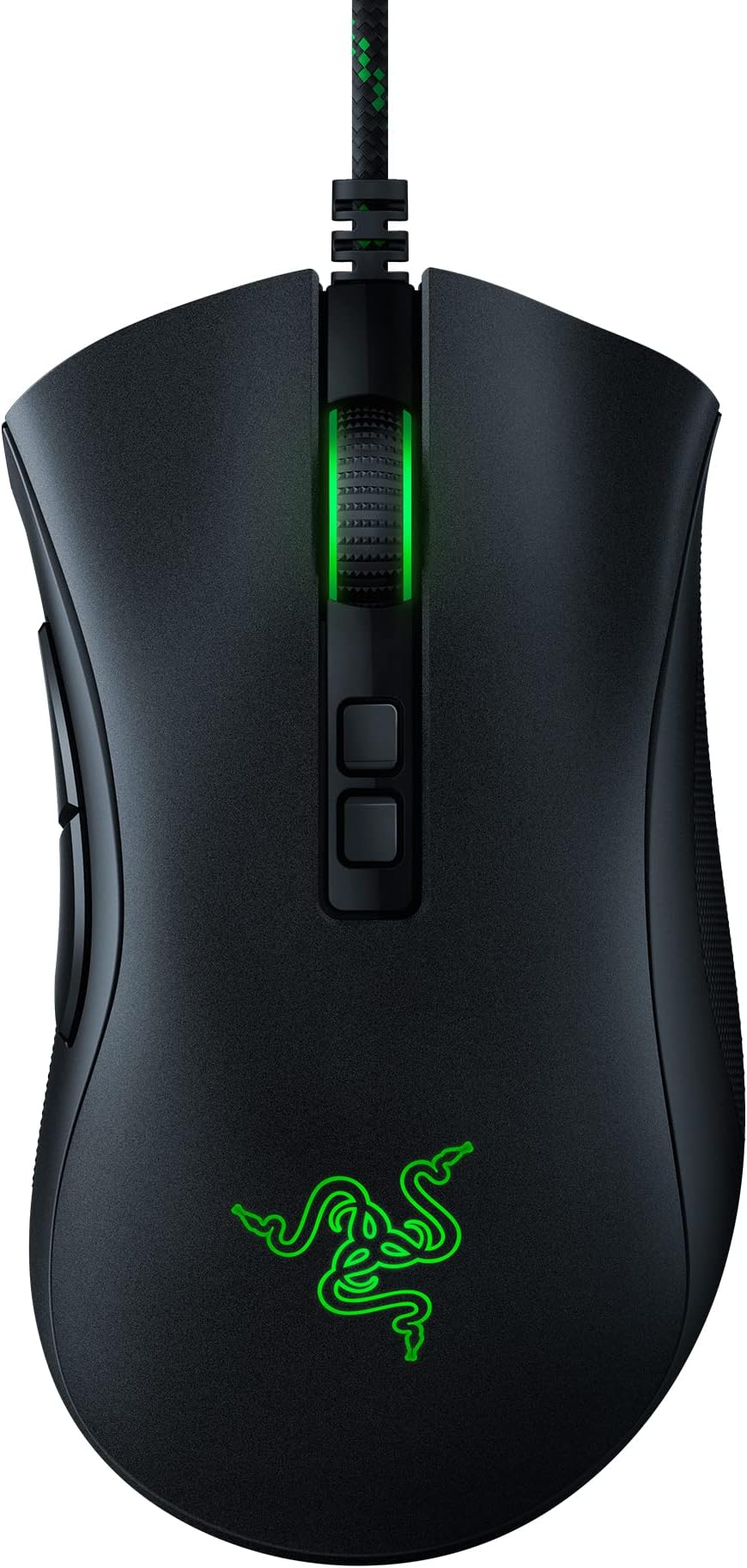
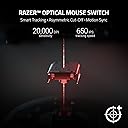
The Razer DeathAdder V2 Special Edition gaming mouse combines a cutting-edge 20K DPI Focus+ optical sensor with ultra-responsive 2nd generation optical switches and 8 customizable buttons. Designed for ergonomic comfort and equipped with a drag-free Speedflex cable, it delivers pro-grade precision and lightning-fast control, making it the top choice for serious gamers and professionals seeking performance and style.





| ASIN | B0BP8H4XFV |
| Additional Features | 20K DPI Optical Sensor, 2nd Gen Faster Optical Switch, 8 Programmable Buttons, Chroma RGB Lighting, Rubberized Side Grips - Ergonomic Design, Special Edition Green SpeedFlex Cable |
| Antenna Location | Gaming |
| Are Batteries Included | No |
| Are Batteries Required | No |
| Best Sellers Rank | #1,133 in Video Games ( See Top 100 in Video Games ) #61 in PC Gaming Mice |
| Brand | Razer |
| Built-In Media | PC Gaming Mice |
| Button Quantity | 8 |
| Color | Special Edition |
| Compatible Devices | Mac, Personal Computer |
| Connectivity Technology | USB |
| Customer Reviews | 4.7 out of 5 stars 17,207 Reviews |
| Hand Orientation | Right |
| Hardware Platform | PC |
| Item Dimensions L x W | 5"L x 2.87"W |
| Item Type Name | PC Gaming Mice |
| Item Weight | 109 Grams |
| Manufacturer | Razer |
| Mfr Part Number | RZ01-03210200-R3U1 |
| Model Name | DeathAdder V2 |
| Model Number | RZ01-03210200-R3U1 |
| Mouse Maximum Sensitivity | 20000 Dots per Inch |
| Movement Detection | Optical |
| Movement Detection Technology | Optical |
| Number of Buttons | 8 |
| Operating System | Windows, macOS, Linux |
| Power Source | Corded Electric |
| Range | 5.0 meters |
| Special Feature | 20K DPI Optical Sensor, 2nd Gen Faster Optical Switch, 8 Programmable Buttons, Chroma RGB Lighting, Rubberized Side Grips - Ergonomic Design, Special Edition Green SpeedFlex Cable Special Feature 20K DPI Optical Sensor, 2nd Gen Faster Optical Switch, 8 Programmable Buttons, Chroma RGB Lighting, Rubberized Side Grips - Ergonomic Design, Special Edition Green SpeedFlex Cable See more |
| Style Name | DeathAdder V2 |
| UPC | 811659036490 |
| Warranty Description | 2 year manufacturer |
D**B
I really love this mouse!
I've used this mouse a ton and it's still working perfectly! I love how smooth it slides around and how it feels in my hand. It's the best mouse that I've ever used.
H**.
Really comfortable and visually pleasing
I had an older version of this mouse before it started having problems with its buttons and replaced it with this newer version. It's a great mouse and a good upgrade! Right away, I should note that you shouldn't get too fooled/confused by the "8 programmable buttons" tagline--it's counting every single button on the mouse, including the standard left and right click and buttons to adjust settings on the bottom of the mouse that you would never use during normal gameplay or computer use. The only two "extra" buttons on this mouse for gamebinding are the two on the left side you can click with your thumb. The other buttons are: left and right click, the mouse wheel, two buttons underneath the mouse wheel to adjust the DPI of the mouse, and a button on the bottom of the mouse to switch between profiles. So if you're wanting more buttons to use during gameplay--like, say, having an entire MMO hotbar on your mouse--this isn't the right one. It's useful if you just want to have a couple of buttons that are easily accessed though! I like using my mouse buttons for stuff like push-to-talk and melee attacks in FPS games. As for the changes compared to the previous version of the Deathadder mouse, they're small but for my use they're good QOL changes. The biggest improvement is the spot underneath the side buttons where you're meant to rest your thumb--in the previous version this was a glued-on rubber pad that game off after a year or so or use. In the V2 mouse, it's now a textured part of the rest of the material of the mouse--the only way it's coming off is if the entire mouse case comes off! I could see the texturing being warn a bit, but that's certainly better than my thumb being gummed up by glue after the pad fell off! The other main change that I've noticed is that I think this mouse is slightly smaller than the previous version. This is great for me, since I'm a woman with small palms and long, thin fingers--I often have problems using gaming mice and controllers comfortably. That being said, I'm not sure if this would be as comfortable for users with larger hands--if you're worried, I'd suggest seeing if you can get measurements for a mouse you find comfortable and then comparing it to the size of this mouse. I believe the profile and DPI buttons are also new features, although honestly I haven't messed with that much since I'm not experienced with those settings and I haven't needed it for my own gameplaying. It does seem like a good feature and the buttons seem like they're good quality and I've never accidentally pressed them during gameplay, which is great. Probably want to check other reviews if you need more information there. Looks-wise, this is simple, but pretty looking mouse. The light on the logo and mouse wheel is really colorful but not bright enough to be distracting when the lights are off in the room. It's pretty easy to use Razer's software to change the color to your tastes, or you can leave it on a default setting where it cycles through various colors in a rainbow order. I know there's also a feature that game devs can use to have the mouse colors be manipulated by the game itself, but I've only ever played one game where I know for sure this was implemented--Overwatch changes the color of the mouse based on the character you're playing as. I don't think it's been used by many other games, and honestly I don't find myself looking at my mouse that much while playing anyway--it's probably a feature that's more fun on keyboards. Overall, I think this is a really great mouse! I recommend it for people that game on their PC or otherwise use their computer enough to want something that has a few more features and/or is a bit more sturdy than a cheaper mouse. If you're a huge tech nerd or want more button options, it might be a better idea to save up for a more expensive mouse. But I think at this price point this mouse has a lot of comfort and control.
A**M
No double click?!!
I have purchased many... MANY mice in my life and this one was very weird to get used to, but the performance of this mouse is the best. I am a gamer, but I also do autocad work with my mouse. I click a lot. My biggest complaint of all mice was the fact that eventually it would begin to double click when you only want to click once, and once that happens, it never fixes itself. I have cleaned my mice and dismantled them and have received replacements and always to be disappointed not long after. I have also spent a lot more money on a mouse than this one. I have used Cobra, Asus ROG, Logitech, Roccat, etc. they do not compare so far. This mouse is great. I'm only slightly nervous the scroll wheel will eventually malfunction like most mice do, as I am not sure the mechanism is any different from other mice, but I could be wrong. The way the mouse is designed, it is (as far as I know) impossible for this mouse to double click due to a malfunction mechanically. The DPI settings are fairly straight forward and the LED is customizable. I don't play with the LED settings, as I am ADD and that distracts me. The DPI settings are nice and you are able to adjust for most tasks. The design of the mouse is solid, but a bit awkward. It took me a month to get used to this mouse in my hand. Once I was finally adjusted to the mouse, I can't find anything to complain about. It is great. **** EDIT 2/20/24 **** I originally got this in March of 2023. Coming up on a year of use already and it works just as good as the first day! I love this mouse. This mouse has survived my kids, my gaming, and work. If this mouse broke today, I would buy another to replace it without thought. I downloaded some software to change the color on the mouse, it was pretty easy to use. Once I picked a color (red) I never adjusted it again. I don't open the software anymore either. It does offer some "ram boosting" software, which displays whenever I start a game, but I don't think that really helps as much as it claims. Buy this mouse if you're a gamer, you hate double clicking, if you own a computer, if you want to own a computer! It's a great mouse!
R**A
good price, solid performance
I have previous had the Razer Naga mouse for many years. I enjoyed it, but for the games I played it was bulky. I chose the DeathAdder V2 here to streamline my mouse a bit. It is an "average" sized mouse, its not small, its not huge. I have larger hands and could use a smidge larger, but I can't expect Razer to know my hand size. Has your 2 main buttons, scrollwheel that clicks, and back and forward button, which is all I really need. Also has an Up and Down DPI adjustment button under the scrollwheel (changes tracking speed essentially). They are slightly recessed and smaller and don't get accidently clicked while gaming. You can set the increments the DPI changes on click as well using Razer software. Very responsive, and can definitely hit the 20K DPI advertised. Because it does not have the extra bulk of other gaming mice physically, it feels very light on top of feeling well constructed. This mouse is CORDED ONLY (NO BATTERY), which also contributes to its light weight. Don't expect a wireless version to be as light! The cord is nicely wrapped so it is fabric and not rubber on the outside. Durable feeling material that is also a bit smooth. Recommend a mouse bungee regardless, but I think that's all corded mice, dont hold it against the DeathAdder! And of course, 2 RGB lights (scrollwheel and palm area) that will sync with Razer software. Overall, great for the price. For anyone not looking to blow a ton of money to have a high performing mouse, this is it! It feels/seems basic, but its actually a top notch mouse for anything else in its price range. For those of us who don't need 10-12 extra buttons in the way of our furious clicking.
D**E
Good gaming mouse with a few issues.
I've had mine for just over a year and 7 months as of this review. I use it so constantly and for so much heavy gaming you could consider this bit of a post-torture test review. I'm really happy with it so far outside of a few small issues and one that is slowly driving me insane. Pros: • Great responsiveness and sensitivity. In my shooters I'm able to do nearly aimbot reactions spinning right on target and it's quick. Has saved my butt many times. • That great sensitivity is adjustable and has up to 5 different sensitivity "stages" which are customizable from 100-20k dpi. • The extra buttons are great. One of the reasons I buy Razer products is the Synapse program which lets you assign buttons or keys as you prefer. • Fits comfortably in the hand for long periods of time. I am on the computer most of the day and haven't really had any major issues with the shape. • The mouse glides along the pad smoothly courtesy of the plastic feet. Unlike my previous mice they haven't budged after all this time. • The mouse looks slick and has just the right amount of lighting imo. • The braided cord doesn't get caught on things and makes it really easy to identify in my rat's nest of cables. There doesn't seem to be much if any in the way of wear even where it's constantly rubbing against the desk. • Being corded obviously means NO BATTERIES NEEDED! • It has an extra ring of the foot material around the optic that seems to keep the optic's hole pretty clean. Worst I've had to deal with is the occasional hair that slipped past. • It's durable. There's no such thing as a gamer that has never slammed their mouse and I'm no exception. It still works just fine after all the punishment I've put it through. • The price is great. I was expecting to have to spend a lot more to get a mouse like this. Cons: • Mouse wheel started sometimes squeaking loudly when used about a month and a half to two months ago. It is absolutely infuriating. It still works fine but the squeaking noise is awful... • Can't just pop off the top plate for easy cleaning and apparently the screws to get it open are hidden underneath the feet, removing the feet can damage them. • The mouse's Synapse settings don't seem to gel with a lot of games when it comes to the "Turbo" feature regardless of speed. I find myself assigning mouse functions that need to have the turbo active to my Anansi's extra keys (best keyboard I've ever owned, almost a decade old now) which gives much more consistent "Turbo" style performance via it's macros. Not being able to create and assign macros for the mouse in Synapse hamstrings it's potential a bit. • The rearward side button can be stiff and feel like it's fighting you a bit with a sound to match when it finally gives. • The soft rubberized portion has a crater where my thumb sits below the two side buttons and is starting to disintegrate a bit on the other side and where my palm rests. Some wear is to be expected but having chunks come off onto your hand isn't great. Again though, I'm using it near constantly so for more normal use it'll probably last longer.
J**R
Solid mouse for multiple uses
All right, let's dive into the world of gaming mice with the Razer DeathAdder V2 Gaming Mouse. Even though I'm not a gamer anymore, I still appreciate the flexibility of programmable buttons, and this mouse has really won me over. Here's my experience with it: Pros: Cool Lights: I must admit, the sleek design and cool RGB lighting on this mouse caught my eye. It adds a touch of style to my setup, even if I'm not gaming as much as before. Plug and Play: Setting up this mouse was a breeze. It's a simple plug-and-play device, perfect for someone like me who wants things to work immediately without any hassle. Programmable Buttons: The programmable buttons are a lifesaver for me. Even though I'm not playing MMOs like I used to, having those extra buttons still comes in handy for work and recreational use. Customizing them to my liking adds a level of personalization that I really appreciate. Clean Crisp Movements: This mouse delivers smooth and precise movements. It's like gliding on air, and I can feel the difference compared to other mice I've used in the past. Cons: Miss My Naga's Num Pad Buttons: While the Razer DeathAdder V2 is fantastic, I do miss the convenience of the num pad buttons that my old Naga mouse had. They were super useful for tasks like Excel and gaming, and I sometimes find myself wishing I still had them. Overall, the Razer DeathAdder V2 Gaming Mouse has been a great addition to my setup. The cool lights, easy setup, and programmable buttons make it a versatile and enjoyable mouse to use. Going back to a wired mouse means no more worries about batteries running out.
J**M
My death adder broke. My fault. Welcome new death adder.
There were extremely few computer peripherals that meets my expectation. My original death adder was a surprise because of all the mouse, I kept on preferring "wired" death adder. I so wanted to cut the cord and move on to wireless. But no wireless was perfect. This new upgraded V2 is just amazing. Razer listens to the customer and only upgraded areas of weakness and left the goodness intact. V2 is BEST MOUSE EVER!!! Bar none. No competition. Key Advantage 1. Weight: Wonderfully light. You can casually lift off the mouse and throw it around on your desk with light flick. You want light mouse, heavy is for computer illiterates. 2. Bottom slider. Original was okay. But with V2 they replaced it will much larger and better slider. Mouse slides on my desk smoother. 3. Light and Flexible cord. I never thought it mattered but V2 has very soft and very light and very flexible USB cord. It is butterfly light and flexible, it doesn't get in the way as heavier non-flexing rubber cables. 4. Textured Grip. Razer added texture on thumb and side grip area. Now the mouse sticks to your hand a lot better than before. It is a minor change but highly noticeable improvement in usability. 5. High DPI. High DPI by itself doesn't really tell the story. I use 2 4K monitor and It is not easy to adjust the DPI setting. This is one of the reasons I keep coming back to Death Adder. It just is buttery smooth even with stock DPI setting. Just in comparison, my Atheris never worked smooth on my setup. Death Adder V2 is THE BEST MOUSE IN THE WORLD. Update After 6 months of use: NO QUESTION IT IS BEST MOUSE AVAILABLE BAR NONE. And yes, I still have to click no on frequent Razer software installation notification. I live with it as a price to pay for using best mouse with relatively expensive price.
B**N
Its not A Beast, monster, Flawless ITS ABOMINATION GOD!
This Death adder is no ordinary Gaming mouse This Mouse Is ABOMINATION GOD! Dude. If you are using Death adder elite from early 2014 or 2015 or older Death adder mouse. Your going to Suck ass At All GAMES! yes that right ALL GAMES! Just stop What you are doing ! Quit wasting your time! Grab your wallet Buy this Gaming mouse IN a heart beat! Are you having Issues with stuttering ingames or Having mouse input lag INGAMES???? or In windows? Buy this gaming mouse And he Will be your Dream And he will Make you aim DEADLY 200% BULL EYE Accurate In first person shooting games. Default settings is 1600 Dpi And 1000 Polling rate. I used to be at 1800 dpi and 500 polling rate. Its unbelievable Man! I played my first match In Modern warfare Team death match and I won It first match ever! Funny thing is that i had not played that game for over a month. and i won it Don't worry about razor synapse 3.0 beta software Its not what you guys think has it is like its bad. or Eats away so much rams or cpu usage However it only uses 1% ram usage in background procress.... which is not even hardly impacting the games performance at all. First thing i Did when i installed razor synapse 3.0 is i disabled the sensitivity buttons which it works. IF YOU ARE USING OLDER DEATH ADDER ! YOU ARE GOING TO SUCK ! IN ALL GAMES! AND CRY ABOUT PERFORMANCE ISSUES INGAMES! BUY THIS ABOMINATION GOD DEATH ADDER! people are accusing me Im using aimbot hacks :) which i wasn't!!!!!!!!!!!!!!!!!!!!! BUY BUY BUY BUY! Remember Guys In razor synapse DO NOT mess with the Celebration Leave those alone ! if you have all you gotta do is hold the profile mouse button on the bottom hold it for 10 seconds it restores everything back to factory default as in the box. Secondly ! IT Lightest like a feather ! helped me aim so much better! Oh One more thing! don't bitch about the loose left and right click buttons it will do that for a few days because it is Brand new takes about after 5 thousands clicks the buttons will start to click normal again. like your old ones.
T**Q
very high quality
love the shape if you have big hand this mouse for you
S**N
Top
Ich habe die Maus jetzt schon lange in Gebrauch und noch keine Probleme gehabt. Die Maus reagiert schnell und eignet sich auch super zum spielen. Versand war wie immer sehr schnell.
Д**Т
El Razer DeathAdder V2: un mouse preciso y cómodo a un precio asequible
Compré el Razer DeathAdder V2 para gaming y debo decir que es un mouse muy preciso. El sensor óptico es extremadamente preciso, lo que me permitió jugar a mis juegos favoritos con una gran precisión. Una de las preocupaciones que tuve fue que el software en segundo plano del mouse hiciera que mi equipo funcionara con más lentitud, pero no encontré un gran problema en ese sentido. El diseño del DeathAdder V2 es cómodo para cualquier tipo de agarre, lo que lo hace ideal para largas sesiones de juego. El precio es muy económico en comparación con otros mouses de alta calidad para gaming. Además, aunque el mouse tiene una gran cantidad de DPI, en realidad, rara vez he tenido que usarlo en su configuración más alta. En general, el Razer DeathAdder V2 es una excelente opción para aquellos que buscan un mouse preciso y cómodo para gaming a un precio asequible
M**A
Muito satisfeito
Mouse com uma pegada muito confortável, sensor preciso, RGB bonito, botões laterais bem posicionados (não há chance de cliques acidentais), opção para salvar até 5 perfis na memória interna, programa para configuração de macros excelente (muitas opções e até macro com cursor da pra fazer), não notei muita diferença nos switches ópticos dele, são um pouco mais fáceis de serem pressionados mas fora isso nada a comentar, funcionam tão bem como qualquer outro. Mouse feets dele são ótimos, parece que passaram sabão no mouse feet de tão suave que ele desliza e pra fechar, peso dele é muito bom, tinha um G403 que considerava um peso bom e esse me surpreendeu com sua leveza dado o seu tamanho (que é semelhante ao G403).
E**.
Wow.... just wow!
I have always enjoyed the Razer products but, three years ago my wife had bought the family Logitech Products (G910 and the mouse G502). All of our G910 died within a week of each other just past the warranty and I replaced it with the Razer Huntsman (LOVE IT). During Xmas, I got the BlackShark v2 which was night and day from the other headset, Blue Mofi, which was great for movies and music. It kind of worked with games like Warzone... but it would miss footsteps and directional audio queues were just not there. With this headset, it is a whole new game! So I thought, let me get another razer product and hence this purchase. HOLY COW it fits my hand perfectly and is very smooth and light. It is night and day compared to my G502. The mouse pad calibration was an interesting feature, just pick your pad and done. I used to sit at about 1500 DPI and then 4 Mouse sensitivity in-game. I found it too twitchy and I have dropped it to 1k and soon to try 500/400 and see if I can get used to that response. I am very happy to be back to all Razer products and enjoying my game performance and reaction times! Pros Lightweight Very accurate Comfortable Mouse Pad Calibration Cons Fewer buttons No notification in-game if your DPI has changed when you alter it via the button Synapse software can be buggy and service stops sometimes
Trustpilot
1 week ago
1 month ago