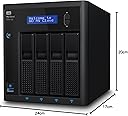
🚀 Elevate your media empire with pro-grade storage and streaming power!
The WD 16TB My Cloud Pro PR4100 is a professional-grade 4-bay NAS featuring an Intel Pentium N3710 quad-core processor and 4GB DDR3L RAM. Designed for seamless media management and HD streaming, it supports built-in video transcoding via Plex, centralizes your data with 16TB capacity, and ensures robust security with AES 256-bit encryption. Compatible across Windows and Mac OS, it offers easy setup through My Cloud OS 3, making it the ultimate solution for professionals seeking reliable, high-performance network storage and streaming.


| ASIN | B01GRFFCY0 |
| Best Sellers Rank | 157,857 in Computers & Accessories ( See Top 100 in Computers & Accessories ) 131 in Network Attached Storage (NAS) Devices |
| Box Contents | LAN (RJ-45)^Quick installation guide |
| Brand | Western Digital |
| Brand Name | Western Digital |
| Cache Memory Installed Size | 16 |
| Color | black |
| Compatible Devices | Desktop, Laptop |
| Connectivity technology | Ethernet LAN^USB port |
| Customer Package Type | Standard Packaging |
| Customer Reviews | 4.3 out of 5 stars 379 Reviews |
| Data Transfer Rate | 625 Megabits Per Second |
| Digital Storage Capacity | 16 TB |
| Digital storage capacity | 16 TB |
| Enclosure Material | Metal |
| Form Factor | 3.5-inch |
| Global Trade Identification Number | 00718037845821 |
| Hard Disk Description | Mechanical Hard Disk |
| Hard Disk Form Factor | 1 Inches |
| Hard Disk Interface | ATA-4 |
| Hard Disk Rotational Speed | 1 |
| Hard disk form factor | 1 Inches |
| Hard disk interface | ATA-4 |
| Hard-Drive Size | 16000 GB |
| Hardware Connectivity | USB 3.0 |
| Hardware Platform | PC |
| Installation Type | External Hard Drive |
| Item Weight | 6.17 Kilograms |
| Manufacturer | Western Digital |
| Manufacturer Part Number | WDBNFA0160KBK-EESN |
| Media Speed | 78.125 MB/s |
| Model Name | WDBNFA0160KBK-EESN |
| Model Number | WDBNFA0160KBK-EESN |
| Network Connectivity Technology | Ethernet LAN^USB port |
| Number of Items | 1 |
| Product Features | Built-in display^Cable lock slot^DLNA certified^External power adapter^LED indicators^On/off switch^Operating temperature range:0 - 35 °C^RAID support^Reset button^Security algorithms:256-bit AES^cooling:Active |
| Product Warranty | 3 Years |
| Special feature | Built-in display^Cable lock slot^DLNA certified^External power adapter^LED indicators^On/off switch^Operating temperature range:0 - 35 °C^RAID support^Reset button^Security algorithms:256-bit AES^cooling:Active Special feature Built-in display^Cable lock slot^DLNA certified^External power adapter^LED indicators^On/off switch^Operating temperature range:0 - 35 °C^RAID support^Reset button^Security algorithms:256-bit AES^cooling:Active See more |
| Specific Uses For Product | Personal |
| UPC | 718037845821 |
| Unit Count | 1.0 count |
S**Y
Excellent bit of kit.
Excellent bit of kit. Very quick and easy to setup. Easy to access and use once the small amount of leg work has been done. Sent all my backups to this device as it is more resilient than the portable HDD I have. It also has my music and picture collection stored and streams it to any DNLA capable device.
G**M
This is my 3rd one - they are brilliant!
Just what you been looking for - a great support community and plenty of documentation - lots to add , and adding disks is easy , smart disk scanning means if there is an issue arising you know about it before its too late. Now I tend to store larger files on these, and the access times are quick, even through the lan you get great speeds - just dont try and copy multiple files individually, queue them altogether, but thats lan not the device! Will be purchasing a 4th in the New Year, these do everything I want them to do and more WD are an active community and there are plans for newer operating systems for these too - already they have a great GUI
P**Y
A solid NAS, but check they have the apps you require!
For those of you looking at purchasing a NAS, there are tonnes of guides out there for what exactly it is and does. So, I won't go into too much detail on this. Setting up was as simple as connecting it to power and to your router via an ethernet cable (all cables provided in the box) and following the instructions on the webpages it refers you to. I went for a 4 bay over a 2 bay because, at the time of purchase, I do not currently need 4 bays of storage - however, I see this as an investment over many years and therefore have paid extra for when I need to expand my storage. I would suggest you do the same, as it will save you time and money in the future! My primary use for this is as a Plex server. Since I set it up, just under 2 weeks ago, the server has worked consistently well over the period with no downtimes, lags or issues etc. on Plex on the TV and several mobile devices. It has been a fantastic purchase for this reason (I was using my old laptop as a plex server before, and having to switch it on to access Plex was a pain). I've also moved my photos, books and other documents to the server as a backup - however, I use Google Photos to store photos and I cannot see anything replacing it anytime soon (Google Photos will not upload full quality photos for free if for example you're a professional photographer - so this is where a NAS server becomes very useful). Overall, it's a fantastic bit of kit and a great NAS for a first time user. However, be warned that the applications on this (similar to what you'd see on applications on a windows computer) is very limited when compared to its competitors such as Synology and QNAP. For me, it's enough for the cheaper price to come out on top - however, please do your research on what applications each NAS supports.
K**T
The Little(ish) Box That
I had several requirements that I needed from a device such as this: (1. It (including the HDDs)had to be made by a manufactuer that I know and trust. (2. Needed to have 4 HDDs that can be put in RAID 5 (which it does and then some.) (3. Reasonably compact (4. Can do backing up to a online repository when required. (5. Sensible UI (accessed by web-browser.) (6. Reasonably affordable (7. 32Tbs of storage (16Tbs is usable when in RAID 5 + spare) (8). Capable of at leasr Gigabit ethernet speeds This item met 7/8 of these requirements - (it's expensive,) I admit, I was nervous when I saw that it came all the was from France. Hiwever, everything was OK when I saw that everything was in English and that it had a UK plug (as well as a two-pronged Euro-plug.) Setting it up took a long time - 12+ hours to put all 4 HDDs in RAID 5 + spare - once done, create a user groupand a user. Done - recommended
G**3
Would still recommend it
Mine has lasted me 3 years and still going strong and use it on a daily basis. Only slight issue I have is that the rebbot always gets stuck and have to reboot it manually but how often do you need to reboot a NAS?
M**R
Some good and bad points
Relatively easy to setup, although a little temperamental. A little perseverance got me there. Then I wanted to transfer quite a lot of files onto my new NAS drive from some old drives. I plugged in a USB 3.0 drive docking station and the PR4100 said the file system was unsupported, even though the docking station is fine when plugged into my Windows PC. The PR4100 claims to support FAT32, NTFS and a number of other formats so it should have been OK. A little research showed that this is a very common issue with the WD NAS drives. A Google search suggested a number of potential solutions, none of which worked, so I then resorted to a direct network connection between desktop PC and NAS drive. I managed to get the two to connect directly and I can copy files using Explorer. The problem is that the transfer rates are very low (30-40 MB/sec). My copy will take a whole weekend and I'm worried there may be copy errors. There doesn't seem to be an efficient way to get large amounts of data onto the device and technical help seems to be completely unavailable - there is a WD Community but my requests for help fall on deaf ears. If I had the choice again I'd go for a different device. Completely unsatisfied. Later comments: After leaving a copy of 700 GB for several hours it failed half way through with "insufficient memory". My desktop computer has 32GB so perhaps it is the PR4100. After extended effort I eventually got the files over to this NAS. After leaving the drive unused for a few months (on for a couple and then switched off for the remainder) I found that I couldn't access my data, even though I had configured RAID 1. I'm not sure if it lost the data but the RAID setup seemed to have been lost. I ended up configuring RAID 1 again, which caused the drives to be reformatted. Copying all the data a second time this NAS decided to reboot halfway through. What a heap of waste matter!
E**S
GREAT NAS !
Excellent product from Western digital; Came with 8tb in total (4 x 2tb hard drives) however the good thing about this is that you can upgrade it easily swapping the hard drives; Installation is very easy simple and quick!
G**O
Good NAS
I have the NAS for over 1 month and there is no problem with it, so far. I am using it mostly for file storage (backup) and Plex server. It does the things very well. I can access my files over the internet on my phone or a computer using a web browser but the speed is a bit slow. As Plex server, the NAS is great on the same network but sometimes (seldom) there are problems with remote connections but I still don't regret buying the NAS. I would recommend it to others.
S**.
Ottimo NAS, potente e semplice da configurare e usare
Ottimo NAS, configurazione semplicissima, estremamente potente e versatile, molto silenzioso, AMAZON da 6 stelle per puntualità, precisione e qualità fornita!!
A**A
Worthless on a wireless network
Been using it on a wireless network and although I expect slow backup times from all what I read, it does give a new definition to slow. The NAS is attached to my wireless router, my laptop directly connects to the router, nothing else in between as far as hardware and it is slow. Tried another different wireless router, different company and more recent but still same problem. On my Macbook trying to use it for timemachine backup, near useless. Definitely not worth it as a NAS. Currently using it as a direct connection to my computers to use as an expensive and heavy backup disk. This is after a few months of use. I intended on using it as a third backup for my photos as well as for my family to use it for cloud backup of their phones.
A**R
Delivered Wrong Item
Very Poor
G**O
Excelente para el uso que le doy
Tengo más servidores, y uso este como servidor multimedia para Plex y Jellyfin (instalado mediante docker), y ahí estupendo, Plex hace toda la transcodificación hardware/software sin necesidad de Plex Pass (por un acuerdo al que llegaron Plex y Wd, si no me equivoco), cosa que no hacen otras marcas. Escasa variedad de aplicaciones propias (que se puede solucionar instalando docker por SSH), interfaz de gestión cutre, pero como servidor multimedia, excelente. Las películas 4K con la mejor calidad de imagen y sonido que tengo en este servidor se ven perfectamente en cualquier tvbox 4k. Salud.
S**N
Kaliteli ve kullanisli
Urun elime ulasti. Bekledigimden kucuk bir boyuta sahip. Kurulumu yapip varsayilanda gelen raid 5 sistemini raid 10 ile degistirdim. 4 slotlu makeine oldugu icin rahat bir kullanim olanagi var. Daha once 2 defa klasik harici diskim bozulmustu bu nedenle daha profesyonel bir kullanim imkani veren bu cihazi tercih ettim. Insallah bozulmadan devam eder :)
Trustpilot
1 month ago
3 weeks ago