📚 Scan smarter, not harder—digitize your world in a flash!
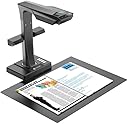
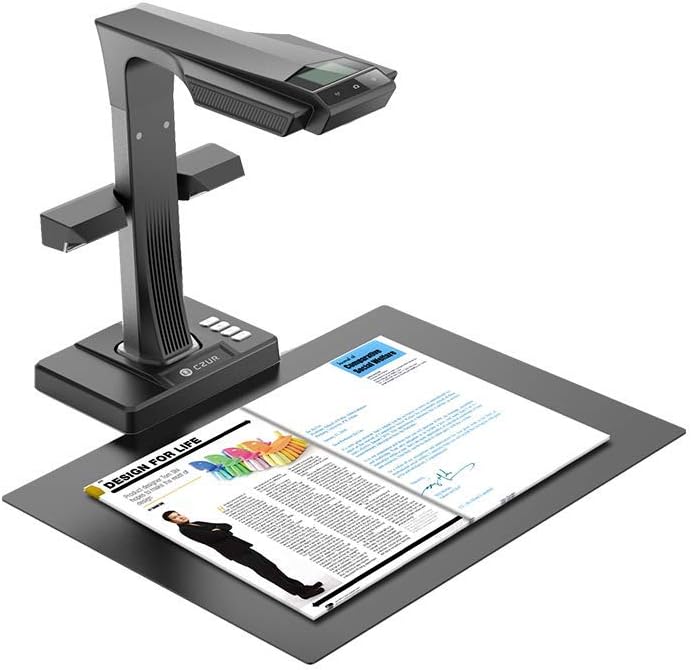
The CZUR ET16 Plus is a professional-grade document and book scanner featuring a 16MP CMOS sensor and patented curve-flattening technology that eliminates shadows and distortion. It scans at a rapid speed of 1 page every 1.5 seconds, supports OCR in over 180 languages, and offers hands-free scanning with auto page detection and foot pedal control. Compatible with Windows XP through 11 and macOS 10.11+, it’s ideal for professionals needing fast, high-quality digitization of books, documents, and more.


| ASIN | B0758VY4G7 |
| Best Sellers Rank | 40,264 in Computers & Accessories ( See Top 100 in Computers & Accessories ) 47 in Document Scanners |
| Brand Name | CZUR |
| Color Depth | 24 bpp |
| Customer Reviews | 3.9 3.9 out of 5 stars (43) |
| Item Weight | 1.5 Grams |
| Light Source Type | LED |
| Manufacturer | Czur |
| Media Type | Books, Business Card, Documents, Invoices, Magazines |
| Minimum System Requirements | macOS 10.11 and Windows XP or later |
| Model Name | ET16 Plus |
| Network Connectivity Technology | USB |
| Optical Sensor Technology | CMOS |
| Paper Size | A3 |
| Resolution | 300 dpi |
| Scanner Type | Document |
S**N
Exceptionally good book scanner
So, Amazon messed up my original order by shipping the wrong item. I decided to order direct from the UK supplier (D&H) and am so glad I did. I've been looking for something like this for years. The kit is so easy to set up - literally just clip on the rear LEDs and it's good to go! The software took about 3 mins to figure out. There's a page for settings and viewing scanned images and another page for actually scanning. Easy peasy. The speed of scanning is just extraordinary. I've scanned 4 volumes, totally about 3000 pages, in about 4 hours. I'm sure that, with practice, it'll be even quicker next time. My biggest mistake was not to trust the software more; where pages were curved, I tried to over-compensate with the 'finger cots' which allow you to hold down the side of the page, and I moved my fingers quite a few times during scanning. In many cases, all I needed to do was just rest the cots on the side of the page to apply very light pressure (without my finger in the cot) and the page scanned perfectly. The books that I was scanning are so thick and small and the pages so thin (bible paper) I knew it would be a challenge, but the scanner did an exceptional job. This device is a real game changer for me.
C**K
A specialist scanner for books
If you want to scan entire books or magazines in quantity but not destroy them in the process, this is what to buy. You can manually scan a double-page spread every few seconds and the software does a decent job of flattening the inevitable curve towards the spine, removing distortion, then separates the pages out. The end result is a series of JPG images which you can optionally edit in any software (e.g. to trim edges, delete duplicate images, change the order of pages.) Then the scanner software will assemble all the images into one PDF. It's easy to use with a bit of experience. It will not produce a PDF as polished as a sheet-feed scanner will, but to use a sheet-feeder you have to dismantle your book. Will cope with sizes up to A3 (= 2 x A4 side by side) happily, probably larger especially if used in good natural light. Ideally you need clear desk space of around 4 square feet for the set-up. Colour illustrations do not reproduce all that well, specially if on shiny paper. Greyscale or B&W is usually OK, but I would not say this scanner was really suitable for publications with a lot of graphics. Dark text on any kind of paper, including shiny, scans adequately, though you need to experiment with the lighting options for best results, again this improves with experience.
B**E
You can do better with iphone apps
Tried it, but it was too expensive and too slow, and lesser quality than an iphone app. Check out vFlat iphone app -- super quick and I think FREE, and does perfect job compared to this monstrosity which takes up WAY too much space.
S**H
Quickly and accurately scans books
"Entry level"?!! Absolute rubbish! This is far better than any "entry level" book scanner that I've used. I've scanned many books with this. I quickly discovered using the yellow thumb things to keep the pages flat has its uses. The best solution to keeping the pages flat is to buy a sheet of clear acrylic at least A3 size and 5 or 6mm thick. When you do this the overhead LEDs will be reflected back into the camera. Turn the overhead lamp off and use the other lamp at the back. Even though you can see the lamp reflected in the sheet, this is because of the camera angle I took the photo at. The overhead camera cannot see the lamps. Also, in the first picture I had the "thin" part of the book propped up by a smaller book. But I learned, by the time I'd reached the second half, there is no need to support the thinner side, just let the acrylic sheet lie across the pages at an angle, it doesn't affect the scanning or the OCR process. The book in the photos was 757 pages long. It took around 50 minutes to scan it then another 10 minutes to convert the scans into a searchable PDF file, sized at 33MB. A word of warning if you use a MacBook. Often, when scanning a book with the scanner attached to a MacBook, the scanning process gets "stuck" early on. Even though when you press the button, it appears to take the picture and casts the 3 horizontal red lines, the software doesn't resolve what the scanner has sent it into an image. Consequently, you can waste a lot of time if you have to re-scan the book, or constantly check that the page images have been imported into the CZUR software. Therefore, if you have one available, I suggest using a Windows PC for the scanning then copy the PDF to you MacBook - for the contents to be indexed by Spotlight.
A**L
Worth every penny
I love it. So much easier than the alternatives. Well presented package: even the USB cable comes in its own little box the size of a pack of playing cards. It detects when you turn the page, so if you tell it to, you can just turn the page and it will photograph that page etc etc. Actually I found it easier to use the hand operated press button, and quicker (because the automatic system pauses a moment to be sure you have finished turning the page. Scanning a 780 page (yes, 780 pages) book took just an hour. (The right-hand pages of the big book lay flat so I didn't need my right hand to hold the page down; with a less compliant book I would probably have used the automatic system. The bundled OCR software is fine, but I am using my Abbyy, which is a bit more sophisticated. Haven't found out what the microphone is for, yet. TIP 1: watch the youtube videos on it. CZUR will find them. TIP 2: my computer wouldn't find the CZUR scanner at first. Turned out I had "Don't use camera" in some arcane setting. (It's a desktop so there is no camera,) A help guide in the CZUR website told me about that and how to alter it. Did I mention this: I love it !
F**N
Great Scanner for vintage books
Excellent scanner , have used it to scan heritage books with great results had cause to contact customer support and had very good experience would highly recommend
S**)
Lo adquirí con dos finalidades. La primera escanear partes de libros de texto para ayudar a los alumnos que no pueden adquirir el libro. El resultado ha sido muy bueno, incluso las conversiones a Word que necesitan retoques pero que las encuentro aceptables. Claro siempre depende del estado del libro. La segunda finalidad era utilizarlo como pizarra de calidad en mis clases online y tengo que decir que si la conexión a internet es buena funciona con ZOOM perfectamente y me ayuda mucho. Las luces de columna funcionan perfectamente para evitar los reflejos que son inevitables con la luz superior.
R**C
metto una stella anche se non meriterebbe neanche quella! pessima esperienza! lo scanner è pessimo per quanto riguarda la scannerizzazione di libri con finitura lucida (ovvero qualsiasi libro a colori moderno), il riflesso delle luci è impossibile evitarlo ed impossibile rimuoverlo ( ho provato tutte le opzioni disponibili). Inoltre la risoluzione delle immagini è molto bassa ed escono molto scure (provando a fotografare con un IPAD è diecimila volte meglio). Quindi essendo praticamente inutilizzabile peri miei scopi ho deciso di restituirlo e qui arriva la seconda pessima esperienza! Ho dovuto spedire lo scanner a MADRID quindi ho dovuto pagare 32€ di spedizione effettuata con poste italiane, dato che qualsiasi altro spedizioniere partiva dai 50€ a salire a cifre proibitive. come se non bastasse mi è stato rimborsato l'importo del prodotto senza i 12€ di spedizione . Quindi per concludere ho buttato 44€ praticamente per un prodotto che in realtà non vale neanche 80€ allego la foto intera effettuata con luce naturale effettuata con IPAD e quella effettuata con lo scanner CZUR . Potrete constatare la pessima risoluzione e vi assicuro che altre immagini sono anche peggiori di questa. P.S. diffidate dalle foto sul sito internet delle immagini a colori perché non corrispondono alla realtà ed inoltre per qualsiasi problema vi toccherà parlare con l'assistenza in cina in lingua inglese. EVITATE L'ACQUISTO !!!! risparmiate tempo e denaro !
D**U
Its great. It serves my purpose of digitising my library. However, Software is not up to mark. Often there is a mistake while splitting the page. And it can't perform OCR on Indian Vernaculars (but can on Cantonese, Mandarin and other Asian scripts). How sad is that?
E**.
Insbesondere die OCR-PDF Wandlung von Datenblättern, Schaltungen auch mit Handschriftlichen Ergänzungen ergibt bei Auswahl "Stempel" (= Hintergrund auf rein Weiß gesetzt) erstaunlich geringe Dateigröße. Bei 127 Seiten werden es beispielsweise (höchste Qualität eingestellt, Farbe) nur 18MB. zB.25 Seiten=4MB. Einzelscans sind mit 500k bis 1,8MB - auch bei "Stempel" Einstellung ... scheinbar werden die Grauwerte des Hintergrundes abgespeichert aber nicht angezeigt ... Auch die Word oder Excel Wandlung ist recht gut - klar hier kann man nicht erwarten das es alle Formatierungen perfekt erkennt. Bestens auch für Rechnungsarchivierung (auch Thermopapierstreifen) zB. für das ganze Monat ... ist dann (mit Einschränkungen) sogar durchsuchbar !!. Video hat bei mir nicht geklappt - ist sehr langsam und abgestürzt ... brauche ich aber nicht. Bei der "Stempel" Funktion darf man dann keine richtigen Farben von Bildern erwarten. Super ist die Umrisserkennung ... man braucht den Zettel nur hinschmeißen - fertig. hoch und Querformat ist dann im fertigen PDF so wie man es hingeschmissen hat ... Für Gegenstände (im Modus "Farbe") ist der Umriss klarerweise nur Rechteckig und nicht besonders exakt ... also kein designtes Produktfoto, aber für "normale" Zwecke recht gut und mit entsprechend geringer Dateigröße.
A**R
Works very well. Value for money. The software has some problems while splitting the pages automatically. At times the split pages are rotated, cut in wrong place... But overall very satisfactory tool. It does scan fast, but for practical reasons you may not get the output as advertised.
Trustpilot
3 days ago
2 months ago