Buy anything from 5,000+ international stores. One checkout price. No surprise fees. Join 2M+ shoppers on Desertcart.
Desertcart purchases this item on your behalf and handles shipping, customs, and support to Panama.
๐ฌ Elevate your AV setup with flawless 4K & immersive sound โ donโt get left behind!
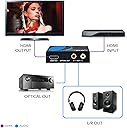
The OREI HDA-913 is a premium 4K HDMI audio extractor and decoder that converts HDMI audio signals into high-quality analog stereo and optical outputs. Supporting advanced audio formats like Dolby Atmos and DTS:X, it delivers immersive sound while passing through 4K video at up to 60Hz with HDR. Its rugged metal enclosure ensures durability and heat management, making it a compact, plug-and-play solution ideal for professionals seeking seamless AV integration worldwide.


| ASIN | B0CCW7P9RM |
| Best Sellers Rank | 4,190 in Electronics & Photo ( See Top 100 in Electronics & Photo ) 56 in Digital-Analog Converters |
| Brand | OREI |
| Customer Reviews | 3.9 3.9 out of 5 stars (41) |
| Global Trade Identification Number | 00850031132566 |
| Included Components | USB Cable |
| Interface | HDMI |
| Item Type Name | Audio extractor |
| Item Weight | 6.2 Ounces |
| Manufacturer | OREI |
| Manufacturer Part Number | HDA-913 |
| Material | Metal |
| Maximum Supply Voltage | 240 Volts |
| Minimum Supply Voltage | 100 Volts (AC) |
| Model Number | HDA-913 |
| Mounting Type | Standalone |
| Number of Channels | 8 |
| Number of Pins | 19 |
| Smart Home Compatibility | Not Smart Home Compatible |
| UPC | 850031132566 |
| Upper Temperature Rating | 104 Degrees Fahrenheit |
D**S
Didn't downmix
This did not downmix anything from dolby 5.1 or DTS 5.1 to stereo.
T**P
This works perfectly. I connect my Roku to this, then this to an APTX latency transmitter via RCA jacks and my stereo receiver via HDMI. All of the audio goes to my 5.1 system and stereo goes to my wireless headset.
K**R
Bottom-line: The OREI HDMI "downmixer" device solves my problem perfectly when matched with premium grade cables. Good customer service too! I bought this device to solve a specific problem: to feed a "downmixed" stereo audio signal to my hearing aids while allowing everyone else in the room to hear multi-channel surround sound audio (such as Dolby Digital or Atmos) through our home theatre speakers. This is a job that _should_ be done by all home theatre receivers but unfortunately not all (very few?) receivers do this, not even the more expensive ones (I'm looking at you Onkyo). It is reasonably simple: while sending multi-channel audio through the amplifiers to the speakers, please also make available a "downmixed" stereo signal to a pair of RCA output jacks so it can be sent it to an external device such as a hearing aid connector. In my case, I have a Phonak TV Connector which takes a stereo audio input and transmits it wirelessly to my hearing aids so I can better understand the sound track of TV shows, DVDs and movies. The frustration is that my receiver (and I gather many others) doesn't include a "downmixer". The key is "downmixer. It is an extra piece of hardware that processes the multi-channel audio to produce a 2 channel output while continuing to pass through the multi-channel audio signal to the main amplifiers and speakers. The OREI HDA-913 HDMI audio extractor is a bona fide downmixer. By inserting it between my streaming box and my receiver, it passes through the HDMI multi-channel audio while extracting and downmixing the audio to a pair of RCA jacks. BEWARE: Many audio extractors do not include a downmixer. They will not produce a stereo output unless the input source is also stereo. If the specifications do not explicitly say "downmixer", then it probably isn't a downmixer. Generally, these models are significantly less expensive. If you need the downmixing feature, expect to pay for the extra bit of hardware to do it. NOTE: Be sure to use HDMI connecting cables that are capable of handling the data rate required for your content. The OREI HDA-913 can pass 4K @ 60 Hz. If your input source is 4K @ 60 Hz then you will need 18 Gbps certified HDMI cables, also known as "Premium High Speed HDMI" cables. These can handle up to 4K @ 60 Hz (HDR, 4:4:4). Unmarked, or "Standard" or even "High Speed (category 2)" HDMI cables won't handle 4K @ 60 Hz. For instance, Amazon Prime Video outputs 4K @ 60 Hz for at least some shows. Under-rated cables will eventually fail to keep up and the HDMI output might not work at all or it might blank out periodically, especially with the overhead of HDCP. I had this exact problem with under-rated cables. OREI customer service was very supportive in helping identify, isolate and resolve the issue. Solution: I bought 8K certified cables and the system works perfectly and is future-proofed.
L**R
Was able to use this device to connect up our AppleTV box, TV and our older in-ceiling speakers. So far, so good. Used another brand twice. The product died after a couple of weeks of use-twice. Just installed this one, hoping it lasts.
P**M
The device itself is pretty good once you get it set up. The setup process, though... The documentation is kind of upside-down in that it patiently explains the things on the device that are most obvious (i.e., "What's the HDMI Input for? What's the HDMI Output for?"). Then there's a 3 position switch that isn't explained at all. I had to figure out what setting to use by trial and error. Not a huge problem except that the entire field of HDMI-to-RCA is a minefield of undocumented pitfalls and settings requirements, so you can't tell whether the reason you're not getting output to your headphones is because the switch isn't set right vs. some other configuration in audio source isn't right (or even that you've connected to an HDMI source with no audio at all). There's a red light that's supposed to blink when it's decoding Dolby or DTS, and it's solid red when "PCM decoder or no signal." Again: a real "no signal" light would have been better, and the light stayed red once I got the rest of the system to work (and I assume that the signal it's getting is either Dolby or DTS, so no idea why it's solid red). I think others have noted this, but although the copy on Amazon says "DTS to 3.5 mm Jack," there isn't actually a 3.5 mm jack on this unit. There's RCA plug outputs. Fortunately I have RCA to 3.5 mm adapters in my arsenal.
R**.
Through an abundance of laziness, I clustered all of my entertainment together in the same corner. I have all 7 of my gaming consoles, two PCs, a Raspberry Pi, and a Roku in the same spot. I also have four monitors for these devices. Each monitor has a designated purpose at the end of an HDMI switch, and each one has a headphone jack. My plan was to connect all of these jacks to an aux switch. Problem is, I was not thinking very hard about varying audio quality from the drivers in each of these monitors. Two are barely audible and the other two are really loud, which necessitates fiddling with volume every time I switch devices. This audio extractor sidesteps the problem I created for myself. Without having to rely on what comes out of my monitor's headphone jack, I should get exactly what's coming out of the source device and have far more normalized volume, without loss of video quality. Results for monitor performance are the same before and after the audio extractor was set up. 60 fps at 60 Hz on 1920x1080, with no perceivable loss of video performance. eizo.be and testufo.com were used to test these details, as well as some gaming overlays. As for what it was advertised to do, the unit does it well. It has also remained cool to the touch while operating, while most similar devices will warm slightly. My complaints are varied and minor. The first is that it is specifically advertised as a downmixer for 3.5mm aux from HDMI digital. Looking at the product images, one can easily tell there is no 3.5mm aux jack on this device. Purchasing an RCA to 3.5mm cord is required. I'm also not fond of the wall wart power supply. It's rated for 5V 1A output that could be supplied from any USB port. I keep a load of IBERLS DC to USB cords on hand (Amazon ID B07J6NQ1KN) just for these types of electronics, as well as a collection of outlet savers (or "pigtails") because these oxy adapters soak up adjacent power sockets. In my particular case, I have no power sockets for this downmixer available, but no less than 8 available USB ports. I used an IBERLS cable and the device works fine. My biggest complaint -- as minor as it is -- is the "in one side and out the other" cable design that small electronics like this seem to have. You end up with cords coming out every which way and it's extremely difficult to cable manage the thing, which completely eliminates its advertised "small footprint" feature. The device has a minimum of a six inch footprint when all the cables are connected to it, and that's making a huge assumption that you can bend the HDMI cables at 90 degrees right at the boot. Realistically, it could take up as much as a foot of space in the one dimension. I would gladly take a 6 x 2.5 x 0.75 inch unit if it meant that all the cabling ports were on the same panel. Heck, make the unit twice as thick and stack all the ports on top of each other like Raspberry Pi USB ports, and I'd still be happier with it. Ultimately though, my use case is very light duty at 1080p 60Hz and does not breach into 4K, ATMOS, 120Hz, or any of the other highfalutin stuff it is advertised to support. It downmixes HDMI audio very well but has presented a cable management challenge. I don't believe any of its downsides are significant enough to lose an entire rating star, and I would call it a 4.5 star item.
Trustpilot
5 days ago
1 month ago