⌨️📡 Elevate your control game—remote mastery in the palm of your hand!
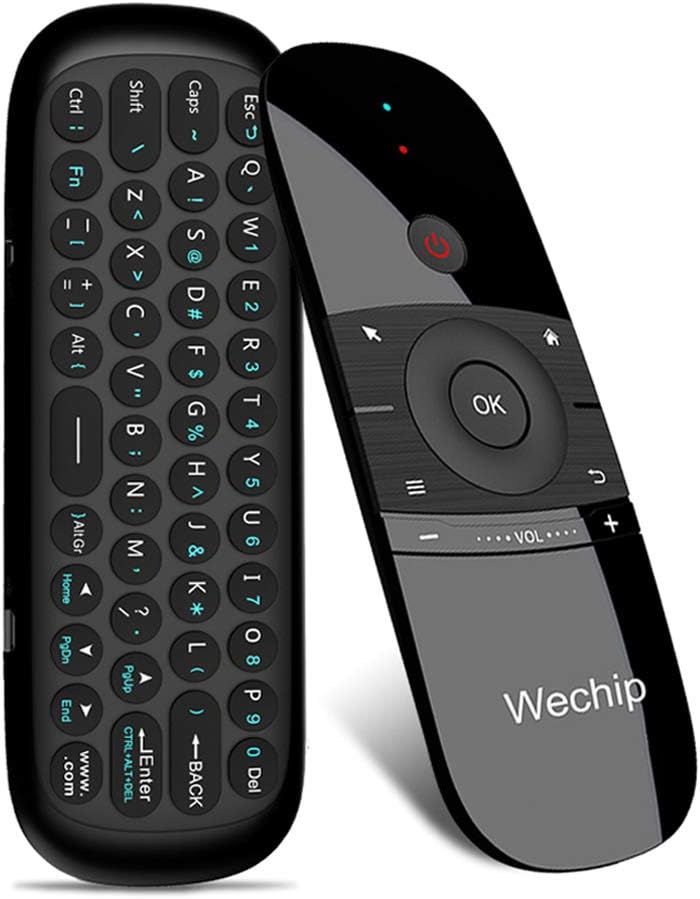
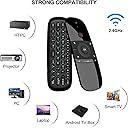
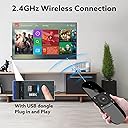
The WeChip W1 Air Mouse Remote Control combines a compact 45-key wireless keyboard with a 4-axis motion sensor, delivering precise cursor control and versatile input for Android TV boxes, PCs, projectors, and more. Featuring a robust 2.4GHz RF connection with up to 10 meters range and smart auto sleep functionality, it offers seamless, cross-platform compatibility and power-efficient operation for the modern multitasker.


| ASIN | B0787Z1C2G |
| Battery Type | Lithium |
| Best Sellers Rank | #66,709 in Electronics ( See Top 100 in Electronics ) #3,680 in Remote Controls (Electronics) |
| Brand | WeChip |
| Button Quantity | 45 |
| Color | Deep Grey |
| Compatible Devices | Television |
| Connectivity Technology | Radio Frequency , wireless |
| Controller Type | Button Control |
| Customer Reviews | 3.9 out of 5 stars 6,224 Reviews |
| Item Dimensions L x W x H | 6.22"L x 2.17"W x 0.65"H |
| Item Weight | 3.04 ounces |
| Manufacturer | wechip |
| Maximum Range | 10 meters |
| Mfr Part Number | ZXW |
| Model Name | WeChip W1 |
| Model Number | WeChip W1 |
| Number of Batteries | 1 Lithium Polymer batteries required. |
| Number of Buttons | 45 |
| UPC | 732173936977 732173937257 |
| Unit Count | 1 Count |
L**.
🎮 Surprisingly Handy for My Living Room Setup! 🖥️⌨️
I bought this WeChip W1 air mouse remote mainly to control my Android TV box, but I quickly found out it does so much more! My elderly father always struggles with typing on smart TVs or navigating small on-screen buttons. One weekend, I set this up for him — literally just plugged in the USB dongle, and it worked instantly. No drivers, no Bluetooth pairing nightmares. He was shocked when he started typing “YouTube” using the full keyboard on the back! The air mouse feature is intuitive — just a flick of the wrist moves the cursor. It’s great for controlling the TV from the sofa without pointing it directly at the screen. And when I want to search or enter passwords, I flip it over and type like a mini wireless keyboard. Super convenient. 💡 A few notes: • The keyboard is not backlit, but the layout is very readable. • It’s rechargeable, which saves me money on batteries. • Not compatible with Samsung or LG TVs directly, but works perfectly through Android TV boxes or PCs. This little device replaced three remotes on our coffee table. A great purchase! ✅ Easy setup ✅ Full keyboard ✅ Accurate air mouse ✅ Rechargeable
S**S
Great form factor, with some flaws
Out of all the options I've looked into for a compact HTPC remote, this one strikes the best balance of usability, familiarity, compact form factor, and price. There are a few things that leave me feeling this could be improved a bit more though: - The Home button is the only way to bring up the start menu as well as the taskbar when an app is fullscreen (e.g. Steam Big Picture). This button is programmed to bring up your default browser, meaning every time you want to navigate to another window in this situation you're launching browser windows you may not want. This could be fixed by just making the Home button function like a Windows key instead. Another nice to have would just be adding a button that simulates alt-tab to allow switching windows without the taskbar. - Speaking of the Windows key, there's no Windows key on the keypad side of the remote either. This is such a core key on Windows and Linux and should have been included somewhere. - No backlight on the buttons if you want to use it in the dark - The air mouse is precise in the middle of the screen but starts to be more difficult to aim into the corners. I find myself having to go in and out of mouse mode to recenter the pointer in relation to your hand. - I don't like that the Fn button on the keypad stays on. It should turn off after pressing the first key so you return to normal typing.
R**S
Good quality and a great price.
Nice item. Very functional and easy to use. Good battery life.
T**E
SHIELD TV and this remote are not quite the match I wanted them to be.
NOT a perfect match for Shield TV. But good enough not to keep till I come across something better. PRO’S 1. The keyboard works great. Netflix, Hulu, YouTube, Prime, Viki, etc. If a text box needs filling the keyboard can fill it. It also uses the gyroscope sensors to know when it should activate and is tuned quite well. Basically, the control side remains active at all angles including vertical. But once it is tilted past that to where the keyboard sides facing more up than the control side it becomes active and the control side disables. 2. More responsive than the standard control. Doesn’t suffer drop out like the standard one does. (The main reason I even looked for a replacement) 3. The air mouse works well, though on a Shield TV there’s not much use for it. CON’S 1. Power button does nothing for the shield. Would have been nice if it put it to sleep or something. I think another reviewer mentioned it’s only for IR learned components. 2. Volume buttons are poorly placed and designed. Little to no “feel” of placement and the size only makes it that much more combersome. 3. The buttons don’t map exactly like the OEM one does so on some apps on some functions the OK and BACK buttons don’t do what you think or, such as the case with the VRV app, don’t do anything at all. 4. It needs the dongle and won’t pair natively with Bluetooth so you lose one USB port. 5. No mic for doing voice search. So I still need my OEM remote nearby but this one can get most jobs done and even if I’m just keeping it around for text entry ability it’s still smaller than a keaboard and mouse.
J**B
Not so good. Problem with air mouse, no Play/Pause button.
Purchased for my Nvidia box. There are 3 problems with this remote that I found out after 1 day of using it. 1. The air mouse it has a very slow long movement. So going from one side screen to another it takes a big movement of the hand. 2. There is no Play/ Pause button so it takes extra step to do that process. 3. The function characters on this remote are so dark that you need a lot of light to see the character that you want to press. Other then that I don't have to say too much at this time. The other remote that I have is good but it kills my AAA 2 batteries in less then two weeks, that's why I need it to replace the remote. Will do update.
A**.
Just stop searching, you found an upgrade
Just bought this a few days ago after racking my brains reading review after review about smart tv replacement remotes. This remote was replacing an ELEMENT FIRE TV EDITION remote. My questions I had while looking for remotes: -Will this work with the built in Fire TV in the television? And yes it does, because the remote used A USB transmitter. Bottom line, if your TV has a USB plug, this is going to work -How do the buttons feel? Really tactile, satisfying, and at a really comfortable "pressing height". My original Fire TV remote had buttons that were sometimes slick at certain angles; not the case with this remote -Will the air mouse work with a smart TV browser? Yup, works with my Mozilla app -Does the "FN" button have to be pressed every time you want a secondary letter of a key? NOPE! They even included an indicator light to tell you when you're in "FN" mode -Is this going to feel cheap? No, it's surprisingly well-made and I think it feels more solid than my Amazon Fire remote. Most likely due to having no removable pieces (like battery compartment). Overall: -Great design -Awesome buttons and application of functionality -Love not having to replace batteries anymore Will update after I've had this for a month.
M**Z
What a great remote for Nvidia Shield TV
Bought this as a replacement of the Nvidia Shield TV stick remote that became unreliable after several updates to the Shield. Although I was skeptical of the Wechip remote, I knew returning would be easy so there was nothing to lose, and have been using this remote now for several months. Very surprised at how good this remote is for the Shield. It does require a USB slot for the dongle, but setup is super easy. I was originally torn between the voice control model and this model with the keyboard, and am very happy with the keyboard which comes in useful so many times. My only knock is the keyboard is not backlit, but is otherwise easy to use by flipping over the remote to activate the keys. This is genius so you never have to worry about typing accidentally while using the remote. Pairing keys to my TV remote was super easy. My only other design knock is the volume controls which are really narrow. I suppose this means you won't accidentally hit them. But at the same time, so narrow you do accidentally hit the keys above them sometimes. Eventually you do get used to it, but could definitely be improved. This remote is rechargable, so no batteries to scramble for when it's weak. Just plug in to any micro USB charger until full, and it'll last a long time. In the months we've had this remote, I think I've charged only once. To wrap this up, this is seriously about the favorite remote we've ever had. My wife immediately got used to it and preferred it over the Nvidia remote ever since.
G**T
THis remote is good, but the documentation is not and IR does not work
The newest version of this device now either doesn't work or require some cryptic combo of buttons to program. the Infrared Pairing.. The instructions (holding the OK and power button at the same time ) on the amazon listing and the video are wrong (they are for the old version ?) .. The "manual" that comes with it if you can call it that is also either wrong or the translation is so bad that it's /im missing something... I have tried it dozens of times and google translated all language versions to see if they are just losing something in translation. But I cant get it to IR pair with anything. So basically the device works great with LibreELEC (Lunx HTPC Distro) via the dongle but I cant turn on and off the TV .
A**D
Good as a media remote, not that much in other fields
Works well as a media remote with a player that has remappable keybinds such as mpv You could use Microsoft's Powertoys to remap one of the buttons to a modifier like the Control key or the Shift key, but you can't use shortcuts as the remote side can only register one key at a time The keyboard side can only register two keys at once, so you can't use some of the more complex shortcuts such as Ctrl+Shift+T The mouse is not accurate and sometimes goes in the wrong direction, turning the mouse control off and on again on the remote fixes it for a bit then it goes back after some moving The keyboard is decent but it could take a while to get used to, especially since you need to trigger the Fn key to type numbers
B**1
Working well with toshiba android tv
Working well with my toshiba android tv and it's easy to use.
C**N
Superó mis expectativas
Lo utilizo con la MiBox 3 y funciona de maravilla. Solo tuve que conectar el receptor USB que se incluye y funcionó sin más al 100%. La opción de puntero es muy práctica y escribir con el teclado facilita muchísimo utilizar el navegador.
A**W
Perfect accessory for Android TV box
I got tired of using the stock remote included with my android box, I have mini keyboard for my second android box, so thought I'd try an air mouse with keyboard for the other android box. Found this on Amazon, read description, looks more sleek than a mini keyboard and hopefully will work the same, so ordered it. It arrived well packaged, complete dongle, cable and instructions. I charged it up, plugged it into android box and it worked perfectly right away. The mouse function is great, it senses your movement (don't have to point at screen), no problems whatsoever using the mouse. The Keyboard works well once you get use to how to activate it. Basically flip it around to use keyboard and then flip back to use mouse. All keys seem to work fine, easy to press and registers the keystroke quite easily. I can even use it on my laptop if the need ever arises. Overall, very happy with this air mouse/keyboard combo, it is the perfect accessory to have for an Android TV box.
T**Y
Almost perfect. Not long lasting
Great product but mine just failed. The volume and back button just went and it can no longer be pressed. I obviously would have it work forever but 3 years is ok I guess.
Trustpilot
2 weeks ago
1 month ago