Buy anything from 5,000+ international stores. One checkout price. No surprise fees. Join 2M+ shoppers on Desertcart.
Desertcart purchases this item on your behalf and handles shipping, customs, and support to Panama.
🎤 Command the stage wirelessly with pro-grade control and style!
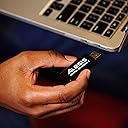
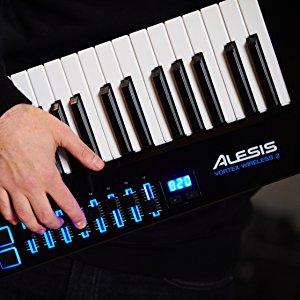
The Alesis Vortex Wireless 2 is a sleek, wireless USB MIDI keytar controller featuring 37 velocity-sensitive keys with aftertouch, 8 RGB backlit pads, and 8 assignable faders. Designed for Mac and PC, it offers low-latency wireless connectivity via a USB dongle, plus traditional MIDI outputs. Its ergonomic design includes a tilt sensor, thumb volume slider, and pitch-bend wheel for expressive live performance. Bundled with top-tier software like Ableton Live Lite and AIR Music Tech instruments, it’s a versatile tool for both stage and studio professionals seeking mobility and creative control.


| ASIN | B078S9L1VZ |
| Additional Features | Back, Compact, Velocity Sensitive Key |
| Best Sellers Rank | #24,240 in Musical Instruments ( See Top 100 in Musical Instruments ) #91 in Computer Recording MIDI Controllers |
| Brand | Alesis |
| Brand Name | Alesis |
| Color | Black |
| Compatible Devices | Mac, PC |
| Connectivity Technology | USB |
| Connector Type | USB |
| Control Method | Touch |
| Control Type | Keyboard Controller |
| Customer Reviews | 4.3 out of 5 stars 538 Reviews |
| Global Trade Identification Number | 00694318023662 |
| Hardware Interface | USB |
| Hardware Platform | macOS, iOS |
| Human Interface Input | Keyboard |
| Included Components | Software Suite |
| Instrument | Synthesizer |
| Instrument Key | Any |
| Item Dimensions D x W x H | 10.23"D x 35.2"W x 2.64"H |
| Item Type Name | Midi Controller |
| Item Weight | 3 Kilograms |
| Keyboard Description | Ergonomic |
| Manufacturer | inMusic Brands Inc. |
| Manufacturer Part Number | VORTEXWIRELESS2 |
| Material Type | Plastic Metal |
| Model Name | VORTEXWIRELESS2 |
| Model Number | VORTEXWIRELESS2 |
| Model Year | 2018 |
| Noise Control | None |
| Number of Keys | 37 |
| Outer Material | Plastic and Metal |
| Platform | Mac |
| Product Dimensions | 10.23"D x 35.2"W x 2.64"H |
| Product Style | Modern |
| Size | 37-Key |
| Special Feature | Back, Compact, Velocity Sensitive Key |
| Supported Software | Ableton Live Lite |
| UPC | 694318023662 694318023730 |
| Unit Count | 1.0 Count |
| Warranty Description | 1 year. |
B**D
Best controller keybed I've used.
Any complaint I have about this device is with Korg, not the device itself. Be aware they have pretty much abandoned this product. That said, it's my favorite keyboard controller yet, among a dozen, or so? I prefer pad controllers and the pads on this one are not really for me, but the keys...and the rest...are EXCELLENT. Add-in that it's wireless and it becomes one of my favorite controllers used in life. The only complaint I might offer is more warning to you: give it a good line of sight between the dongle receiver and the instrument. If you start spinning around, you might lose the wonderful reactivity of the low latency MIDI. Wander too far, same thing, it'll glitch on you. Always keep that invisible tether in mind and it's a wonderful controller. My only regret is how rarely I need keys...my current favorite MIDI controller is a gamepad (via Max4Live device). Figure that one out. But when I do need a keyboard, click, there it is. I might also complain about KORG not simply designing a stand for it, but you can prop it in a good corner easily enough. The reality is that the keys size and feel make my fingers happy and that makes this thing fun to play. Wireless is the cherry on top. I am humored that Amazon wants me to address the sound quality. Um. It has no sound, Amazon. It's a controller. MINE sounds GREAT. :D They also suggest value for money...what I can say is I'll probably get near what I paid for it if I do sell it. No plans to currently.
N**L
Solid performance with latest firmware update and Ilio Gig Performer
The Vortex feels lighter and much more ergonomic than my Roland Lucina AX09. The MIDI assign-ability of 8 sliders and 8 pads has made use on cover band gigs more flexible and capable than with Roland AX-1 and AX-09. The software editor for the Vortex is straightforward and easy to use. I’m currently using it in conjunction with Ilio Gig Performer (runs so much easier on computer processor than MainStage 3), the most recent firmware update for the Vortex, my MacBook Air with 8gb ram, Kontakt, and some of the bundled software synths that come with the Vortex. I have had no crashes or MIDI panic situation in the few weeks I’ve used it. The ability to run on USB power or 4aa batteries is much appreciated as is the ability to connect wirelessly or through traditional 5pin MIDI cable. Will update as experience dictates. Very happy with the Alesis Vortex 2 to this point! UPDATES: 8/18/18 Discovered that fader messages, that transmit successfully with USB and wireless connection, do not transmit over standard 5 pin MIDI connection. Contacted customer support via support page this afternoon; standing by for a reply. 8/21/18 Alesis customer support sends reply, suggesting I monitor and confirm MIDI output of the Vortex through a MIDI utility app. Turns out the Vortex 2 does successfully send fader messages over standard 5 pin MIDI. Whatever trouble I'm having is elsewhere in my MIDI configuration and not to do with the controller itself. So yeah, user error. So far, 10/10 for costumer support and I'm still very happy with the Vortex 2. 9/4/18 Recently played in a situation with all band members using wireless monitor setups, sound and lights running on its own wireless network, wireless mics and instrument signal transmitters, in a shopping area that also was sure to have a lot of wireless action. I experienced some wireless interference that showed in the loss of two or three note-off signals in the span of total of 2 hours and 20 minutes of playing between three sets. Would advise the programming of at least one pad to MIDI panic in every preset, or be near enough to hit it on the computer.
E**O
Keytar is a midi controller
Reminder that there is no sound bank inside the Keytar. It is a midi controller. You need to connect to another keyboard, PC, or sound module via the usb or midi interface. The sound will come from whatever you connect to.
T**K
He is a very happy 14 year old
My son purchased this with his own money. He is a very happy 14 year old. He connected it to his computer and showed me all the sounds it can make. My fave is the guitar sound. His comment to that, "if I wanted to play guitar, I would've bought one mom" lol He loves it and with watching youtube lessons, he can play some nice tunes.
J**Z
Nice Wireless Latency
-Very good with the Latency, -I expected really plastic keys but they are actually good to me, good response, and it feels nice
G**K
No current OS support, no midi controller mapping available for download
This is a bare bones device with almost no documentation or help, and completely unresponsive support. Almost all videos that exist, to the extent there are any, apply to the first version of the Vortex Wireless, which is totally different and has been discontinued. There is no midi controller mapping available for download - you have to work that out yourself. On the Vortex itself, There are no midi buttons to logically map to loop control ideas. Too many sliders and variable outputs that you might map to sound parameters, and not enough easily accessible buttons with which to do control actions like loop start/stop. There is no getting started guide. The version of Ableton it comes with is Lite, which doesn't allow for the Looper. (You have to spend at least $99 for the Intro version, and more likely $349 for the standard version). My impression is that this company is not doing so well, and they have thrown this device out into the market to see what sticks. UPDATE: Downgrading my review to 1 star since NONE of the software available for this device works on current operating systems. Alesis is too slow to release updates, so now their software is *incompatible* with any Mac or Windows machine you would buy now. Just pass this by - it's an utter waste of money.
M**L
Huge downgrades from previous Vortexes
I have a couple of complaints... But all things considered, it's still a wireless MIDI controller keytar. Though it's not perfect, many things can be forgiven with such a unique product. It's one of my favorite purchases and I would recommend it to anyone who wants a 3-octave MIDI controller to make music production more enjoyable. I'm not much of a musician so this will be more of a technical review. EDIT (August 2021): The price has since been increased from 299 to 399, so I've removed a star since it's not that good. This price increase is what happened to the other two Alesis keytars before their end of life. Speaking of the other two Alesis keytars, the Vortex and the Vortex Wireless, both of them were much better than this one. The original featured full onboard parameter editing (no software required, ever), a sustain jack, octave buttons that work at the same time as the sustain button, dedicated program up/down buttons, a start/stop button, and an optional center-positive DC barrel jack. I'm assuming the Vortex Wireless had the same features since they look the same, but I only have the original Vortex to compare. The Vortex Wireless 2 removed a surprising amount of functionality that the other two had, and the only benefit seems to be that it has 8 sliders instead of 3 knobs. But considering those 3 knobs could be quickly and easily modified at any time without software, the 8 sliders barely make up for the loss of features, in my opinion. - Pros • There is minimal wireless latency on the keys and pads. I tested the pads by watching the delay between their LEDs and the computer's audio. For the keys, I listened to the delay between the key press and the computer's audio. The wireless latency was not noticeable for me, at least no more than any other MIDI controller is when connected with a USB cable. • It's a keytar MIDI controller, and it's wireless. Very expressive in that it has an accelerometer, aftertouch, and three buttons to switch between touch ribbon banks on the fly. All while keeping the thumb on the pitch wheel. Do note that said aftertouch is channel aftertouch, not polyphonic aftertouch. I personally think this is much more playable than Roland's AX-Edge, aside from the fact that this is only a MIDI controller. That one has only 2 knobs, one of them dedicated to master volume. No sliders, no dedicated pitch wheel, and the sustain button is in a ridiculous place. Also, its ribbon controller isn't as sensitive. • Even in wireless mode, you have a switch at the bottom that lets you power the keytar via USB instead of batteries. This means that instead of swapping out your AA batteries every couple of hours, you can simply connect the USB port to a pocket-sized battery pack that will last longer and be easier to recharge. • It can store 25 mapping presets, and each preset can be set to trigger Program Change and Bank Select LSB/MSB messages on load. Each of the 8 pads can also trigger these 3 messages. Using both of these, you can access a maximum of 225 sounds on an external synth. • The white keys are glossy and the black keys are matte. Personally, I prefer it this way. Every other keyboard I've seen has glossy black keys, and after getting this one, the others felt inferior. The chassis has a glossy piano black finish, which makes it a pleasure to look at under every lighting condition I've held it in. - Cons • The pitch bend is 7-bit, meaning it only has 128 (2^7) levels of precision. This is common among low-quality MIDI controllers. Higher quality ones (some of them cheaper than this keytar, like the nanoKEY Studio) use the standard, 14-bit, which allows for 16,384 (2^14) levels. Decide for yourself whether or not this matters, because in average cases, it doesn't. But that's no excuse; 14-bit pitch is part of the original MIDI specification from the 80s. If a MIDI manufacturer doesn't follow it, then they're breaking the rules and setting someone up for disappointment. The low resolution becomes noticeable for me if I slowly pitch bend up 2 octaves. I don't do that often, but when I do, I don't want it to sound like trash. • Though the latency of the keys and pads is negligible, everything else (sliders, pitch wheel, ribbon) lags behind at around 200 ms. And this is while connected via USB. The numbers on the built-in screen show no latency. Maybe it's a compromise to lower the wireless latency on the keys/pads, but I don't know why the issue persists when wired. The original Vortex didn't have this issue. It doesn't matter much to me in practice, but it's a bit annoying when using the pitch wheel. • All of the buttons are soft instead of clicky, so you might accidentally press them twice. • First, although there's a built-in sustain button, it isn't pressure sensitive and thus doesn't support half-damper. It only sends on/off. Second, there is no jack for an external sustain pedal, which makes it slightly less suitable to double as a regular MIDI keyboard. Third, as of the time I'm writing this review, the sustain button cannot be edited to send anything other than CC 64. An option to have it toggle and hold would be nice, since keeping it pressed makes it harder to reach other controls. • The octave buttons will not function while the built-in sustain button is pressed. The original Vortex did not have this problem. You most likely can't stretch your finger that far anyway due to the octave buttons' distance from the sustain button, but this also means you can't use your other hand to press an octave button. They just don't work at the same time. Aside from that, I would prefer them to be on the front face above the ribbon, or on the bottom face opposite of the pitch wheel. • It doesn't support Bluetooth; you have to use the included USB-A wireless adapter, and it only works in ports that support OTG. To be fair, I have a MIDI keyboard that supports Bluetooth (nanoKEY Studio) and the Bluetooth connectivity delays and drops notes when I'm only about 3 feet from the computer. The Vortex's wireless connection has never caused any distance issues for me at several meters, but there is the occasional interference, even when I'm sitting right in front of the computer. Maybe the connection is 2.4 GHz? • The amount of pressure you have to use to trigger the pads is much higher than on the Akai MPK Mini mkII. You could audibly tap these and it still wouldn't register. I see this complaint with pads on other Alesis controllers as well. • There is no indicator for battery life. Very frustrating as I'll never know if performance issues are caused by dying batteries until I swap them out. Speaking of the batteries, they come loose easily and the resulting loss of continuity between the four can cause issues such as hanging notes. This con is irrelevant if you use a USB battery pack instead of AA batteries. • The keytar wobbles when it's laid on a flat surface, because the strap knob on the back protrudes from the chassis. This doesn't happen on Roland's AX-Edge due to the way it's carved and the fact that it has rubber legs. • Only the pads are RGB, the other LEDs stay blue. This one is minor, but... I'm a little tired of seeing blue LEDs on everything. I'd rather turn them all off, but they can't be turned off.
C**E
Works well
I got this because of the wireless option and sliders. It's lite and much cheaper than others out there. The editing sw needs to be updated. but works. It will not show up well with a 4K screen. So I have a 2nd monitor that zooms in and makes it work. the USB connection works great with Connectivity mioXL 8x12 MIDI Interface. I have it with a MIDI pedal board from Behringer. You can use that to really get the expression out of the midi interfaces that control a keyboard or multiple ones at the same time.
R**Y
Great wireless controller, looks cool, truly wireless.
It's a very capable MIDI controller with a lot of options. Some points: - By default the ribbon controller is "sticky" and controller value stays on, which is unlike most keytars that have it release to default value the moment you lift the finger. Some people have been unhappy about that. But it's not hardwired and can be easily changed with its software, so when you set it to pitch bend and return on release for guitar-like pulls it works just fine. - Same goes for pitch bend, volume control etc. that affect only "upper" MIDI channel, not "lower" one (keyboard can play 2 channels set in software). It's all configurable via software (you need to plug USB by cable to use software). You can configure default "upper" or "lower" zones, split, and what channel all controls affect individually, so set it any way you like. Split is not very usable for me, but good to have. - Freshly charged AA NiMh rechargeables are enough for 4 to 6 hours of power on state. There is no indication of battery level, it just starts to flicker and reset when batteries are low. That's not good. But generally you should insert fresh batteries before a performance or a rehearsal, and that should guarantee you won't run out of juice at the worst moment. That's the only real "con" I have. It should have been trivial to make screen or any of LEDs blink or turn red when batteries were getting low, before the device goes offline or berserk (and when it does - you can have stuck MIDI notes etc. - disaster when playing live). So make sure to use fresh batteries when it's important. You can also power via USB but it's not gonna be wireless then, so not a good option on stage. - USB wireless receiver is NOT a transmitter! It only works one way, despite DAW recognizing MIDI out, nothing is sent, as long as I can see. No program change values can be sent to Vortex to switch programs for example. Not a big deal, and make sense technologically (same inexpensive 2.4mHz radio setup as mice etc.) but good to know. - USB can only work with a computer (laptop) to control VST instrument or a hardware synth connected to the same computer. You can also connect by MIDI cable directly to any hardware synth. As far as I could research, USB to MIDI boxes do not work with this dongle, it needs a computer to send MIDI. For me, using a laptop is a good trade-of for being truly wireless on stage. Also allows me to use VST instruments as well as hardware synths. Shreddage guitar sounds amazing with Vortex, but it needs to be set up properly to use most of its functionality. - Keyboard is very ligt and feels good, just as it should, I think. It has aftertouch, which is nice for an inexpensive controller - It fits well horizontally in the second tear of my keyboard stand. You can actually use it as a horizontal keyboard without much trouble, except for the awkward pitch bend position. That's nice. - LED colors for the pads are fully adjustable through software.
P**H
Best Tones
Nice Keytar
B**D
Excellent rapport qualité prix !
Très sympa à utiliser, ludique à souhait avec des sons de guitare en Midi.
T**I
Ottimo
Personalmente ritengo la keytar un accessorio divertente per uscire di tanto in tanto da dietro le quinte. Questo oggetto ha veramente tanti controlli, sul manico ha una rotella (solo per pitch bend) ed un ribbon (programmabie, compresi 3 preset per pitch ed expression), oltre che a svariati tasti come sustain ed octave switch. Il feedback dei tasti mi piace molto, piu' di quanto mi aspettassi. Il keybed e' solido e non ho avvertito nessuno slittamento laterale. E' un controller MIDI puro, quindi non ha suoni, ma difficilmente ci si presenta in live armati solo di keytar, quindi si avra' sicuramente sempre a disposizione un PC o un'altra tastiera a cui agganciarsi. Per la nicchia in cui vivono le keytar, non vedo assolutamente alcun vantaggio in spendere mille euro per una Blade quando con 250 euro puoi ottenere gli stessi risultati. Il look sicuramente e' meno aggressivo, ma anche il peso e' decisamente piu' contenuto.
F**Y
Başarılı
Çok çeşitli tonlar ve sayısız enstruman sesi olmasını çok beğendim
Trustpilot
4 days ago
2 weeks ago