Buy anything from 5,000+ international stores. One checkout price. No surprise fees. Join 2M+ shoppers on Desertcart.
Desertcart purchases this item on your behalf and handles shipping, customs, and support to Panama.
🎬 Own the Spotlight with AVKANS AI-Powered Precision!
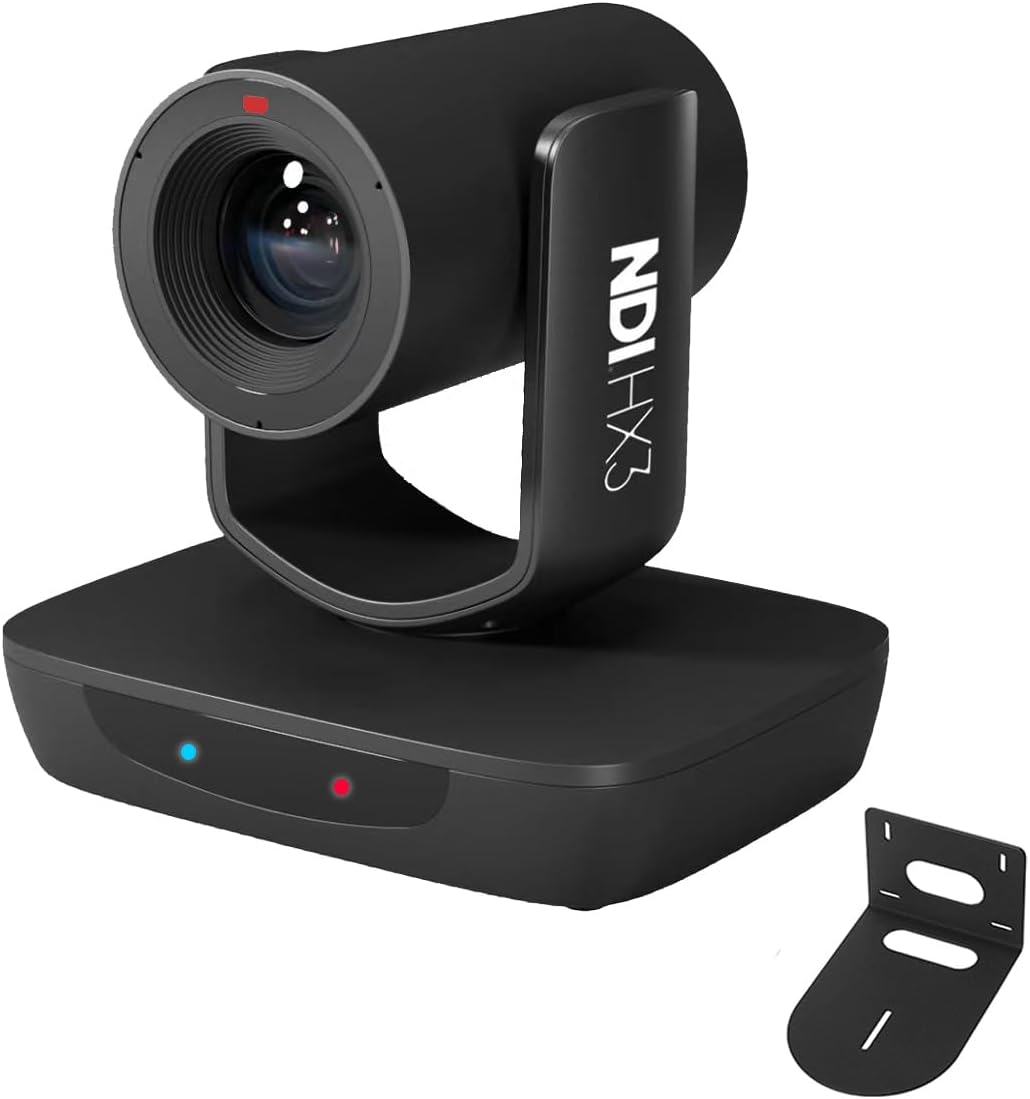
The AVKANS AI Auto Tracking NDI 6 Camera is a budget-friendly powerhouse designed for professional live streaming and event production. Featuring 20X optical zoom, multi-output connectivity (HDMI, SDI, USB3.0), and advanced AI tracking with customizable modes, it delivers crisp 1080P 60fps video with minimal latency. Ideal for churches, weddings, sports, and studio use, it offers easy setup with free software and top-tier customer support, making high-quality streaming accessible and reliable.


| ASIN | B0CM91M5LN |
| Antenna Location | LIVE STREAMING |
| Are Batteries Included | No |
| Best Sellers Rank | #213 in Webcams |
| Brand | AVKANS |
| Built-In Media | Camera Body |
| Camcorder Type | Video Camera |
| Color | Black(AI Track NDI Camera) |
| Compatible Devices | Desktop |
| Connectivity Technology | HDMI |
| Customer Reviews | 4.6 out of 5 stars 111 Reviews |
| Display Resolution Maximum | FHD MP |
| Effective Video Resolution | 1080 Pixels |
| Exposure Control Type | Automatic |
| Features | AI Auto Tracking, NDI, NDI HX2, NDI HX3, Tally Light |
| File Format | MP4 |
| Flash Memory Speed Class | C10 |
| Flash Memory Type | NM |
| Flash Memory Video Speed Class | V90 |
| Focus Type | Auto Focus |
| Form Factor | Dome |
| Has Image Stabilization | Yes |
| Image Aspect Ratio | 16:9 |
| Image stabilization | True |
| Item Type Name | ptz camera |
| Item Weight | 2.63 Kilograms |
| Lens Type | Zoom |
| Log Gamma Curve | [UNC] |
| Manufacturer | AVKANS |
| Maximum Focal Length | 128 |
| Minimum Focal Length | 32 |
| Model Name | LV20N |
| Model Number | LV20N |
| Number of Speakers | 1 |
| Operating System | Android, iOS |
| Optical Zoom | 20 x |
| Photo Sensor Size | 1/2.8 |
| Photo Sensor Technology | CMOS |
| Screen Size | 0.1 Inches |
| Sensor Type | CMOS |
| Shooting Modes | Automatic |
| Style Name | Auto Tracking NDI Camera |
| Supported Audio Format | AAC, MP3 |
| Supported Image Format | JPEG, PNG, TIFF |
| Unit Count | 1.0 Count |
| Upper Temperature Rating | 273.15 Kelvin |
| Video Capture Format | MP4 |
| Video Capture Resolution | 1080p |
| Video Resolution | 1080p |
| Warranty Description | 1 YEARS |
| Water Resistance Level | Not Water Resistant |
| White Balance Settings | Auto |
| Zoom | Optical |
D**D
AVKANS AI Auto Tracking PTZ Camera Review: A Game-Changer for recording Roller Derby
In the fast-paced world of roller derby, finding the right equipment can make all the difference. As a seasoned videographer constantly on the lookout for cutting-edge technology, I recently had the opportunity to put the AVKANS AI Auto Tracking PTZ Camera through its paces. Designed to meet the demanding needs of sports coverage and other video production services, this budget-friendly NDI camera boasts an impressive array of features that set it apart from the competition. Let's start with the basics. Equipped with NDI HX3 technology and a 20X optical zoom lens, the AVKANS PTZ Camera delivers stunning 1080P 60fps video with minimal latency, ensuring a smooth and immersive viewing experience. Whether you're broadcasting a live sermon, capturing the excitement of a wedding ceremony, or covering a high-energy sports match, this camera rises to the occasion with unmatched clarity and precision. One of the standout features of the AVKANS PTZ Camera is its versatile connectivity options. With HDMI, SDI, and USB video outputs, it seamlessly integrates into any production setup, offering flexibility and compatibility that are second to none. Whether you're working with OBS, vMix, Streamlabs, Propresenter, Wirecast, or other NDI software, rest assured that this camera has you covered. Plus, with the inclusion of SDI output, you can enjoy real-time video streaming and recording, even in environments where network connectivity is less than ideal. But what truly sets the AVKANS PTZ Camera apart is its powerful AI auto-tracking capabilities. Unlike other auto-tracking cameras on the market, which offer limited customization options, the AVKANS camera puts you in the driver's seat. With features like adjustable tracking area, sensitivity, speed, and three distinct tracking modes (Presenter Tracking, Zone Tracking, and Hybrid Tracking), you have full control over how your subjects are tracked, ensuring smooth and precise movement in any scenario. Setting up and operating the AVKANS PTZ Camera is a breeze, thanks to its user-friendly interface and comprehensive support options. AVKANS provides free CMS software for network setup, along with web interface support for easy access from any device. Plus, with free training sessions and remote assistance available, you can hit the ground running without worrying about technical hurdles. In conclusion, the AVKANS AI Auto Tracking PTZ Camera is a game-changer for anyone involved in live events, video production, or streaming. With its top-of-the-line features, versatile connectivity, and intuitive operation, it's the perfect tool for capturing every moment with unparalleled clarity and precision. Whether you're streaming a church service, recording a wedding, or covering a sporting event, this camera is sure to exceed your expectations.
A**R
Reliable, very good picture quality, great support
A really great camera, purchased two on a great deal used. Recently used it with the AV Pro Joystick controller, wired up to a Rodecaster Video switcher taking in everything over NDI for over 24 hours continuously without break. The cameras were moved constantly during this period and they performed well, even in somewhat low light conditions. The video is good, of course the color clarity and sharpness is not as great as a mirrorless or even higher end PTZ cameras, but for this price point, the technology is great. NDI makes things so easy as a single cable can deliver power + control (VISCA over IP) and get the video. An even greater point is the support from the AVKANS team. They respond so swiftly and are willing to spend the time to help you figure things out the right way (some settings may not work with each other always, for example NDI HX3 disables RTSP, but NDI HX2 doesn't - you need RTSP to see the preview on the AVKANS pro joy controller - which is a really great addition to these cameras). All in all, can't complain. in the future, may definitely upgrade to the 4k versions from AVKANS that have better sensors, maybe once we get 4k capable switchers too.
D**E
Good Quality, Good Value. Excellent image and auto tracking.
We wanted a tracking PTZ zoom camera for our Sunday worship livestreaming at church. This AVKNS LV20N camera is a great value with outstanding image, auto tracking, multiple simultaneous outputs including NDI (though for now we only use HDMI), POE support (or local, included power supply) and a nice IR remote (in case you want to operate the camera without using the built-in web interface or other operation options). It also comes with a mounting bracket for wall or ceiling mount. I upgraded the firmware using the web interface to be version 1.0.26 which was easily found on the manufacturers web site. The manual that came with the unit is lacking, but there are a number of videos on YouTube that are helpful. In particular, to set up auto tracking so that it works well, you should set preset 1 to be the initial tracking image and set preset 0 to be the "arena". The arena is the area where the camera will zoom out to if tracking is lost so it can find the person an resume tracking. I found that it tracks very well, panning, tilting and zooming as needed to track the speaker, even with the camera over 50 feet from the speaker. If you want to enable and control tracking with the IR remote you should know that F1 enables/disables tracking. Change the zoom of the tracking with F2, F3 and F4: F2 tracks with a close zoom image, F3 tracks with a medium zoom image, and F4 tracks with a wider zoom image. I found that F3 works best for our situation. The IR sensor is on the front of the base, so if you use the IR remote, you may need to orient the base differently depending on the location of the IR remote. It is currently not possible to set to zoom range for tracking via the joystick controller. The manufacturer said "Once we have created visca IP commands, then you can do it." Hopefully that will happen soon because it is the only reason that I still need to use the IR remote. The manufacturer and seller responded in less than 12 hours to inquiries and provided helpful information via both the amazon support link or the support email found on the manufacturer's web site.
R**E
A Fine Camera, great price and great support
I bought this camera for our church as a 2nd camera to enable us to switch back and forth from our high priced camera to this low priced one. But the more we used it, the more we realized that this AVKANS camera operates better in some ways the our high priced camera. In particular, the AVKANS is better in lower light situations. With the AVKANS we can even pretty much dispense with spotlights on our stage on Sunday mornings, while with the high priced camera lighting is critical requiring special low light modes like AAE along with tricky settings to combat noise problems. The AVKANS just works in its Auto mode in all kinds of lighting. It is also simpler to setup. When we first got the AVKANS camera, we had some focus issues, But AVKANS support was great. They got online with the camera and automatically calibrated the focus for our venue, and it has been great ever since. At one point I thought that NDI-HX3 was not working correctly due to jerkiness in the hi-res NDI image in NDI Monitor. But now I believe it was more likely a mirage created by the way NDI Monitor works on a less powerful machine. Selecting low-bandwidth in NDI Monitor does not show any jerkiness, and there is no jerkiness in the actual 1080P output to a display. AVKANS has provided a couple of firmware updates since I bought the camera. When you update, you have to do it sequentially. That is, you need to install each of the the older updates in the series in order before you can install the most recent one. It is worth doing though. I especially like their new "One Push" White balance adjustment feature. It makes it easy to get the white balance right. Five Stars for this AVKANS camera!
A**Y
Fantastic product!!!!
I just received the AVKANS LV20N NDI PTZ camera and it is incredible! This is a great camera and it looks fantastic. They are all NDI ready and this feature makes utilizing these cameras so easy. Another feature that is very impressive is the optical zoom. I am not a fan of digital zoom because of pixilation. But these have optical zoom and the image stays perfect without pixilation. They all come with a remote control if you don't have a controller for the PTZ feature. These are very easy to use and provide a wonderful picture. No question, great cameras!!!
A**.
A game changer at a great price!
My organization holds an annual conference which we record for our members. In the past, we relied upon stationary cameras to edit between -- but this also meant that we had limited shots unless someone was stationed at each camera to adjust them. This affordable AVKANS PTZ camera added a welcome boost to our production value, making it easy to get multiple shots from the PTZ while using our secondary stationary camera as a cutaway. I loved how smoothly and quietly the AVKANS PTZ camera operated. Its relatively small form factor also made it very unobtrusive. Being as lightweight as it is, I was able to use a Slow Dolphin camera clamp to mount it from my lighting truss's post at eye height. And the POE (Power Over Ethernet) option is awesome -- you only need one cable to power it and control it! To use the POE option, you'll have to buy a basic POE-capable switch and Cat6 ethernet. Totally worth it to streamline the amount of cables you need for your setup. The image quality was excellent for our purposes. Setting up the PTZ Camera took a little persistence to get set up with the software. There are multiple downloads and some configurations to learn, for which YouTube was a big help, but it was easy to operate after that. Ultimately, I was able to integrate it nicely with OBS Studio by using compatible plugins for the NDI configuration. I also added a small Stream Deck controller ($60) to make it easy for me to switch between the PTZ camera's presets at the push of a button. The AI tracking feature is intriguing, but you must run it via a certain AI Tracking software (the tracking is not native to the camera). I could see the tracking feature working well for a teacher in a classroom -- but not in an environment where you have multiple people entering into the frame as we do at our conferences. If there were an easier way to turn the tracking feature on/off, then maybe we'd use it -- but it wasn't that easy at this point. Instead, we configured the camera to operate at its slowest speed and then used the PTZ plugin controls in OBS Studio to manually reframe the subject (left/right/up/down, or zoom depth) whenever they moved out of the frame's center. This slower speed also meant we could do a smooth pan across the stage or across the audience -- a nice touch. We also employed the camera's Presets for key Zoom/Position shots that we knew we'd want (wide, close-up, etc). Again, the Stream Deck controller made controlling the presets easy with a quick button push, but you can technically accomplish it with the OBS Studio plugin controls or even from the PTZ Camera's remote. Overall, this approach worked very well for us and was easy for a single user to operate. I'd love to add a second PTZ for next year to allow us to take the production to the next level. But I'm very happy with the one we do have. TIP: If you are taking this PTZ Camera to another facility other than your building/office and you're using the POE option, be sure to buy a basic router so you can run it on your own closed network and control your own IP address assignments. I had completely overlooked this when I tested and configured the PTZ Camera at my office and then took it to the hotel event center, where their network reassigned the IP address and was subject to change whenever their network had to reset randomly. That was not fun to discover when in the middle of recording a session! A simple $25-50 router will save you that hassle, and you'll never have to worry about changing your configuration or your IP address expiring/resetting on its own. Having a closed network also means you'd be protected against anyone gaining unwanted access to your camera(s).
S**B
Great Camera and Good Support... Could use Manuals
This is a great reasonably priced camera that is easy to use once it is set-up properly. I do not have a PTZ console so the auto-tracking is very important, but I was having trouble getting the auto-tracking to zoom how I wanted (the shot was either too wide or too tight). I emailed their pro support address and after arranging a time (they are China Standard time, so I had to stay a bit late) they were able to remote in, update the camera firmware and set the zoom level. As an IT manager I could have done this myself with a decent manual, but the average user at a church or community center may need the assistance. Definitely get the firmware updated as soon as you get this camera as they added several auto-tracking zoom profiles to make it easy to control with the remote (hitting F3 sets it for upper body). The firmware also provides an updated web interface so yo don't need to install the CMS App. My config is running with an ethernet connection for management & POE, and USB through an extension cable for video (since it is mostly used for Zoom/Teams meetings). I have a powered extension cable but the video feed looks great through the cable even if it is not powered. Would buy again!
J**N
Really grateful for these people and their ingenuity
This is a great camera. It’s perfectly priced. It’s overly exceptional and it works really well. What’s my favorite part is that even though the technical support is in a world away they will be working with you. Anytime you can see fit. They come onto your screen. they take control they program it. They fix it for you. They are very knowledgeable and they speak perfect English.
R**E
I Cant fault this camera...
Cant fault this camera. It works great and for the price, you definitely cant complain...
F**S
Speaking of Technical Support I give 7 stars.
Speaking of Technical Support I give 7 stars. I'm new to PTZ camera technology and Jenny did amazing job. She patiently walk me through in every detail to setup my camera to the network, she updated the camera thru remote connection. Walk me thru the functionality of this camera and the remote control. I love that they include in the remote the focus, iris control, back light compensation, zoom in/out, F1-F4 to start tracking and changed from close-up to whole body tracking. The only downside is not able to track another person, if your tracking a person on the stage then stop tracking and focus the camera to the side to track another person won't let you do, the camera will go back to the previous person, but they assured me to update the camera software to accomodate this function. This function is critical to me because our church just started with 2 ptz camera in switching scene and limited in budget. And the 20X zoom is perfect to our church with 50 feet from camera to the stage.
E**.
LV20N -NDI Cámara PTZ accesible de acuerdo su calidad
Compre 2 cámaras LV20N (1 de 20x y 1 de 12x) Me sorprendio la calidad que se proyectaba por cable HDMI, al mover la cámara a zonas donde habia iluminación debil en la imagen generaban un alto contraste y muy nitidas. Es un equipo al que puede mover los ajustes a video manual controlando la apertura de iris, obturación y ajustes 2D y 3D de tal manera que controlas como una cámara profesional, siendo esta una de las versiones más economicas de la marca AVKANS. Si eres un profesional en el ambito audiovisual, recomiendo que adquieras una cámara de la misma marca de mayor rango economico. Sin embargo, es un excelente producto comparando otras cámaras PTZ dentro de la linea WEBCAMS de rango PRO. Lo recomiendo ampliamente para su uso en plataformas de reuniones virtuales, casas de reunión de culto religioso y si eres un novato o principiante en el mundo de las cámaras PTZ donde esta limitado el nivel de inversión en equipos similares de super marcas reconodidas a nivel mundial. La conectividad NDI, te permite utilizar la imagen de una sola cámara en distintos o diferentes equipos de computo transmitiendo en a plataformas con producciones independientes y de acuerdo al formato de la red social. Es una cámara FULL HD 1920x1080 que se conecta muy bien con los mejores softwares de producción audiovisual que normalmente utilizas. La marca AVKANS se encuentra en el sureste de China y desde el inicio de la compra, la marca ha estado al pendiente y contestando todas nuestras inquietudes para lograr sacar el mayor provecho que ofrecen sus equipos PTZ. Hemos decicido hacer la compra de una cámara de mejor nivel de esta misma marca con la finalidad de explotar y mejorar aún más la calidad del servicio que ofrecemos.
Trustpilot
2 weeks ago
2 days ago