Desertcart purchases this item on your behalf and handles shipping, customs, and support to Panama.
๐ง Digitize your nostalgia โ preserve your soundtrack for the future!
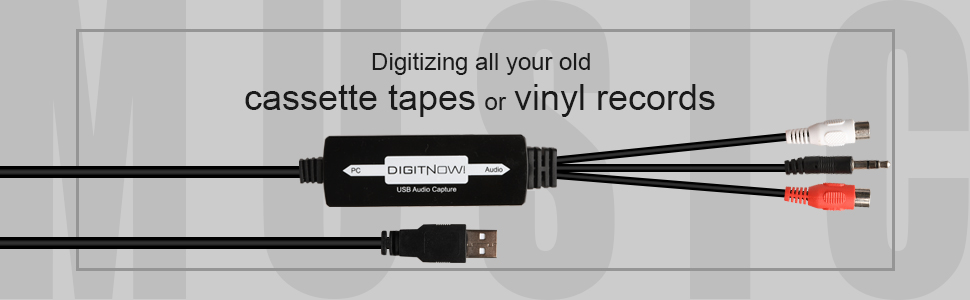
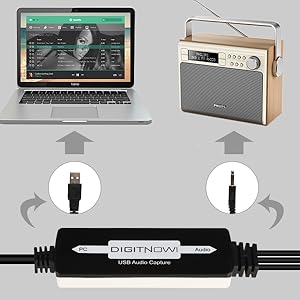
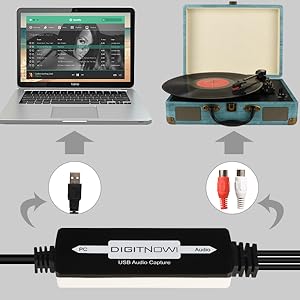
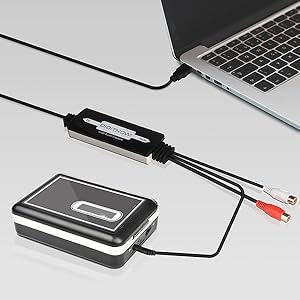
The DIGITNOW USB 2.0 Audio Capture Card is a compact, plug-and-play device that converts analog audio from cassettes, vinyl, and other sources into high-quality MP3 or WAV digital files. Compatible with both Mac and Windows systems, it includes professional-grade Audacity software for seamless recording and editing. Perfect for millennials looking to preserve and modernize their vintage music collections with ease and style.


| ASIN | B0H1HP86WK |
| Best Sellers Rank | #12 in MP3 Cassette Player Adapters |
| Brand | DIGITNOW |
| Built-In Media | Capture Card |
| Compatible Devices | Personal Computer |
| Customer Reviews | 4.2 out of 5 stars 1,153 Reviews |
| Hardware Interface | USB 2.0 |
| Included Components | Capture Card |
| Manufacturer | DIGITNOW |
| Operating System | Windows 10, macOS 10.11+ |
| Other Special Features of the Product | Live Audio Recording, Professional Audio Conversion Software |
| Platform | Windows |
| Special Feature | Live Audio Recording, Professional Audio Conversion Software |
| Unit Count | 1 Count |
C**H
Good and it works.
Received yesterday as listed. In the box is the Audio to USB converter, audio accessories (3.5mm female to female audio connector and 3.5mm female to 2 RCA male audio connector), software on small CD (3") and printed instruction manual with contact information (Email and phone numbers). The audio end cable is about 5" long and has the standard red and white RCA audio and a 3.5mm male audio jack. The PC end cable is about 30" long with a USB A port (1.0 or 1.1). The converter itself is about 3" long, 1" wide and 1/2" thick. It is true PNP on Windows 11 Pro. I plugged the USB end into a front USB 2.0 port on my desktop, and it immediately shows up as "USB microphone" in device manager (It has a built in LED power light). I put the small 3" CD in my DVD R/RW drive and just follow the instructions (Make sure to pick Windows or MAC OS in Audacity folder). If you do not have an optical drive, you can go to "Audacityteam.org" for a free download. The included manual, though not necessarily in the best English, is very helpful and fairly straightforward. I had no need for the included audio accessories, but nice to have depending on someone else's particular set up (Will need separate 3.5mm audio cable). I put it to the test with an old turntable and vinyl LP record and the 3 songs I picked worked fine and played as MP3 on my computer. I am planning to transfer some songs from old 33 vinyl records (Eventually burn them to CD's) before I get rid of all my vinyl albums and turntable to declutter my space. I was planning to do the same with old cassettes, but my ancient full size Studio Fisher tape deck kicked the bucket, and I threw it in the trash with all my 40 years+ old cassette collections (Not sure if they still work and didn't feel like buying a cheap small battery-operated handheld cassette player). So yes, this little gadget actually works and no issue on initial use. Good first impression and recommend. Thank you.
L**D
It works well and is easy to use
I bought this to digitize old LPs so I could play them in the car. It works perfectly. My computer doesn't have a DVD drive, so I couldn't use the included software disc, but I just downloaded the software. I probably would have done that anyway, just to make sure I had the latest version. It's really easy to use. Plug the USB end into the computer, run RCA cables from the "Tape Out" plugs on the amplifier, plug those cables into the female RCA plugs on this adapter, start the software, and play the LP. The learning curve is maybe two minutes, adjusting the gain to eliminate distortion, and you're good to go. The sound quality is excellent, far better than needed in a car, even one with a good stereo. The unit appears reasonably well-constructed, though it's unlikely to be put under any stress, so it's unlikely to break from use. Overall, for the price, and considering that I'm just an ordinary consumer, not a sound engineer, this device does everything I need, at a bargain price.
H**L
Works fine, with a few caveats
I was able to use this to transfer an audio cassette to an mp3 on my computer, but a few caveats: 1.) the Audacity software that comes with this product is an ancient version ("compatible with Windows 98"). Download your own current version - it's free. 2.) You will need an male-male audio cable if you are transferring from a component cassette deck. This is the Red/White cable you use to connect components to an amplifier. 3.) This unit works as a USB microphone, from the point of view of your computer. You'll need to change your computer settings to use this microphone instead of your built-in mike. This is easy.
B**A
Mission Accomplished
So easy to use! I downloaded free software for transferring cassettes to digital. I plugged one cable into the cassette player and one into my laptop. All worked well as I transferred 15 sentimental cassette tapes to digital. The cables are well-made. The sound quality is excellent. Thankful to have these handy audio tools.
R**E
Great Line In device
This product worked as expected and exceeded my expectations. While you can use it to record off of record players (or anything with a 3.5mm or RCA jack), I used it to listen to my Nintendo Switch's Game Audio (Super Smash Brothers Ultimate!) while having a Discord call open on my computer. It works without having to use the drivers on the CD and comes with useful accessories, such as the female to female 3.5 mm adapter and the coaxial to RCA Left/Right audio adapter The audio may initially sound distorted or bass-boosted when you first plug it in, but all you have to do is go into the Sound Control Panel>Recording>Right-click on the device> Properties>Levels, and adjust the volume there until the distortion goes away (somewhere between 50-75). After setting that, the audio will be clean and clear with no humming or buzzing introduced by the adapter. To listen to the device while its playing audio, go into the Sound Control Panel>Recording>Right-click on the device> Properties>Listen and click Listen to this Device. This is significantly better than Nintendo's offering, with the drawback that it won't work with phones, but if you use your computer to chat anyways this a worthy investment. It's also really useful if you find a record or cassette tape that has songs you would like to make digital. Note: The software bundled with the drivers (Audacity) is a free program. If you are recording audio, I would recommend downloading the latest version off of the Audacity website (google it!). If this is the default recording device (denoted by a green check mark in the Sound Control Panel >Recording) then it could be possible to use the built-in voice recorder in windows 10, however it wouldn't offer as many settings as Audacity.
H**S
Apparently non-functional Out of the Box
I sold my vintage cassette tape deck and while prepping it for delivery, I found some old family recordings I wanted to digitize. I was able to delay delivery a couple of days and got this device via next day delivery - problem solved! I spent 5+ hours trying to get the device to talk to my standard Windows 10 computer. I followed the install directions for the HW and loaded the ancient version of Audacity. Audacity appeared to find the device (USB microphone) without any problem and showed that the output would be sent to a file on the computer, just like it was supposed to. I verified that signal was present on the tape deck output and amplitude was good. Audacity displayed no incoming audio stream and produced errors when I tried to record - basically it said there was no source. I did the usual Windows routine - check the drivers, delete the drivers and then reinstall - still no audio stream. I tried switching USB ports, etc. without any improvement. I downloaded the latest version of Audacity and installed it. Still, all I got were error messages when attempting to record. Checked the Audacity "Help" and didn't find any hints other than to confirm that the errors indicated no input. Time was up, so I made the recordings by playing the tapes through a speaker and using a cell phone microphone and app. I hated giving this device a one star rating, but it does appear to be defective. I noted that few other reviewers reported such problems. Unfortunately, I can't comment on the recording quality. I have no other use for the device, so am returning it.
A**R
great value
works well and cheap price
P**H
OK for LP and cassettes
Its ok for basic recording. Functions well EXCEPT it has a -27dB noise floor on the left channel with no input or shorted input. Its not hum or a tone, just broadband white noise. Right channel is fine noise is just about -80dB. So if your converting cassettes or LPs then its fine as their noise is just about the same.
Trustpilot
1 month ago
4 days ago