

Buy anything from 5,000+ international stores. One checkout price. No surprise fees. Join 2M+ shoppers on Desertcart.
Desertcart purchases this item on your behalf and handles shipping, customs, and support to Panama.
🖨️ Print Your World, Anywhere, Anytime — No Ink, No Limits!
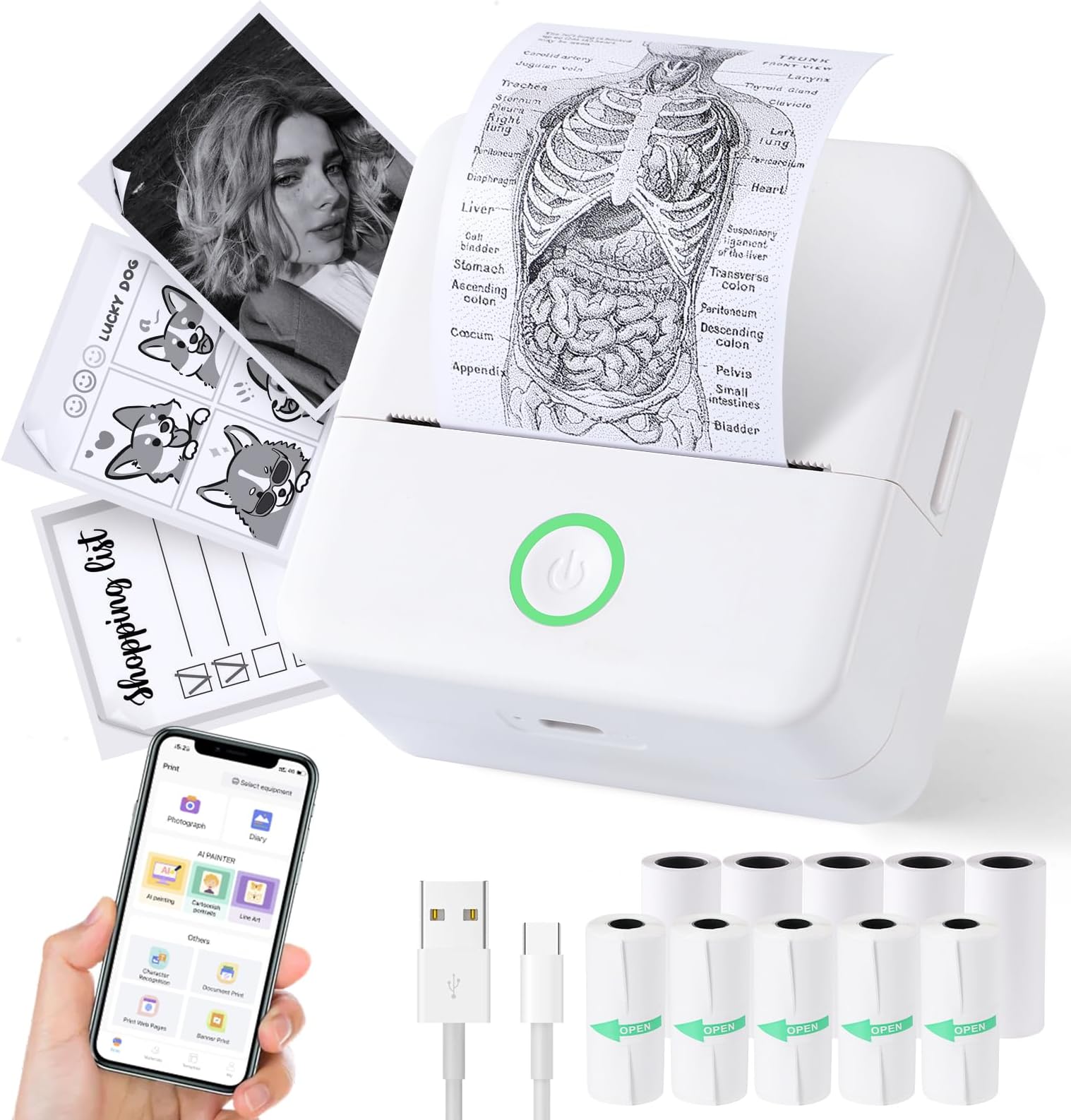
The cudinham Print Pods Mini Printer is a sleek, inkless thermal printer designed for iOS and Android devices. Featuring Bluetooth 5.0 connectivity, a high-resolution 200 DPI print output, and a rechargeable 1200mAh battery, it delivers crisp black-and-white prints on 2-inch thermal or adhesive paper. Compact and portable, it includes 10 rolls of paper and a versatile app with AI-powered templates, making it ideal for on-the-go note-taking, labeling, and creative projects.


| ASIN | B0CL6ND8C8 |
| Additional Printer Functions | Print Only |
| B&W Pages per Minute | 20 ppm |
| Best Sellers Rank | #6,739 in Office Products ( See Top 100 in Office Products ) #10 in Portable Thermal Printers |
| Brand | cudinham |
| Built-In Media | Adhesive Printing Paper*5, Mini Printer*1, Power Cable*1, Thermal Printing Paper*5, User Manual*1 |
| Color | White |
| Color Depth | 24 bpp |
| Compatible Devices | Smartphones, Tablets |
| Connectivity Technology | Bluetooth |
| Control Method | App |
| Controller Type | iOS |
| Customer Reviews | 4.0 out of 5 stars 1,631 Reviews |
| Dual-sided printing | No |
| Duplex | Simplex |
| Hardware Interface | USB |
| Ink Color | Black |
| Item Dimensions D x W x H | 1.77"D x 3.35"W x 3.35"H |
| Item Type Name | Thermal |
| Manufacturer | Cudinham |
| Maximum Copy Resolution Black and White | 200 dots_per_inch |
| Maximum Copy Speed Black and White | 20 ppm |
| Maximum Media Size | 2 inches |
| Maximum Print Resolution Black and White | 200 Dots Per Inch |
| Maximum Sheet Capacity | 5 |
| Model Name | X6 |
| Model Number | MP-01 |
| Model Series | X6 |
| Number of Drivers | 1 |
| Number of Trays | 1 |
| Other Special Features of the Product | Adhesive Printing Paper*5, BlueTooth 5. |
| Output sheet capacity | 5 |
| Paper Size | 2.25 Inches |
| Print media | Labels |
| Printer Connectivity Type | Bluetooth |
| Printer Output Type | Monochrome |
| Printer Type | Thermal |
| Printing Technology | Thermal |
| Processor Count | 1 |
| Resolution | 200 x 200 DPI |
| Scanner Type | Portable |
| Specific Uses For Product | All |
| Total USB 3.0 Ports | 1 |
| Total Usb Ports | 1 |
| Unit Count | 10.0 Count |
| Warranty Description | 1 year |
| Warranty Type | Limited Warranty |
| Wattage | 1000 milliamp_hours |
S**A
Great product:)
Super easy to use! I was printing within 3min of opening. No color, but that's in the product info before buying. I played with the printing settings a little bit. Print in "high speed" or "high definition" adjust the "print depth" for highlight/shadow changes. For darker shadows, increase the print depth (7 is the darkest print). For lighter shadows, decrease the print depth (I haven't used less than 3, but 1 is lightest print). No issues so far, it's fun, cute, and was pretty cheap. I caught myself worrying about running out of ink, before I remembered that there is no ink! I was printing pictures and sticker designs, I like that I can print anything I want for personal use:) the app is easy and I found no problem using all the features offered for free. I've included the prints and settings used, as well as the original files used to give you a better idea.
L**Z
Compact and Easy-to-Use Portable Thermal Printer
I loved this portable mini printer. It is very easy to connect to your phone via the app and doesn't require ink, which helps save money. The print quality is good for notes, labels, lists, drawings, and black-and-white photos. Plus, it comes with several rolls of paper so you can start using it right away. Its compact size makes it perfect for taking anywhere.
P**Y
Buyer beware $35 to print!!!!!
I bought this for my, 13 year old, son for christmas. He was super excited to use it until he found out he had to pay $35 a year or $7 a week to print something off. Nowhere in the description does it say you have to pay anything to use the device. This is absolute crap! I spend $30 on something and only find out after we download the app that we have to pay to use it. I would call this bait and switch. This is usually one of those items that a child will use several times in the beginning and then put away and take out again when they want to print off one or two things. I will have to pay $35 a year for something he may only use 5 or 10 times a year. I bought the printer, I bought the paper, we downloaded the app. WHY DO I NEED TO PAY$35 A YEAR TO USE SOMETHING I HAVE ALREADY PAID FOR??????
O**.
I was fascinated by this mini printer 😊
I loved this mini printer. It’s compact, easy to use, and connects quickly to my phone. The print quality is good for labels, notes, and stickers. Very practical and useful for organizing.
R**C
It's a little good, and a little bad, but hey... the day is young.
The print quality seems pretty darn good for such a small device. The connectivity is pretty fast and easy. It comes with a decent supply of paper. I wish there was software to allow this to print directly from my Windows computer and not be dependent on an Android emulator to run the downloadable phone app. The other negative is that the manual for this little device is horrible. The translation is part jibberish, and there are some operational aspects that I would actually like to know some details about but I'll never be able to interpolate the silly words and phrases on the pages into anything intelligent or useful. I haven't had it long or used it much but it could end up being a fun little device... especially if the quality of the device is far better than the quality of the users manual.
R**A
Good for the price, but pay attention to your settings
This little printer is very portable and holds charge for a respectable amount of time. I used it for college notes. I could easily take a picture of my screen, print the image, and paste it into my notebook. This is what I really needed it for because there was so much detail to remember in my class And visual examples help me best. I do think this is a good purchase for the price, but I want to let you know of some things you should prepare for. When you print, you can change the setting for how light or dark your print will be. I suggest that you print Dark because I have found that the images that I printed lightly are starting to fade. The prince where I used, the darkest settings have lasted the longest. If I needed to touch up the picture because it would become too dark, I took the photo with my regular phone camera and adjusted it that way before sending it to the printer. It is great that you can either take a picture directly or import the picture from your camera Also, the settings are limited because this is a very small machine. So be prepared to have an image that looks more like notes and less like a photograph. I also recommend getting a unit with sticker labels because they are easier for your notes. I think that the prince I made with the sticker labels are clear and more solid than when I used the non-sticker paper. If you are using non-sticker paper, I also recommend that you use a non-acidic glue or tape underneath. Otherwise, the acid in regular tape will wipe out whatever you printed. Although this is great for the price. I am giving it three stars because I did lose quite a few notes that are non-recoverable because of the quality of the label paper and no warning about printing dark.
M**A
Mediocre
Everything is nicely packaged upon arrival. I was wondering why some of the paper rolls had "open" stickers and the other's didn't. Nothing is labeled but I figured out that the green stickers were on the rolls that you can print stickers/labels on. The directions were written in broken English, but it is easy enough to get the point. Set up was relatively easy, but sometimes there are pop ups in what I am assuming is Chinese (see pictures). The app has lots of cool features, and it makes it easy to take a picture and print. The picture comes out WAY DARKER than the image. The printing is very fast. I was excited about the label maker option, but if you try to click on any of the features (some in Chinese), the whole app crashes! You can type a word and print it, but if you try to add a little image or click through the options, the app crashes and you have to start all over. If you want a one word label, it prints it very clearly on the printer. Overall, the printer works well on light images. The app looks like it has a lot of cool features, but you can't do much with it. Honestly, I have a label maker that I could just use....
L**A
Mini printer
It arrived on time and well-packaged. It is a mini printer that comes with several rolls of paper and a charger. It is easy to connect, and you just need to download an app that is easy to use..
L**E
Mini printer
Mini printer was exactly what it says it does, very happy and delivery was great too. Thank you
R**V
Christmas gift fail
It doesn’t work. I’ve tried connecting the required app to 3 different iPhones (with 3 different operating systems) and it still freezes on the start up screen.
A**N
Very Useful
A good printer. It was easy to connect to the app and the images are high quality. The only flaw is that it did not come with sticker printer as it claimed.
A**R
False advertising
Did not contain any sticker (self adhesive) paper rolls, as advertised, only ordinary paper. As it was purchased specifically based on this claimed feature (inclusion of 5 rolls of adhesive paper), it is not fit for the intended purpose (printing stickers). Unhappy.
Trustpilot
1 month ago
2 weeks ago