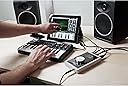
🎶 Elevate Your Audio Game!
The Apogee Duet 2 is a high-performance 2-channel USB audio interface designed for recording mics, guitars, and keyboards on Mac and iOS devices. With exceptional AD/DA conversion capabilities, it supports recording at up to 192kHz/24-bit, ensuring professional-grade sound quality. Its USB 2.0 connection allows for quick setup on both Mac and Windows PCs, while direct compatibility with iOS devices makes it a versatile tool for musicians on the move. Weighing just under 500 grams, it’s the ideal portable solution for any audio enthusiast.


| ASIN | B00BB2QBLI |
| Audio Input | Lightning, USB |
| Brand Name | Apogee |
| Compatible Devices | Personal Computer, Smartphone, Tablet |
| Connectivity Technology | USB |
| Customer Reviews | 4.1 4.1 out of 5 stars (81) |
| Global Trade Identification Number | 00805676301013, 00805676301167 |
| Included Components | Breakout Cable with 2 Combination Line/Mic/Instrument Inputs and 2 Balanced Line Outputs, Duet, Quick Start Guide, USB-A Cable (Lightning and USB-C cables sold separately), Universal Power Adapter for US, UK and EU |
| Item Type Name | 2 Channel Audio Interface |
| Item Weight | 1.1 Pounds |
| Manufacturer | Apogee Electronics Corp. |
| Manufacturer Part Number | DUET-IOS-MAC |
| Maximum Sample Rate | 192 KHz |
| Model Number | Duet-iOS-Mac |
| Number of Channels | 2 |
| Operating System | iOS, macOS |
| UPC | 805676301013 805676301167 |
N**O
Apogee deserve their excellent reputation
Apogee deserve their excellent reputation, the Duet is a well designed premium product which importantly delivers on sound quality. The detail and clarity this device brings to recordings and playback is remarkable. I thought I had a good set up before purchasing this for a small portable project studio. Looks like further Apogee purchases will have to be made. Fast delivery and prompt attention from DJ and Studio, highly recommended.
G**N
Can't fault it.
Brilliant interface. Takes a bit of getting used to, but more than makes up for it.
J**N
Five Stars
Excellent
S**K
Apogee is an amazing company
The Apogee Duet 2 is an amazing soundcard for professional use with iMac/Logic Pro X! I started with the smaller Apogee One - also a great product. But needed more inputs. This Apogee Duet 2 is HIGHEST level quality.... Great mic preamps. Great sound.
S**T
£100 cheaper at gear4Music currently + pro tools, Great interface though & perfect for Apple/Logic
*Important alert that will save you £100* At the time of writing there is a sale on, at gear 4music on their website, they are selling this device + a years subscription to Pro Tools for £349, I got an extended 5 year warranty for £19 extra so still a lot cheaper than Amazon at the moment. Now for the product itself, I went from a Scarlett 2i2 1st gen & the differences were noticed immediately, out the box it just looks so modern & aethetically compliments the Imac. It took me about 20 mins to set up, going on the avid website to download the correct drivers, then it was all set & ready to go. Just follow the instructions it comes with step by step & you will be fine. It was alittle bit fiddly but that was down to me not reading the instructions clearly. I’m using the exact same mic & set up apart from the audio interface of course but comparing my old recordings to this one there is an obvious improvement in sound quality. I’m really happy with my purchase & it’s been one of the best additions to my home studio so far, I’m looking forward to making more songs with this interface. The breakout cables include 2 inputs for Mic/instrument + an in & an out for your monitors. I’m not sure about this particular version but on my version (the pro tools version) it includes a Midi input which I was really pleased with as my keyboard had to be connected by usb to the Mac previously. Perfect for people that don’t need many plugins just the essentials to record at home. The slider knob & controls are also very practical. I wouldn’t swap it for another interface under the £700+ mark, being the Apollo Twin Duo. If you are an Apple user & use Apple based daws such as GarageBand & Logic Pro X, this is the interface for you.
M**M
Pretty Good Interface - Crummy Tech Support
Maestro software that accompanies the hardware is difficult to work out. It's also has exceptional tiny text on a widescreen monitor. I downloaded the drivers for Max OSX from the Apogee website and got a warning that the software did not match the firmware version in the actual interface. The firmware updater in the software package failed to recognise the Apogee was actually connected to my MacBook Pro. A check through the Knowledge base suggested a solution was to use an iPad to update the firmware (seriously!). However, the only trouble with this is that the package does not contain any cable to connect the interface to an iPad despite the product being actually intended for Mac and iPad. I raised a ticket to check what I should do about the firmware and received a reply. However, I cannot access this reply due to a password issue. Asking for reset or similar action from Apogee has not been successful. The reset request has simply been ignored. Further attempts have indicated I should contact customer service, but there's no phone number despite comments on the Website that Apogee really cares about their customers. Obviously this caring attitude is limited to big names like Steve Van Zandt and not the little people. Sound wise the Duet is similar in quality to the MOTU Microbook it replaced. It's better than the Microbook with regard to Latency especially when trading off latency against processing power. The knob on the top is also more useful as a volume control than using the keyboard. Is it worth the £400 or so I paid for it. Probably, but if you're looking for good support Apogee is not the manufacturer that should be at the top of your list.
M**A
REALMENTE LLEGO EN EL TIEMPO ESTIMADO, BUEN SERVICIO Y EXCELENTE PRODUCTO,
A**L
This product bricked in 3 months. Looking for a replacement free of cost since it is under warranty.
P**G
The Apogee Duet is a wonderful product. I've been recording for years and have sung on many records, commercials and films. Apogee was part of just about every studio that I've recorded around the world. To take that same technology and put it in a portable unit where now it can be used with the technology of today is pretty amazing. Today's technology with ProTools, LOGIC, Digital Performer, Reasons, etc having the Apogee Duet as a companion is well worth it. It will make your music 'radio ready'. I've done many duets in the course of my career, and I'm happy to now have this 'duet' interface as one of my studio companions. :-)
A**.
Il top per l' home studio: i convertitori ed il suono apogee sono da paura! Ho provato un bel pò di schede audio prima di fare la mia scelta definitiva. L'unica pecca è la mancanza di in e out digitali, per il resto nessun altro aspetto negativo.
A**E
La Duet es una autentica pasada. Tiene una definición increíble y una presentación impecable. No voy a hablar sobre sus virtudes auditivas, para eso hay reviews profesionales que ahondan en sus especificaciones técnicas al detalle, sobre la calidad de sus previos y demás. Voy a hablar de sus funciones y su practicidad. Es pequeña, preciosa y cuenta con una goma antideslizante con la que me he quedado a cuadros, nunca había visto que un dispositivo se fijara con tanta fiereza a la su superficie de apoyo. Hardware: - Los conectores, todos ellos, son fuertes y encajan a la perfección. - El knob central te permite subir y bajar el volumen en las salidas de manera independiente con tan solo hacer presión en él. - Tiene dos pulsadores tactiles que se pueden configurar al gusto gracias al software maestro de Apogee. - Los graficos de la señal en db, te muestran cuando pica la señal en color rojo y son un buen complemento para el uso en DAWs y editores de audio en general. - Las salidas en uso se iluminan en color blanco si tienen volumen y también te muestra las que están en mute. Software: - El software maestro, te permite hacer absolutamente todo lo que se puede hacer con la tarjeta. - Se pueden configurar entradas, salidas, dispositivos de control (para los pulsadores táctiles), el mixer y la configuración de sistema. - Puedes variar el volumen de cada salida o accionar el mute a cualquiera de ellas. - Tiene un modo mono que se puede asociar a uno de los botones táctiles muy práctico para cuando estás trabajando en una mezcla. - Puedes asociar el volumen de auriculares al knob central y los auriculares al teclado o viceversa. - Su integración en macOS es total, tanto que si asocias el volumen de los monitores al volumen del teclado, también puedes controlarlo con el mando apple tv. En fin, encantado no, encantadísimo y espero que dure muchos años.
Trustpilot
1 month ago
1 month ago