Desertcart purchases this item on your behalf and handles shipping, customs, and support to Panama.
๐๏ธ Elevate your iPad artistry with the ultimate paper-like precision!
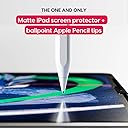
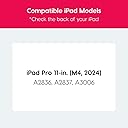
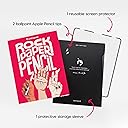
Astropad Rock Paper Pencil v2.0 is a premium matte screen protector engineered exclusively for the iPad Pro 11-inch (M4, 2024). Featuring advanced NanoCling technology, it offers a residue-free, reusable, and ultra-thin fit that eliminates screen gaps. Paired with two precision Apple Pencil tips compatible with both 1st and 2nd generation pencils, it delivers an unparalleled pen-on-paper drawing experience, perfect for professionals craving tactile feedback and flawless performance.


| ASIN | B0D74M5GMW |
| Best Sellers Rank | #808 in Tablet Screen Protectors |
| Brand | Astropad |
| Brand Name | Astropad |
| Clarity | 100 |
| Color | Transparent |
| Compatible Devices | iPad Pro 11-inch (M4, 2024) |
| Compatible Phone Models | iPad Pro 11-inch (M4, 2024) |
| Compatible Tablet Computer Models | Apple iPad Pro 11-Inch (M4) |
| Customer Package Type | FFP |
| Customer Reviews | 4.3 out of 5 stars 834 Reviews |
| Finish Type | Matte |
| Item Dimensions L x W | 12"L x 9.44"W |
| Item Hardness | Flexible |
| Item Weight | 300 g |
| Manufacturer | Astropad |
| Material | Optical Grade PET |
| Model Name | Rock Paper Pencil 2 |
| Model Number | M4 |
| Number of Items | 1 |
| Part Number | M4 |
| Product Dimensions | 12"L x 9.44"W |
| Screen Size | 11 inches |
| Screen Surface Description | Matte |
| Special Features | Scratch Resistant |
| UPC | 198168658406 |
A**D
If you have sensory issues, want a traditional feel and need a protector this is your product!
To keep it short and sweet, this is the best screen protector I have ever had for my Ipad. Main points and concerns: - Texture is perfect! - Does not scratch easily or leave fingerprints. (If you have made scratches you are likely applying too much pressure). - Friction is super realistic to paper! Jitter and slippery-ness from using the ipad is GONE. - Does cover the front facing camera but I believe it is worth using despite this. - Tips are extremely precise and feel like a ballpoint pen/mechanical pencil. - Very easy to apply! - A little fuzzy, but not noticeable when playing games, reading or watching videos. - Perfect fit and thickness. - Lovely overall product! In depth review: I have ASD and texture is really significant to me, moreover, the texture on this is satisfying. I feel very comfortable touching it and resting my wrist on it with and without drawing glove. It does look a little fuzzy on the screen but it is not noticeable for watching videos or playing games. The friction that you feel on it feels very realistic to paper. The usual jitter and slippery-ness that comes with drawing on an ipad is completely obliterated with this product. I have seen other reviews that mention the tips scratching the protector easily as well as fingerprints collecting easily, however, I disagree with this. I think that you have to be exerting a lot of pressure on it to get that result. The only negative opinion I have on this, is that the location of my camera on my ipad is blocked by the protector, but it is completely worth ignoring this for the other benefits of using it. 10/10 Would recommend to all artists looking for a more traditional feeling that you are used to.
R**R
Excellent product, even better customer service
Tl;dr put it on easily, got a pen tip that scratched, but the second tip provided was fine. Astropad customer service is sending me a replacement for free. Easy to apply, feels like pen on paper, and doesn't effect visibility or pressure sensitivity for apple pencil. I ordered this after trying paperlike and finding it difficult to put it on without bubbles. I stumbled upon astropad after trying to find alternatives to paperlike and wanted to give it a try. The application was simple, amd after cleaning ny ipad screen, it went on smoothly and easily. I put on one of the pen tips provided amd started doing some basic up and down strokes and it scratched and snagged. I was seriously disappointed that I'd already ruined my product without even using it for it's intended purpose!! I then used the second pen tip provided, and it glided across the screen protector like butter. It would seem the first tip was defective. I immediately wrote to Astropad customer service telling them what happened. Within 24 hours, they wrote back a personal message apologizing for the mishap, gathered my information, and are sending a replacement at no cost to me. Please consider this product if you're interested in the pen on paper feel with a removable screen. Other than the initial incident, I've had no trouble with it, and the sensitivity, precision, and visibility is pristine. Overall great product and I will be telling others about it!
C**O
A Game Changer for me
The combination of a hard pen-like tip and a textured surface was like night and day for me. As a traditional graphite and colored pencil artist, the slick glass surface of the iPad was distracting. I tried soft tip covers (which fell off), replacement tips that screwed in and had a rubberized feel to it, but it was like moving a rubber glove over glass--just draggy and not like a pencil tip on paper. The Astropad Rock Paper Pencil 2 changed everything. With the addition of a textured surface that was magnetic, without an adhesive, there were no bubbles to contend with, and it added an unexpected plus of less reflective surface glare. The hard tip is the opposite of what I thought I needed, but I was pleasantly wrong about that combination on a lightly texture surface--it really has made this a pleasure again, in the few short minutes of testing I've done. Procreate users should also experiment with the wrench icon to adjust the pressure and smoothing to make it feel ideal for your needs. I had to add stabilization and motion filtering to my pencil just to get my signature to look right instead of wobbly. Then, I had to change the pressure curve/App Pressure Sensitivity to get it to respond to how I draw and use pencils. These changes will make a huge difference in how you will feel using the Astropad Rock Paper Pencil 2. Highly recommended!
S**3
Good, worth the cost, but not great
First, this is trivially easy to install. Second, the metal nibs are nice. I have used a paper like screen protector pretty much since the iPad came out. They really help the writing experience providing the right amount of drag on the pencil to make it feel like you are writing on (very rough) paper. The only problem is that the plastic nibs wear out pretty quickly and leave lots of scratches on the screen protector. When I got my new iPad, I decided to hold off on getting a screen protector to see if I could get used to writing on a glass screen -- that lasted a couple of months (and shouldn't have lasted a week). Writing on glass is simply too slick and hard to control -- lots of hand cramping and illegible writing. This screen protector is the best of the paper like screen protectors I've used and it was trivial to install -- I haven't tried to remove it, even though that seems possible. The only issue I've run into is that the metal nibs can scratch the surface if you happen to drag them backwards across the screen -- this wouldn't happen when writing, but can happen when moving object around on the screen (e.g., Post-It notes). So far, the scree is still easily usable, but I expect that I'll need to replace the screen protector before I need to replace the nibs.
A**J
WORLDS better than the paperlike
iโve tried 3 paper โlikeโ screen protectors for my new ipad and this is by FAR the best one iโve tried. the first one was from the ESR brand and it made my 2,000$ ipad look SUPER grainy so that one was an immediate no. Then, i went for the Paeike because they somewhat pioneered the paper feel screen protector space. I had that one on my ipad for about a week but i had a few gripes, the biggest two being the installation process and the amount of bubbles. Now, it very well couldโve been user error but for a 50$ screen protector i feel that it shouldโve come with an application device of sorts. then, i ordered this one and i just got it today and OH MY GOD ITS AMAZING. For starters, it has a far superior paper feel than either of the ones i trekked previously AND itโs magnetic so i donโt need to worry about bubbles! it was super easy to install i just cleaned my screen and put it on and voila! An added bonus is the metal apple pencil tips, iโve been testing out another brands but they donโt come anywhere close to the ones that came with this screen protector, it really feels like im writing with a pen and i LOVE IT. i cannot say enough good things about this screen protector!
A**R
Great concept, middling execution
I considered several screen protectors before finally deciding on this one. I loved the idea of being able to take it off and on, especially. The packaging is really nice, if a bit excessive. The screen protector didnโt come with any instructions, and I was a little confused at first. I cleaned my screen and applied it, and it stuck really well with the magnets. So far, so good. I love the texture, and writing on it is fantastic. The included ballpoint pen tips are very nice for journaling/planner writing, etc. The cover itself gives the screen a sort of cloudy haze, however, so watching videos and such is not a great experience. Overall, I enjoyed the cover for writing, but when I used it for drawing, I started to run into problems. I do a lot of digital drawing in miniature, which means a great deal of zooming in for detail work. Zoomed in, the iridescent air bubbles/diffraction are extremely problematic. They were so distracting that I was unable to complete my work. Using black or other dark colors while zoomed in is out of the question, because the diffraction makes the screen too difficult to see. Pulling the screen cover up and reseating it works briefly, but the diffraction/bubbles return as soon as enough pressure is applied to the screen cover. In addition, pulling up the cover means that dust and hair can get under it, so now youโve got trapped debris to contend with. This is even more of an issue when taking the cover off to watch videos and then putting it back on after. There is a lot of dust underneath, plus pet hair (I have dogs and cats, so YMMV). I clean the screen and the cover before each re-application, but thereโs still always something stuck underneath no matter what I do. I truly love the concept of being able to remove and replace the matte protector at a whim, but it just doesnโt work well in practice. I canโt use it for drawing because of the diffraction, and will probably need to go with a non-removable competitor and cut my losses on this one. Itโs a shame, and I really hope there can be some kind of improvement eventually. Iโm not even sure if I can return it at this point.
V**S
Transformed writing experience on my iPad Pro -- highly recommended!
There's a new version of this screen protector that I am eager to try. But as for version 2.0 (the one I am reviewing), I have had it for almost a year, and I am very happy with it. It has changed the way I use my iPad Pro. I write a lot, and this feels almost as good as paper. The only issue I have had with it over time is that the screen protector develops scratches. This might have to do with writing style, pressure, dust, and combination of these factors. I reached out to their customer support team after an initial glitch with my screen protector, and they immediately resolved the issue. They've been very patient in hearing feedback and are prompt in following-up. I would definitely recommend this to all iPad (and especially iPad Pro) users, especially if you write a lot on your iPad. It would be good to be able to order tips (or screen protectors) separately.
W**R
The best drawing screen protector out right now!
This is my second Rock Paper Pencil screen protector and after trying a couple others, this one is by far my favorite. The feeling is similar to writing on paper with a ball point pen. It provides a little more of a tactical feel without being too rough or having too much pencil resistance. The fact that itโs easily removable is the biggest selling point. No bubbles, easy installation with unlimited retries if itโs not aligned right, and when Iโm not drawing I can take it off to have my normal iPad screen back. A little on the pricier side but well worth it for the versatility, quality, and total package value. Just get yourself one you wonโt regret it.
T**.
Indispensable pour le dessin sur Procreate
C'est un indispensable ! Le film est super pratique et รงa permet d'avoir une bonne sensation lorsque je dessine sur l'Ipad avec ProCreate. Je n'ai pas encore utilisรฉ l'embout pour stylet car honnรชtement celui d'Apple me convient trรจs bien. Je recommande, c'est cher mais รงa fait 6 mois que je l'ai et pour l'instant il tient trรจs bien. Et รงa รฉvite d'abรฎmer l'รฉcran de l'Ipad donc c'est un bon investissement.
T**N
Better than Paperlike! Easy to install
So easy to install! Fabulous texture for illustrators. It's thicker than paperlike and a breeze to install. I haven't tried the pen tips yet. The main reason I purchased this product was because I wore out my paperlike screen protector in two weeks!
E**Y
Absolutely great
I just decided to invest in this and I love it, feels just like paper and is really easy to apply, however it can slip but all you need to do is make sure you run your finger firmly around the edge and it stays put. It also is prone to scratching with the ballpoint tips but I feel like that is expected but I love the fact that it comes in its own sleeve!
I**N
Very happy!
Awesome! Iโve been using a different variety of paper screen for a few years. But this brand is much longer wearing. Great texture. Super easy to apply. I would buy again. I am also using the pencil tip provided which is pretty good.
E**.
El tacto
Es caro, pero si es cierto que el tacto que ofrece, junto a las puntas que trae, se asemeja mucho al papel. Si quieres usar el Ipad a modo de cuaderno, para estudiar y tomar apuntes, merece mucho la pena. Incluso manejando con tus manos, se siente bien
Trustpilot
1 week ago
1 day ago