🚀 Compact power, limitless potential — build your future-ready PC today!
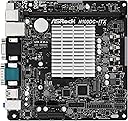
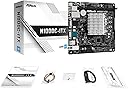
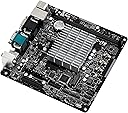
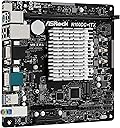
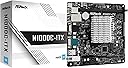
The ASRock N100DC-ITX is a Mini-ITX motherboard featuring an Intel N100 quad-core processor (up to 3.4GHz), support for DDR4 memory, dual M.2 slots for NVMe SSDs, SATA3 ports, HDMI and D-Sub video outputs, Gigabit LAN, and multiple USB 3.2 Gen1 ports. Its compact design with 19V DC power input is ideal for space-saving, high-performance PC builds targeting professionals and media enthusiasts.
| ASIN | B0C9JG8L79 |
| Best Sellers Rank | #782 in Computer Motherboards |
| Brand | ASRock |
| CPU Model | Celeron |
| CPU Socket | LGA 1356 |
| Chipset Type | Intel Alder Lake-N N100 |
| Compatible Devices | Personal Computer |
| Compatible Processors | Intel N100 |
| Customer Reviews | 4.5 out of 5 stars 108 Reviews |
| Global Trade Identification Number | 04710483943188 |
| Graphics Card Interface | PCI-Express x4 |
| Item Dimensions L x W x H | 12.2"L x 8.27"W x 1.97"H |
| Item Weight | 630 g |
| Main Power Connector Type | 24-Pin |
| Manufacturer | ASRock |
| Memory Slots Available | 2 |
| Memory Storage Capacity | 16 GB |
| Mfr Part Number | N100DC-ITX |
| Model Name | N100DC-ITX |
| Model Number | N100DC-ITX |
| Number of Ethernet Ports | 1 |
| Number of Items | 1 |
| Number of Ports | 4 |
| Platform | Windows 10 |
| Processor Socket | LGA 1356 |
| RAM Memory Technology | DDR4 |
| Ram Memory Maximum Size | 16 GB |
| S/PDIF Connector Type | Optical |
| System Bus Standard Supported | SATA 3 |
| Total Number of HDMI Ports | 1 |
| Total PCIe Ports | 1 |
| Total SATA Ports | 4 |
| Total Usb Ports | 6 |
| USB 2.0 | 2 |
| Unit Count | 1 count |
| Warranty Description | 3 Years Manufacturer |
W**G
Great board, works fine with 12V power instead of 19V
J**.
Excellent MoBi
This MoBo needs a external power like a portable pc. If your problem is space, this motherboard is the right one.
J**R
Finally, everything I needed
I wanted to build a low power server and I went through several Chinese N100 motherboards but they never went below 15W usage, because they never went to lower C-states. I then tried another motherboard and while it went through power low power C-states, the Realtek NIC struggled with lost packets. So I bought an Intel i226 card but that BIOS had a bug where if I disabled the onboard Realtek to enter proper C-states, the Intel card stopped working. So after wasting a lot of money and thinking I'd go insane, I finally stumbled onto this board and everything worked magically. I disabled the internal Realtek NIC that this board also has, connected my Intel network card and voila; proper C-states (C8), very low power usage (4.5w @ 12V, 5.5w @ 19V) and no lost packets. It's the only N100 that I've had that actually works well. Kudos to ASRock. Please don't discontinue it.
N**E
Unique Motherboard
This is a great motherboard for Network Attached Storage or a basic desktop computer. Used this board to make a desktop PC for my parents which turned out great. It does run hot, case cooling would be recommended.
V**9
Ottima per server
Funziona bene, spedizione rapida. La uso per server Debian, il processore in teoria non ha bisogno di raffreddamento attivo ma se il case è piccolo e poco ventilato, quando sotto carico meglio aggiungere una ventola perché altrimenti le temperature superano agevolmente gli 80^. Abbinato a 8gb di ram ddr4 ( supporta le normali DIMM desktop) e ssd nvme gestisce senza problemi server Plex, immich e torrent. Super silenzioso
S**N
Not as cool as I had hoped for...
Even though N100 is a 6W TDP CPU, I find the CPU heatsink a bit too hot for comfort. To be safe, I would need to install a fan to keep heat in check later, which kind of defeat the purpose of building a mini silent PC. Well, it is what it is. Hope that it can work and serve me well for many years to come.
L**N
prisvärd uppgradering
rätt pris
A**.
Ideal für HTPC oder Homeserver
Für einen lautlosen, stromsparenden und auch noch kostengünstigen HTPC oder Homeserver, scheint dieses Board sehr gut geeignet zu sein. Es läuft »out of the box« unter Linux (Ubuntu 22.04) und benötigt wirklich keine Kühlung. Im Idle beträgt die CPU-Temperatur gerade mal 39 Grad – auch ohne irgendwelche Lüfter. Die Performance ist erstaunlich gut – ganz besonders für ein doch relativ günstiges Board und eine so kleine CPU. Der Rechner lässt auch gut für Office, Surfen oder Video nutzen. Wer ein NAS bauen möchte, der benötigt entweder zwei sehr große Platten oder muss mit einer PCI-Karte weitere SATA-Anschlüsse nachrüsten, denn das Board hat nur zwei Sata-Ports. Dafür gibt es viele USB-Anschlüsse – intern und extern. Anders als bei Asrock angegeben läuft es auch mit einem 32 GB RAM Riegel völlig problemlos – möglicherweise gehen auch 48 GB. Es gibt aber auch ein paar Dinge, die man beachten sollte: Das Board ist sehr »wählerisch« in Bezug auf die Hardware-Komponenten. Beispielsweise werden für Wifi nur Intel-Kärtchen vom Typ CNVio oder CNVio2 unterstützt. Andere Karten werden nicht erkannt. Auch für Ram und die M2-SSDs gibt es Listen mit unterstützten Herstellern und Modellen. Möglicherweise können also übriggebliebene Komponenten nicht verwendet werden. Ferner laufen in Default-Konfiguration des BIOS per USB angeschlossene Festplatten selbst dann, wenn der Rechner ausgeschaltet ist. Es gibt aber eine Option im Bios, um das Verhalten zu ändern. Kurioserweise ließ sich mein Exemplar zuerst nicht ausschalten, denn der Rechner startete jedesmal wieder neu. Abhilfe brachte ein einmaliger Reset (CMOS löschen). Auch das ist im Handbuch beschrieben. Wem die CPU-Temperaturen zu hoch erscheinen, der kann einen 60 mm Lüfter auf den Kühlkörper der CPU setzen und dort mit Drahtklammern befestigen. Schon bei einer Drehzahl von nur 600 bis 800 Umdrehungen sinkt die Temperatur um etwa 10 Grad.
C**B
省電力なので長時間使っても電気の心配いらず(但し軽作業向き
購入&使用して2年余り経過しましたが、音楽を聴きながらブラウザ作業などの軽作業であれば問題なく使えています 構成は以下になります ・MB :ASRock N100DC-ITX ・CPU:MBオンボード(N100プロセッサー) ・GPU:N100プロセッサー 内蔵GPU ・RAM:Patriot Memory Viper Elite II DDR4 3200MHz 16GB ・SSD:Cドライブ Patriot M.2 P300 1TB & Dドライブ PCI_SLOTに拡張カードを差してKIOXIA M.2 2TB ・FAN:Thermalright TL-9015R CPUファン92 ・Key E:ワイヤレスカード(AX211NGW) + MHF4 ケーブル長さ120mm ・電源:エレコム ノートPC用ACアダプター 丸型コネクタ 19V ・CASE:自作(ケースというか土台とマウンタ、おおむねまな板) OSも用意する必要があるので中華の手のひらPCのほうが大分安くなりますが、好きに作れるメリットがあります。 このマザーはサーバー用途での利用も多いと思うので、小型PCではなくこちらを購入して大き目のファンをゆっくり回してばっちり冷却するほうが良さそうです(サーバー用途の場合)。 使い始めて2年経ちますが、軽作業をする分にはまだまだ現役でいけると思います。 そもそもゲームや動画編集にAI生成などはN100の守備範囲外なので軽作業用途です。 idleは20W以下で電気代はきにしなくていいレベルなので長時間使用に向いています。 軽作業のサーバー用途や自作k-の皆さんのセカンドマシンにもオススメかも ファンレス仕様ですが、空気の対流がないような状態で使用するとけっこう発熱します。 暑い中調子乗って使ってたらCPUが90度超えててヤバかったので大き目のファンで冷却。 現在は50度以下で運用できています。 CPUが高温になると隣のM.2や周辺のマザーの半導体に寿命にも悪影響がありそうなのでファン使用推奨です。
Trustpilot
2 days ago
1 month ago