

Desertcart purchases this item on your behalf and handles shipping, customs, and support to Panama.
🎵 Step into the future of hands-free page turning — never miss a beat or a slide!
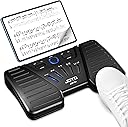
The JOYO Wireless Page Turner Pedal (SP-01) is a Bluetooth-enabled footswitch designed for musicians and professionals who demand seamless, hands-free page control. Compatible with popular apps like forScore and OnSong, it offers 5 versatile control modes and a powerful 60-hour rechargeable battery. Its silent, non-slip design ensures stable, distraction-free use during performances or presentations, all packed into a compact, durable form factor perfect for on-the-go creativity.


| ASIN | B0CXSX57G7 |
| Additional Features | 5 Switching Page Modes, 60 Hour Battery Life, Anti-Slip, Bluetooth, Universal |
| Battery Type | 3.7V/450mAh rechargeable lithium ion battery with 60 hours battery life |
| Best Sellers Rank | #839 in Musical Instruments ( See Top 100 in Musical Instruments ) #7 in Keyboard Pedals & Footswitches |
| Brand | JOYO |
| Built-In Media | USB Charging Cable |
| Button Quantity | 2 |
| Color | Black |
| Compatible Devices | Ipad, Laptop, Phone, Various Apps |
| Connectivity Technology | Bluetooth |
| Controller Type | Foot Pedal |
| Customer Reviews | 4.3 out of 5 stars 771 Reviews |
| Item Dimensions L x W x H | 6.69"L x 3.86"W x 0.98"H |
| Item Weight | 260 g |
| Manufacturer | JOYO Technology |
| Max Number of Supported Devices | 18 |
| Maximum Number of Supported Devices | 18 |
| Maximum Range | 30 feet |
| Mfr Part Number | 051-JSP01-0011 |
| Model Name | JOYO Wireless Page Turner Pedal |
| Model Number | JSP-01 |
| Number of Batteries | 1 Lithium Ion batteries required. |
| Number of Items | 1 |
| Special Feature | 5 Switching Page Modes, 60 Hour Battery Life, Anti-Slip, Bluetooth, Universal |
| Unit Count | 1 Count |
L**L
Best foot pedal —blue tooth.
I love mine! So easy! Best price! Works fantastic! Haven’t had a problem! Very compatible with my iPad. So easy to set up. Small and easy to use and carry in my orchestra bag. I find the pedal a little stiff but it could be because I’m not putting my foot in the right spot. When I’m careful it’s not a problem. Stable on the floor. My older one cost four times more and was always giving me trouble. It was a different brand. Not a problem at all with this product. I love it!
L**M
For me, this bluetooth page turner is a game changer!
How have I managed without this? I spend my work days editing animation, and I have storyboards in PDF format on a Samsung Galaxy tablet. I've used this method over a decade, always pausing my editing when I needed to tap the tablet screen to advance the storyboard. It hit me one day, my feet are just sitting doing nothing all day, is there such a device that can flip the pages for me? I found this gizmo and I had to try it! I choose JOYO because I have several guitar pedals they made (the American is my goto) so why not go with a brand and quality I trust. And sure enough, I love the build quality and sturdiness of this device, built by a company that clearly understands making pedals that last. This page turner works perfectly! Right out of the gate once paired to my tablet, the pedals control page turns in my storyboard files on Android! It only took me an hour or so to get used to, but now I've mastered using my feet to aid my work! Each page turn saves me a split second of time, but those split seconds add up over the course of a work day. And best of all my focus and concentration on my work is not broken. I'm very pleased with this page turner pedal! It feels like it was made for jobs like mine, though I'm sure this is mainly used by musicians to turn sheet music pages. So far a single charge has lasted me several days- I'm working on just having it always plugged in where I use it.
B**O
Very reliable, especially for the price.
After my much more expensive AirTurn system failed, I needed an inexpensive page turner my iPad and Forescore software. I've have other Joyo products and they have worked out very well, so for the money I figured I would give this a shot. I'm glad I did. It's been a few months and this unit has been a solid performer. It doesn't turn pages as "snappy" as the AirTurn, but that was pretty easy to get used to in only a short time. Would totally recommend.
D**R
Feels rugged enough and the buttons are silent
I got this to scroll songs in the Ultimate Guitar Tabs app on iPhone. The set up is a little tricky, but once it's up, it works, and it makes a huge difference in your stage presence. No more fiddling with your phone in the middle of a song, and I find that I look at my phone less, because I know I don't have to think about how much I'm going to have to scroll. Ultimate Guitar has auto scrolling, but it's always too slow or too fast, so you still have to fiddle with your phone. I give the JSP-01 4 stars, because I wish there was some way I could be 100% certain I was tapping it in the right way to actuate the scroll button, but it's possible to tap and have nothing happen, and then you have to look down and tap it again. I don't know how this could be fixed. You'll want to practice with it a lot before taking it on stage. It's less of a distraction than hand scrolling, but you still have to work out when you're going to hit it, and you have to get your foot motion down. It scrolls up the same amount every time, so with practice you can hit it when your line gets down to a certain point on your screen. To set it up with Ultimate Guitar Tabs, first go to your iPhone Settings and make sure Bluetooth is on. Turn on the JSP-01and soon the Bluetooth list should show JOYO JSP-01 Connected, and the light around the round button in the middle of the unit will turn green. Make sure the blue line LED is in the middle mode with the up/down icon. Back in the Tabs app you'll hit the G icon in the upper right corner, then hit the gear icon to get to Settings. Look down the screen to get to Gear/Pedal Interface and tap on that. Scroll up to see “AirTurn Settings”, hit that, leave “AirTurn Support” on, and tap on “Keyboard”. With that checked, go back then next to “Scroll tab down” tap where it says “Set up”. Select which pedal button you want to scroll down with, I picked the right one, and actuate the pedal button with your hand or foot. “Set up” should be replaced with “Ped3”, if it's the right button. Now next to “Scroll tab up” tap where it says “Set up”, actuate the left pedal button and “Set up” will change to “Ped1”. There are more functions you can mess with, but it seems in practice, the Tabs app only gives you Up Scroll and Down Scroll. At this point, close the app. Then reopen it. If you don't do that, your changes might not be saved. I spent two frustrating nights figuring this out, but once it's set up it connects quickly and works every time. Still check the scrolling before you get on stage just to make sure.
R**S
Great with Ultimate Guitar Tabs
This finally solved my frustration with Guitar Tabs scrolling. On my android tablet, the link establishes as a "keyboard"...so it prevents the on-screen keyboard from popping up, so you need to go into android settings and set "always display on-screen keyboard". Also, for the Guitar Tabs that only have a "play" button and no scroll, the footswitch has no effect.
L**R
Great Pedal
I've used this pedal almost weekly for over a year now, and it has been great. Much less than expensive than some of the other "name brands". Also, it's very nice that the indicator LED's face up toward the operator, not toward the audience like one older square metal box brand pedal at 2X the price. Pedal actuation is very quiet. Holds a charge very well and the main LED circle changes color based on remaining charge level.
L**N
Not Performance Ready
I’ve never used another product like this, so I don’t know if my experience compares. This works mostly well – the connection is quick and easy. But it seems whenever I launch a new PDF, I have to really smash the pedals a few times for it to recognize it’s there. It’s fine for practice, but I would not rely on this for a performance or recital.
J**N
Easy to use
Connects easily and has a long battery life.
C**N
Efficace !
Simple d'utilisation. Connexion aisée, reconnue et qui ne s'interrompt pas. plusieurs fonctionnalités. C'est parfait et pourtant je l'utilise avec une tablette assez ancienne.
F**M
Goede prijs kwaliteit
Top apparaat voor niet al te veel geld. Werkt perfect, net iets anders dan airturn maar dat maakt eigenlijk niks uit. Voelt goed als je trapt, en is best compact. Ik ben blij met m’n aankoop.
R**D
All I need for page turning sheet music on a tablet or laptop.
As a keyboard player with my own portable instrument and using pianos and organs in various venues, music on paper and in books is never going to be as convenient as a tablet or laptop. I had a more expensive page turner but left it behind somewhere and in case this happened again I did not want to spend a lot of money. This pedal does all I need at a great price. The USB C charging option is better than a cumbersome power supply. The pedal is a decent weight and doesn't move around the floor and I'm happy it does not have a load of functions will I never use like my last one.
M**E
Consigliato
Ottimo prodotto... consigliato
C**S
Sencillo
Cumple con su función perfectamente.
Trustpilot
2 months ago
2 weeks ago