Desertcart purchases this item on your behalf and handles shipping, customs, and support to Panama.
๐ Power, Ports & Productivity โ All in One Docking Station!
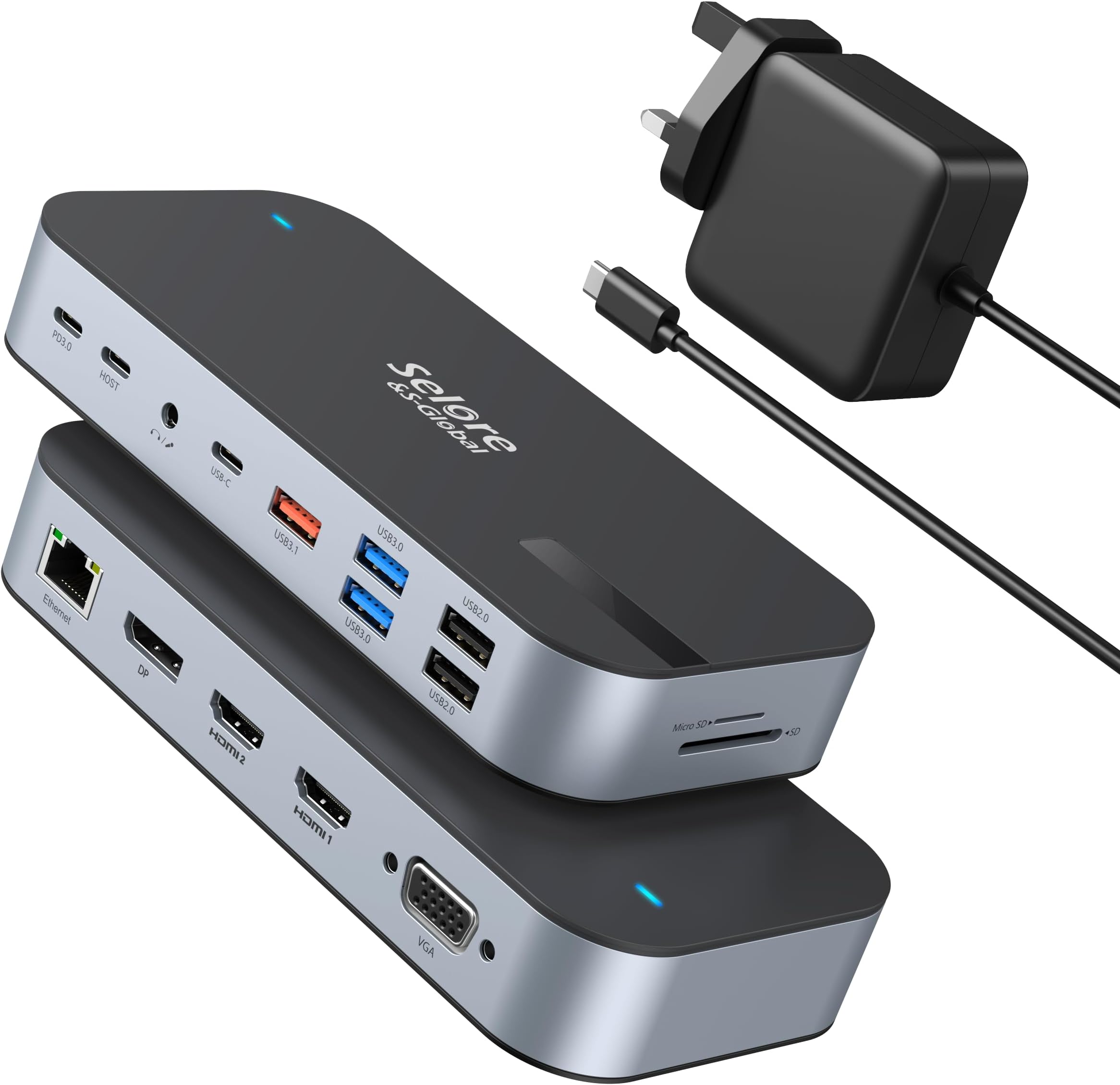
The Selore&S-Global 16-in-1 USB C Docking Station combines a robust 65W power adapter with quad 4K monitor support, ultra-fast 10Gbps USB 3.1 data transfer, and gigabit Ethernet connectivity. Designed for professionals craving seamless multitasking and reliable performance, it offers extensive port options including dual HDMI, DisplayPort, VGA, multiple USB A & C ports, and SD card readers. Compatible with leading laptops, this docking station transforms your workspace into a powerhouse of efficiency and style.


| ASIN | B0D6V7CHHN |
| Best Sellers Rank | 3,332 in Computers & Accessories ( See Top 100 in Computers & Accessories ) 26 in Docking Stations |
| Brand | Selore&S-Global |
| Brand Name | Selore&S-Global |
| Colour | Black Gray |
| Compatible Devices | Microsoft Surface Book 2, Microsoft Surface Go, Surface Pro 5, Surface Pro 7, Surface Pro X, Dell Precision 5510, Dell XPS 13 15 17, Lenovo Yoga , Lenovo thinkpad , HP EliteBook, MacBook Pro, MacBook Air |
| Compatible devices | Microsoft Surface Book 2, Microsoft Surface Go, Surface Pro 5, Surface Pro 7, Surface Pro X, Dell Precision 5510, Dell XPS 13 15 17, Lenovo Yoga , Lenovo thinkpad , HP EliteBook, MacBook Pro, MacBook Air Compatible devices Microsoft Surface Book 2, Microsoft Surface Go, Surface Pro 5, Surface Pro 7, Surface Pro X, Dell Precision 5510, Dell XPS 13 15 17, Lenovo Yoga , Lenovo thinkpad , HP EliteBook, MacBook Pro, MacBook Air See more |
| Country of Origin | China |
| Customer Reviews | 4.2 out of 5 stars 18,546 Reviews |
| Data Transfer Rate | 10000 Megabits Per Second |
| Hardware Interface | USB 3.1 Type C |
| Hardware interface | USB 3.1 Type C |
| Manufacturer | Selore&S-Global |
| Number of Ports | 15 |
| Product Features | Plug and Play |
| Product Warranty | 2 Years |
| Special feature | Plug and Play |
| Total USB Ports | 6 |
| Total USB ports | 6 |
O**O
Excellent Value for Money
If you're like me, you seem to need a never ending supply of USB A, B and C ports for plugging all your peripherals into. I have a Mac mini with a Satechi hub that sits underneath it - and works really well (recommended). However, having three USB ports on the front of this device means having cables all over my desktop - not something that looks good or helps out when working in a confined space. So I tried an Anker hub (chosen because of the perceived quality and half decent price on Amazon). Said hub arrives, I hook it up to my three external HDD's and....nothing. Not a peep. Try a flash drive - yes, that works. HDD's don't. Maybe I was doing something wrong but my impatience got the better of me and I sent it back. Enter the Selore hub. Hmm...doubts already. Never heard of them. But then, I'd never heard of 'Satechi' and that proved itself immediately. Ordered the new hub (at almost half the price of the Anker) and it arrived within 24hours. Hooked it up. Attached HDD's...ta-daaa!! Everything's cooking! Plugged in the RJ45 lead to my gigabit switch...now we've got connectivity too! Whoa! All the USB leads are now rear facing and the 'front' of the unit shows HDMI sockets (that I probably won't use) and a useful (for some) VGA socket. Most of the hubs on Amazon have two or three USB A sockets. This has FIVE. One of which supports USB-A 3.1 with 10Gbps transfer speeds... (whatever that means...). Data transfer is fast enough for me - I'm not expecting anything too flash. As long as it takes minutes and not hours, I'm happy as it's largely just backup and storage. It's been backing up 'Time Machine' as well as some hefty music files for the past ten minutes and there's no heat coming from the unit. It feels like a good bit of kit. That soft, almost rubbery texture on the outside and a sleek aluminium band round where the USB sockets are. One thing to note - they sell this with and without the power supply. I think it can run from USB C but if you're creating high demand, it might be worth the (very little) extra to get it with the power supply (that connects to the USB C PD100W socket). Thoughts? I'd have liked it to have had maybe one or two more USB sockets. But that's about it. Good value. Good connectivity. Good build quality. Just....'Good' (so far....) Buy with confidence.
C**E
Works well - but for install set your PC/Laptop to 1080p
Delivers great functionality for it's size. I initially used it for an ancient work PC used for remote working, and it worked a treat. I then tried it with my own laptop which has a 2800x1800 screen resolution and got 2 blank screens. Contacted support, who responded within 48 hours, suggesting I change laptop resolution to 1080p. I did this - it worked straight away... and my laptop automatically reverted to 2800x1800 with my external screens at 1080p. I should deduct a star for not working immediately, but support was so good, I won't. I am also not sure that I actually read the instructions before using it!!
C**L
Not quiet right
Good when it works, i have to unplug it and plug it back in every time i start my computer
D**Y
Great connectivity and "just works"
I've been trying to find a docking station to work with the monitors simultaneously for some time. They seem hard to find. They either only manage 3 x 1080p and I need 1440p, or they don't have enough USB connections for input devices, a camera etc. So I was delighted to find this pop in my face on Amazon for ยฃ89 in a nice package, oodles of sockets and a cute animated smiley face! It's quite compact too, for that many connectors. It did work straight out of the box, but displays a QR code (the smiley face turns out to be a status screen!) which I scanned with my phone. It takes you to a website with drivers for Windows, Mac Android and Linux. It's a bit of a challenge to get it from there to your laptop, but I saved it to that place nobody knows, on Android (Samsung Files knows!) and copied it from there to OneDrive so it synced to my laptop. You coiuld also plug your phone into your laptop, enable USB data, and browse to the download folder in your phone. It's a ZIP file. There is an on/off button on the top which is long press to switch power, or short press to change what the display screen shows. Smiley face, monitor status, power etc. I'm only on day 2, but so far very happy indeed and would recommend you just buy this rather than doing what I did and start buying a cheap one and working up until finding this one which works great. You can pay hundreds of Pounds for a device which does less than this.
S**N
It works!
Absolutely does what it says on the tin! I have a Chromebook and this allows me to charge and connect to an extra screen as well.
A**R
HDMI functionality won't work - Avoid
Tested on 2 different laptop's one of them "gaming spec" HDMI's simply don't work on USB A USB A 3.0 or USB C, tested vs an alternative brand and simply does not work
R**T
Very good item
Couldnโt get it working with my MacBook. But think thatโs cause my MacBook is a 2020 m1 . The item is very handy . Nothing wrong with the item
A**R
Is easy to use
Its plug & play easy to use & fills good quality
T**N
Small but Powerful - Compact USB-C Hub with Reliable HDMI & Charging
This hub has made my MacBook Air so much more functional. I can plug in my mouse, charge my laptop using the 100W PD port, and connect my external monitor through HDMI all at the same time without constantly switching cords. Everything connects quickly and runs smoothly - no issues so far. Data transfer through the USB ports has been reliable, and the hub itself feels solid and well made. I also really appreciate the compact design. Itโs small and lightweight enough to toss in my bag when Iโm working away from home, but still powerful enough to handle everything I need. Definitely a great add-on if you need more ports.
B**N
Usb
Top product
X**X
Gut
Die freundlichen haben das passende Teil fรผr meinen Laptop gefunden. Wichtig fรผr den Kauf, besser vorher fragen
M**A
ุฌู ูู ู ู ุชุงุฒ
ุฌู ูู ู ู ุชุงุฒ ูู ููู ูู ู ุนุงู ุดุบุงู ุฒู ุงูููุฒ ุนูู ุทูู ุงุดุจู ูุงุณุชู ุชุน ูุงุจ ุชูุจ ุญูู ( ูููููู ) ูุงุฒู ู ููุฐ ุชุงูุจ ุณู C ูุดุบู ุดุงุดุชูู ุจุนุฑุถ ู ุฎุชูู ุจุตุฑุงุญุฉ ููุงู ๐
W**R
Your eye protection on your monitors might not work with this.
My setup is this. I have a very powerful video card that I use for image generation. I use this so I can run both of my large monitors off of my motherboard and cpu. It does a fine job, but during startup, my screens go to sleep sometimes when it's inconvenient. My eye protection software that takes the blue light and reduces it at night does not work with it. It will go in with my laptop case, for I am installing a new power brick in my computer.So I can run two video cards. This was only a temporary fix between paychecks. It does its job, but it is not totally what I need. I know there's arguments for the contrary, but they could make the cord on the thing a little bit longer. It is an adapter not a dongle. It seems pretty durable and like it would last a while. So I do not see myself in a situation where I would have to buy a new one for a while. It is made well from seemingly durable plastic material, and it is a small device. It plugs into my Thunderbolt port and gives me 2 HDMI outs for two separate 4K monitors. It gives me the same problems whether I'm using windows Linux or my wife's Mac, operating system has nothing to do with the problem areas. And if I had my laptop on a table and needed to do a presentation where I had to plug into a larger screen via an HDMI cable, this would suit me fine. It is not a long term solution for my large home computer.
Trustpilot
3 weeks ago
2 weeks ago