


🎨 Print Bold. Print Fast. Print Smart.
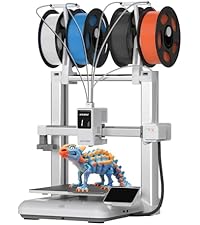
The Anycubic Kobra S1 Combo is a professional-grade 3D printer featuring up to 8-color multicolor printing via dual ACE PRO units, ultra-fast 600mm/s coreXY motion, and a high-temp 320℃ clog-free hotend. Its intelligent drying system and AI-powered built-in camera ensure consistent, high-quality prints with advanced filament compatibility in a 250x250x250mm build volume.



| Best Sellers Rank | #195,523 in Industrial & Scientific ( See Top 100 in Industrial & Scientific ) #203 in 3D Printers |
| Brand | ANYCUBIC |
| Color | Black |
| Compatible Devices | Laptop, Personal Computer, Smartphone |
| Customer Reviews | 3.9 out of 5 stars 130 Reviews |
| Item Weight | 1 kg |
| Material | Metal |
| Product Dimensions | 18"D x 18"W x 20"H |
D**N
Crappy Printer, I wasted my time so you dont have to waist yours..
Printed roughly 15 items, jormal amd multi-color. And that was it, started clog error constantly which the only way I could stop was printing single color items, not sure how that made any sense, since I could switch to other colors fine. Immediately ended up with partial clog next, which after cleaning, cleaning, and more cleaning still there. Now somehow the tensioner isnt right and won't take filament at all. This printer was great, but once something goes wrong, everything goes wrong, I cannot recommend it. Edit: Anycubic reached out to me and sent me multiple offers to correct this, I chose to get the parts and fix it myself. Although I got unlucky at first, thats customer service everyone should strive for!!
J**E
Unbelievable for this price!
The value for money is off the charts on this printer. We've only had it for 4 days and the poor thing has barely stopped printing. We had so much trouble in the past with our Ender 3 series printer that we had almost given up on 3D printing. Constantly trying to level the bed, adhesion problems, failure after failure on prints. Not this thing. It's amazing! The auto bed leveling actually does what it says. We haven't had to make any manual adjustments of any kind. Everything went together easily, and all but a couple of prints have gone flawlessly. The only two the messed up were tiny little buttons that were really poor designs. Adding a support fixed them no problem and they printed fine. The only thing that was a little confusing was the difference bettween wireless and "LAN" printing. If you want to use the software on your PC and control the printer from there - you will need to enable "LAN Printing" even though it's using wifi. If you want to just print from the marketplace using your phone or what have you, then you have to turn off LAN mode and log back in using the qr code with your phone. It sounds way worse than it is. Once we figured it out it is actually fantastic. I can't recommend this enough. It is super quiet, super easy to use, and ridiculously fast (you can choose slow, normal, and sport print speeds/qualities). I'm sure there are cons to be had, but we're super happy with it right now and I can't think of any yet. I'll update when I find them :)
T**T
Way too obvious customer service was trying to scam me into keeping a lemon printer
At first this thing was awesome and I honestly can see how if it maintains it's functionality long after the 5th or 6th print than it's going to be well worth the money but the unit I was sent started kicking parts off the bed. Then it started globbing up and pushed the nozzle into the bed and engraved a flexi rex head into the printer before it sent me a notification about the issue. No biggie new build plate new hotend without this plastic throat that causes the issue. Seriously. Look that up before you buy one of these. Anyway I get it all back together and find out the bed, which is just a chunk of plastic and some very thin metal pads has been warped by this extruder/hotend/nozzle fiasco. Which is now globbing up no matter what I do. Check forums, do bed level, test, print and it sticks to some spots before it globs up and drags plastic everywhere. FUN. so I get ahold of anycubic support and they suggest sending me another flimsy plastic bed carriage and a new bed assembly made of the same paper thin materials and I ask why I should have to fix a product under warranty? They continue to offer me A whopping 12 USD worth of PLA to "sweeten" the deal or I could send the printer back to them but I wouldn't be able to return the next printer should it go wrong. Also if I returned the printer they would take my old printer first and upon receipt would send another printer which to me sounds like; yeah we can refurbish that one and send you another refurbished or potentially the same one refurbished....then you cant send it back WHEN it inevitably has the bed warp. Nah. NAAAAAAHHHHH! So the options they gave where to do precision work on a brand new $600 piece of equipment I just paid for less than a week ago and the prize would be this KG of PLA to waste while I test the thing as compensation for what could turn out to be endless hours of work resulting in my return window closing before I got fed up (seriously watch these guys on YouTube trying to resolve this crap) NAAAAAAAH, you can have it back anycubic. I can see your sneaky crap a mile away you cheeky sods. I'll give it another go since this isn't for me really but this is go #3. the first printer I received was damaged beyond repair during shipping and had to be returned, the second or current printer went haywire and started blobbing instead of printing. So I'm hoping the third time's the charm for this cause if not this reviews gonna get even worse for you anycubic. How's that for asking me about my review!? You like it more now!? Got a 3rd printer shipped and after jumping in front of all the problems that come with ordering one of these I've finally managed to get a working printer that has been pumping out plastic junk like a champ. I do have issues with the exotic bedplates adhering on this printer but it seems to plant everything to the stock plate they send. After going through a bunch of BS I finally have a working printer. Just make sure you don't remote print from your phone unless you see it has KS1 even then I'd check the slicer first. I've done a lot of research and it seems if you send files from your phone to the printer it gets the settings from that file which may or may not have been created for your printer resulting in incorrect settings being applied automatically by the system resulting in failures that may or may not render the whole thing useless. It's also worth mentioning the first layer SUCKS on this printer. Always looks like crap. I've never seen a textured bed produce visible lines on the bed layer before. Still makes stuff. Just not stuff I'd sell. I've printed up all sorts of Halloween junk and dummy 13s for al my co workers to strike poses with this one.
M**.
It's amazing but a couple issues for them to irorn out
Great printer have about 80 hours on it 2kg of filament just a few problems number one there's a carbon filter but no censor for air quality activated carbon charcoal is amazing at catching the particles of micro plastic but it does eventually stop and expire but there is no way to tell when to get more because there is no air quality sensor so I recommend changing it out every few months on the right is the Burj khalifa I made 1 1000 scale can out great and next to it is an air filter I know there's a fight about wether pla is toxic but just to be safe and if you are someone like me who doesn't wanna wait for the stuff to get filtered out after printing and just yanke the part out as soon as it's done I recommend having a good air filter I have a Honeywell and it works great secondly nozzle wiper is just a block of silicone unlike bambus brush design but haven't had any issues yet last problem is brims are stinking to much but it's not hard to get them off with a utility knife or deburing tool but yea overall great for being 540 at time of purchase
L**F
Reliable Multicolor 3D Printer That Delivers Consistent Results
The Anycubic Kobra S1 Combo with the ACE Pro multicolor system has been a strong performer after several months of regular use. From day one, it has proven to be reliable and capable, producing consistent prints with good quality across different materials and colors. The multicolor functionality works smoothly and adds a lot of creative flexibility without making the workflow feel overly complicated. Once set up, the printer runs predictably and handles longer prints without issues. Layer adhesion, color transitions, and overall print consistency have all been solid, which makes it easy to trust for both functional prints and more detailed projects. The ACE Pro system integrates well with the printer and doesn’t feel like an afterthought or add-on. The only problems encountered so far were due to user error rather than the machine itself. After dialing in settings and getting more familiar with the workflow, those issues disappeared. This speaks well to the printer’s design and stability, especially for users who are still refining their process or learning new features. Overall, this has been a dependable and enjoyable 3D printer to own. It performs well over time, handles multicolor printing confidently, and rewards proper setup and operation with excellent results. For anyone looking for a capable multicolor printer that works reliably once configured correctly, this combo has been a great experience.
T**S
Amazing printer
Update 2/19/2026: The camera lag was fixed a few weeks after I posted this review. ————- Upgraded from an Anet A8 (2017) to an ender 3 (2019). I have to say the Kobra S1 is amazing! Great value! I do the auto level after like 5 prints (or 1 big one) to be safe. Quick and easy to setup! Literally print ready out of the box! Only used PLA, the only adhesion issues which were not many (like 3) were either because I didn’t clean the bed good or because the first layer was too fast, but that’s it! I use 70% isopropyl alcohol and a microfiber cloth to clean the bed every 2 to 3 prints. Tallest thing (which was the max height) I printed was an attachment for a shop vac, also printed 6 (multi color) coasters (at the same time) for my Etsy shop. Latest update causes the camera to lag in the Anycubic app and slicer but really no big deal. They will get a fix out soon I’m sure. I also heard (from Reddit) that they will be open sourcing the firmware (I think this month) but we will have to see.
B**N
A beginners honest review
True beginner review: Update: 1 July 2026 1690 print hours, I've gone through 2 nozzles, and on my 3rd build plate. Don't hesitate to buy this printer! 10/10 reccomend. I purchased this printer as my first ever shot at 3d printing. IIt has been nothing but amazing, in the one month that I have owned it I have 378 print hours on it with only one issue which was a clog. The clog could have been user error, but it was super easy to clear the clog and get printing again. Very great printer for a beginner, I have ran pla, pla+,pla high speed, pla silk and tpu through it. My only complaint is that the ace pro will not feed tpu, but the included spool holder and direct feed works fine. I wont be printing much in tpu so its not a huge deal to me. Overall excellent printer and would definitely buy again if I ever decided to start a print farm.
C**L
AnyCubic Combo. ACE Pro already failing after 6 days of moderate use. Still needs improvements.
I received the S1 Kobra Combo 6 days ago on July 11, 2025. Been having fun printing for days now. BUT! The ACE Pro has broken already. To clarify. Slots 1,2 & 4 still function. Slot 3 has stopped functioning properly. The connection on the back is where the trouble seems to be? I'm not looking inside to find out. All I can tell you is that there was some loud plastic sounding knocks from the unit while printing. Like gears jammed and trying to spin. Shut the unit down. Cleared the filament tubes. Ran a piece of filament backwards through the tube to feel for anymore filaments stuck inside. Seems clear. The connection on the back of the ACE Pro for #3 is stuck out. The filament loader for #3 just loads a few mm and immediately ejects the filament. It will not load on #3. The other three slts function like normal. Amazon is sending a replacement Combo. Today is July 16th. The replacement is scheduled on the 28th. Odd because the 1st came the next day. No worries. I really just need the ACE Pro replaced/fixed. Not a whole Combo that I have to disassemble and rebuild/rebox with the broken ACE. I'm not mad. But 6 days? Not very "Pro" at all. But like my 3d printing capabilities, I get there is a learning curve. Even with making fairly new tech reliable over years of service.
Trustpilot
1 day ago
1 week ago